1. መግቢያ
The Edifier P180 is a stereo earbud headset designed for clear audio and convenient communication. Featuring an inline microphone and control, it offers a comfortable listening experience for various devices.

Figure 1: Edifier P180 Wired Earbud Headset
2. በሳጥኑ ውስጥ ያለው
- Edifier P180 Earbud Headset
- ኬብል
3. ቁልፍ ባህሪያት
- Classic Comfort: Ergonomic design for comfortable wear without irritating the ear canal.
- እጅግ በጣም ጥሩ የድምፅ ጥራት; Equipped with 16mm neodymium magnetic monomers for high-fidelity audio playback.
- Integrated Microphone and Control: 3.5mm stereo earphones with a built-in microphone and remote button for mobile phone communication.
- ተግባራዊነት፡- Single button control for picking up/hanging up calls and skipping songs (device dependent for iOS/Android).
- ዘላቂ ንድፍ; Constructed with quality materials for longevity.

Figure 2: Ergonomic design for comfortable fit.
4. ማዋቀር
- ማሸግ ፦ Carefully remove the Edifier P180 headset from its packaging.
- መርምር፡ Check the earbuds and cable for any visible damage.
- አገናኝ፡ Insert the 3.5mm audio jack into the headphone port of your compatible device (smartphone, tablet, computer, etc.). Ensure the jack is fully inserted for proper audio and microphone function.
- አቀማመጥ፡- Place the earbuds comfortably in your ears. The ergonomic design is intended to rest well without causing irritation.
5. የአሠራር መመሪያዎች
The Edifier P180 features an inline control button for easy management of calls and music playback.
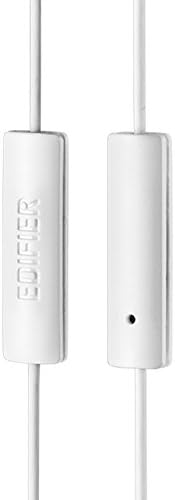
Figure 3: Inline microphone and control button.
- የጥሪዎችን መልስ / ማብቂያ Press the control button once to answer an incoming call. Press it again to end an active call.
- ሙዚቃን ማጫወት/ማቆም፦ Press the control button once to play or pause audio playback.
- ትራኮችን መዝለል፡ Double-press the control button to skip to the next track. Triple-press to go to the previous track (functionality may vary by device and operating system).
- የድምፅ ረዳት Long-press the control button to activate your device's voice assistant (e.g., Siri, Google Assistant).
ቪዲዮ 1፡ ይፋዊው ምርት አልቋልview of the Edifier P180 Classic Earbud Headsets, demonstrating features and usage.
6. ጥገና
- ማጽዳት፡ የጆሮ ማዳመጫዎቹንና ገመዱን ለስላሳና ደረቅ ጨርቅ በቀስታ ይጥረጉ። ጠጣር ኬሚካሎችን ወይም ሻካራ ቁሳቁሶችን ከመጠቀም ይቆጠቡ።
- ማከማቻ፡ When not in use, store the headset in a clean, dry place, away from extreme temperatures and direct sunlight. Avoid tangling the cable.
- እርጥበትን ያስወግዱ; Do not expose the headset to water or excessive moisture, as this can damage the internal components.
7. መላ መፈለግ
- ድምጽ የለም፡
- የ3.5ሚሜ መሰኪያው ሙሉ በሙሉ በመሳሪያዎ የድምጽ ወደብ ውስጥ መግባቱን ያረጋግጡ።
- የመሣሪያዎን የድምጽ መጠን ቅንጅቶች ያረጋግጡ።
- በመሳሪያው ላይ የተወሰነ ችግር እንዳይፈጠር የጆሮ ማዳመጫዎቹን በሌላ መሳሪያ ይሞክሩት።
- ማይክሮፎን አይሰራም;
- የ 3.5 ሚሜ መሰኪያው ሙሉ በሙሉ መጨመሩን ያረጋግጡ።
- የመሣሪያዎን የማይክሮፎን ግቤት ቅንብሮች ያረጋግጡ።
- ማይክሮፎኑን በሌላ መሳሪያ ወይም መተግበሪያ ይሞክሩት።
- የሚቆራረጥ ኦዲዮ፡
- Check the cable for any kinks or damage.
- የድምጽ መሰኪያው ንጹህ እና ከቆሻሻ የጸዳ መሆኑን ያረጋግጡ።
8. ዝርዝሮች
| ባህሪ | ዝርዝር መግለጫ |
|---|---|
| የሞዴል ቁጥር | P180 |
| የድግግሞሽ ምላሽ | 20 Hz - 20,000 ኸርዝ |
| የጆሮ ማዳመጫዎች ጃክ | 3.5 ሚሜ ሚሜ |
| የግንኙነት ቴክኖሎጂ | ባለገመድ |
| የእቃው ክብደት | 1.76 አውንስ (50 ግራም) |
| የምርት ልኬቶች | 2.01 x 5.59 x 0.91 ኢንች |
| ቁሳቁስ | ኒዮዲሚየም |
| የመቆጣጠሪያ ዓይነት | Inline Control Button |
| እክል | 32 ኦኤም |
| የድምጽ መቆጣጠሪያ | የድምፅ ማግለል |
9. ዋስትና እና ድጋፍ
The Edifier P180 headset is backed by a የ 1 ዓመት ዋስትና. For any support inquiries or warranty claims, please refer to the contact information provided with your purchase or visit the official Edifier webጣቢያ.