መግቢያ
The ASTRO Gaming A40 TR Headset and MixAmp Pro TR are designed to provide a high-fidelity audio experience for gaming on PlayStation 4 and PC. The A40 TR headset offers user customization, allowing transformation from an open-back to a closed-back noise-canceling headset with optional Mod Kits. The MixAmp Pro TR features all-digital components for clear, interference-free audio and voice communication, with customizable settings via the ASTRO Command Center software.

Image: The ASTRO Gaming A40 TR Headset and MixAmp Pro TR, showcasing both components together. The headset is black with gold accents, and the MixAmp is a compact black unit with control dials.
የጥቅል ይዘቶች
ከዚህ በታች የተዘረዘሩት ሁሉም እቃዎች በምርት ማሸጊያዎ ውስጥ መካተታቸውን ያረጋግጡ፡-
- ASTRO A40 TR Headset
- ASTRO MixAmp Pro TR
- A40 TR Inline Mute Cable (2.0m)
- TOSlink Optical Cable (3.0m)
- Micro-USB Cable (3.0m)
- Digital Daisy Chain Cable (0.5m)
- Swappable Microphone
ማዋቀር
ከ PlayStation 4 (PS4) ጋር በመገናኘት ላይ
- ያገናኙት። TOSlink Optical Cable from the MixAmp Pro TR's OPTICAL port to the PS4's Optical Out port.
- ያገናኙት። ማይክሮ-ዩኤስቢ ገመድ from the MixAmp Pro TR's USB port to an available USB port on the PS4.
- ያገናኙት። A40 TR Inline Mute Cable from your A40 TR Headset to the headset port on the front of the MixAmp Pro TR.
- በእርስዎ PS4 ላይ፣ ወደሚከተለው ይሂዱ Settings > Sound and Screen > Audio Output Settings.
- አዘጋጅ ዋና የውጤት ወደብ ወደ ዲጂታል መውጫ (ኦፕቲካል).
- ይምረጡ Dolby Digital (Bitstream) for the audio format.
- ወደ ሂድ ቅንብሮች> መሣሪያዎች> የድምጽ መሣሪያዎች.
- አዘጋጅ የግቤት መሣሪያ ወደ USB Headset (ASTRO MixAmp Pro TR).
- አዘጋጅ የውጤት መሣሪያ ወደ USB Headset (ASTRO MixAmp Pro TR).
- አስተካክል። የድምጽ መቆጣጠሪያ (የጆሮ ማዳመጫዎች) ወደ ከፍተኛ.
- አዘጋጅ ወደ የጆሮ ማዳመጫዎች ውፅዓት ወደ የኦዲዮ ውይይት or ሁሉም ኦውዲዮ as preferred.
ከፒሲ ጋር በመገናኘት ላይ
- ያገናኙት። ማይክሮ-ዩኤስቢ ገመድ from the MixAmp Pro TR's USB port to an available USB port on your PC.
- ያገናኙት። A40 TR Inline Mute Cable from your A40 TR Headset to the headset port on the front of the MixAmp Pro TR.
- On your PC, ensure the MixAmp Pro TR is selected as the default playback and recording device in your sound settings.
- ያውርዱ እና ይጫኑት። ASTRO Command Center software from the official ASTRO Gaming website to customize settings, update firmware, and manage EQ presets.
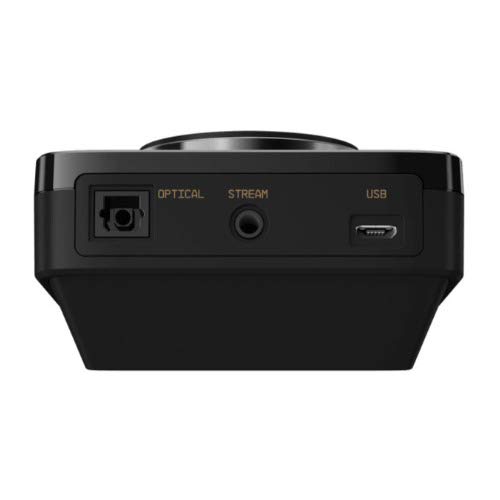
ምስል: የኋላ view of the ASTRO MixAmp Pro TR, highlighting the Optical, USB, AUX, and Stream ports for various connections.
Operating the MixAmp Pro TR
ድብልቅውAmp Pro TR provides intuitive controls for managing your audio experience:
- ዋና የድምጽ መደወያ፡ The large dial on the left controls the overall volume of your headset. Rotate clockwise to increase volume, counter-clockwise to decrease.
- Game/Voice Balance Dial: The smaller dial on the right allows you to adjust the balance between game audio and voice chat.
- Rotate towards "GAME" to prioritize game audio.
- Rotate towards "VOICE" to prioritize voice chat.
- EQ Presets Button: Located in the center, this button cycles through four customizable equalizer presets. The active preset is indicated by the illuminated icon (star, headphone, etc.). These presets can be configured using the ASTRO Command Center software.
- Dolby Button: Activates or deactivates Dolby Surround Sound. When active, the Dolby logo will illuminate.
- የማይክሮፎን ድምጸ-ከል አዝራር፡- Located on the A40 TR Inline Mute Cable, this switch mutes or unmutes your microphone. When muted, the MixAmp's volume dials will typically glow red.
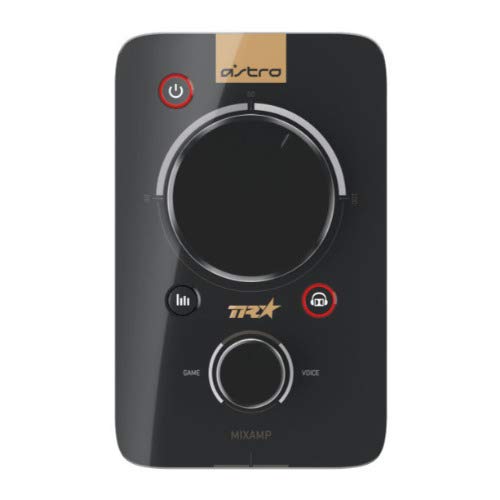
ምስል: ከፍተኛ view of the ASTRO MixAmp Pro TR, showing the large master volume dial, the smaller game/voice balance dial, and the EQ preset buttons.
ጥገና
- ማጽዳት፡ Use a soft, dry cloth to clean the headset and MixAmp. ሻካራ ማጽጃዎችን ወይም መሟሟቶችን ያስወግዱ።
- ማከማቻ፡ Store the headset and MixAmp ከፀሀይ ብርሀን እና ከከፍተኛ ሙቀት ርቆ በሚገኝ ቀዝቃዛና ደረቅ ቦታ.
- የኬብል እንክብካቤ; ጉዳት እንዳይደርስ ኬብሎችን በቀስታ ይያዙ። ስለታም መታጠፊያዎችን ወይም ከመጠን በላይ መጎተትን ያስወግዱ።
- የጆሮ ትራስ; Periodically check ear cushions for wear and tear. Replacement cushions are available from ASTRO Gaming.
መላ መፈለግ
If you encounter issues with your ASTRO Gaming A40 TR Headset or MixAmp Pro TR, try the following solutions:
| ችግር | መፍትሄ |
|---|---|
| ከጆሮ ማዳመጫው ምንም ድምጽ የለም። |
|
| ማይክሮፎን አይሰራም። |
|
| Distorted or poor audio quality. |
|
For more detailed troubleshooting, please refer to the official ASTRO Gaming support resources.
ዝርዝሮች
- የሞዴል ቁጥር፡- 939-001511
- የድግግሞሽ ምላሽ፡ 20 - 20,000 ኸርዝ
- ስም-አልባ እክል፡ 48 ኦኤም
- የጭንቅላት ባንድ ጫና፡ 2.6N
- የምርት መጠኖች: 9.06 x 13.87 x 4.33 ኢንች
- የእቃው ክብደት፡ 1.06 ፓውንድ
- ግንኙነት፡ ኦፕቲካል ፣ ዩኤስቢ
- ተኳኋኝነት PlayStation 4, ፒሲ
ዋስትና እና ድጋፍ
For detailed warranty information and product support, please visit the official ASTRO Gaming webድህረ ገጽ ወይም የቀረበውን ሰነድ ይመልከቱ፡
Ensure you register your product on the ASTRO Gaming website for the latest updates and support.


