1. መግቢያ
The Noyafa NF-909C is a compact and easy-to-use 2-in-1 testing instrument designed for optical fiber networks. It integrates both an optical power meter and an optical light source, making it suitable for absolute optical power measurements and insertion loss tests. This device offers a wide range of power measurement, high accuracy, and stable output, providing a cost-effective solution for fiber optic testing.
2. የደህንነት መረጃ
- መመሪያውን ያንብቡ፡- Before operating the device, thoroughly read and understand this user manual.
- የባትሪ ደህንነት፡ Use only specified 1.5V batteries (3x AAA). Do not mix old and new batteries or different types of batteries. Remove batteries if the device will not be used for an extended period.
- የሌዘር ደህንነት፡ The optical light source emits laser radiation. አትሥራ look directly into the optical output port or into a fiber connected to the light source. Direct exposure to laser light can cause severe eye damage.
- የአካባቢ ሁኔታዎች; Operate the device within the specified operating temperature range (-10°C to +60°C). Avoid exposure to extreme temperatures, humidity, or dust.
- ማጽዳት፡ Keep optical connectors clean. Use only approved cleaning methods and materials to avoid damaging the fiber end-faces.
- ጥገና፡- መሳሪያውን ለመክፈት ወይም ለመጠገን አይሞክሩ. ሁሉንም አገልግሎቶች ብቁ ለሆኑ ባለሙያዎች ያመልክቱ።
3. የጥቅል ይዘቶች
እቃዎቹን ሲያስወግዱ ሁሉም እቃዎች በጥሩ ሁኔታ ላይ መሆናቸውን እና መኖራቸውን ያረጋግጡ፡
- Noyafa NF-909C Fiber Optic Tester Unit
- የተጠቃሚ መመሪያ
- Protective Cap for Optical Ports
- (Batteries may or may not be included depending on the retailer)
4. ምርት አብቅቷልview
The NF-909C features a clear LCD display, intuitive control buttons, and standard optical connectors for versatile use.
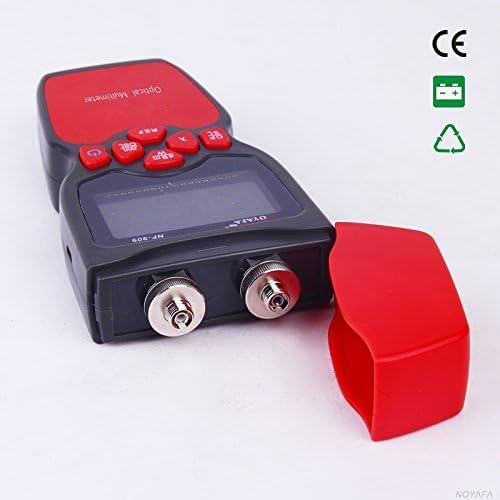
ምስል 1፡ ፊት ለፊት view of the Noyafa NF-909C Fiber Optic Tester. This image shows the device's display screen, the red control buttons (Power, REF, dBm/W, λ, Hz), and the two optical input/output ports on the front, protected by a red cap. The device is black and red.
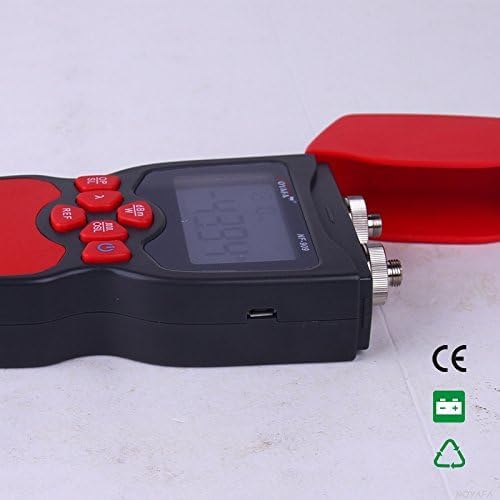
ምስል 2፡ ጎን view of the Noyafa NF-909C Fiber Optic Tester. This image highlights the micro USB port located on the side of the device, which may be used for power or data transfer, though its primary function is typically for charging or external power supply. The red protective cap is shown detached.
ቁልፍ አካላት፡-
- LCD ማሳያ፡- Shows measurement readings, selected wavelength, unit, and battery status.
- የመቆጣጠሪያ አዝራሮች; Power On/Off, Reference (REF), Unit (dBm/W), Wavelength (λ), Frequency (Hz).
- Optical Power Meter Input: Typically supports SC, ST, LC connectors (optional).
- Optical Light Source Output: Typically FC connector (SC, ST, LC optional).
- የባትሪ ክፍል፡ Located on the rear, for 3x 1.5V batteries.
- የማይክሮ ዩኤስቢ ወደብ; For power supply or charging (refer to Figure 2).
5. ማዋቀር
5.1 የባትሪ ጭነት
- በመሳሪያው ጀርባ ላይ የባትሪውን ክፍል ሽፋን ያግኙ.
- ሽፋኑን ለመክፈት ሽፋኑን ያንሸራትቱ ወይም ይክፈቱት።
- Insert three (3) 1.5V AAA batteries, ensuring correct polarity (+/-) as indicated inside the compartment.
- የባትሪውን ክፍል ደህንነቱ በተጠበቀ ሁኔታ ይተኩ.
5.2 የመነሻ ኃይል በርቷል
ተጭነው ይያዙት። ኃይል button to turn on the device. The LCD display will illuminate, showing the current mode and settings.
6. የአሠራር መመሪያዎች
6.1 Optical Power Meter Mode
This mode measures the absolute optical power or relative loss in optical fiber networks.
- የፋይበር አገናኝ፡ Connect the optical fiber to be tested to the Power Meter input port. Ensure the connector is clean.
- የሞገድ ርዝመት ይምረጡ፡- የሚለውን ይጫኑ λ button to cycle through the available calibrated wavelengths: 850nm, 1300nm, 1310nm, 1490nm, 1550nm, 1625nm. Select the wavelength matching your light source.
- View መለኪያ፡ The display will show the optical power in dBm.
- Change Unit: የሚለውን ይጫኑ dBm/ደብሊው button to switch between dBm and W (Watts) units.
- Set Reference (REF): For relative measurements (loss), connect a known good fiber to a stable light source and the power meter. Press the ማጣቀሻ button to set the current power reading as the reference (0dB). Subsequent measurements will show the loss relative to this reference.
- Frequency Identification: The power meter can identify modulation frequencies from 10Hz to 60KHz. If the incoming signal is modulated, the frequency will be displayed.
6.2 Optical Light Source Mode
This mode provides a stable optical signal for testing fiber optic cables.
- የፋይበር አገናኝ፡ Connect the optical fiber to be tested to the Light Source output port. Ensure the connector is clean.
- የሞገድ ርዝመት ይምረጡ፡- የሚለውን ይጫኑ λ button to cycle through the available wavelengths: 1310nm and 1550nm. Select the desired wavelength.
- Select Modulation Frequency: የሚለውን ይጫኑ Hz button to cycle through modulation frequencies: 270Hz, 1KHz, 2KHz, or continuous wave (CW).
- የውጤት ምልክት፡- The device will emit a stable optical signal at the selected wavelength and modulation.
6.3 ራስ-አጥፋ ተግባር
The device features an auto-off function to conserve battery life. If no operation is performed for approximately 15 minutes, the device will automatically power off. Press the ኃይል መልሰው ለማብራት አዝራር.
7. ጥገና
- Cleaning Optical Connectors: Always ensure optical connectors are clean before use. Use lint-free wipes and appropriate optical cleaning solutions. Dirty connectors can lead to inaccurate measurements and damage to the device or fiber.
- የባትሪ መተካት፡ When the battery indicator on the display shows low power, replace all three 1.5V AAA batteries promptly.
- ማከማቻ፡ When not in use, store the device in a dry, cool place, away from direct sunlight and extreme temperatures. Always replace the protective caps on the optical ports to prevent dust and damage.
- የውጭ ጽዳት; የመሳሪያውን ውጫዊ ገጽታ ለስላሳ, መamp ጨርቅ. ገላጭ ማጽጃዎችን ወይም ፈሳሾችን አይጠቀሙ.
8. መላ መፈለግ
- መሣሪያው አይበራም፦
- ባትሪዎቹ በትክክል ከተጫኑ እና በትክክለኛው ፖላሪቲ ያረጋግጡ።
- በአዲስ ባትሪዎች ይተኩ።
- Inaccurate power meter readings:
- Ensure optical connectors are clean.
- Verify the selected wavelength on the power meter matches the light source wavelength.
- Check if the fiber under test is properly connected and not damaged.
- No light output from light source:
- Ensure the device is powered on and in light source mode.
- የባትሪውን ደረጃ ይፈትሹ.
- Verify the fiber is properly connected to the output port.
- Auto-off activates too quickly:
- The auto-off is fixed at 15 minutes of inactivity. This is normal operation.
9. ዝርዝሮች
| ባህሪ | ዝርዝር መግለጫ |
|---|---|
| Optical Power Meter Module | |
| Detector Measurement Range | -50 ~ +26 ዲቢኤም |
| Calibrated Wavelengths | 850, 1300, 1310, 1490, 1550, 1625 nm |
| ጥራት | 0.01 ዲቢኤም |
| Identification Frequency Range | 10 Hz ~ 60 ኪኸ |
| የጨረር ማገናኛ | SC, ST, LC (optional) |
| Optical Light Source Module | |
| Emitter Wavelengths | 1310 / 1550 nm (other wavelengths customizable) |
| የውጤት ኃይል | -7 ዲቢኤም |
| የውጤት መረጋጋት | 0.05 dB / 15 mins; 0.1 dB / 8 hours |
| Modulation Frequencies | 270 Hz, 1 KHz, 2 KHz |
| የጨረር ማገናኛ | FC (SC, ST, LC optional) |
| አጠቃላይ ዝርዝሮች | |
| የኃይል አቅርቦት | 3 x 1.5V AAA ባትሪዎች |
| ራስ-ማጥፋት ጊዜ | 15 ደቂቃዎች (በግምት) |
| የአሠራር ሙቀት | -10 ° ሴ ~ +60 ° ሴ |
| ልኬቶች (L x W x H) | 160 x 75 x 32 ሚ.ሜ |
| ክብደት | 400 g (unit only) / 150 g (item weight from specs) |
| አነስተኛ የሥራ ማስኬጃ ቁtage | 1.5 ቮልት |
| ከፍተኛው ኦፕሬቲንግ ጥራዝtage | 5 ቮልት |
| ዝርዝር ሜታል | UL 61010-1, IEC 61010-2-030 |
| አምራች | Shenzhen Noyafa Electronic |
10. ዋስትና እና ድጋፍ
For warranty information, technical support, or service inquiries, please refer to the warranty card included with your product or contact your authorized Noyafa dealer or the manufacturer directly. Keep your purchase receipt as proof of purchase.