1. መግቢያ
The AJA V2Analog is a compact, high-quality mini-converter designed to convert HD/SD-SDI signals to analog component or composite video. This device is engineered for professional video workflows, providing reliable signal conversion for various applications.
Its versatility allows for complete integration into any workflow, making it a valuable asset in any video production environment.

ምስል 1: የፊት እና ጎን view of the AJA V2Analog Mini-Converter, highlighting input and output ports.
2. የደህንነት መረጃ
እባክዎ መሳሪያውን ከመጠቀምዎ በፊት ሁሉንም የደህንነት መመሪያዎች በጥንቃቄ ያንብቡ። ይህንን መመሪያ ለወደፊት ማጣቀሻ ያቆዩት።
- ክፍሉን ለዝናብ፣ ለእርጥበት ወይም ለከፍተኛ ሙቀት አያጋልጡት።
- ከመጠን በላይ ሙቀትን ለመከላከል ትክክለኛ የአየር ዝውውርን ያረጋግጡ.
- Use only the specified power supply (5-20 VDC).
- መሳሪያውን ከመውደቅ ወይም ለከባድ ጉዳት ከማጋለጥ ይቆጠቡ።
- ሁሉንም አገልግሎቶች ብቁ ለሆኑ የአገልግሎት ሰራተኞች ያመልክቱ።
3. ማዋቀር እና ግንኙነቶች
Follow these steps to set up your AJA V2Analog converter:
- የኃይል ግንኙነት; Connect the appropriate power supply (5-20 VDC) to the "POWER" input on the converter.
- SDI ግቤት፡ Connect your HD/SD-SDI source to the "SDI IN" BNC connector.
- የአናሎግ ውጤት Connect the Y/G, Pb/B, and Pr/R BNC outputs to your analog component or composite display/device. Ensure correct color component matching (Y/G for Luminance/Green, Pb/B for Blue Difference, Pr/R for Red Difference).
- የዩኤስቢ ግንኙነት (አማራጭ) For firmware updates or configuration, connect a USB cable from the "USB" port on the converter to your computer.
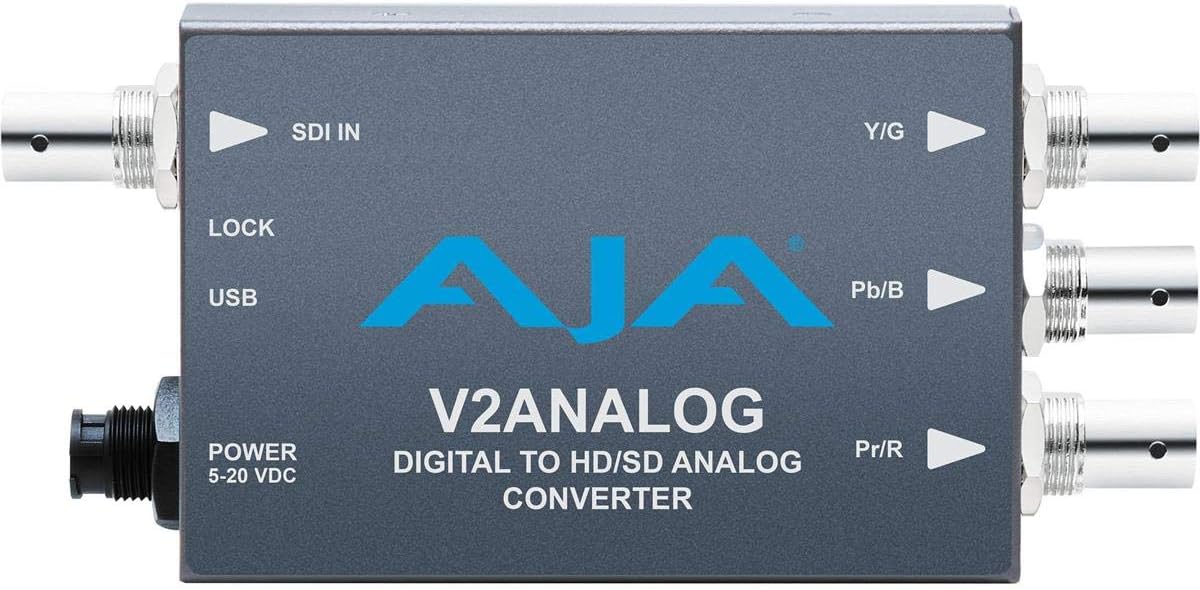
ምስል 2: ከፍተኛ view of the AJA V2Analog Mini-Converter, illustrating port labels for connection.
4. የአሠራር መመሪያዎች
Once all connections are made, power on the device. The V2Analog will automatically detect the incoming SDI signal format and convert it to the appropriate analog output. The "LOCK" LED indicator will illuminate when a stable SDI signal is detected and locked.
4.1. Signal Compatibility
The V2Analog supports various HD and SD SDI formats. It is designed to convert these digital signals to standard analog component (YPbPr) or composite (CVBS) outputs.
4.2. Configuration (Advanced)
Advanced configuration options, such as output format selection or color space adjustments, may be available via AJA's Mini-Config software, accessible through the USB port. Refer to the AJA webየቅርብ ጊዜ ሶፍትዌሮችን እና ዝርዝር የውቅር መመሪያዎችን ለማግኘት ጣቢያ።
5. ጥገና
The AJA V2Analog is designed for reliable operation with minimal maintenance. Follow these guidelines:
- ማጽዳት፡ የክፍሉን ውጫዊ ክፍል ለማጽዳት ለስላሳ እና ደረቅ ጨርቅ ይጠቀሙ. ፈሳሽ ወይም ኤሮሶል ማጽጃዎችን አይጠቀሙ.
- የጽኑዌር ዝማኔዎች ፦ Periodically check the AJA website for firmware updates. Keeping the firmware current ensures optimal performance and compatibility.
- ማከማቻ፡ ለረጅም ጊዜ አገልግሎት በማይሰጥበት ጊዜ ክፍሉን በቀጥታ ከፀሀይ ብርሀን እና ከከፍተኛ ሙቀት ርቆ በቀዝቃዛና ደረቅ ቦታ ያከማቹ።
6. መላ መፈለግ
If you encounter issues with your V2Analog, refer to the following common problems and solutions:
| ችግር | ሊሆን የሚችል ምክንያት | መፍትሄ |
|---|---|---|
| ምንም የቪዲዮ ውፅዓት የለም። | No power; Incorrect SDI input; Incorrect analog output connection; No signal lock. | Check power supply; Verify SDI source is active and connected to "SDI IN"; Ensure Y/G, Pb/B, Pr/R are connected correctly to display; Check "LOCK" LED. |
| Distorted or colored video | Incorrect analog output format; Loose connections. | Ensure display is set to correct input type (component/composite); Tighten all BNC connections. |
| "LOCK" LED not illuminated | No valid SDI input signal. | Verify SDI source is active and sending a compatible signal. Check SDI cable integrity. |
If the problem persists, contact AJA Technical Support for further assistance.
7. ዝርዝሮች
| ባህሪ | ዝርዝር |
|---|---|
| ሞዴል | V2ANALOG |
| የምርት ስም | አጃአ |
| ግቤት | HD/SD-SDI (BNC) |
| ውፅዓት | Component (Y/G, Pb/B, Pr/R BNC), Composite (selectable) |
| የበይነገጽ አይነት | USB, SDI, Component |
| ኃይል | 5-20 ቪዲሲ |
| ልኬቶች (L x W x H) | 7.2 x 5.7 x 4.2 ኢንች |
| ክብደት | 1.35 ፓውንድ |
| ዩፒሲ | 091131246023 |
8. ድጋፍ እና ዋስትና
For technical support, product registration, or warranty information, please visit the official AJA webየደንበኛ አገልግሎት ክፍላቸውን ይጎብኙ ወይም ያነጋግሩ። የተወሰኑ የዋስትና ውሎች እና ሁኔታዎች እንደ ክልል እና የተገዛበት ቀን ሊለያዩ ይችላሉ።
አጃአ Webጣቢያ፡ www.aja.com


