መግቢያ
This manual provides essential instructions for the safe and efficient operation of your ICOM IC-7300 Direct Sampling Shortwave Radio. Please read this manual thoroughly before using the transceiver to ensure proper functionality and to prevent damage.
The ICOM IC-7300 is a high-performance HF/50MHz transceiver featuring RF direct sampling technology. It includes a 4.3-inch color touchscreen LCD, a real-time spectrum scope, and a built-in automatic antenna tuner. It supports various modes including SSB, CW, RTTY, AM, and FM, with a maximum output power of 100 Watts.
የደህንነት መረጃ
- Do not operate the transceiver in explosive atmospheres.
- የኤሌክትሪክ ንዝረትን ለመከላከል ትክክለኛውን የመሬት አቀማመጥ ያረጋግጡ.
- Avoid exposing the unit to direct sunlight, rain, or extreme temperatures.
- Use only the specified power supply (13.8V DC).
- Do not open the transceiver casinግ; አገልግሎትን ብቁ ለሆኑ ሰራተኞች ያስተላልፉ።
የጥቅል ይዘቶች
ሁሉም እቃዎች በጥቅሉ ውስጥ መኖራቸውን ያረጋግጡ፡-
- ICOM IC-7300 Radio Unit
- HM-219 Hand Microphone
- የዲሲ የኃይል ገመድ
- የመጫኛ ሃርድዌር
- የተጠቃሚ መመሪያ (ይህ ሰነድ)
ማዋቀር
1. የኃይል አቅርቦቱን ማገናኘት
Connect the supplied DC power cable to the transceiver's DC IN connector and to a stable 13.8V DC power source. Ensure correct polarity (red to positive, black to negative) to prevent damage.
2. አንቴናውን በማገናኘት ላይ
Connect a suitable HF/50MHz antenna to the ANT connector on the rear panel. For optimal performance and to protect the transceiver, use an antenna designed for the operating frequencies and ensure it is properly matched.
3. ማይክሮፎኑን በማገናኘት ላይ
Plug the HM-219 hand microphone into the MIC connector on the front panel.
4. የመጀመሪያ ኃይል በርቷል
የሚለውን ይጫኑ ኃይል button to turn on the transceiver. The ICOM logo will appear on the display, followed by the operating screen.

Image: Front panel of the ICOM IC-7300, displaying the main operating screen with frequency, mode, and spectrum scope.
የአሠራር መመሪያዎች
መሰረታዊ ኦፕሬሽን
- የድግግሞሽ ምርጫ፡ ትልቁን ይጠቀሙ ብዙ dial to change the operating frequency. You can also directly input frequencies using the touchscreen keypad.
- ሁነታ ምርጫ፡- Tap the mode indicator on the touchscreen (e.g., USB, LSB) to cycle through available modes (SSB, CW, RTTY, AM, FM).
- የድምጽ ማስተካከያ; የሚለውን ተጠቀም AF/RF/SQL የድምጽ ውፅዓት ደረጃን ለማስተካከል ቁልፉ።
- ማስተላለፍ: የሚለውን ይጫኑ ትራንስፖርት button or the PTT button on the microphone to transmit. Ensure your antenna is tuned before transmitting.
የንክኪ ማያ ገጽን በመጠቀም
The 4.3-inch color touchscreen provides intuitive access to various functions and settings.
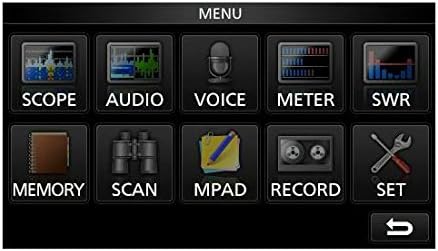
Image: The main menu screen of the IC-7300, accessible via the touchscreen, showing various function icons.
- Spectrum Scope: መታ ያድርጉ ወሰን ወደ view the real-time spectrum scope, which displays signal activity across a selected frequency range.
- የመለኪያ ማሳያ; መታ ያድርጉ METER ወደ view various operational parameters such as output power, ALC, SWR, and voltage.
- ቅንብሮች፡- መታ ያድርጉ አዘጋጅ to access detailed configuration options for the transceiver.
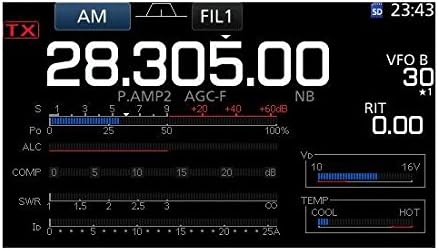
ምስል: ዝርዝር view of the IC-7300's display in AM mode, showing frequency, filter settings, and various operational meters.
Built-in Auto Tuner
The IC-7300 includes an internal automatic antenna tuner. To activate, press the አውቶ TUNE button. The tuner will automatically adjust to achieve the lowest possible SWR for your connected antenna. This function is effective for SWR values up to approximately 3:1.
ጥገና
- ማጽዳት፡ Use a soft, dry cloth to clean the exterior of the transceiver. Do not use abrasive cleaners or solvents.
- የአየር ማናፈሻ; Ensure the ventilation holes on the top and sides of the unit are not obstructed to prevent overheating.
- ማከማቻ፡ When not in use for extended periods, store the transceiver in a dry, dust-free environment.
መላ መፈለግ
| ችግር | ሊሆን የሚችል ምክንያት | መፍትሄ |
|---|---|---|
| ኃይል የለም | Power cable disconnected; incorrect voltage; blown fuse. | Check power cable connections; verify 13.8V DC supply; inspect and replace fuse if necessary. |
| ምንም የድምጽ ውጤት የለም። | Volume too low; speaker/headphone disconnected; squelch set too high. | Adjust AF/RF/SQL knob; check speaker/headphone connection; reduce squelch level. |
| ማስተላለፍ አይቻልም | Antenna not connected; high SWR; PTT button not pressed. | Connect antenna; use auto tuner or external tuner to reduce SWR; ensure PTT is engaged. |
| ደካማ አቀባበል | Antenna issue; incorrect mode/frequency; high noise level. | Check antenna connection and type; verify operating mode and frequency; adjust noise reduction (NB, NR) settings. |
ዝርዝሮች
| ባህሪ | ዝርዝር |
|---|---|
| የሞዴል ቁጥር | IC-7300 |
| የድግግሞሽ ክልል (RX) | 0.030 - 74.800 ሜኸ |
| የውጤት ኃይል | 100 W (SSB, CW, RTTY, FM); 25 W (AM) |
| የተቀባዩ ዓይነት | ቀጥታ ኤስampሊንግ |
| የሰርጦች ብዛት | 101 |
| የኃይል አቅርቦት ቁtage | 13.8 ቪ ዲሲ (± 15%) |
| ልኬቶች (W×H×D) | 9.4 x 3.7 x 9.4 ኢንች (240 × 94 × 238 ሚሜ) |
| ክብደት | 8.4 ፓውንድ (3.8 ኪ.ግ) |
| ልዩ ባህሪያት | 4.3-inch Color Touchscreen LCD, Real-time Spectrum Scope, Built-in Auto Tuner |
ዋስትና እና ድጋፍ
For warranty information and technical support, please refer to the official ICOM website or contact your authorized ICOM dealer. Keep your purchase receipt as proof of purchase for warranty claims.
Online resources and additional support may be available at the ICOM America Store on Amazon.
ተገዢነት መረጃ
ይህ መሳሪያ የFCC ደንቦች ክፍል 15ን ያከብራል። ክዋኔው በሚከተሉት ሁለት ሁኔታዎች ተገዢ ነው፡ (1) ይህ መሳሪያ ጎጂ ጣልቃገብነትን ላያመጣ ይችላል እና (2) ይህ መሳሪያ ያልተፈለገ አሰራርን የሚያስከትል ጣልቃ ገብነትን ጨምሮ የደረሰውን ማንኛውንም ጣልቃ ገብነት መቀበል አለበት።


