መግቢያ
Thank you for choosing the Anker Bluetooth Selfie Stick. This manual provides essential information for setting up, operating, and maintaining your device. Please read these instructions carefully before use to ensure optimal performance and safety.
በሣጥኑ ውስጥ ያለው
- Anker Bluetooth Selfie Stick
- የማይክሮ ዩኤስቢ ባትሪ መሙያ ገመድ
- የእጅ አንጓ
- የእንኳን ደህና መጣችሁ መመሪያ
ምርት አልቋልview እና ባህሪያት
The Anker Bluetooth Selfie Stick is a highly adjustable and compact monopod designed for self-portraits and group photos. Its robust aluminum alloy construction ensures durability while remaining lightweight for portability.
- Highly Adjustable: Extends up to 29.7 inches (75.5 cm) for wide-angle shots and retracts to a compact 7 inches (17.8 cm) for easy storage.
- ጠንካራ ንድፍ; Constructed from durable yet lightweight aluminum alloy with an ergonomic handle for enhanced grip.
- ረጅም የባትሪ ህይወት; Features a 20-hour battery life on a single charge, ensuring extended usage.
- እንከን የለሽ የብሉቱዝ ግንኙነት; Easily pairs with most smartphones for convenient shutter control.
- የተኳኋኝነት መጨመር፡ Compatible with iPhones and Android smartphones between 2.2 and 3.3 inches wide. (Note: Not compatible with Windows devices. Some Android phones may require the "Camera 360" app for connection.)
የማዋቀር መመሪያ
1. የራስ ፎቶ ስቲክን መሙላት
Before initial use, fully charge the selfie stick using the provided Micro USB charging cable. The indicator light will show charging status.

Image: The Anker Bluetooth Selfie Stick showing the Micro USB charging port at the bottom of the handle.
2. ስማርትፎንዎን በማያያዝ ላይ
- Gently pull open the phone cradle.
- Insert your smartphone into the cradle, ensuring it is securely held. The cradle is adjustable to fit phones between 2.2 and 3.3 inches wide.
- Adjust the angle of the phone cradle as desired.
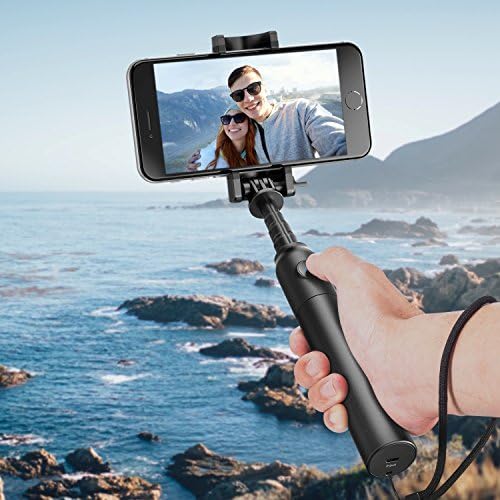
Image: A hand holding the Anker Bluetooth Selfie Stick with a smartphone securely mounted in the adjustable cradle, extended over a scenic ocean background.
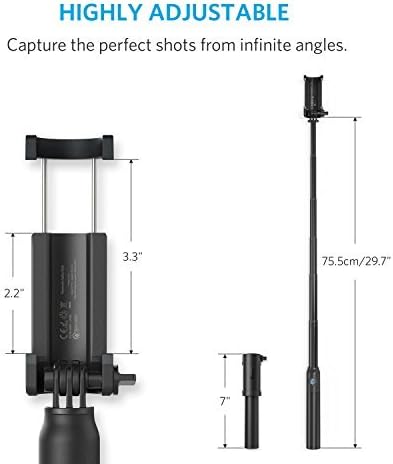
Image: A diagram illustrating the dimensions of the selfie stick, showing it retracts to 7 inches and extends to 29.7 inches, with the phone cradle accommodating devices from 2.2 to 3.3 inches wide.
3. በብሉቱዝ በኩል ማጣመር
- Press and hold the power button on the selfie stick handle for approximately 3-5 seconds until the blue indicator light flashes, indicating it's in pairing mode.
- በስማርትፎንዎ ላይ ወደሚከተለው ይሂዱ ቅንብሮች > ብሉቱዝ.
- Select "Anker selfie stick" or "BLE-M3" from the list of available devices to pair.
- Once paired, the blue indicator light on the selfie stick will remain solid.
የአሠራር መመሪያዎች
ፎቶዎችን/ቪዲዮዎችን ማንሳት
After successfully pairing your device, open your smartphone's camera app.
- ፎቶ ለማንሳት፡- Press the shutter button on the selfie stick handle once.
- To start/stop video recording: Depending on your phone's camera app, a single press of the shutter button may start or stop video recording. Refer to your phone's camera app settings for specific functionality.
Adjusting Length and Angle
The selfie stick's aluminum rod can be extended and retracted to achieve your desired length. The phone cradle can be rotated to switch between portrait and landscape modes, and tilted for various angles.
Video: Demonstrates the easy operation of the selfie stick, including extending the monopod, adjusting the phone cradle, and using it as a tripod with a Bluetooth remote control for taking photos and videos.
Charging the Selfie Stick
To charge the Anker Bluetooth Selfie Stick, connect the provided Micro USB cable to the charging port located at the bottom of the handle and plug the other end into a USB power source. The indicator light will show red during charging and turn blue when fully charged.
ሙሉ ኃይል መሙላት ለ20 ሰዓታት ያህል የባትሪ ዕድሜ ይሰጣል።
ተኳኋኝነት
The Anker Bluetooth Selfie Stick is compatible with most iPhone and Android smartphones with a width between 2.2 and 3.3 inches.
- ማስታወሻ 1፡- Downloading the "Camera 360" app might be required for some Android phones for connection.
- ማስታወሻ 2፡- Not compatible with Windows devices.
ዝርዝሮች
| ባህሪ | ዝርዝር |
|---|---|
| የሞዴል ቁጥር | አ7161 |
| የምርት ልኬቶች | 7.42 x 1.98 x 1.39 ኢንች |
| የእቃው ክብደት | 5.1 አውንስ |
| የታጠፈ መጠን | 7 ኢንች |
| ገመድ አልባ ቴክኖሎጂ | ብሉቱዝ |
| የባትሪ ዓይነት | 1 ሊቲየም አዮን ባትሪ (ተጨምሯል) |
| አምራች | አንከር |
| ቀለም | ጥቁር |
የደህንነት መረጃ
- መሳሪያውን ለከፍተኛ ሙቀት ወይም ቀጥተኛ የፀሐይ ብርሃን አያጋልጡ.
- ልጆች በማይደርሱበት ቦታ ያስቀምጡ.
- መሣሪያውን ለመበተን ወይም ለማሻሻል አይሞክሩ.
- የቀረበውን የኃይል መሙያ ገመድ ወይም የተረጋገጠ አቻ ይጠቀሙ።
ዋስትና እና ድጋፍ
Anker provides an 18-month worry-free warranty for this product. For technical support or warranty claims, please refer to the contact information in your Welcome Guide or visit the official Anker webጣቢያ.