መግቢያ
This manual provides detailed instructions for the setup, operation, and maintenance of your Acer R271 bid 27-inch IPS Full HD (1920 x 1080) Display. Please read this manual thoroughly before using your monitor to ensure proper functionality and to maximize your viewልምድ.

ፊት ለፊት view of the Acer R271 bid 27-inch IPS Full HD Display.
ማዋቀር
የጥቅል ይዘቶች
ሁሉም ክፍሎች በጥቅሉ ውስጥ መገኘታቸውን ያረጋግጡ፡-
- Acer R271 bid 27-inch Display
- የቁጥጥር አቋም
- የኃይል ገመድ
- የኤችዲኤምአይ ገመድ (በክልሉ ሊለያይ ይችላል)
- ቪጂኤ ገመድ (በክልሉ ሊለያይ ይችላል)
የክትትል ስብሰባ
To assemble the monitor, carefully attach the stand to the back of the display panel. Ensure it clicks securely into place. Place the monitor on a stable, flat surface.
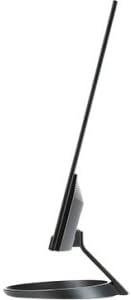
ጎን view illustrating the slim design of the Acer R271 bid monitor.
መቆጣጠሪያውን በማገናኘት ላይ
The Acer R271 bid monitor supports multiple input options. Connect the appropriate cable from your computer or device to the corresponding port on the monitor.
- ኤችዲኤምአይ: ለከፍተኛ ጥራት ዲጂታል ቪዲዮ እና ድምጽ።
- DVI (w/HDCP): ለዲጂታል ቪዲዮ ግንኙነት።
- ቪጂኤ: ለአናሎግ ቪዲዮ ግንኙነት።
የቪዲዮ ገመዱን ካገናኙ በኋላ የኃይል ገመዱን ወደ ሞኒተሪው እና ከዚያም ወደ ኃይል ማሰራጫ ያገናኙ.
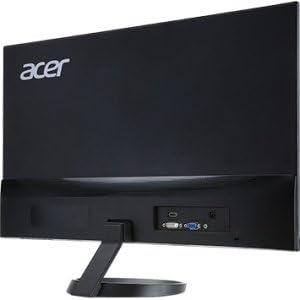
የኋላ view of the Acer R271 bid monitor, highlighting the HDMI, DVI, and VGA input ports.
በማብራት ላይ
Press the power button, usually located on the bottom right side of the monitor, to turn on the display. The monitor will automatically detect the active input source.
የአሠራር መመሪያዎች
መሰረታዊ ተግባራት
Use the buttons located on the bottom bezel of the monitor to navigate the On-Screen Display (OSD) menu. These buttons typically allow you to:
- Power On/Off the monitor.
- Select input source (HDMI, DVI, VGA).
- Adjust volume (if applicable).
- Access the OSD menu for advanced settings.
የማሳያ ቅንብሮች
The OSD menu provides options to customize your display. Common adjustments include:
- ብሩህነት፡- የስክሪኑን አጠቃላይ ብርሃን ያስተካክሉ።
- ንፅፅር፡ በብርሃን እና በጨለማ አካባቢዎች መካከል ያለውን ልዩነት ያስተካክሉ።
- የቀለም ቅንጅቶች ጥሩ የቀለም ሙቀት፣ ጋማ እና የግለሰብ አርጂቢ ደረጃዎች።
- የሥዕል ሁኔታ፡- ለተለያዩ የይዘት አይነቶች (ለምሳሌ፣ መደበኛ፣ ፊልም፣ ጨዋታ) ቅድመ-ቅምጥ ሁነታዎችን ይምረጡ።
ቁልፍ ባህሪያት
The Acer R271 bid monitor incorporates several features designed to enhance your viewልምድ;
- የአይፒኤስ ቴክኖሎጂ፡- Provides clear and bright colors from wide viewing angles (up to 178 degrees).
- የዜሮ ፍሬም ንድፍ፡ An edge-to-edge display that minimizes bezels, ideal for multi-monitor setups.
- የአይን መከላከያ ቴክኖሎጂ፡- Includes features like Blue Light Filter, Flicker-less, and ComfyView ለረጅም ጊዜ ጥቅም ላይ በሚውልበት ጊዜ የዓይንን ድካም ለመቀነስ.
ይፋዊ የምርት ቪዲዮ ማሳያasing the Acer R1 Series monitor's features, including ZeroFrame design, Full HD resolution, IPS technology for wide viewing angles, and Eye Protect technology for user comfort.
ጥገና እና እንክብካቤ
ሞኒተርን ማጽዳት
ስክሪኑን ለማፅዳት በለስላሳ እና ከተሸፈነ ጨርቅ በጥንቃቄ ያጥፉት። ግትር ለሆኑ ምልክቶች፣ መampen the cloth with a mild, non-abrasive screen cleaner. Avoid using alcohol-based cleaners or spraying liquid directly onto the screen.
አጠቃላይ እንክብካቤ
Keep the monitor away from direct sunlight, excessive heat, and moisture. Do not block the ventilation openings. Avoid placing heavy objects on the monitor or its cables.
መላ መፈለግ
No Display or "No Signal" Message
- የኃይል ገመዱ ከሁለቱም ሞኒተሪው እና ከኃይል ማመንጫው ጋር ደህንነቱ በተጠበቀ ሁኔታ መገናኘቱን ያረጋግጡ።
- Verify that the video cable (HDMI, DVI, or VGA) is firmly connected to both the monitor and your computer.
- Check if the correct input source is selected on the monitor using the OSD menu.
- ኮምፒውተርዎ መብራቱን እና በእንቅልፍ ሁነታ ላይ አለመሆኑን ያረጋግጡ።
ደካማ የምስል ጥራት
- የብሩህነት፣ የንፅፅር እና የቀለም ቅንብሮችን በ OSD ምናሌ በኩል ያስተካክሉ።
- የኮምፒዩተርዎ ማሳያ ጥራት ወደ ተቆጣጣሪው ቤተኛ ጥራት (1920 x 1080) መዋቀሩን ያረጋግጡ።
- በቪዲዮ ኬብል ወይም ወደቦች ላይ የሚደርስ ማንኛውም አካላዊ ጉዳት ካለ ያረጋግጡ።
ዝርዝሮች
| ባህሪ | ዝርዝር መግለጫ |
|---|---|
| የስክሪን መጠን | 27 ኢንች |
| የማያ ጥራት | 1920 x 1080 (ሙሉ ኤችዲ) |
| የፓነል ዓይነት | አይፒኤስ |
| የምላሽ ጊዜ | 4 ሚሴ |
| ፒክስል ፒች | 0.311 ሚሜ |
| ብሩህነት | 250 ኒት |
| የምልክት ግብዓቶች | 1 x HDMI, 1 x DVI (w/HDCP), 1 x VGA |
| ምጥጥነ ገጽታ | 16፡9 |
| የእቃው ክብደት | 8.05 ፓውንድ |
| የምርት ልኬቶች (LxWxH) | 24.8 x 18.1 x 9.4 ኢንች |
| ቀለም | ጥቁር |

Detailed dimensions of the Acer R271 bid monitor.
የዋስትና መረጃ
The Acer R271 bid monitor typically comes with a 3-year limited warranty. Please refer to the warranty card included with your product or visit the official Acer website for specific terms and conditions, as warranty details may vary by region and retailer.
የደንበኛ ድጋፍ
For further assistance, technical support, or to download the latest drivers and software, please visit the official Acer support webጣቢያ፡
You may also contact Acer customer service directly for personalized support.


