1. መግቢያ
This manual provides detailed instructions for the setup, operation, and maintenance of your Enover TS18 7-Day Programmable Digital Timer. This device is designed to automate the control of electrical appliances by setting specific ON/OFF times throughout the week, offering convenience and energy management.
2. የምርት ባህሪዎች
- ተለዋዋጭ የጊዜ ሰሌዳ ማስያዝ፡ Program up to 10 distinct ON/OFF cycles within a 7-day period. Each program repeats weekly.
- የኢነርጂ አስተዳደር፡- Automatically controls lamps, holiday lights, humidifiers, and other electrical devices. Includes a feature to protect devices from overcharge.
- Security Function: Features a random ON/OFF option to vary lighting times, simulating occupancy when away from home.
- ለተጠቃሚ ምቹ በይነገጽ፡ Equipped with a large LCD display for clear visibility and a manual override switch for immediate control adjustments.
- የባትሪ ምትኬ An integrated battery retains programmed settings during power outages፣ የዳግም ፕሮግራሚንግ አስፈላጊነትን ያስወግዳል።

Image: Enover TS18 Digital Timer highlighting key features for easy home automation.
3. የጥቅል ይዘቶች
ጥቅሉ የሚከተሉትን ነገሮች ያካትታል:
- 1 x Enover Digital Timer Switch (Model TS18)
- 1 x የተጠቃሚ መመሪያ

Image: Contents of the Enover TS18 Digital Timer package, including the timer and manual.
4. ምርት አብቅቷልview
The Enover TS18 Digital Timer features a clear LCD display and intuitive buttons for easy programming. It plugs directly into a standard electrical outlet.

ምስል፡ ፊት ለፊት view of the Enover TS18 Digital Timer, displaying the time and control buttons.
የአዝራር ተግባራት፡-
- ሳምንት: Sets the day(s) for programs.
- ሰአት፥ Adjusts the hour for time and program settings.
- ደቂቃ፥ Adjusts the minute for time and program settings.
- RES/RCL: Resets or recalls settings.
- ሰዓት፡- Enters or exits clock setting mode.
- ሰዓት ቆጣሪ፡ Cycles through program settings (P1 ON, P1 OFF, P2 ON, etc.).
- በርቷል/በራስ/አጥፋ፡ Selects operating mode (Always ON, Automatic, Always OFF).
- ደረጃ: Activates or deactivates the random ON/OFF function.
- ዳግም አስጀምር Small button (requires a pointed object) to clear all settings and reset the device.
Video: A brief demonstration of the Enover Digital Timer's basic functions and display.
5. ማዋቀር
5.1 የመጀመሪያ ክፍያ
Before first use, plug the timer into an electrical outlet for approximately 5-10 minutes to charge the internal battery. This ensures the display is active and settings can be retained.
5.2 የአሁኑን ሰዓት እና ቀን ማቀናበር
- ተጭነው ይያዙት። ሰዓት አዝራር።
- በመያዝ ላይ እያለ ሰዓት, የሚለውን ይጫኑ ሳምንት button repeatedly to set the current day of the week.
- በመያዝ ላይ እያለ ሰዓት, የሚለውን ይጫኑ ሰአት button repeatedly to set the current hour (AM/PM will display).
- በመያዝ ላይ እያለ ሰዓት, የሚለውን ይጫኑ ደቂቃ button repeatedly to set the current minute.
- ይልቀቁት ሰዓት ቅንብሮችን ለማስቀመጥ አዝራር።
6. የአሠራር መመሪያዎች
6.1 የማብራት/የማጥፋት ዑደቶችን ፕሮግራሚንግ
ሰዓት ቆጣሪው እስከ 10 የሚደርሱ የማብራት/ማጥፋት ፕሮግራሞችን ይፈቅዳል። ፕሮግራም ለማዘጋጀት የሚከተሉትን ደረጃዎች ይከተሉ፡
- የሚለውን ይጫኑ TIMER button once. The display will show "1 ON".
- ተጫን ሳምንት to select the day(s) for this program (e.g., MO, TU, WE, TH, FR, SA, SU, MO TU WE TH FR, SA SU, MO TU WE TH FR SA SU, etc.).
- ተጫን ሰአት የሚፈለገውን ሰዓት ላይ ለማዘጋጀት።
- ተጫን ደቂቃ የተፈለገውን ON ደቂቃ ለማዘጋጀት.
- የሚለውን ይጫኑ TIMER button again. The display will show "1 OFF".
- Repeat steps 2-4 to set the desired OFF time for Program 1. Ensure the correct day(s) are selected for the OFF time.
- መጫኑን ይቀጥሉ TIMER to cycle through and set additional programs (2 ON, 2 OFF, up to 10 ON, 10 OFF).
- ሁሉንም የሚፈለጉትን ፕሮግራሞች ካዘጋጁ በኋላ, ይጫኑ ሰዓት አዝራር ወደ የአሁኑ ጊዜ ማሳያ ለመመለስ.
- ሰዓት ቆጣሪው መብራቱን ያረጋግጡ አውቶማቲክ mode for programs to execute. Press በርቷል/በራስ/አጥፋ ለማሽከርከር አውቶማቲክ.
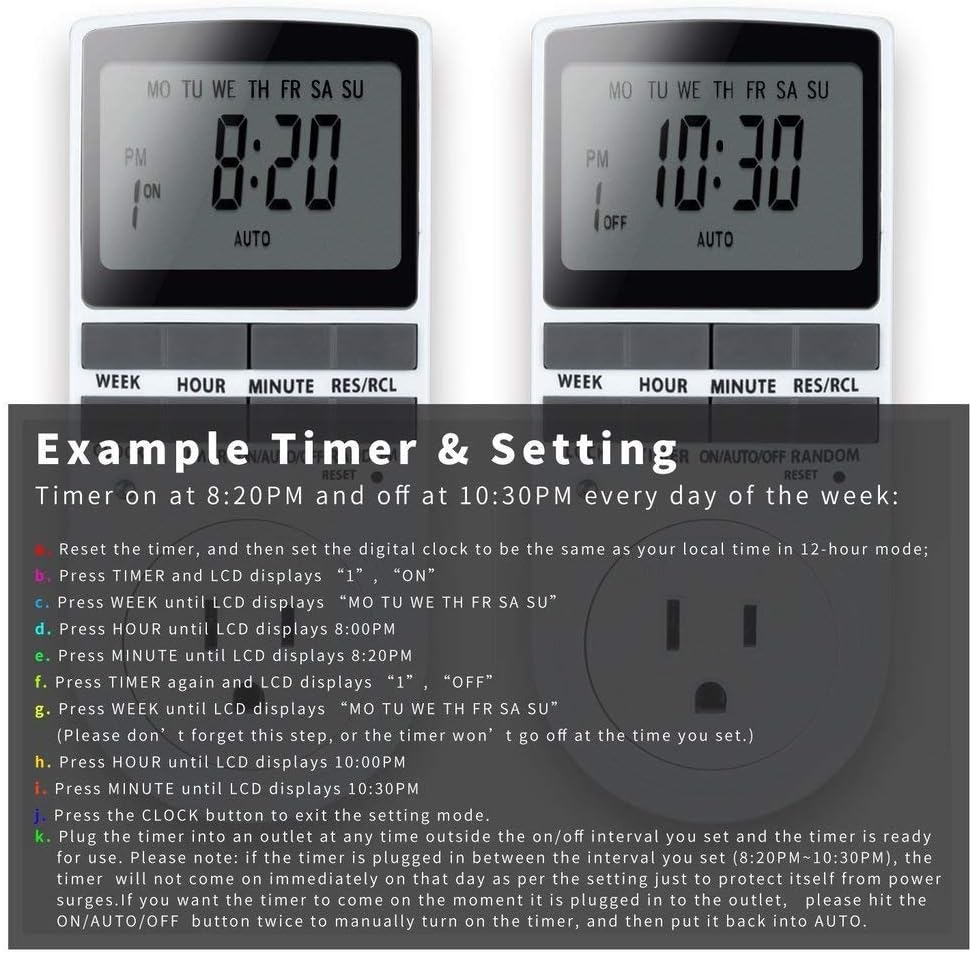
Image: Visual guide for setting an example timer program (ON at 8:20 PM, OFF at 10:30 PM daily).
6.2 Random Function (Anti-theft)
To activate the random ON/OFF feature:
- የሚለውን ይጫኑ በዘፈቀደ button. The word "RANDOM" will appear on the display.
- In random mode, the timer will turn ON and OFF at varying times within a set period, typically around the programmed ON/OFF times, to simulate occupancy.
- ለማሰናከል፣ ይጫኑ በዘፈቀደ አዝራር እንደገና.

Image: The anti-theft random feature of the Enover TS18 Digital Timer, designed to deter intruders.
6.3 በእጅ መሻር
To manually switch the timer's output without affecting programmed settings:
- የሚለውን ይጫኑ በርቷል/በራስ/አጥፋ ሁነታዎችን ለማሽከርከር አዝራር፡- ON (always on), አውቶማቲክ (follows programs), ጠፍቷል (always off).
- Select the desired temporary mode. The timer will revert to አውቶማቲክ mode at the next programmed ON/OFF event.
Video: A detailed demonstration of setting programs and using the manual override function on the Enover Digital Timer.
7. መተግበሪያዎች
The Enover TS18 Digital Timer can be used to automate various household devices, enhancing convenience and energy efficiency.
- Coffee Makers: Program your coffee maker to start brewing before you wake up.
- Aquarium Lights/Pumps: Automate the lighting and filtration cycles for your aquarium.
- Indoor Grow Lights: Maintain consistent light schedules for plants.
- የበዓል ማስጌጫዎች; Set festive lights to turn on and off automatically.
- Fans/Humidifiers: Control environmental devices to operate only when needed.
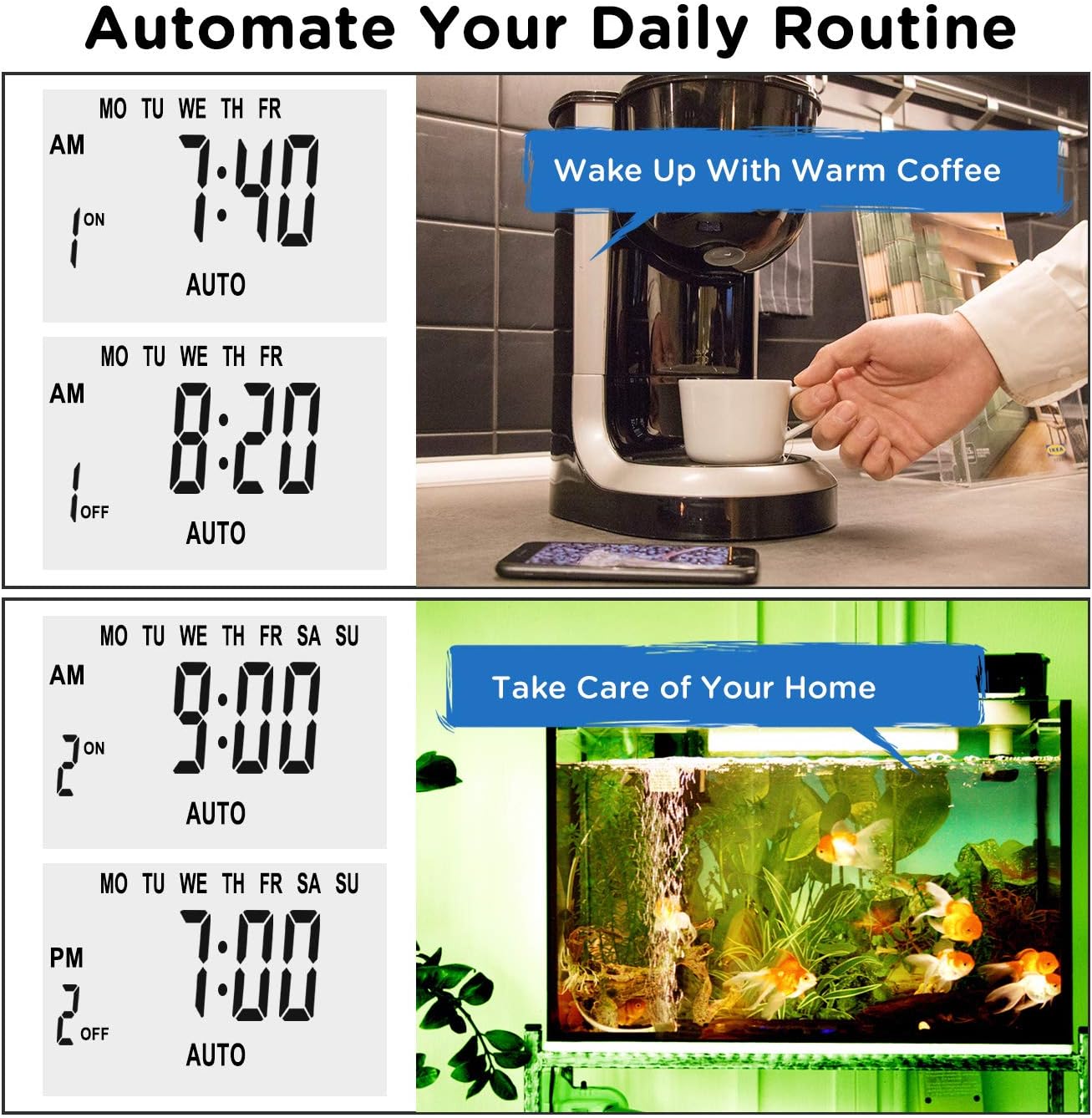
ምስል፡ ዘጸamples of automating daily routines with the Enover TS18 Digital Timer, such as a coffee maker and aquarium.
8. ዝርዝሮች
| የሞዴል ቁጥር | TS18 |
| የምርት ስም | ኢኖቨር |
| ቀለም | ነጭ |
| ቁሳቁስ | ፕላስቲክ |
| የቅንብሮች ብዛት | 10 (የማብራት/የማጥፋት ፕሮግራሞች) |
| ጥራዝtage | 120 ቮልት |
| ዋትtage | 1800 ዋት |
| Ampየጉርምስና አቅም | 15 Amps |
| የመጫኛ ዘዴ | መሰካት |
| የመጫኛ አይነት | ተራራ ላይ ይሰኩት |
| ተሰኪ ቅርጸት | ቢ - ከመሬት መሰኪያ ጋር የአሜሪካ ዘይቤ |
| ልዩ ባህሪያት | 3-wire grounded plug and 3-prong grounded outlet |
| አጠቃቀም | የቤት ውስጥ አጠቃቀም ብቻ |
| የእቃው ክብደት | 6.4 አውንስ |
| የጥቅል ልኬቶች | 5.67 x 3.31 x 2.6 ኢንች |
| የባትሪ ሕዋስ ዓይነት | ኒኤምኤች |
| የባትሪ ህይወት | 100 days (backup) |
9. መላ መፈለግ
- ሰዓት ቆጣሪው እንደተዘጋጀው አይበራም/አያጠፋም፦
- ሰዓት ቆጣሪው መብራቱን ያረጋግጡ አውቶማቲክ ሁነታ.
- የአሁኑ ሰዓት እና ቀን በትክክል መዋቀሩን ያረጋግጡ።
- Check that the ON and OFF times for the specific program are correctly entered and assigned to the desired days.
- Confirm the appliance connected to the timer is switched ON.
- ማሳያው ባዶ ወይም ደብዛዛ ነው፡-
- Plug the timer into an active electrical outlet for 5-10 minutes to charge the internal battery.
- All settings lost after power outage:
- The internal battery may not be sufficiently charged. Ensure the timer is regularly plugged in to maintain battery charge.
- To clear all settings:
- Use a pointed object (like a pen tip) to press the ዳግም አስጀምር button. This will clear all programs and reset the clock. You will need to re-enter all settings.
10. ዋስትና እና ድጋፍ
For warranty information or technical support, please refer to the contact details provided on the product packaging or the official Enover webጣቢያ. ለዋስትና ጥያቄዎች የግዢ ደረሰኝዎን ያስቀምጡ።


