1. መግቢያ
This manual provides essential instructions for the proper setup, operation, and maintenance of your YI YAS.1616.INT 4K Action Camera Kit. Please read this manual thoroughly before using the product to ensure optimal performance and safety. Keep this manual for future reference.
2. ምርት አብቅቷልview
2.1 ኪት ይዘቶች
The YI YAS.1616.INT 4K Action Camera Kit includes the following components:
- YI 4K Action Camera
- YI Monopod
- የብሉቱዝ የርቀት መቆጣጠሪያ
- ዳግም ሊሞላ የሚችል ባትሪ
- የዩኤስቢ ገመድ
- መመሪያ መመሪያ

Image 2.1: Contents of the YI 4K Action Camera Kit.
2.2 የካሜራ ባህሪያት
The YI 4K Action Camera is designed for high-quality video and photo capture, featuring:
- 4K/30fps Video Recording: Captures video at 60mbps, offering 4 times the quality of standard 1080p.
- Advanced Imaging Hardware: Equipped with an Amarelle A9SE75 chip, Sony IMX377 image sensor, and 7-layer optical glass lenses with an F2.8 large aperture for enhanced light intake.
- 2.19" LCD Touchscreen: A 640 x 360 high-resolution display with Gorilla Glass Retina for easy previewing, shooting, and scratch resistance.
- ረጅም የባትሪ ህይወት; A 1400mAh 4.4V lithium-ion battery provides up to 120 minutes of 4K/30fps video recording on a single charge.
- ውጤታማ የማቀዝቀዝ ስርዓት; Prevents overheating during extended recording sessions.
- ግንኙነት፡ Built-in Wi-Fi for smartphone app control and Bluetooth for remote control.
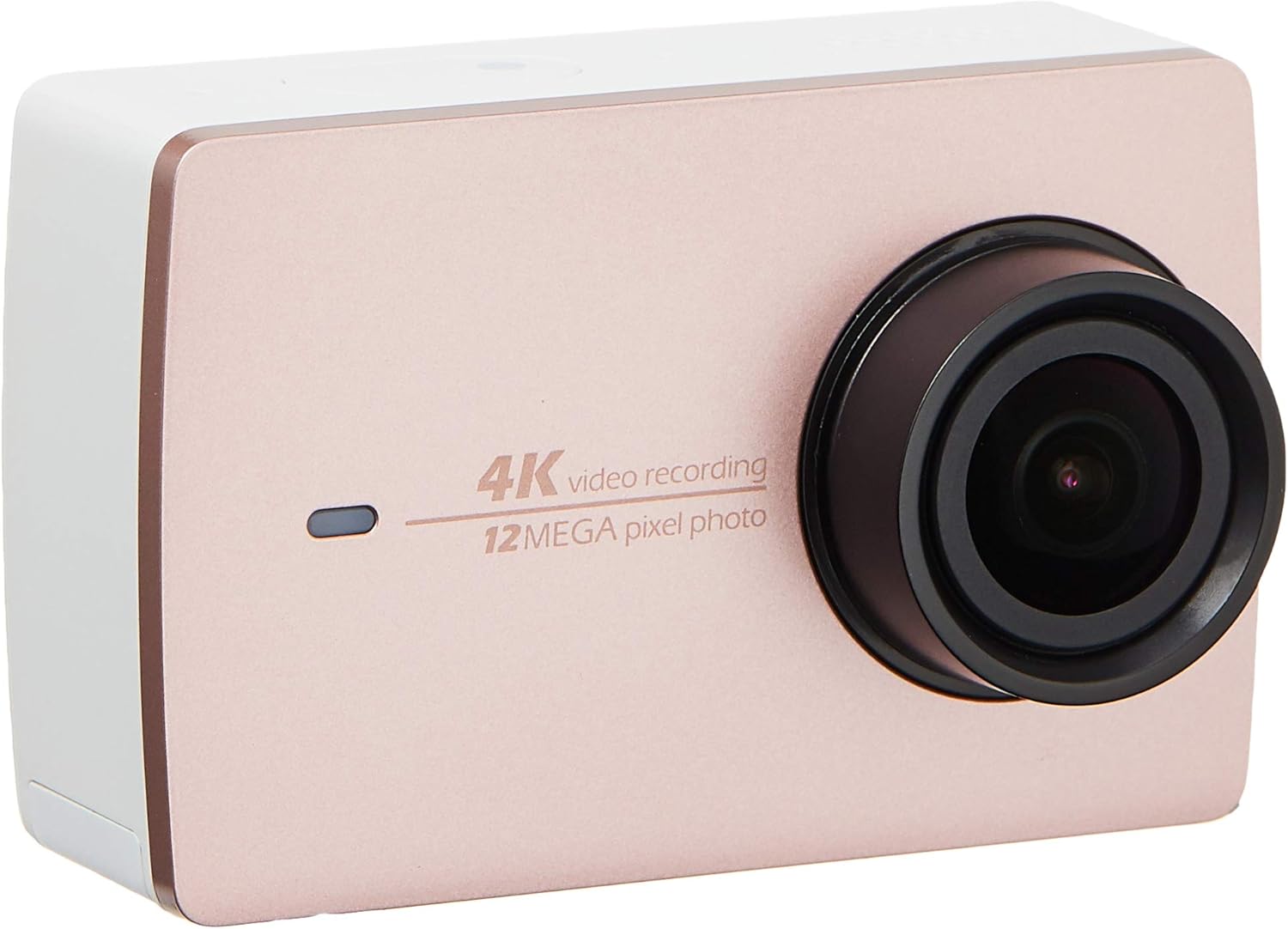
ምስል 2.2፡ ፊት view of the YI 4K Action Camera.
3. ማዋቀር
3.1 ባትሪ መጫን እና መሙላት
- የባትሪውን ክፍል በካሜራው ላይ ያግኙት።
- Insert the 1400mAh lithium-ion battery, ensuring correct polarity.
- የባትሪውን ክፍል ደህንነቱ በተጠበቀ ሁኔታ ይዝጉ።
- Connect the camera to a power source using the provided USB cable for charging. The charging indicator will illuminate.
3.2 የማህደረ ትውስታ ካርድ ጭነት
The YI 4K Action Camera supports SDHC and SmartMedia flash memory types.
- የማህደረ ትውስታ ካርድ ማስገቢያ ሽፋን ይክፈቱ.
- Insert a compatible memory card (not included) into the slot with the contacts facing the correct direction. Push until it clicks into place.
- የማህደረ ትውስታ ካርድ ማስገቢያ ሽፋንን ዝጋ።
3.3 ማብራት / ማጥፋት
- ለማብራት፡- ማያ ገጹ እስኪበራ ድረስ የኃይል አዝራሩን ተጭነው ይያዙት።
- ለማጥፋት፡- ካሜራው እስኪጠፋ ድረስ የኃይል አዝራሩን ተጭነው ይያዙት።
3.4 Connecting the Bluetooth Remote
The included Bluetooth remote allows for convenient control of the camera.
- ካሜራው መብራቱን ያረጋግጡ።
- Activate Bluetooth pairing mode on the camera via the settings menu.
- Follow the remote's instructions to enter pairing mode.
- Once paired, the remote can be used to switch between video and photo modes and trigger recording/capture.

Image 3.1: The YI Monopod, included in the kit.
4. ካሜራውን መስራት
4.1 የንክኪ ማያ ገጽ ዳሰሳ
The 2.19" LCD touchscreen provides intuitive control:
- ያንሸራትቱ Navigate through different modes (Video, Photo, Time-lapse, etc.) and settings.
- መታ ያድርጉ፡ Select options, adjust settings, or start/stop recording.
- ቅድመview: View የእርስዎ የተያዙ footage and photos directly on the screen.
4.2 የቪዲዮ ቀረጻ
- Select the Video mode on the touchscreen.
- Adjust video resolution (e.g., 4K/30fps) and other settings as desired.
- Press the Shutter button or tap the record icon on the screen to start recording.
- Press the Shutter button or tap the record icon again to stop recording.
4.3 ፎቶ ማንሳት
- Select the Photo mode on the touchscreen.
- Adjust photo settings such as resolution, exposure, and white balance.
- Press the Shutter button or tap the capture icon on the screen to take a photo.
4.4 የዋይፋይ ግንኙነት እና የመተግበሪያ አጠቃቀም
The camera's built-in Wi-Fi allows connection to a smartphone app for remote control, live preview, and content management.
- Download the official YI Action Camera app from your device's app store.
- በቅንብሮች ምናሌ በኩል በካሜራ ላይ Wi-Fiን ያንቁ።
- ስማርትፎንዎን ከካሜራው የWi-Fi አውታረ መረብ ጋር ያገናኙ (SSID እና የይለፍ ቃል በካሜራ ማያ ገጽ ላይ ይታያሉ)።
- Open the YI Action Camera app to control the camera, view footagኢ፣ እና ማስተላለፍ files.
5. ጥገና
5.1 ጽዳት
- Use a soft, lint-free cloth to clean the camera body and touchscreen.
- ሌንሱን ለማፅዳት ልዩ የሆነ የሌንስ ማጽጃ ጨርቅና መፍትሄ ይጠቀሙ። የማጥፊያ ቁሳቁሶችን ያስወግዱ።
- ሁሉም ወደቦች ከአቧራ እና ከቆሻሻ ነጻ መሆናቸውን ያረጋግጡ።
5.2 ማከማቻ
- ካሜራውን በቀጥታ ከፀሀይ ብርሀን እና ከከፍተኛ ሙቀት ርቆ በቀዝቃዛና ደረቅ ቦታ ያከማቹ።
- ባትሪውን ለረጅም ጊዜ ከተቀመጠ በኋላ እንዳይፈስ ለመከላከል ያስወግዱት።
5.3 የጽኑ ዝማኔዎች
Periodically check the official YI website or the YI Action Camera app for available firmware updates. Keeping your camera's firmware updated ensures optimal performance and access to new features.
6. መላ መፈለግ
6.1 የተለመዱ ጉዳዮች እና መፍትሄዎች
- ካሜራ አይበራም ባትሪው ሙሉ በሙሉ መሙላቱን እና በትክክል መጨመሩን ያረጋግጡ።
- ቀረጻው ሳይታሰብ ይቆማል፡- Check if the memory card has sufficient space or if it's a high-speed card suitable for 4K recording. Ensure the battery is not depleted.
- የማያ ንካ ምላሽ የማይሰጥ፡ Try restarting the camera. If the issue persists, ensure the screen is clean and dry.
- Bluetooth remote not connecting: Ensure both the camera and remote are in pairing mode and within range. Check the remote's battery.
- የWi-Fi ግንኙነት ችግሮች፡- Verify the camera's Wi-Fi is enabled and your smartphone is connected to the correct network. Try restarting both devices.
For further assistance, refer to the official YI support resources.
7. ዝርዝሮች
| አምራች | YI |
| የሞዴል ቁጥር | 90010 |
| የምርት ልኬቶች | 6.6 x 3 x 4.3 ሴ.ሜ |
| ክብደት | 96.39 ግ |
| የፎቶ ዳሳሽ ቴክኖሎጂ | CMOS |
| የቪዲዮ ቀረጻ ጥራት | 4K |
| ከፍተኛ የትኩረት ርዝመት | 1 |
| ከፍተኛው Aperture | 2.8 ሚሊሜትር |
| የፍላሽ ማህደረ ትውስታ አይነት | ኤስዲኤችሲ፣ ስማርትሚዲያ |
| የቪዲዮ ቀረጻ ቅርጸት | MP4 |
| የሚደገፍ የድምጽ ቅርጸት | AAC፣ MP3 |
| የስክሪን መጠን | 2.19 ኢንች |
| የግንኙነት ቴክኖሎጂ | ዋይ ፋይ |

Image 7.1: YI 4K Action Camera with monopod, illustrating approximate dimensions.
8. ዋስትና እና ድጋፍ
8.1 የዋስትና መረጃ
ይህ ምርት ከ ሀ የ1 ዓመት የአካባቢ (ሲንጋፖር) ዋስትና. እባክዎን የዋስትና ጥያቄዎችን ለማግኘት የግዢ ማረጋገጫዎን ያስቀምጡ። ዋስትናው በመደበኛ የአጠቃቀም ሁኔታዎች ውስጥ የማምረቻ ጉድለቶችን ይሸፍናል።
8.2 የደንበኛ ድጋፍ
For technical support, service, or warranty inquiries, please visit the official YI Technology website or contact their authorized service centers in Singapore. Contact information can typically be found on the product packaging or the official webጣቢያ.