አስፈላጊ የደህንነት መመሪያዎች
ከመጠቀምዎ በፊት ሁሉንም መመሪያዎች በጥንቃቄ ያንብቡ።
- ከማጽዳት፣ ከማገልገልዎ ወይም ከመንቀሳቀስዎ በፊት ሁል ጊዜ የአየር ማራገቢያውን ከኃይል ማከፋፈያው ያላቅቁት።
- የአየር ማራገቢያው በሚሠራበት ጊዜ ጣቶችን ወይም ሌሎች ነገሮችን በፍርግርግ ውስጥ አያስገቡ።
- በተበላሸ ገመድ ወይም መሰኪያ ማንኛውንም የአየር ማራገቢያ አያሰራጩ። ማራገቢያውን ያስወግዱ ወይም ለምርመራ እና/ወይም ለመጠገን ወደ ተፈቀደ የአገልግሎት ተቋም ይመለሱ።
- ገመዱን ምንጣፍ ስር አያሽከርክሩ። ገመዱን በውርወራ ምንጣፎች፣ ሯጮች ወይም ተመሳሳይ መሸፈኛዎች አይሸፍኑት። ገመዱን ከትራፊክ አካባቢ ያርቀው እና የማይቋረጥበት ቦታ ያዘጋጁ።
- ማራገቢያውን በእርጥብ ወይም በዲ አይጠቀሙamp እንደ መታጠቢያ ቤት ወይም የልብስ ማጠቢያ ቦታዎች ያሉ ቦታዎች.
- ይህ ማራገቢያ ለቤት ውስጥ አገልግሎት ብቻ የታሰበ ነው። ከቤት ውጭ አይጠቀሙ.
- የአየር ማራገቢያውን ከመጋረጃዎች፣ መጋረጃዎች ወይም በአድናቂው ምላጭ ውስጥ ሊያዙ ከሚችሉ ነገሮች ያርቁ።
- ደጋፊው ስራ ላይ ሲውል ልጆችን ይቆጣጠሩ።
ምርት አልቋልview
The Optimus 18-inch High Velocity Industrial Floor Fan is designed to provide powerful air circulation in various indoor environments. Its robust construction and high-velocity motor make it suitable for workshops, garages, and large rooms.
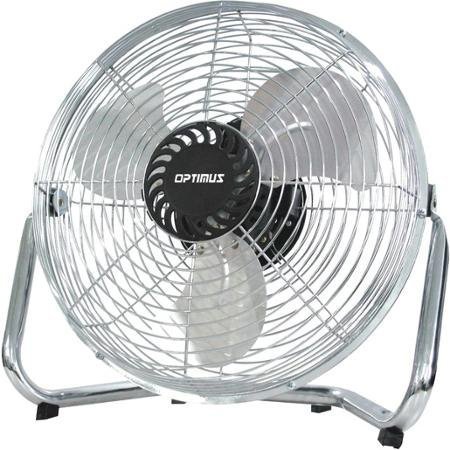
Image: Optimus 18-inch High Velocity Industrial Floor Fan. This image shows the fan with its silver metallic finish and sturdy floor stand.
ቁልፍ ባህሪዎች
- 18-inch diameter for wide air distribution.
- Industrial-grade high velocity airflow.
- Durable metallic finish.
- Floor standing design for stable placement.
- Multiple power levels for adjustable airflow.
የማዋቀር መመሪያዎች
- ደጋፊውን ይንቀሉት፡ Carefully remove the fan and all components from the packaging. Retain packaging for future storage or transport.
- Assemble the Floor Stand:
- Attach the fan head to the floor stand using the provided screws and tools. Ensure all connections are secure.
- Verify the fan head can pivot smoothly on the stand.
- አቀማመጥ፡- Place the fan on a firm, level surface. Ensure there is adequate space around the fan for proper air circulation and to prevent obstruction of the air intake/output. Keep the fan at least 3 feet away from walls or furniture.
- የኃይል ግንኙነት; Ensure the fan is in the "OFF" position before plugging it into a standard 120V AC electrical outlet.
የአሠራር መመሪያዎች
This fan features push-button controls for easy operation. A remote control may also be included for convenience.
- ማብራት/ማጥፋት፡ Locate the power button on the control panel. Press the button once to turn the fan ON. Press it again to turn the fan OFF.
- የደጋፊ ፍጥነት ማስተካከል; The fan has 4 power levels. After turning the fan ON, repeatedly press the speed control button to cycle through the available speed settings (Low, Medium, High, Max). The fan will operate at the selected speed.
- የአየር ፍሰት አቅጣጫ ማስተካከል; The fan head can be tilted manually to direct airflow upwards or downwards. Gently tilt the fan head to the desired angle. Do not force the fan head beyond its intended range of motion.
ጥገና
Regular cleaning and maintenance will ensure optimal performance and extend the life of your fan.
- አድናቂውን ማጽዳት;
- Always unplug the fan from the power source before cleaning.
- ለስላሳ ይጠቀሙ, መamp cloth to wipe the exterior surfaces of the fan. Do not use abrasive cleaners or harsh chemicals, as these may damage the finish.
- To clean the fan blades, carefully remove the front grille (if detachable, refer to assembly instructions for details). Wipe the blades with a soft cloth. Ensure the grille is securely reattached before operating the fan.
- የአየር ማራገቢያውን እንደገና ከማገናኘትዎ በፊት ሁሉም ክፍሎች ሙሉ በሙሉ ደረቅ መሆናቸውን ያረጋግጡ።
- ማከማቻ፡ ረዘም ላለ ጊዜ ጥቅም ላይ በማይውልበት ጊዜ ማራገቢያውን በቀዝቃዛና ደረቅ ቦታ ያስቀምጡት. ከአቧራ እና ከጉዳት ለመከላከል በመጀመሪያ ማሸጊያው ውስጥ ማከማቸት ይመከራል.
መላ መፈለግ
| ችግር | ሊሆን የሚችል ምክንያት | መፍትሄ |
|---|---|---|
| ደጋፊ አይበራም። | አልተሰካም፤ የኃይል መውጫው አይሰራም፤ የማራገቢያ ማብሪያ / ማጥፊያው ጠፍቷል። | Ensure fan is securely plugged into a working outlet. Check household fuse/circuit breaker. Press the power button to turn the fan on. |
| ዝቅተኛ የአየር ፍሰት. | Fan speed set too low; obstructed intake/output; dirty blades. | Increase fan speed. Clear any obstructions. Clean fan blades and grilles as per maintenance instructions. |
| ያልተለመደ ድምፅ ወይም ጫጫታ። | Loose parts; fan not on a level surface; foreign object in blades. | Unplug the fan and check for any loose screws or components. Place the fan on a stable, level surface. Carefully inspect for and remove any foreign objects. |
ዝርዝሮች
| ባህሪ | ዝርዝር |
|---|---|
| የምርት ስም | ኦፕቲመስ |
| የሞዴል ስም | ከፍተኛ ፍጥነት |
| የንጥል ሞዴል ቁጥር | 306c1b92-f36b-4ccc-ac62-2ad33d5c9efb |
| ዲያሜትር | 18 ኢንች |
| ቀለም | ብር |
| ቅጥ | የኢንዱስትሪ |
| የኃይል ምንጭ | ባለገመድ ኤሌክትሪክ |
| የኃይል ደረጃዎች ብዛት | 4 |
| የመቆጣጠሪያ ዘዴ | የአዝራር መቆጣጠሪያ |
| የቤት ውስጥ / የውጭ አጠቃቀም | የቤት ውስጥ |
| የተካተቱ አካላት | Floor Stand, Remote Control |
| ዝርዝር ሜታል | OSHA |
ዋስትና እና ድጋፍ
Optimus products are manufactured to high-quality standards. This product is covered by a limited warranty against defects in materials and workmanship from the date of purchase. Please refer to the warranty card included with your product for specific terms and conditions.
For technical support, troubleshooting assistance, or warranty claims, please contact Optimus customer service. Contact information can typically be found on the product packaging or the official Optimus webጣቢያ.
እባክዎ ለዋስትና ዓላማዎች የግዢ ማረጋገጫዎን ያቆዩ።


