1. ምርት አብቅቷልview
The Keeley Bubble Tron Dynamic Flanger Phaser and Random Synth Filter is a versatile effects pedal designed to produce unique modulation sounds. Inspired by classic dynamic flangers and phasers, this pedal offers three distinct modes of operation: Dynamic Flange, Dynamic Phase, and Random Filter. It allows for expressive control over your guitar's signal, reacting to your pick attack and playing dynamics to create a range of sonic textures.
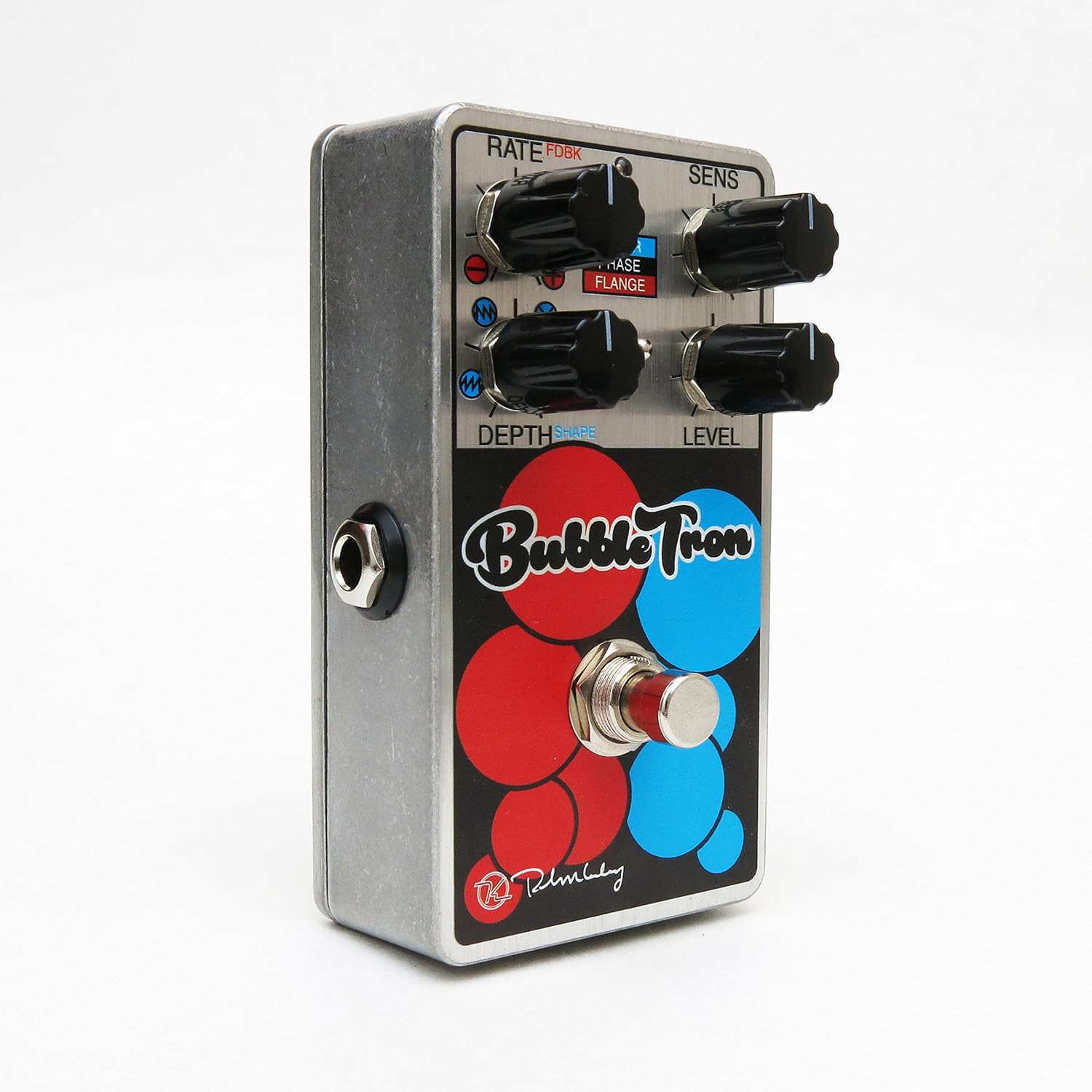
Figure 1: Keeley Bubble Tron Dynamic Flanger Phaser Pedal.
The pedal features a simple yet powerful control layout, allowing users to dial in subtle or extreme effects. Its dynamic response makes it an intuitive tool for guitarists seeking to add expressive modulation to their sound.
2. ማዋቀር
To set up your Keeley Bubble Tron pedal, follow these steps:
- የኃይል ግንኙነት; Connect a standard 9V DC power supply (center negative, 65mA+ current draw) to the 9V jack on the pedal. Ensure the power supply meets these specifications to prevent damage.
- የግቤት ግንኙነት፡- መደበኛ 1/4-ኢንች የመሳሪያ ገመድ በመጠቀም ጊታርዎን ወይም ሌላ መሳሪያዎን ከ"INPUT" መሰኪያ ጋር ያገናኙት።
- የውጤት ግንኙነት፡- ከፔዳል በግራ በኩል ያለውን የ"OUTPUT" መሰኪያ ወደ እርስዎ ያገናኙ ampሊፋየር ወይም በሲግናል ሰንሰለቱ ውስጥ ያለውን ቀጣዩን ፔዳል በመደበኛ 1/4 ኢንች የመሳሪያ ገመድ በመጠቀም።
- የመነሻ ቅንብሮች Before engaging the pedal, set all knobs to their 12 o'clock position and ensure the mode switch is in the middle (Phase) position for a neutral starting point.
3. የአሠራር መመሪያዎች
The Keeley Bubble Tron offers a variety of controls to shape your sound. Familiarize yourself with each knob and switch:
መቆጣጠሪያዎች፡-
- RATE (FDBK):
- In Filter & Phase modes: Controls the rate of the LFO.
- In Flange mode: Controls feedback. Turning left provides maximum negative feedback; turning right provides maximum positive feedback.
- ስሜታዊነት (SENS)
- In Filter mode: Controls envelope sensitivity, acting like a synth filter.
- In Phase & Flange modes: Controls input sensitivity, determining the point at which dynamic control is triggered. Start with this knob at full left and adjust for desired responsiveness.
- DEPTH (Shape):
- In Filter mode: Selects LFO shape (from full left: ramp ወደ ላይ፣ ramp down, random, or triangle).
- In Phase & Flange modes: Sets the depth of the effect for mild or lush sounds.
- ደረጃ፡ የውጤቱን አጠቃላይ የውጤት ደረጃ ይቆጣጠራል።
- ፉትስዊች፡ ውጤቱን ያበራል እና ያጠፋል።
Mode Select Switch:
- የላይ: Activates Filter mode.
- መካከለኛ፡ Activates Phase mode.
- ታች Activates Flange mode.

Figure 2: Bank A (Default Mode) Control Layout. This mode is active when the internal switch is set to Bank A.
Internal Mini Toggles (Bank Selection):
The Bubble Tron features internal mini toggles to expand its sonic capabilities. To access these, you will need to remove the back plate of the pedal.
- ANALOG FILTER (Vintage/Modern):
- ቪንtagሠ ሁነታ፡ Rolls off some high frequencies for a warmer tone.
- Modern Mode: Provides full-range clarity (default setting).
- BANK TOGGLE (Bank 1/Bank 2):
- Bank 1 (Default): Offers Sample & Hold Filter, Dynamic Phaser, and Dynamic Flanger modes.
- ባንክ 2፡ Offers Envelope Filter, Standard 8-Stage Phaser, and Standard Classic Flanger modes.

Figure 3: Bank B Control Layout. Access this mode by switching the internal Bank Toggle from Bank A to Bank B.

Figure 4: Internal Mini Toggles for Analog Filter and Bank Selection.

Figure 5: External Toggle Switch modes for Bank 1 and Bank 2.
4. ጥገና
To ensure the longevity and optimal performance of your Keeley Bubble Tron, observe the following maintenance guidelines:
- ማጽዳት፡ Use a soft, dry cloth to clean the pedal's exterior. Avoid abrasive cleaners or solvents, as these can damage the finish.
- ማከማቻ፡ ፔዳሉን ቀዝቃዛና ደረቅ ቦታ ላይ ከፀሐይ ብርሃን እና ከፍተኛ የሙቀት መጠን ራቅ አድርገው ያስቀምጡት። ለረጅም ጊዜ አገልግሎት ላይ በማይውሉበት ጊዜ የኃይል አቅርቦቱን ያላቅቁ።
- የኃይል አቅርቦት; Always use a regulated 9V DC power supply with a center-negative polarity and sufficient current (65mA+). Incorrect power supplies can cause damage and void the warranty.
- ግንኙነቶች፡ Ensure all cables are securely connected. Avoid excessive force when plugging or unplugging cables.
5. መላ መፈለግ
If you encounter issues with your Keeley Bubble Tron, try these troubleshooting steps:
- ድምጽ የለም፡
- ሁሉንም የኬብል ግንኙነቶች (ግቤት, ውፅዓት, ኃይል) ያረጋግጡ.
- Verify the power supply is correctly connected and providing the specified 9V DC.
- መሳሪያዎን እና ampማቀፊያው በትክክል እየሰራ ነው።
- Bypass the pedal to confirm the issue is with the pedal itself.
- የማይፈለግ ጫጫታ/ሃም፡
- ከፍተኛ ጥራት ያለው ገለልተኛ የኃይል አቅርቦት ይጠቀሙ።
- የተሳሳቱ ገመዶችን ይፈትሹ.
- ትክክለኛውን መሠረትዎን ያረጋግጡ ampማቀፊያ እና ሌሎች መሳሪያዎች.
- Effect Not Engaging/Responding:
- Check the footswitch functionality.
- Adjust the SENS (Sensitivity) knob, especially in dynamic modes, to ensure it's set appropriately for your playing style and instrument output.
- Verify the MODE SELECT switch is in the desired position.
6. ዝርዝሮች
| ባህሪ | ዝርዝር መግለጫ |
|---|---|
| ፔዳል ዓይነት | Dynamic Flange, Phaser, Random Synth Filter |
| የኃይል ፍላጎት | 9V DC Center Negative, 65mA+ |
| ግቤት/ውፅዓት | Mono Instrument Input, Mono Output |
| የእቃው ክብደት | 9.6 አውንስ |
| የምርት ልኬቶች | 6 x 7 x 10 ኢንች |
| የንጥል ሞዴል ቁጥር | Kbubble |
| የሲግናል ቅርጸት | አናሎግ |
7. ዋስትና እና ድጋፍ
For warranty information and technical support, please refer to the official Keeley Electronics webጣቢያ ወይም በቀጥታ የደንበኛ አገልግሎታቸውን ያግኙ። ለማንኛውም የዋስትና ጥያቄዎች የግዢ ማረጋገጫዎን ያስቀምጡ።
ኦፊሴላዊ Webጣቢያ፡ Keeley Electronics Store


