መግቢያ
Thank you for choosing the Divoom Onbeat 500 Portable Wireless Bluetooth Speaker. This device is designed to deliver powerful sound with convenient wireless connectivity. This manual will guide you through the setup, operation, and maintenance of your speaker to ensure optimal performance and longevity.
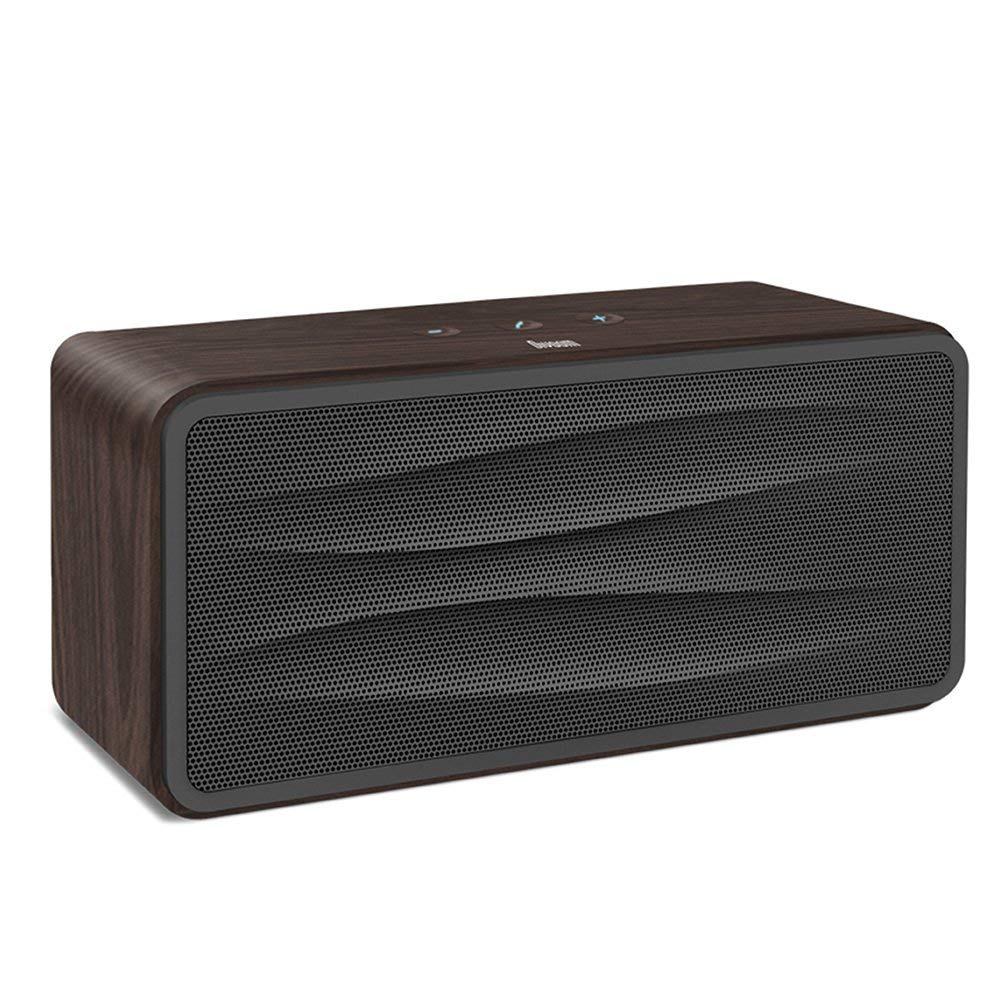
ምስል 1፡ ፊት ለፊት view of the Divoom Onbeat 500 speaker. This image displays the speaker's main grille and overall design.
የጥቅል ይዘቶች
እባክዎን ጥቅሉን ለሚከተሉት ነገሮች ያረጋግጡ፡
- Divoom Onbeat 500 Speaker
- የማይክሮ ዩኤስቢ ባትሪ መሙያ ገመድ
- ረዳት ገመድ
- የተጠቃሚ መመሪያ (ይህ ሰነድ)
- የዋስትና ካርድ
የምርት ባህሪያት
The Divoom Onbeat 500 speaker offers a range of features for an enhanced audio experience:
- ኃይለኛ ድምጽ; 2.1 channel design with a proprietary passive bass radiator for rich audio.
- NFC ቴክኖሎጂ፡- Tap-to-pair functionality for quick and easy Bluetooth connection.
- የብሉቱዝ ግንኙነት; Wirelessly play and control music from up to 33 feet (10 meters) away.
- አብሮ የተሰራ ስፒከር ስልክ፡ Allows you to make and take calls directly from the speaker.
- ለረጅም ጊዜ የሚቆይ ባትሪ; Integrated 5000mAh battery provides extended playback time.
- ረዳት ግቤት፡- ከብሉቱዝ ላልሆኑ መሳሪያዎች ጋር ባለገመድ ግንኙነት።
ማዋቀር
1. አፈጉባ Charውን ኃይል መሙላት
Before initial use, fully charge your Divoom Onbeat 500 speaker. Use the provided Micro USB charging cable to connect the speaker to a USB power source (e.g., computer USB port, USB wall adapter). The charging indicator light will illuminate during charging and turn off or change color when fully charged. A full charge typically provides 8-10 hours of playback.
2. ማብራት / ማጥፋት
- ለማብራት፡- Press and hold the Power button for a few seconds until you hear an audible prompt or see the indicator light illuminate.
- ለማጥፋት፡- Press and hold the Power button again for a few seconds until the speaker powers down.
3. የብሉቱዝ ማጣመር
The Onbeat 500 offers two methods for wireless connection:
NFC (Near Field Communication) Pairing:
If your device supports NFC, you can pair quickly:
- NFC በእርስዎ ዘመናዊ ስልክ ወይም ታብሌት ላይ መንቃቱን ያረጋግጡ።
- With the Onbeat 500 powered on, gently tap your NFC-enabled device against the NFC area on the speaker.
- Confirm the pairing request on your device. The speaker will indicate a successful connection.
መደበኛ የብሉቱዝ ማጣመር፡
For devices without NFC or for manual pairing:
- Power on the Divoom Onbeat 500 speaker. It will automatically enter Bluetooth pairing mode if no device is connected, or you may need to press a dedicated Bluetooth button (refer to speaker controls).
- On your audio device (smartphone, tablet, computer), go to the Bluetooth settings and enable Bluetooth.
- ፈልግ available devices. You should see "Divoom Onbeat 500" in the list.
- Select "Divoom Onbeat 500" to connect. The speaker will confirm the connection with an audible prompt.
4. AUX ግንኙነት
To connect a device using the auxiliary cable:
- Connect one end of the provided auxiliary cable to the AUX-in port on the Divoom Onbeat 500.
- Connect the other end of the auxiliary cable to the headphone jack or audio output of your device.
- The speaker will automatically switch to AUX mode, or you may need to select it manually (refer to speaker controls).

ምስል 2፡ ጎን view of the Divoom Onbeat 500, illustrating the location of the charging port, AUX input, and control buttons.
አፈጉባኤውን በመስራት ላይ
1. የሙዚቃ መልሶ ማጫወት
Once connected via Bluetooth or AUX, you can control music playback from your connected device. The speaker may also have integrated controls for volume adjustment, play/pause, and track skipping. Refer to the speaker's physical buttons for these functions.
2. የድምጽ ማጉያ ተግባር
When connected to a smartphone via Bluetooth, the Divoom Onbeat 500 can be used as a speakerphone:
- ለጥሪ መልስ Press the Call button (often indicated by a phone icon) on the speaker.
- ጥሪን በማጠናቀቅ ላይ፡- የጥሪ አዝራሩን እንደገና ይጫኑ።
- ጥሪን ባለመቀበል የጥሪ አዝራሩን ተጭነው ይያዙት።

ምስል 3፡ የኋላ view of the Divoom Onbeat 500, highlighting the passive bass radiator for enhanced low-frequency sound.
ጥገና
1. ማጽዳት
የድምጽ ማጉያዎን ገጽታ እና ተግባር ለመጠበቅ፡-
- ውጫዊውን ለስላሳ ፣ ደረቅ ፣ ከተሸፈነ ጨርቅ ይጥረጉ።
- Do not use abrasive cleaners, alcohol, benzene, or other chemical solvents, as these may damage the finish.
- እርጥበት ወደ ማናቸውም ክፍት ቦታዎች እንዳይገባ ያድርጉ.
2. የባትሪ እንክብካቤ
To prolong the life of the built-in lithium-ion battery:
- በተደጋጋሚ ባትሪውን ሙሉ በሙሉ ከመሙላት ይቆጠቡ።
- ለረጅም ጊዜ አገልግሎት በማይሰጥበት ጊዜ ድምጽ ማጉያውን በቀዝቃዛና ደረቅ ቦታ ያከማቹ።
- Charge the speaker at least once every three months if stored for a long time to prevent deep discharge.
መላ መፈለግ
If you encounter issues with your Divoom Onbeat 500, please refer to the following common solutions:
| ችግር | ሊሆን የሚችል መፍትሄ |
|---|---|
| ተናጋሪው አይበራም። | Ensure the battery is charged. Connect the speaker to a power source using the Micro USB cable and try again. |
| ከተናጋሪው ምንም ድምፅ የለም። | Check the volume level on both the speaker and your connected device. Ensure the speaker is correctly paired via Bluetooth or connected via AUX. Try re-pairing the Bluetooth device. |
| የብሉቱዝ ማጣመር አልተሳካም። | ድምጽ ማጉያው በማጣመር ሁነታ ላይ መሆኑን ያረጋግጡ። በመሳሪያዎ ላይ ብሉቱዝን ያጥፉ እና ያብሩ። መሣሪያዎን ወደ ድምጽ ማጉያው ያቅርቡ። በመሳሪያዎ ላይ ያለፉትን የብሉቱዝ ግንኙነቶችን ያጽዱ እና እንደገና ይሞክሩ። |
| ደካማ የድምፅ ጥራት | Ensure the speaker and connected device are within range (for Bluetooth). Check for interference from other wireless devices. Try a different audio source or cable. |
ዝርዝሮች
Detailed technical specifications for the Divoom Onbeat 500 speaker:
- የሞዴል ስም፡- Divoom Onbeat 500
- የድምጽ ማጉያ አይነት፡ የኮምፒተር ድምጽ ማጉያ
- የግንኙነት ቴክኖሎጂ; ብሉቱዝ
- የገመድ አልባ የግንኙነት ቴክኖሎጂ፡- ብሉቱዝ
- የመቆጣጠሪያ ዘዴ፡- ንካ
- የኃይል ምንጭ፡- በባትሪ የተጎላበተ
- ባትሪ፡ 1 ሊቲየም አዮን ባትሪ (5000mAh)
- ኦዲዮ ዋትtage: 20 ዋት
- የድምጽ ማጉያ ከፍተኛ የውጤት ኃይል፡- 100 ዋት
- የዙሪያ ድምጽ ቻናል ውቅረት፡- 2.1
- ተስማሚ መሣሪያዎች Android, Windows, iPhone (iOS)
- የማገናኛ አይነት፡ ዩኤስቢ (ለመሙላት)
- የምርት መጠኖች: 22.5 x 7.49 x 10.49 ሴሜ (LxWxH)
- የእቃው ክብደት፡ 1.55 ኪ.ግ
- ቀለም፡ ከሰል
- ልዩ ባህሪያት፡ NFC, Built-in Speakerphone, Passive Bass Radiator
ዋስትና እና ድጋፍ
Your Divoom Onbeat 500 speaker comes with a limited warranty. Please refer to the included Warranty Card for detailed terms and conditions, including warranty period and coverage.
For technical support, service inquiries, or further assistance, please visit the official Divoom website or contact their customer service department using the information provided on your Warranty Card or product packaging. Please have your model number (Onbeat 500) and purchase details ready when contacting support.


