1. መግቢያ እና በላይview
This manual provides detailed instructions for the setup, operation, and maintenance of your Xprinter XP-Q200 80mm Thermal Printer. The XP-Q200 is a high-speed thermal receipt printer designed for various operating systems including Windows, Android, and iOS. It offers versatile connectivity options such as USB, Bluetooth, and Ethernet, making it suitable for a wide range of business environments.

ምስል 1.1: የፊት view of the Xprinter XP-Q200 Thermal Printer.
2. የደህንነት መረጃ
Please read the following safety precautions carefully before using the printer to ensure safe and proper operation:
- ከታተመ በኋላ ወዲያውኑ የሙቀት ህትመት ጭንቅላቱን አይንኩ፣ ምክንያቱም ሞቃት ሊሆን ይችላል።
- Use only the power adapter supplied with the printer. Using an incorrect adapter may damage the printer or cause fire.
- Do not disassemble or modify the printer. Refer all servicing to qualified personnel.
- አታሚውን ከውሃ፣ ከእርጥበት እና ከፀሐይ ብርሃን ያርቁ።
- አታሚው በተረጋጋና ደረጃ ላይ መቀመጡን ያረጋግጡ።
3. የጥቅል ይዘቶች
ከዚህ በታች የተዘረዘሩት ሁሉም እቃዎች በአታሚ ጥቅልዎ ውስጥ መካተቱን ያረጋግጡ፡
- Xprinter XP-Q200 Thermal Printer Unit
- የኃይል አስማሚ
- የዩኤስቢ ገመድ
- Thermal Paper Roll (initial)
- የተጠቃሚ መመሪያ
4. የምርት ባህሪዎች
The Xprinter XP-Q200 offers a range of features designed for efficient and reliable thermal printing:
- ከፍተኛ ፍጥነት ማተም; Achieves print speeds of up to 260mm/sec with an integrated auto cutter.
- በርካታ በይነገጾች፡ Equipped with USB, Bluetooth, and Ethernet connectivity for flexible integration.
- ሰፊ ተኳኋኝነት Supports Windows, Linux, and Android operating systems.
- Logo and Barcode Support: Allows for downloading and printing of store logos (BMP file format) and various barcode types on thermal paper.
- የወረቀት አያያዝ; Designed to handle thermal paper rolls up to 80x80mm.
- International Language Support: Supports a variety of international languages and scripts.
- Error Alarms: Features print job tips and error alarm functions for operational awareness.
- Black Mark Detection: Includes a black mark detection function for specific printing applications.
- Missing Orders Function: Incorporates a feature to help avoid "missing orders."
- Monitoring Capabilities: Supports Ethernet and Serial port monitoring functions.
- NV Logo Storage: Provides 256K Bytes of NV Logo download storage.
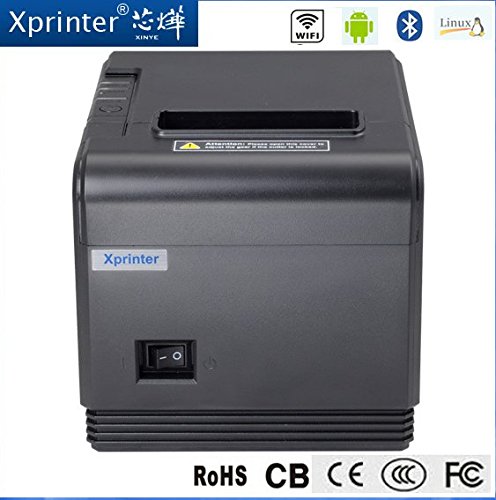
ምስል 4.1: የፊት view highlighting connectivity options.
5. ማዋቀር
5.1 አካላዊ አቀማመጥ
- Unpack the printer and remove all protective packaging materials.
- Place the printer on a stable, flat surface near a power outlet and your host device.
- Connect the power adapter to the printer's power port and then plug it into a wall outlet.
5.2 የሙቀት ወረቀትን መጫን
- Press the cover open button (usually located on the side or front) to open the printer's top cover.
- Insert the thermal paper roll into the paper compartment with the printing side facing the thermal print head. Ensure the roll unwinds from the bottom.
- ትንሽ መጠን ያለው ወረቀት ከመቁረጫው በላይ ይጎትቱ።
- Close the top cover firmly until it clicks into place. The printer will automatically feed the paper to the correct position.
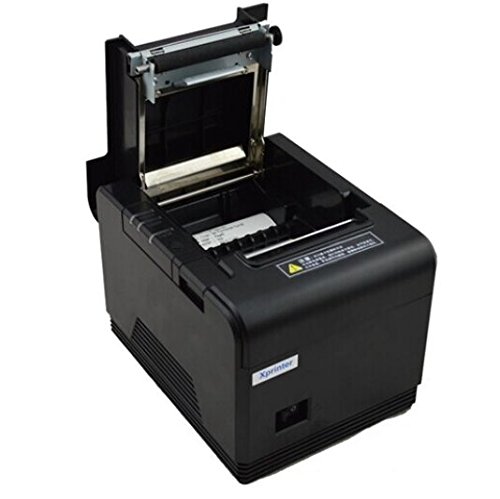
Figure 5.1: Loading thermal paper into the printer.
5.3 ከመሳሪያ ጋር መገናኘት
The XP-Q200 supports USB, Bluetooth, and Ethernet connections.

ምስል 5.2: የኋላ view የግንኙነት ወደቦች ያሉት የአታሚው ክፍል።
5.3.1 የዩኤስቢ ግንኙነት
- የዩኤስቢ ገመዱን አንድ ጫፍ ከአታሚው የዩኤስቢ ወደብ እና ሌላኛውን ጫፍ ደግሞ ከኮምፒውተርዎ የዩኤስቢ ወደብ ጋር ያገናኙ።
- The computer should detect the printer automatically.
5.3.2 Bluetooth Connection (for Android/iOS)
- አታሚው መብራቱን ያረጋግጡ።
- On your Android or iOS device, go to Bluetooth settings and enable Bluetooth.
- ፈልግ available devices. The printer should appear as "XP-Q200" or similar.
- Select the printer to pair. The default PIN is usually "0000" or "1234".
- Once paired, you can select the printer from your application's print settings.
5.3.3 የኤተርኔት ግንኙነት
- የኤተርኔት ገመድ ከአታሚው የኤተርኔት ወደብ ወደ አውታረ መረብዎ ራውተር ወይም መቀየሪያ ያገናኙ።
- The printer will obtain an IP address automatically via DHCP. For static IP configuration, refer to the advanced settings utility provided with the printer drivers.
5.4 የአሽከርካሪዎች መጫኛ
For Windows and Linux systems, you will need to install the appropriate printer drivers. Drivers are typically available on the Xprinter official website or on a CD included with the printer. Follow the on-screen instructions during installation.
6. የአሠራር መመሪያዎች
6.1 መሰረታዊ ማተሚያ
Once the printer is connected and drivers are installed (if applicable), you can send print jobs from your application. Ensure the printer is powered on and has paper loaded.
- From your application (e.g., POS software, web browser), select the print option.
- Choose "Xprinter XP-Q200" from the list of available printers.
- Adjust any print settings as needed (e.g., paper size, copies).
- ስራውን ወደ አታሚው ለመላክ "አትም" ን ጠቅ ያድርጉ.
6.2 Logo and Barcode Printing
The XP-Q200 supports custom logo and barcode printing. Refer to the printer's utility software (usually provided with drivers) for instructions on how to upload logos (BMP format) to the printer's NV memory and configure barcode printing settings.
7. ጥገና
7.1 ማተሚያውን ማጽዳት
አዘውትሮ ማጽዳት የህትመት ጥራትን ለመጠበቅ እና የአታሚውን ዕድሜ ያራዝመዋል።
- የህትመት ራስ፡ የጥጥ መጥረጊያን በትንሹ ተጠቀም መampened with isopropyl alcohol to gently wipe the thermal print head. Allow it to dry completely before closing the cover. Clean the print head regularly, especially if print quality degrades.
- የፕላተን ሮለር፡ Clean the rubber platen roller with a soft cloth dampበ isopropyl አልኮሆል የተስተካከለ።
- ውጫዊ፡ የአታሚውን ውጫዊ ክፍል ለስላሳና ደረቅ ጨርቅ ይጥረጉ። የማጽጃ ማጽጃዎችን ወይም ማሟሟቶችን አይጠቀሙ።
7.2 የወረቀት Jams ማጽዳት
የወረቀት መጨናነቅ ከተከሰተ;
- ማተሚያውን ያጥፉ።
- የላይኛውን ሽፋን ይክፈቱ.
- Carefully remove any jammed paper. Ensure no small pieces of paper remain inside.
- Close the top cover firmly.
- አታሚውን መልሰው ያብሩት።
8. መላ መፈለግ
This section addresses common issues you might encounter with your XP-Q200 printer.
| ችግር | ሊሆን የሚችል ምክንያት | መፍትሄ |
|---|---|---|
| አታሚ አይበራም። | Power cable loose; Power outlet faulty; Power adapter faulty | Check power connections; Try a different outlet; Contact support if adapter is faulty. |
| ምንም የህትመት ውጤት የለም። | No paper; Paper loaded incorrectly; Printer offline; Driver issue | Load paper correctly; Check printer status; Reinstall drivers. |
| ደካማ የህትመት ጥራት | Print head dirty; Low quality paper; Print head worn out | Clean print head; Use recommended thermal paper; Contact support for service. |
| የወረቀት መጨናነቅ | Paper loaded incorrectly; Foreign object inside | መጨናነቅን ለማጽዳት ክፍል 7.2 ይመልከቱ። |
| Bluetooth/Ethernet connection fails | Incorrect pairing; Network issue; IP address conflict | Re-pair device; Check network cables/settings; Verify IP address. |
9. ዝርዝሮች
| ባህሪ | ዝርዝር መግለጫ |
|---|---|
| የሞዴል ስም | XP-Q200 |
| የህትመት ቴክኖሎጂ | ሙቀት |
| የህትመት ፍጥነት | 260 ሚሜ በሰከንድ |
| የአታሚ ውፅዓት | ሞኖክሮም |
| የግንኙነት ቴክኖሎጂ | Bluetooth, USB, Ethernet |
| የሉህ መጠን | Thermal (80mm) |
| ባለሁለት ጎን ማተም | አዎ |
| ቀለም | ጥቁር |
| የመቆጣጠሪያ አይነት | አይኦኤስ፣ አንድሮይድ |
| የተካተቱ አካላት | ወረቀት |
| ልዩ ባህሪ | ዩኤስቢ |
| የስካነር አይነት | ተንቀሳቃሽ |


