መግቢያ
ስለገዙ እናመሰግናለንasing the Ezonetronics 1DIN Car Stereo, Model RM-CW9601. This unit features a 7-inch retractable touchscreen, Bluetooth connectivity, FM radio, and multimedia playback capabilities. This manual provides essential information for installation, operation, and maintenance to ensure optimal performance and user satisfaction. Please read this manual thoroughly before using the product.
የደህንነት መረጃ
- ክፍሉን ከመንዳት በሚያዘናጋ መልኩ አያንቀሳቅሱት። ሁል ጊዜ ለመንገድ ደህንነት ቅድሚያ ይስጡ።
- Ensure proper installation by a qualified professional to prevent damage to the unit or vehicle.
- መሳሪያውን ለከፍተኛ ሙቀት፣ ለረጅም ጊዜ በቀጥታ ለፀሐይ ብርሃን ወይም እርጥበት ከማጋለጥ ይቆጠቡ።
- ክፍሉን ለመበተን ወይም ለማሻሻል አይሞክሩ። ይህ ዋስትናውን ሊያሳጣ እና የደህንነት አደጋዎችን ሊያስከትል ይችላል።
- የድምፅ መጠኑን ወደ ውጭ የትራፊክ ድምፆች እንዲሰሙ የሚያስችልዎ ደረጃ ላይ ያስቀምጡ።
የጥቅል ይዘቶች
ሁሉም እቃዎች በጥቅሉ ውስጥ መኖራቸውን ያረጋግጡ፡-
- Ezonetronics 1DIN Car Stereo Unit (RM-CW9601)
- የኃይል እና የድምፅ ማጉያ ሽቦ ማሰሪያ
- የርቀት መቆጣጠሪያ
- የተጠቃሚ መመሪያ (ይህ ሰነድ)
- የመጫኛ መለዋወጫዎች (ቅንፎች፣ ዊንጮች)
- Optional: Rearview Camera (if included in your specific package)
ምርት አልቋልview
The Ezonetronics RM-CW9601 features a single DIN chassis with a motorized retractable 7-inch touchscreen display. The front panel includes essential controls and ports for easy access.

ምስል 1፡ ፊት ለፊት view of the Ezonetronics RM-CW9601 car stereo, illustrating the 7-inch screen in both retracted and extended positions, along with front panel controls and ports.
የፊት ፓነል መቆጣጠሪያዎች እና ወደቦች፡
- የኃይል / ሁነታ ቁልፍ Press to turn on/off, short press to change mode.
- የድምፅ ቁልፍ; ድምጽን ለማስተካከል ያሽከርክሩ። ድምጸ-ከል ለማድረግ/ድምጸ-ከል ለማድረግ ተጫን።
- የዩኤስቢ ወደብ፡ ከዩኤስቢ አንጻፊዎች ለሚዲያ መልሶ ማጫወት።
- የኤስዲ ካርድ ማስገቢያ፡ For media playback from SD cards.
- AUX ግቤት፡ 3.5 ሚሜ መሰኪያ ለውጫዊ የድምጽ መሳሪያዎች.
- ዳግም አስጀምር አዝራር፡- Small button to reset the unit (requires a pointed object).
- Screen Retract/Extend Button: Controls the motorized screen movement.
ማዋቀር
1. መጫን
The RM-CW9601 is designed for a standard 1DIN car stereo opening. Professional installation is highly recommended. Ensure the vehicle's battery is disconnected before starting installation.
- አሁን ያለውን የመኪና ስቲሪዮ ከዳሽቦርዱ ያስወግዱ።
- Connect the wiring harness to the vehicle's wiring.
- የተሰጡትን የመጫኛ ቅንፎች እና ዊንጮች በመጠቀም መሳሪያውን በዳሽቦርዱ ውስጥ ያስጠብቁ።
- Reconnect the vehicle's battery and test the unit.
2. የሽቦ ዲያግራም (አጠቃላይ)
Refer to the detailed wiring diagram included with your product packaging for specific connections. Below are common connections:
- ቢጫ ሽቦ፡ ቋሚ 12 ቪ (ባትሪ)
- ቀይ ሽቦ; የተቀያየረ 12 ቮልት (መለዋወጫ/ማቀጣጠያ)
- ጥቁር ሽቦ; መሬት
- ብርቱካናማ ሽቦ; Illumination (Optional)
- ሰማያዊ ሽቦ የኃይል አንቴና / Ampሊፋየር የርቀት መቆጣጠሪያ
- የድምፅ ማጉያ ሽቦዎች; Connect to vehicle speakers (e.g., White/White-Black for Front Left, Grey/Grey-Black for Front Right, Green/Green-Black for Rear Left, Purple/Purple-Black for Rear Right).
- የተገላቢጦሽ ካሜራ ግቤት፡ ከኋላ ጋር ይገናኙview camera video output and reverse trigger wire.
- የመሪነት መቆጣጠሪያ ግብዓት፡ Connect to vehicle's steering wheel control wires (if applicable).

ምስል 2፡ Illustration of USB connection points, relevant for media input and smartphone integration.
የአሠራር መመሪያዎች
1. መሰረታዊ ኦፕሬሽን
- ማብራት/ማጥፋት፡ በፊት ፓነል ወይም የርቀት መቆጣጠሪያ ላይ ያለውን የኃይል አዝራሩን ይጫኑ.
- የድምጽ ማስተካከያ; Rotate the volume knob or use the remote control.
- ሁነታ ምርጫ፡- Short press the power/mode button to cycle through available modes (Radio, USB, SD, Bluetooth, AUX, CarPlay/Android Auto).
- የስክሪን መቆጣጠሪያ፡ Use the dedicated button to retract or extend the 7-inch display.
2. የብሉቱዝ ተግባር
መሣሪያው ብሉቱዝን ለእጅ ነፃ ጥሪ እና ገመድ አልባ የድምጽ ዥረት ይደግፋል።
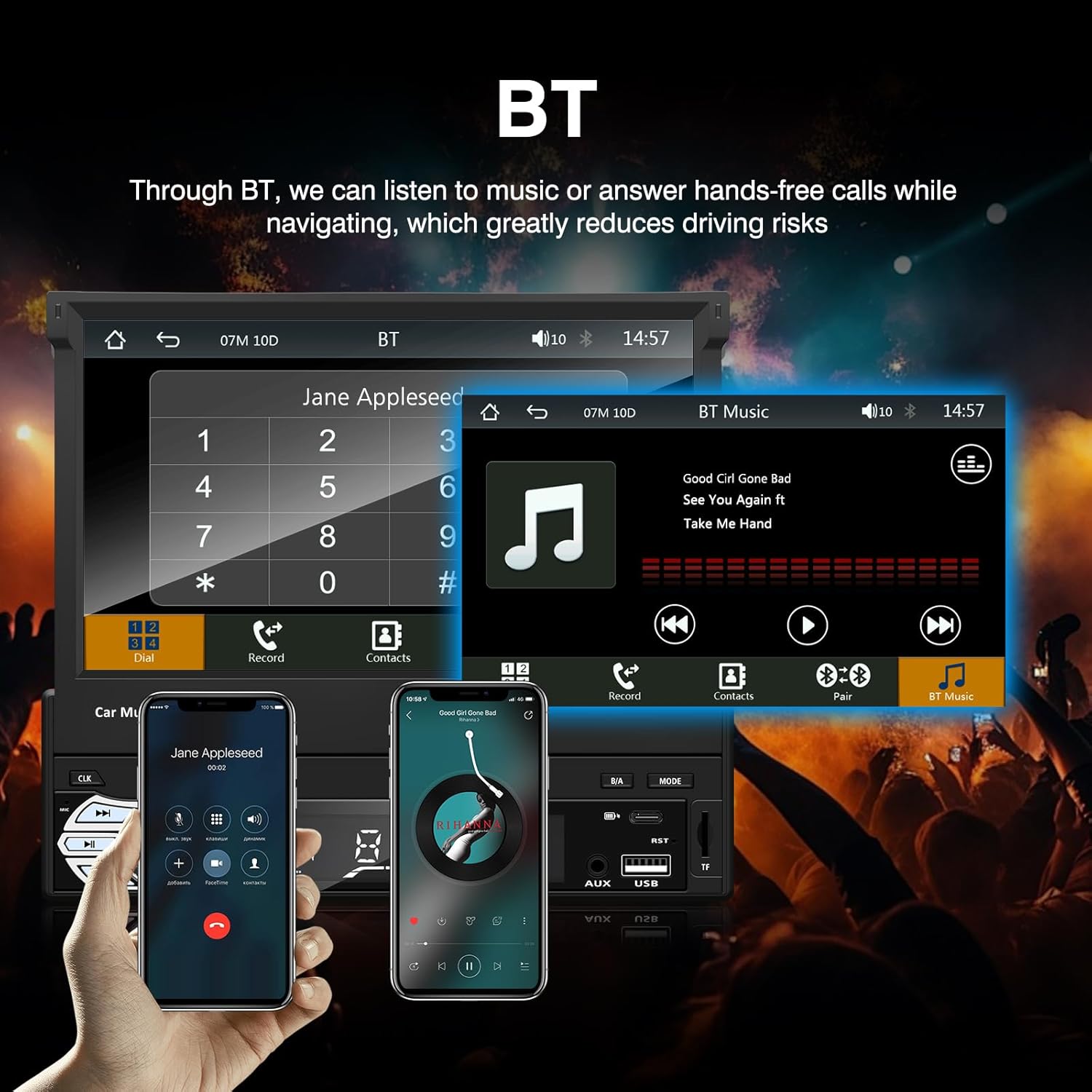
ምስል 3፡ Bluetooth interface for hands-free calls and music streaming, showing a dial pad and music controls.
- ማጣመር፡ በተንቀሳቃሽ መሣሪያዎ ላይ ብሉቱዝን ያንቁ። ፈልግ available devices and select "Ezonetronics" or similar. Enter PIN "0000" if prompted.
- ከእጅ ነጻ ጥሪ፡ Once paired, you can make and receive calls directly through the car stereo. Use the touchscreen or remote to dial, answer, or end calls.
- የድምጽ ዥረት (A2DP)፦ Play music from your paired device wirelessly. Control playback (play/pause, skip) from the car stereo or your device.
3. የዩኤስቢ/ኤስዲ ሚዲያ መልሶ ማጫወት
Insert a USB drive or SD card into the respective slot. The unit will automatically switch to USB/SD mode and begin playing compatible media files.

ምስል 4፡ Icons indicating support for Bluetooth, Auxiliary input, TF (SD) Card, and USB connections for media playback.
- Supported formats include RM, RMVB, ASF, MKV, DIVX, MPEG4, AVI, VOB for video, and MP3/MP4 for audio.
- በአቃፊዎች ውስጥ ያስሱ እና files using the touchscreen interface.
4. ኤፍኤም ሬዲዮ
Access the FM radio mode to listen to local broadcasts.

ምስል 5፡ FM Radio interface with frequency display and equalizer settings for audio customization.
- ራስ -ሰር ቅኝት ፦ Automatically search and save strong stations.
- በእጅ ማስተካከል Fine-tune frequencies using the touchscreen.
- ቅድመ-ቅምጦች Save your favorite stations for quick access (up to 18 preset stations).
5. አፕል ካርፕሌይ / አንድሮይድ አውቶ
Connect your compatible smartphone via USB to access Apple CarPlay or Android Auto features directly on the stereo's display.

ምስል 6፡ Wired Apple CarPlay interface, displaying phone applications like navigation, music, and messages on the car stereo screen.

ምስል 7፡ Wired Android Auto interface, displaying Android applications like Google Maps, Spotify, and phone calls on the car stereo screen.
- Ensure your phone has CarPlay or Android Auto enabled.
- Use a high-quality USB cable for a stable connection.
- Access navigation, music, messages, and other compatible apps safely while driving.
6. የመስታወት አገናኝ
Mirror Link allows you to display your smartphone's screen content directly onto the car stereo's display via a USB data cable.

ምስል 8፡ Mirror Link function demonstrating a smartphone screen being projected onto the car stereo display.
- Connect your smartphone to the USB port using a data cable.
- ግንኙነቱን ለመጀመር በስቲሪዮ እና በስልክዎ ላይ ያሉትን የማያ ገጽ ላይ ጥያቄዎችን ይከተሉ።
- Note: Functionality may vary depending on your smartphone model and operating system.
7. የኋላview የካሜራ ግቤት
ከኋላ በሚሆንበት ጊዜview camera is connected and the vehicle is shifted into reverse, the stereo automatically displays the camera feed.

ምስል 9፡ Reversing display showing the view ከኋላview camera with parking assistance lines, providing an intuitive aid for parking.
- የኋላውን ያረጋግጡview camera is properly installed and connected to the dedicated input.
- ማሳያው በራስ-ሰር ወደ ካሜራ ይቀየራል view when the reverse gear is engaged.
8. የመንኮራኩር መቆጣጠሪያ
The unit supports connection to your vehicle's existing steering wheel controls for convenient operation. Refer to your vehicle's manual and the stereo's wiring diagram for proper connection and configuration.
ጥገና
- ማያ ገጹን ማጽዳት; የንክኪ ማያ ገጹን በቀስታ ለማጽዳት ለስላሳ፣ ከንጣፍ ነፃ የሆነ ጨርቅ ይጠቀሙ። ሻካራ ማጽጃዎችን ወይም ሟሟቶችን አይጠቀሙ።
- አጠቃላይ ጽዳት; የመሳሪያውን ውጫዊ ክፍል በደረቅና ለስላሳ ጨርቅ ይጥረጉ።
- ፈሳሾችን ያስወግዱ; ፈሳሾችን በቀጥታ በመሳሪያው ላይ አይረጩ።
- የሙቀት መጠን፡ Avoid prolonged exposure to extreme heat or cold, which can affect the unit's lifespan.
መላ መፈለግ
| ችግር | ሊሆን የሚችል ምክንያት | መፍትሄ |
|---|---|---|
| ዩኒት ኃይል የለውም። | የተሳሳተ ሽቦ; የተነፋ ፊውዝ; የተሽከርካሪ ባትሪ ችግር. | Check power connections (Yellow, Red, Black wires). Inspect vehicle fuses. Ensure battery is charged. |
| ድምጽ የለም። | የድምጽ መጠኑ በጣም ዝቅተኛ ነው፤ ድምጸ-ከል ተደርጓል፤ የድምጽ ማጉያው የተሳሳተ ሽቦ። | የድምጽ መጠን ይጨምሩ። ድምጸ-ከል ገባሪ መሆኑን ያረጋግጡ። የድምጽ ማጉያ ግንኙነቶችን ያረጋግጡ። |
| ብሉቱዝ አይገናኝም። | Bluetooth not enabled on phone; Incorrect pairing process. | Ensure phone's Bluetooth is on and discoverable. Re-attempt pairing. |
| USB/SD media not playing. | የማይደገፍ file format; Corrupted media; Drive/card not inserted correctly. | ይፈትሹ file formats. Try a different USB drive/SD card. Ensure proper insertion. |
| የኋላview ካሜራው አይታይም። | ካሜራው አልተገናኘም፤ የተገላቢጦሽ ቀስቅሴ ሽቦ አልተገናኘም። | Verify camera video input and reverse trigger wire connection. |
If problems persist, consult a qualified technician or contact customer support.
ዝርዝሮች
- የምርት ስም፡ EZoneTronics
- የሞዴል ቁጥር፡- RM-CW9601
- ቀለም፡ ጥቁር
- ስክሪን፡ 7-inch Capacitive Touchscreen, Retractable
- የግንኙነት ቴክኖሎጂ; Bluetooth, USB, SD, AUX, RCA
- ብሉቱዝ፡ Integrated Bluetooth 2.0 with A2DP/Hands-free
- ተስማሚ መሣሪያዎች ስማርትፎን
- የኦዲዮ ውፅዓት ሁነታ ፦ ስቴሪዮ
- የቪዲዮ ኢንኮዲንግ ድጋፍ፡ RM, RMVB, ASF, MKV, DIVX, MPEG4, AVI, VOB
- የዩኤስቢ/ኤስዲ ድጋፍ፡ Up to 32GB max.
- ልዩ ባህሪያት፡ Touchscreen, Steering Wheel Control Support, Rear Camera Input, Apple CarPlay, Android Auto, Mirror Link
- አምራች፡ Rhythm Electronics Limited
ዋስትና እና ድጋፍ
This product comes with a limited manufacturer's warranty.
- Main Unit Warranty: 12 months for defective items (excluding damaged or misused items after receipt).
- ተጨማሪዎች ዋስትና፡ 3 months for accessories.
For warranty claims or technical support, please contact your retailer or the manufacturer directly. Keep your purchase receipt as proof of purchase.


