መግቢያ
ስለገዙ እናመሰግናለንasing the Trevi RR 501 BT Portable Bluetooth, USB, SD, MP3 Stereo Boombox. This manual provides essential information for the safe and efficient use of your new device. Please read these instructions carefully before operating the unit and retain them for future reference.
የደህንነት መረጃ
- ይህንን መሳሪያ ለዝናብ ወይም እርጥበት አያጋልጡ።
- የአየር ማናፈሻ ክፍተቶችን አያግዱ።
- የኤሌክትሪክ ገመዱ አለመቆንጠጥ ወይም አለመራመዱን ያረጋግጡ።
- በአምራቹ የተገለጹ አባሪዎችን/መለዋወጫዎችን ብቻ ይጠቀሙ።
- በመብረቅ አውሎ ንፋስ ጊዜ ወይም ለረጅም ጊዜ ጥቅም ላይ በማይውልበት ጊዜ መሳሪያውን ይንቀሉ.
- ሁሉንም አገልግሎቶች ብቁ ለሆኑ የአገልግሎት ሰራተኞች ያመልክቱ።
- ክፍሉን አይክፈቱ casinሰ; በውስጥም ለተጠቃሚ አገልግሎት የሚሰጡ ክፍሎች የሉም።
የጥቅል ይዘቶች
እባክዎ የሚከተሉት ነገሮች በጥቅልዎ ውስጥ መካተታቸውን ያረጋግጡ፡-
- Trevi RR 501 BT Boombox Unit
- የ AC ኃይል ገመድ
- የተጠቃሚ መመሪያ (ይህ ሰነድ)
ምርት አልቋልview
Familiarize yourself with the main components of your Trevi RR 501 BT Boombox.
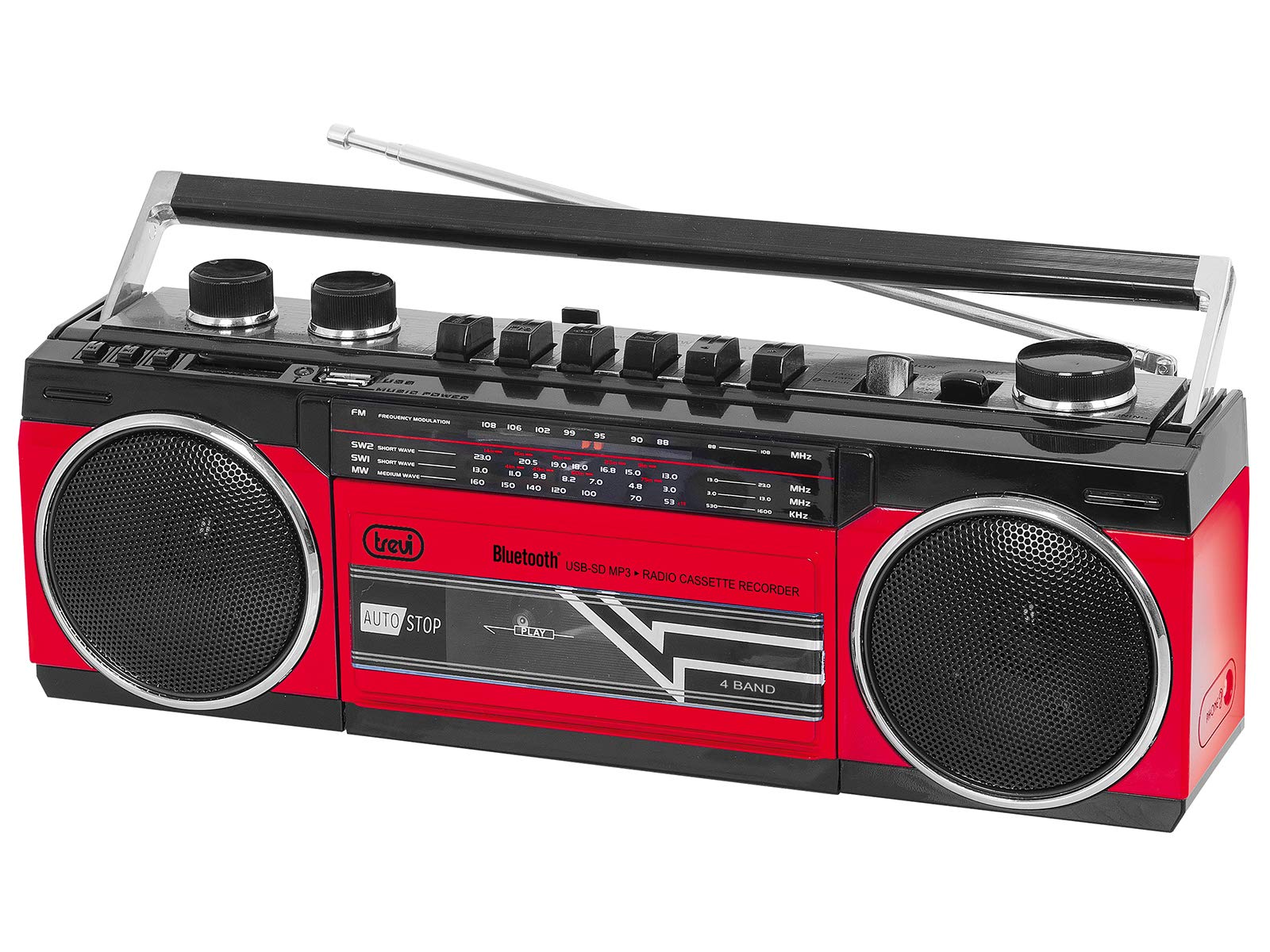
ምስል 1፡ ፊት ለፊት view of the Trevi RR 501 BT Boombox, showing the dual speakers, control panel, and cassette deck.

ምስል 2፡ አንግል view of the Trevi RR 501 BT Boombox, highlighting the side profile እና እጀታ.
ቁልፍ አካላት፡-
- ተናጋሪዎች፡- Two integrated stereo speakers.
- የቁጥጥር ፓነል Buttons for playback, mode selection, and tuning.
- የድምፅ ቁልፍ; የድምጽ ውፅዓት ደረጃን ያስተካክላል።
- የማስተካከያ ቁልፍ፡ For radio frequency selection.
- ሞድ መራጭ ፦ Switches between Radio, Bluetooth, USB, SD, and Cassette modes.
- የካሴት ወለል፡ For playing and recording audio cassettes.
- የዩኤስቢ ወደብ፡ ለዩኤስቢ ፍላሽ አንፃፊ መልሶ ማጫወት።
- የኤስዲ ካርድ ማስገቢያ፡ ለኤስዲ ካርድ መልሶ ማጫወት።
- አንቴና፡ Telescopic antenna for FM radio reception.
- የኃይል ግቤት፡ የኤሲ የኃይል ገመዱን ለማገናኘት።
- የባትሪ ክፍል፡ (Located on the bottom/rear) For optional battery operation.
ማዋቀር
የኃይል ግንኙነት;
- የኤሲ ኃይል Insert the AC power cable into the AC input jack on the back of the unit, then plug the other end into a standard wall outlet.
- የባትሪ ሃይል (አማራጭ) Open the battery compartment cover (usually on the bottom or rear). Insert the required number of D-size batteries (not included), ensuring correct polarity (+/-). Close the compartment cover securely.
Note: When using AC power, batteries are automatically disconnected. Remove batteries if the unit will not be used for an extended period.
የአሠራር መመሪያዎች
ማብራት/ማጥፋት፡
To turn the unit on, rotate the የድምፅ ኖድ clockwise until you hear a click. To turn off, rotate the የድምፅ ኖድ counter-clockwise until it clicks off.
Radio Operation (FM):
- ክፍሉን ያብሩ.
- ያቀናብሩ ሞድ መምረጫ to "RADIO".
- ለተመቻቸ አቀባበል የቴሌስኮፒክ አንቴናውን ያራዝሙ።
- አሽከርክር ኖንቦን በማዞር ላይ to select your desired FM station.
- አስተካክል። የድምፅ ኖድ ወደምትመርጡት የማዳመጥ ደረጃ።
የብሉቱዝ ግንኙነት
- ክፍሉን ያብሩ.
- ያቀናብሩ ሞድ መምረጫ to "BT" (Bluetooth). The unit will enter pairing mode, indicated by a flashing LED.
- በብሉቱዝ የነቃለት መሳሪያዎ (ለምሳሌ፣ ስማርትፎን፣ ታብሌት) ላይ፣ ብሉቱዝን ያንቁ እና የሚገኙ መሳሪያዎችን ይፈልጉ።
- Select "Trevi RR 501 BT" from the list of devices.
- Once paired, the LED indicator will stop flashing and remain solid. You can now play audio from your device through the boombox.
የዩኤስቢ/ኤስዲ መልሶ ማጫወት፡
- ክፍሉን ያብሩ.
- የዩኤስቢ ፍላሽ አንፃፊን ወደ ውስጥ ያስገቡ የዩኤስቢ ወደብ ወይም ኤስዲ ካርድ ወደ ውስጥ የኤስዲ ካርድ ማስገቢያ. Ensure the media contains MP3 audio files.
- ያቀናብሩ ሞድ መምረጫ to "USB/SD". The unit will automatically begin playing the first compatible audio file.
- Use the playback control buttons (e.g., Play/Pause, Next, Previous) on the unit to manage your audio.
የካሴት መልሶ ማጫወት፡
- ክፍሉን ያብሩ.
- የሚለውን ይጫኑ አቁም/አስወጣ button on the cassette deck to open the cassette compartment.
- Insert an audio cassette with the open edge facing upwards and the tape side facing you. Close the compartment door.
- ያቀናብሩ ሞድ መምረጫ to "TAPE".
- የሚለውን ይጫኑ ተጫወት መልሶ ማጫወት ለመጀመር አዝራር።
- የሚለውን ተጠቀም ዳግም ንፋስ እና ፈጣን ወደፊት ቴፑን ለማሰስ አዝራሮች።
- ተጫን አቁም/አስወጣ to stop playback and open the compartment.
የካሴት ቀረጻ፡
- Insert a blank cassette into the cassette deck.
- Select the desired audio source (Radio, Bluetooth, USB, SD) using the ሞድ መምረጫ.
- Start playback of the source audio.
- የሚለውን ይጫኑ መዝገብ button (usually red) on the cassette deck. The ተጫወት button will also engage. Recording will begin.
- ቀረጻውን ለማቆም የ አቁም/አስወጣ አዝራር።
ጥገና
- ማጽዳት፡ የክፍሉን ውጫዊ ክፍል ለማጽዳት ለስላሳ እና ደረቅ ጨርቅ ይጠቀሙ. ገላጭ ማጽጃዎችን ወይም ፈሳሾችን አይጠቀሙ.
- የካሴት ወለል እንክብካቤ፡- በየጊዜው የቴፕ ራሶችን ያፅዱ እና ሮለቶችን በጥጥ በጥጥ በትንሹ ያፅዱampበ isopropyl አልኮሆል የተስተካከለ።
- ማከማቻ፡ When not in use for extended periods, store the unit in a cool, dry place, away from direct sunlight and extreme temperatures. Remove batteries if applicable.
መላ መፈለግ
| ችግር | ሊሆን የሚችል ምክንያት | መፍትሄ |
|---|---|---|
| ኃይል የለም | የኃይል ገመድ አልተገናኘም; ባትሪዎች ተሟጠዋል ወይም በስህተት ገብተዋል። | የኤሲ (AC) የኃይል ግንኙነትን ያረጋግጡ፤ ባትሪዎቹን ይተኩ ወይም ትክክለኛውን ፖላራይት ያረጋግጡ። |
| ደካማ የሬዲዮ አቀባበል | አንቴና አልተራዘመም; ደካማ ምልክት. | ቴሌስኮፒክ አንቴናውን ሙሉ በሙሉ ያራዝሙ፤ ለተሻለ ምልክት ክፍሉን እንደገና ያስቀምጡ። |
| ብሉቱዝ አይጣመርም። | Unit not in BT mode; Device too far; Already paired with another device. | Ensure mode is set to BT; Move device closer; Disconnect from other devices. |
| ዩኤስቢ/ኤስዲ አይጫወትም። | የተሳሳተ ሁነታ፤ ተኳሃኝ ያልሆነ file ቅርጸት፤ የተበላሸ ሚዲያ። | Set mode to USB/SD; Ensure files are MP3; Try different USB/SD media. |
| የካሴት መልሶ ማጫወት ችግሮች | Cassette inserted incorrectly; Tape heads dirty. | Re-insert cassette correctly; Clean tape heads and pinch rollers. |
ዝርዝሮች
| የምርት ስም | ትሬቪ |
| የሞዴል ቁጥር | 0RR50102 |
| የግንኙነት ቴክኖሎጂ | ብሉቱዝ ፣ ዩኤስቢ |
| የድምጽ ማጉያ አይነት | ስቴሪዮ |
| ልኬቶች (L x W x H) | 50 x 50 x 28 ሴንቲሜትር |
| የኃይል ምንጭ | AC |
| የእቃው ክብደት | 1.25 ኪ |
| የውጤት ኃይል | 6 ዋት |
| ቀለም | ቀይ |
| ቅጥ | ሬትሮ |
ዋስትና እና ድጋፍ
For warranty information and technical support, please refer to the warranty card included with your product or visit the official Trevi website. Information regarding spare parts availability and software updates is not provided in the product specifications.
እባክዎ ለማንኛውም የዋስትና ጥያቄዎች የግዢ ማረጋገጫዎን ያቆዩ።


