1. መግቢያ
The Sengled Smart Light Bulbs A19 are Zigbee-compatible LED bulbs designed for integration into smart home systems. These bulbs provide soft white (2700K) illumination, are dimmable, and offer control via voice commands or a mobile application when connected to a compatible Zigbee hub. This manual provides instructions for installation, setup, operation, and troubleshooting.

Image 1.1: Sengled Smart Light Bulbs A19 (4-Pack)
2. የደህንነት መረጃ
- የኤሌክትሪክ ደህንነት; Always ensure power is turned off at the switch before installing or removing bulbs.
- የቤት ውስጥ አጠቃቀም ብቻ; These bulbs are designed for indoor use in dry locations. Do not expose to water or excessive humidity.
- የአሠራር ሙቀት; የአየር ፍሰትን የሚገድቡ በተዘጉ እቃዎች ውስጥ አይጫኑ፣ ምክንያቱም ይህ የአምፑልን የአገልግሎት ዘመን ሊቀንስ ይችላል።
- የዲመር ተኳኋኝነት These bulbs are dimmable via the smart home system. Do not use with standard incandescent dimmers.
- ማስወገድ፡ የኤሌክትሮኒክስ ቆሻሻን በአካባቢው ደንቦች መሠረት በኃላፊነት ያስወግዱ።
3. የጥቅል ይዘቶች
ጥቅሉ የሚከተሉትን ያጠቃልላል
- 4 x Sengled Smart LED Light Bulbs (A19, Soft White 2700K)
4. ዝርዝሮች
| ባህሪ | ዝርዝር |
|---|---|
| የሞዴል ቁጥር | E21-N13A |
| አምፖል አይነት | LED |
| አምፖል ቅርጽ መጠን | አ19 |
| አምፖል ቤዝ | E26 |
| ዋትtage | 9 ዋት |
| አመላካች እኩል | 60 ዋት |
| ብሩህነት | 800 Lumens |
| የቀለም ሙቀት | 2700 ኬልቪን (ለስላሳ ነጭ) |
| ጥራዝtage | 120 ቮልት (100-120V፣ 60Hz) |
| የመቆጣጠሪያ ዘዴ | ድምጽ፣ አፕ |
| ግንኙነት | Zigbee Protocol (Hub Required) |
| አማካይ ህይወት | 25,000 ሰዓታት |
| የቤት ውስጥ / የውጭ አጠቃቀም | የቤት ውስጥ |
| መጠኖች | 2.4" ዋ x 4.5" ኤች |
5. የማዋቀር መመሪያዎች
These Sengled Smart Light Bulbs require a compatible Zigbee hub for full functionality. Compatible hubs include Sengled Smart Hub, Amazon Echo devices with a built-in Zigbee hub (e.g., Echo 4th Gen, Echo Plus, Echo Show 10, Echo Studio), SmartThings Hub, Wink Hub, or Hubitat Hub.
5.1. የመጀመሪያ ደረጃ የማዋቀር እርምጃዎች
- አምፖሉን ጫን; Screw the Sengled Smart Light Bulb into a standard E26 light socket. Ensure the power to the fixture is turned off before installation.
- አብራ፡ ኃይሉን ወደ ብርሃን መሳሪያው ያብሩ. አምፖሉ ማብራት አለበት.
- መተግበሪያውን ያውርዱ፡- Download the Sengled Home App from the Apple App Store or Google Play Store. Alternatively, use the app for your chosen compatible hub (e.g., Amazon Alexa App, SmartThings App).
- ይመዝገቡ/ይግቡ፡ Open the app and register for an account or log in if you already have one.
- መሣሪያ አክል፡ Follow the in-app instructions to add a new device. This typically involves scanning a QR code on the bulb or packaging, or initiating a device search within the app.
- ወደ ሃብ ይገናኙ፦ The bulb will connect to your Zigbee hub. This process usually completes within one minute.
5.2. Hub-Specific Setup Options
The following images illustrate common setup configurations:

Image 5.1: Setup with Sengled Smart Hub

Image 5.2: Setup with Samsung SmartThings Hub

Image 5.3: Setup with Amazon Echo (Built-in Hub)
6. ኦፕሬሽን
Once successfully paired with your smart hub, the Sengled Smart Light Bulbs offer various control options.
6.1. የድምጽ መቆጣጠሪያ
Control your lights hands-free using voice commands with compatible assistants like Amazon Alexa or Google Home Assistant.

Image 6.1: Voice control example with Alexa
6.2. Dimming and Remote Control
Adjust the brightness from 1% to 100% and control your lights from anywhere using the Sengled Home App or your smart home platform's app.
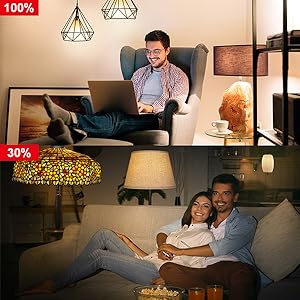
Image 6.2: Dimming functionality from 100% to 30%

Image 6.3: Remote control from any location
6.3. Scheduling and Routines
Set schedules for your lights to turn on/off or adjust brightness at specific times, such as dusk or sunrise. Create routines for automated lighting scenarios.
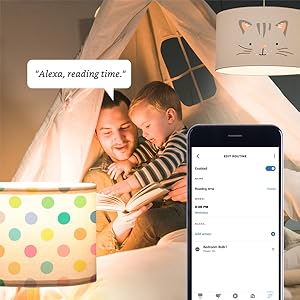
Image 6.4: Setting up a reading time routine
6.4. የቡድን ቁጥጥር
Add multiple smart bulbs (up to 64) to your smart hub system and control them individually or as a group within the app.
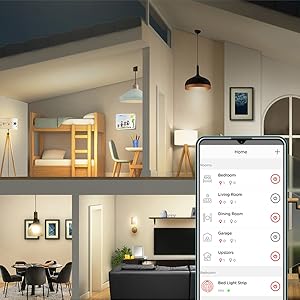
Image 6.5: Managing lights by room for group control
7. ጥገና
- ማጽዳት፡ አምፖሉ መጥፋቱን ያረጋግጡ እና ከማጽዳትዎ በፊት ያቀዘቅዙ። ለስላሳ እና ደረቅ ጨርቅ ይጥረጉ. ፈሳሽ ማጽጃዎችን አይጠቀሙ.
- ማከማቻ፡ አምፖሎችን ሲያከማቹ፣ ከፀሐይ ብርሃን እና ከፍተኛ የሙቀት መጠን ራቅ ባለ ቀዝቃዛና ደረቅ ቦታ ያስቀምጡ።
- ምንም ለተጠቃሚ የሚያገለግሉ ክፍሎች፡- Do not attempt to disassemble or repair the bulb. This will void the warranty.
8. መላ መፈለግ
8.1. Bulb Not Responding/Connecting
- ኃይልን ይፈትሹ፡ Ensure the light fixture switch is in the ON position and the bulb is receiving power.
- የመገናኛ ማዕከል ግንኙነት፡ Verify that your Zigbee hub is powered on and connected to your network.
- ቅርበት፡ Ensure the bulb is within range of your Zigbee hub or another Zigbee device acting as a repeater.
- እንደገና ማጣመር፡ If the bulb loses connection, try removing it from your app and re-pairing it according to the setup instructions. Power cycling the bulb (turning it off and on 5 times) can sometimes reset it for re-pairing.
- የመተግበሪያ ዝማኔ፡- Ensure your Sengled Home App or smart home platform app is updated to the latest version.
8.2. Voice Control Issues
- Assistant Link: Confirm that your Sengled account (or smart hub) is correctly linked to your voice assistant (Alexa, Google Home).
- የመሣሪያ ግኝት; Ask your voice assistant to "Discover devices" to ensure all bulbs are recognized.
- Command Clarity: Speak commands clearly and ensure the device name used in the command matches the name in your app.
8.3. Unstable Connection
- የዚግቤ ኔትወርክ፡ A strong Zigbee mesh network is crucial. Adding more Zigbee devices (like smart plugs or other bulbs) can strengthen the network.
- ጣልቃ ገብነት፡- Keep your Zigbee hub away from Wi-Fi routers, microwaves, or other devices that might cause wireless interference.
9. የዋስትና መረጃ
Sengled Smart Light Bulbs are covered by a የ 3 ዓመት የተወሰነ ዋስትና from the date of purchase. This warranty covers defects in materials and workmanship under normal use. For warranty claims or detailed terms, please refer to the official Sengled webጣቢያ ወይም የደንበኛ ድጋፍን ያነጋግሩ።
10. የደንበኛ ድጋፍ
For further assistance, technical support, or to report issues, please visit the official Sengled support website or contact their customer service department. Contact information can typically be found on the Sengled website or within the Sengled Home App.


