መግቢያ
ስለገዙ እናመሰግናለንasing the POWERFLEX PF-AZ01-Z003 Portable Bluetooth Speaker. This device is designed to provide high-quality audio playback and hands-free calling capabilities. Please read this manual carefully before using the speaker to ensure proper operation and to maximize its performance.

ምስል፡ The POWERFLEX PF-AZ01-Z003 Portable Bluetooth Speaker is shown from an angled perspective, highlighting its black finish, front grille, and the touch-sensitive control panel on its top surface, which features illuminated volume controls.
የጥቅል ይዘቶች
እባክዎ ለሚከተሉት ዕቃዎች ሳጥኑ ላይ ምልክት ያድርጉ።
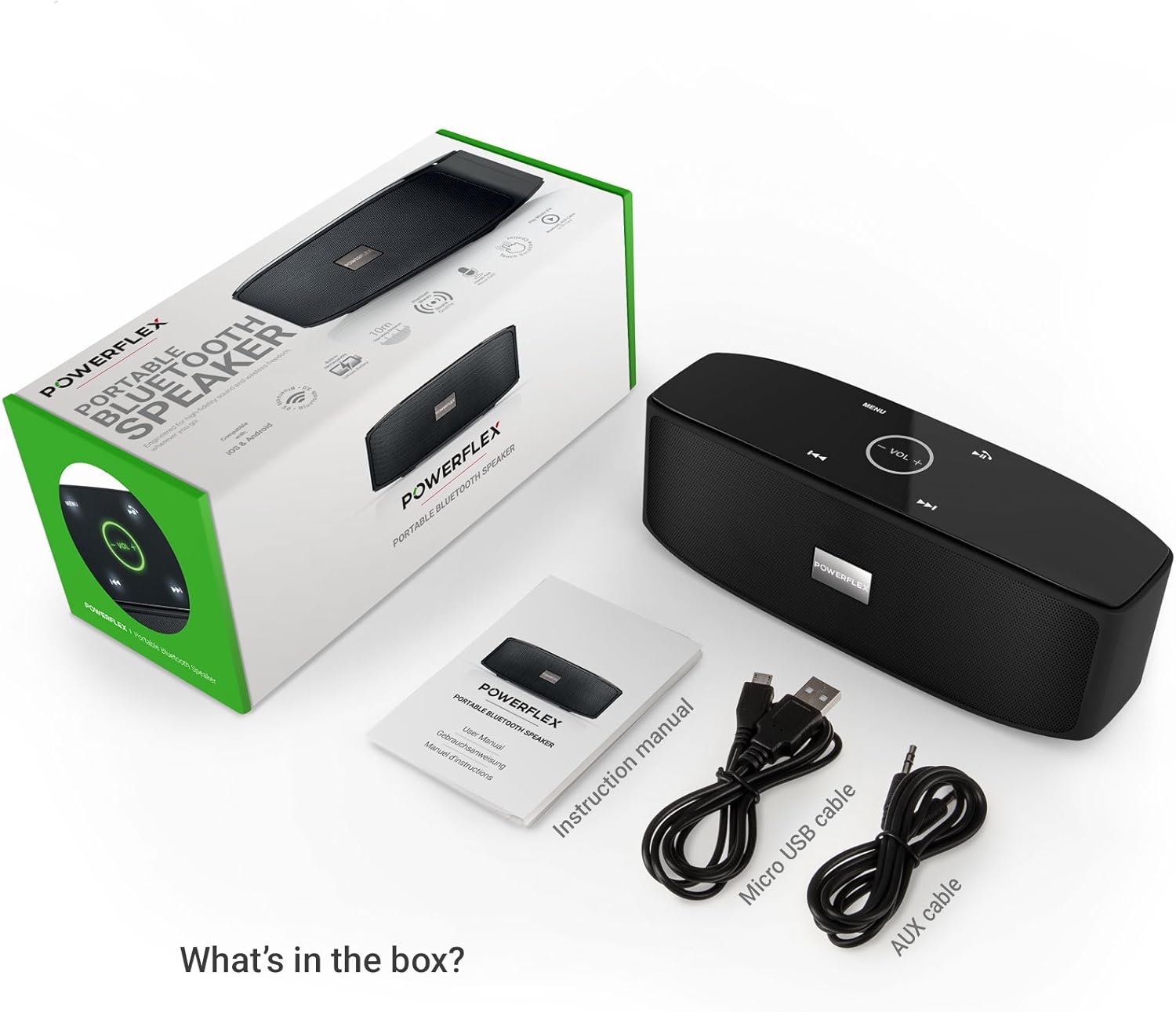
- POWERFLEX PF-AZ01-Z003 Portable Bluetooth Speaker
- የማይክሮ ዩኤስቢ ባትሪ መሙያ ገመድ
- AUX ገመድ
- የተጠቃሚ መመሪያ

ምስል፡ This image displays the POWERFLEX PF-AZ01-Z003 Portable Bluetooth Speaker alongside its accessories: a Micro USB charging cable, an AUX cable, and the instruction manual. These are the items typically found inside the product packaging.
ባህሪዎች አብቅተዋልview
The POWERFLEX PF-AZ01-Z003 speaker offers several key features for an enhanced audio experience:
- የላቀ ድምጽ፡ Equipped with dual five-watt drivers for clear highs, detailed mid-ranges, and deep bass.
- የብሉቱዝ 3.0 ግንኙነት፡- Provides a stable wireless connection up to 10 meters (33 feet).
- ከእጅ ነጻ ጥሪ፡ Integrated microphone allows for clear phone calls.
- በርካታ መልሶ ማጫወት አማራጮች፡- Supports Bluetooth, AUX input, and TF (MicroSD) card playback.
- የንክኪ መቆጣጠሪያዎች፡- Intuitive touch-sensitive panel for easy music and call management.
- ተንቀሳቃሽ ንድፍ; Compact build for easy transport.

ምስል፡ This image presents a cutaway view of the POWERFLEX PF-AZ01-Z003 speaker, revealing its internal components, specifically the dual five-watt drivers. The visual emphasizes the speaker's design for delivering vibrant highs, detailed mid-ranges, and deep bass for true stereo sound.

ምስል፡ This image showcases the POWERFLEX PF-AZ01-Z003 speaker positioned in front of a collection of diverse iOS and Android Bluetooth-enabled devices, including smartphones and tablets. The arrangement visually confirms the speaker's broad compatibility with various mobile operating systems.

ምስል፡ This image demonstrates the compact design of the POWERFLEX PF-AZ01-Z003 speaker, showing it being easily placed into a backpack. The accompanying text highlights its portability and specific dimensions (190 x 58 x 70mm), indicating it fits conveniently into bags.
ማዋቀር
1. አፈጉባ Charውን ኃይል መሙላት
The speaker is powered by an internal 1800 mAh rechargeable battery. Before first use, fully charge the speaker.
- የማይክሮ ዩኤስቢ የኃይል መሙያ ገመዱን በድምጽ ማጉያው ላይ ካለው የዲሲ5V ወደብ ጋር ያገናኙ።
- የዩኤስቢ ገመድ ሌላኛውን ጫፍ ከዩኤስቢ ኃይል አስማሚ (ያልተካተተ) ወይም ከኮምፒዩተር ዩኤስቢ ወደብ ጋር ያገናኙ።
- The charging indicator light will illuminate. Once fully charged, the light will change color or turn off (refer to LED indicator section in the full manual for details).
2. ማብራት / ማጥፋት
To power on the speaker, slide the ON/OFF switch to the 'ON' position. To power off, slide the switch to the 'OFF' position.
ምስል፡ ይህ ምስል በዝርዝር ያቀርባል view of the speaker's rear panel, highlighting the physical ON/OFF switch, the DC5V port for charging, the AUX input jack for wired connections, and the TF (MicroSD) card slot for direct media playback.
የአሠራር መመሪያዎች
1. የብሉቱዝ ማጣመር
- ድምጽ ማጉያው መብራቱን እና በብሉቱዝ የነቃለት መሳሪያዎ በ10 ሜትር (33 ጫማ) ርቀት ላይ መሆኑን ያረጋግጡ።
- The speaker will automatically enter Bluetooth pairing mode, indicated by a flashing LED light (refer to LED indicator section in the full manual).
- በመሳሪያዎ (ስማርትፎን፣ ታብሌት፣ ወዘተ) ላይ ወደ ብሉቱዝ ቅንብሮች ይሂዱ እና የሚገኙ መሳሪያዎችን ይፈልጉ።
- Select "PF-AZ01-Z003" from the list.
- Once paired, the speaker will emit an audible confirmation, and the LED light will become solid.

ምስል፡ This image demonstrates the speaker's Bluetooth connectivity, showing a smartphone wirelessly streaming music to the POWERFLEX PF-AZ01-Z003. Blue concentric circles emanate from the phone towards the speaker, symbolizing the wireless connection, and text indicates playback from up to 10 meters.
2. ሙዚቃ ማጫወት
Once connected via Bluetooth, you can play music from your device. The speaker also supports AUX cable and TF card playback.
- ብሉቱዝ፡ Play music directly from your paired device.
- AUX ግቤት፡ Connect an audio device using the provided 3.5mm AUX cable to the AUX port. The speaker will automatically switch to AUX mode.
- TF ካርድ፡ Insert a TF (MicroSD) card with MP3 files into the TF card slot. The speaker will automatically begin playing music from the card.
3. የንክኪ መቆጣጠሪያዎች
The speaker features touch-sensitive controls on its top panel for easy operation.
- አጫውት/ ለአፍታ አቁም፡ Tap the Play/Pause button (usually indicated by a triangle or two vertical bars).
- ድምጽ ወደ ላይ/ወደታች፡ Tap the '+' or '-' buttons to adjust the volume.
- ቀጣይ ትራክ፡ Tap the '>>|' button.
- ቀዳሚ ትራክ Tap the '|<<' button.
- ሁነታ/ምናሌ፡ Tap the 'MENU' button to switch between input modes (Bluetooth, AUX, TF).

ምስል፡ This image shows a hand interacting with the touch-sensitive controls on the top surface of the POWERFLEX PF-AZ01-Z003 speaker. A finger is pressing the 'VOL +' button, which is illuminated in green, while a smartphone displaying music playback is visible in the foreground, emphasizing the ease of control.
4. ከእጅ ነፃ ጥሪ
The speaker includes a built-in microphone, allowing you to answer phone calls when connected via Bluetooth.
- ጥሪ ሲደርስ ሙዚቃው ይቆማል።
- Tap the Play/Pause button to answer the call.
- ወደ ተናጋሪው ይናገሩ።
- Tap the Play/Pause button again to end the call.

ምስል፡ This image depicts a smartphone displaying an incoming call, positioned next to the POWERFLEX PF-AZ01-Z003 speaker. The text "Make hands free calls with the built-in microphone" is prominently displayed, indicating the speaker's capability for hands-free communication.
ጥገና
To ensure the longevity and optimal performance of your POWERFLEX PF-AZ01-Z003 speaker, follow these maintenance guidelines:
- ማጽዳት፡ የተናጋሪውን ገጽ ለማጽዳት ለስላሳና ደረቅ ጨርቅ ይጠቀሙ። ሻካራ ማጽጃዎችን፣ አልኮልን ወይም ኬሚካል ማሟሟቶችን አይጠቀሙ።
- ማከማቻ፡ ድምጽ ማጉያውን በቀጥታ ከፀሀይ ብርሀን እና ከከፍተኛ ሙቀት ርቆ በቀዝቃዛና ደረቅ ቦታ ያከማቹ።
- የውሃ መጋለጥ; ይህ ድምጽ ማጉያ ውሃ የማይገባ ነው። ለውሃ ወይም ከመጠን በላይ እርጥበት እንዳይጋለጥ ያድርጉ.
- የባትሪ እንክብካቤ To preserve battery life, avoid fully discharging the battery frequently. Charge the speaker regularly, even if not in use for extended periods.
መላ መፈለግ
If you encounter issues with your POWERFLEX PF-AZ01-Z003 speaker, refer to the following common problems and solutions:
| ችግር | ሊሆን የሚችል ምክንያት | መፍትሄ |
|---|---|---|
| ተናጋሪው አይበራም። | ባትሪው ተሟጧል። | የማይክሮ ዩኤስቢ ገመድ በመጠቀም ድምጽ ማጉያውን ይሙሉ። |
| በብሉቱዝ በኩል ማጣመር አይቻልም። | Speaker is not in pairing mode; device is too far; Bluetooth is off on device. | Ensure speaker is in pairing mode (flashing LED). Move device closer. Enable Bluetooth on your device. Forget previous pairings and try again. |
| ምንም ድምጽ ወይም ዝቅተኛ ድምጽ የለም. | Volume too low on speaker or device; incorrect input mode; loose AUX cable. | Increase volume on both speaker and connected device. Press 'MENU' to select correct input mode. Ensure AUX cable is securely connected. |
| የድምፅ ማዛባት. | Volume too high; device too far from speaker. | Reduce volume on speaker and/or connected device. Move device closer to the speaker. |
ዝርዝሮች
| ባህሪ | ዝርዝር |
|---|---|
| የሞዴል ስም | PF-AZ01-Z003 |
| የምርት ስም | POWERFLEX |
| የግንኙነት ቴክኖሎጂ | ብሉቱዝ ፣ ዩኤስቢ |
| የብሉቱዝ ስሪት | 3.0 |
| ልዩ ባህሪ | Portable, Built-in Microphone |
| ተስማሚ መሣሪያዎች | Universal (iOS & Android Bluetooth enabled devices) |
| የመጫኛ አይነት | የጠረጴዛ ጫፍ |
| የኃይል ምንጭ | ባትሪ |
| የባትሪ አቅም | 1800 ሚአሰ |
| የባትሪ ሃይል ይዘት | 6.66 ዋት-ሰዓት |
| Lithium Ion Cells | 1 |
| የምርት ልኬቶች | 23 x 10.6 x 9.6 ሴ.ሜ |
| የምርት ክብደት | 760 ግ |
| ቀለም | ጥቁር |
ዋስትና እና ድጋፍ
For warranty information and technical support, please refer to the documentation included with your purchase or contact POWERFLEX customer service. Keep your proof of purchase for warranty claims.
አምራች፡ POWERFLEX
ምርት ASIN: B074M8W712


