1. መግቢያ
This manual provides instructions for the ROCCAT KONE Aimo Gaming Mouse. The KONE Aimo features an Owl-Eye Optical Sensor, customizable RGB AIMO LED illumination, and 23 programmable keys. It is designed for precision and ergonomic comfort during extended use.
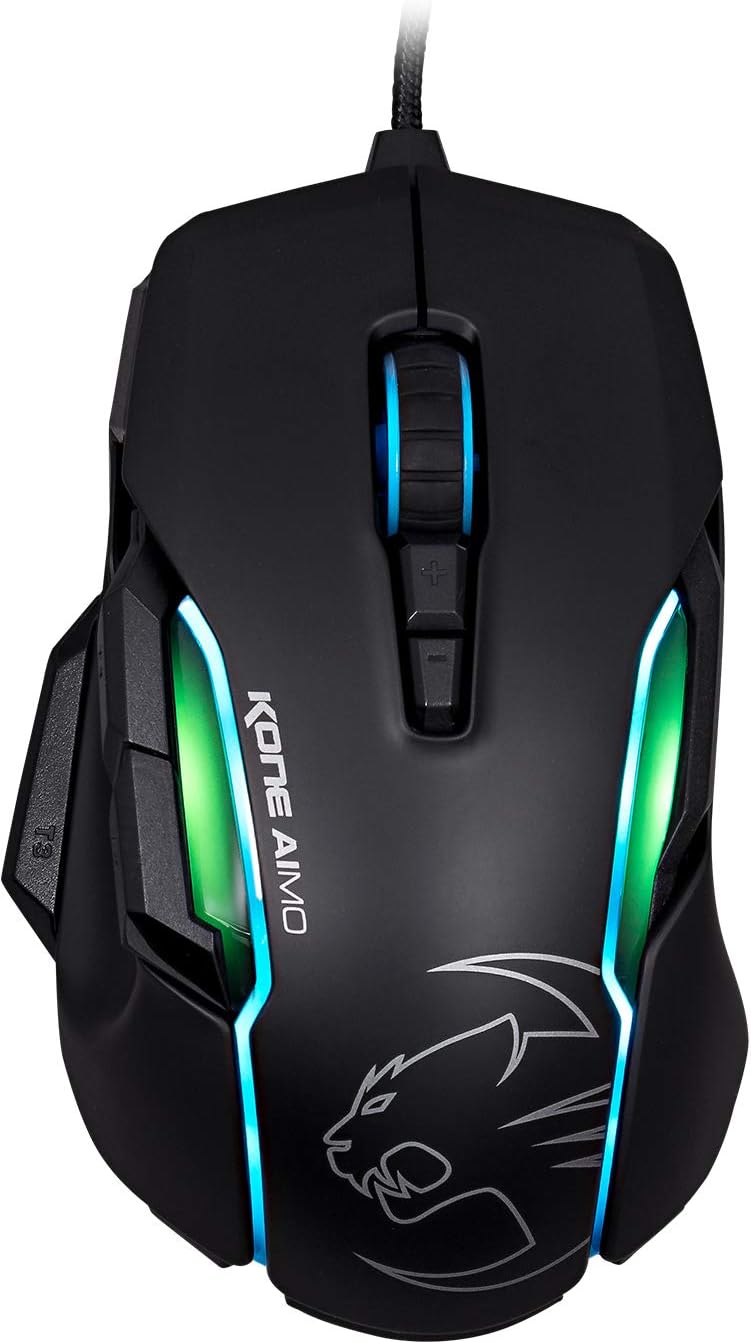
ምስል 1: ከፍተኛ view of the ROCCAT KONE Aimo Gaming Mouse, showcasing its ergonomic shape and RGB lighting zones.
2. የጥቅል ይዘቶች
ሁሉም እቃዎች በጥቅሉ ውስጥ መኖራቸውን ያረጋግጡ፡-
- KONE AIMO Mouse with Attached Braided USB Cable
- ፈጣን መመሪያ
- ROCCAT Stickers

Figure 2: Retail packaging of the ROCCAT KONE Aimo Gaming Mouse.
3. ማዋቀር
- መዳፊቱን ያገናኙ; Plug the USB cable of the ROCCAT KONE Aimo mouse into an available USB port on your computer.
- የአሽከርካሪ ጭነት; Your operating system (Windows 7, 8, 8.1, 10) should automatically detect and install the necessary drivers.
- ROCCAT Swarm ሶፍትዌርን ይጫኑ፡- For full customization of DPI settings, button assignments, and AIMO lighting, download and install the ROCCAT Swarm software from the official ROCCAT webጣቢያ። ይህ ሶፍትዌር ባለሙያዎችን እንዲፈጥሩ እና እንዲያስተዳድሩ ያስችልዎታልfiles.

Figure 3: The ROCCAT KONE Aimo mouse in use on a mouse pad, connected to a computer.
4. የአሠራር መመሪያዎች
4.1. የአዝራር ተግባራት
The KONE Aimo features 23 programmable keys, including a tri-button thumb zone and a 4D tilting Titan wheel. These can be customized via the ROCCAT Swarm software.
- ግራ/ቀኝ ጠቅ አድርግ፡- መደበኛ የመዳፊት ተግባራት።
- Scroll Wheel (4D Titan Wheel): Scrolls vertically and can tilt horizontally for additional functions. Also acts as a clickable button.
- የዲፒአይ ማስተካከያ አዝራሮች፡ Located above and below the scroll wheel, these buttons allow for on-the-fly DPI sensitivity changes. Settings are configured in the Swarm software.
- Thumb Buttons (T1, T2, T3): Three buttons located on the left side, easily accessible by the thumb. The bottom-most button (T3) is often defaulted to the Easy-Shift[+] function.
- Easy-Shift[+] Button: This exclusive ROCCAT feature doubles the number of programmable functions for other buttons when held down, effectively expanding the total programmable keys.

ምስል 4: ዝርዝር view of the programmable thumb buttons (T1, T2, T3) on the left side of the mouse.
4.2. AIMO Lighting System
The AIMO lighting system provides intelligent, reactive RGB illumination across four independently configurable LED light zones and the glowing mouse wheel. It can synchronize with other compatible ROCCAT devices and is programmable through the ROCCAT Swarm software.

Figure 5: The KONE Aimo mouse displaying its multi-zone RGB AIMO illumination.
4.3. Owl-Eye Optical Sensor
The mouse is equipped with the ROCCAT Owl-Eye Optical Sensor, a modified PixArt 3361 sensor, offering adjustable DPI from 100 to 12,000. This sensor provides precise tracking and responsiveness. A built-in tracking distance control unit monitors the lift-off distance for enhanced accuracy.

Figure 6: The bottom of the mouse, highlighting the Owl-Eye Optical Sensor.
4.4. Ergonomics
The KONE Aimo features refined ergonomics designed for comfort during extended use. Its shape provides a natural fit for the hand, with a dedicated thumb rest area.

Figure 7: A hand gripping the KONE Aimo mouse, illustrating its ergonomic design.
5. ጥገና
- ማጽዳት፡ የመዳፊት ገጽን ለማጽዳት ለስላሳ እና ደረቅ ጨርቅ ይጠቀሙ. ለግትር ቆሻሻ, ትንሽ መamp ጨርቅ ጥቅም ላይ ሊውል ይችላል፣ ይህም እርጥበት ወደ ውስጠኛው ክፍል እንዳይገባ ያረጋግጣል።
- የዳሳሽ እንክብካቤ Keep the optical sensor on the underside of the mouse clean and free of dust or debris to ensure optimal tracking performance.
- የኬብል አስተዳደር ጉዳት እንዳይደርስብዎት የተጠለፈውን የዩኤስቢ ገመድ ከመጠን በላይ ከመጎተት ወይም ከመጠን በላይ ከመጎተት ይቆጠቡ።
6. መላ መፈለግ
- አይጥ ምላሽ የማይሰጥ፡
- የዩኤስቢ ገመዱ ደህንነቱ በተጠበቀ ሁኔታ በሚሰራ የዩኤስቢ ወደብ ላይ መያያዙን ያረጋግጡ።
- Try a different USB port or another computer to rule out port or system issues.
- ኮምፒተርዎን እንደገና ያስጀምሩ.
- Tracking Issues / Inaccurate Movement:
- በመዳፊት ግርጌ ላይ ያለውን የኦፕቲካል ዳሳሽ ያጽዱ.
- መዳፊቱን በንጹህ፣ ተስማሚ በሆነ የመዳፊት ፓድ ወይም ወለል ላይ መጠቀምዎን ያረጋግጡ።
- Check DPI settings in the ROCCAT Swarm software.
- የRGB መብራት እየሰራ አይደለም / የተሳሳተ ነው፡
- Verify that the ROCCAT Swarm software is running and updated.
- በSwarm ሶፍትዌር ውስጥ የመብራት ቅንብሮችን ያረጋግጡ።
- የRGB መብራቶችን የሚቆጣጠር ምንም አይነት የሚጋጭ ሶፍትዌር እንደሌለ ያረጋግጡ።
- የማይሰሩ አዝራሮች፡-
- Check button assignments in the ROCCAT Swarm software.
- Ensure the software is not experiencing issues (try restarting it).
7. ዝርዝሮች
| ባህሪ | ዝርዝር |
|---|---|
| የምርት ስም | ሮኮሳት |
| የሞዴል ቁጥር | ROC-11-815-BK |
| ዳሳሽ | Owl-Eye Optical Sensor (modified PixArt 3361) |
| የዲፒአይ ክልል | ከ100 እስከ 12,000 ዲፒአይ |
| ሊዘጋጁ የሚችሉ አዝራሮች | 23 (በቀላል-Shift[+]) |
| ማብራት | RGBA AIMO LED Illumination (4 independent zones + scroll wheel) |
| ግንኙነት | ዩኤስቢ (ገመድ) |
| የስርዓተ ክወና ተኳኋኝነት | Windows 7, Windows 8, Windows 8.1, Windows 10 (32-bit and 64-bit versions) |
| የእቃው ክብደት | 11.2 አውንስ (በግምት 317.5 ግራም) |
| የምርት ልኬቶች (LxWxH) | 5.12 x 2.95 x 1.57 ኢንች (በግምት 13 x 7.5 x 4 ሴሜ) |
8. ዋስትና እና ድጋፍ
For warranty information, technical support, and additional resources, please visit the official ROCCAT website or contact ROCCAT customer service. Keep your proof of purchase for warranty claims.
እንዲሁም መጎብኘት ይችላሉ ROCCAT በአማዞን ላይ መደብር ለበለጠ የምርት መረጃ.


