መግቢያ
The DigiTech TRIO Band Creator Pedal is an innovative device designed to automatically generate bass and drum parts that complement your guitar playing. It listens to your chords and rhythm, then creates a virtual band to accompany you. This manual provides detailed instructions for setting up, operating, maintaining, and troubleshooting your TRIO pedal.
The TRIO offers seven distinct music genres and twelve song styles within each genre, allowing for versatile musical accompaniment. It supports both 3/4 and 4/4 time signatures.
ምርት አልቋልview
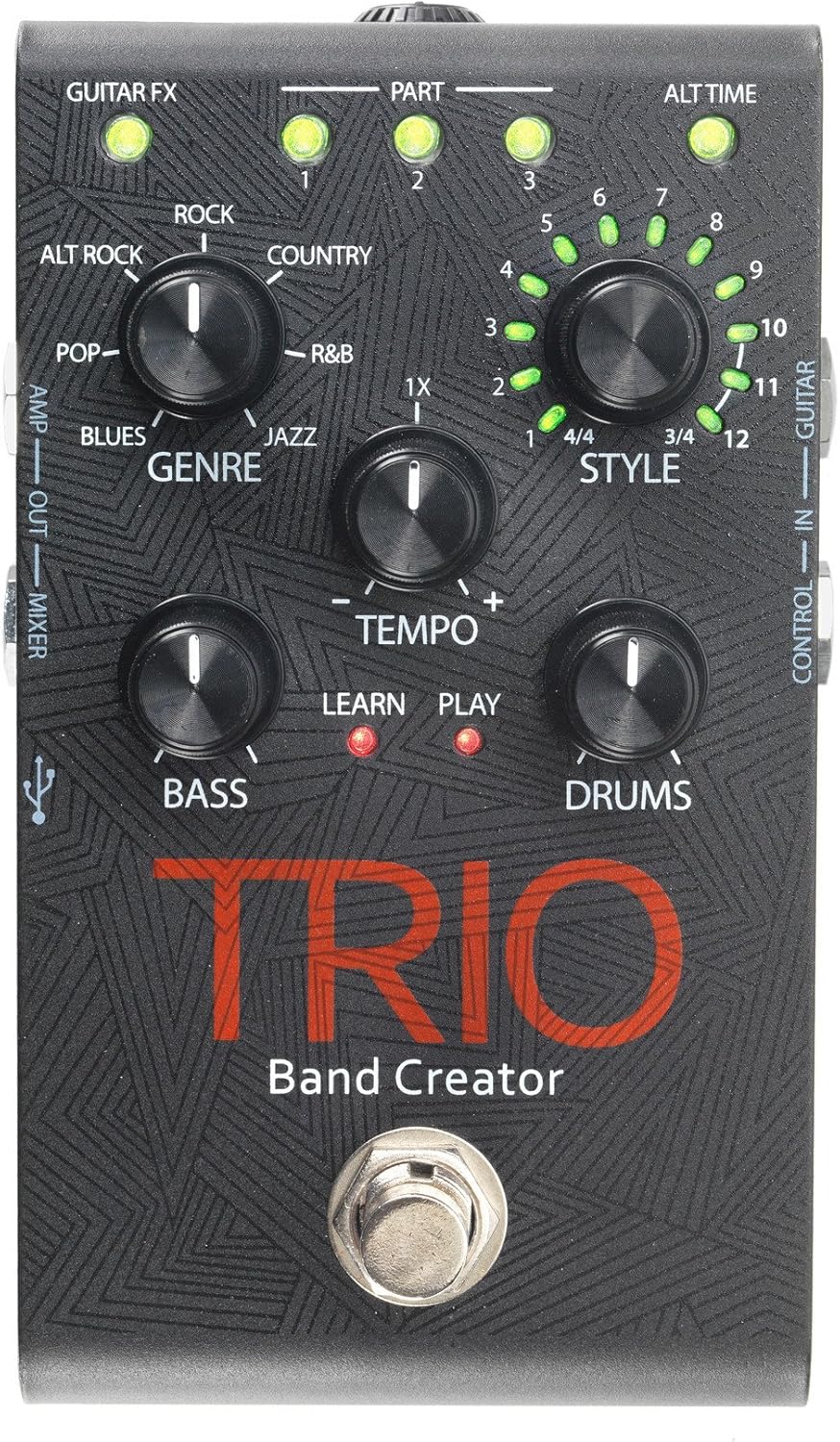
Figure 1: DigiTech TRIO Band Creator Pedal Front Panel. This image displays the pedal's layout, including the Genre, Style, Tempo, Bass, and Drums knobs, the footswitch, and various LED indicators and input/output jacks.
The TRIO pedal features a robust design with intuitive controls. Key components include:
- የዘውግ ቁልፍ፡ Selects one of seven music genres (Blues, Pop, Alternative Rock, Rock, Country, R&B, Jazz).
- Style Knob: Chooses from twelve song styles within the selected genre, and also indicates 3/4 or 4/4 time signatures.
- Tempo Knob: Adjusts the playback speed of the generated band.
- ባስ ኖብ፡ Controls the volume level of the generated bass line.
- Drums Knob: Controls the volume level of the generated drum track.
- የእግር ኳስ ተጫዋች Used for teaching the pedal your song, starting/stopping playback, and switching song parts.
- የ LED አመልካቾች Provide visual feedback for Guitar FX, Part (1, 2, 3), Alt Time, Learn, and Play status.
- የግብዓት / የውጤት ጃክሶች Include Guitar In, Control In, Amp Out, Mixer Out, and Headphone Out.
- የዩኤስቢ ወደብ፡ ለ firmware ዝመናዎች።
ማዋቀር
Before using your DigiTech TRIO pedal, ensure all connections are made correctly.
- የኃይል ግንኙነት; Connect the included 9V DC power supply (300mA minimum) to the TRIO's power input jack. Plug the power supply into a standard AC outlet.
- ጊታር ግቤት፡- ጊታርዎን ከ ጋር ያገናኙት። ጊታር ኢን jack on the TRIO pedal using a standard 1/4-inch instrument cable.
- ውፅዓት ወደ Ampማቀፊያ/ቀላቃይ፡
- ከጊታር ጋር ለመገናኘት amplifier, use the AMP ውጣ jack. This output includes your guitar signal and is optimized for guitar amps.
- For connecting to a mixing console, PA system, or headphones, use the ድብልቅ ውጣ jack. This output provides a full-range signal suitable for these devices.
- የጆሮ ማዳመጫ ውፅዓት ለግል ልምምድ፣ የጆሮ ማዳመጫዎችን ከጆሮ ማዳመጫዎች ጋር ያገናኙ የጆሮ ማዳመጫ ውጭ jack. Adjust the headphone level using the dedicated control.
- Optional Footswitch (DigiTech FS3X): If using an optional FS3X footswitch for extended control, connect it to the ውስጥ ተቆጣጠር ጃክ
Ensure all cables are securely connected before powering on your ampሊፋይ ወይም የድምጽ ስርዓት.
የአሠራር መመሪያዎች
Basic Operation: Creating a Song
- Select Genre: አዙሩ ዘውግ knob to choose your desired musical style (e.g., Rock, Blues, Jazz).
- Select Style: አዙሩ ስታይል knob to select a specific song style within the chosen genre. The LEDs around the knob indicate the style number (1-12) and the time signature (3/4 or 4/4).
- Teach the TRIO:
- Press the TRIO's footswitch once. The ተማር LED will illuminate red.
- Play your guitar chords and rhythm for the first section of your song. Play clearly and consistently for 4-8 measures.
- Press the footswitch again to stop teaching. The ተማር LED will turn off, and the ተጫወት LED will illuminate red. The TRIO will then generate and play the bass and drum parts based on what you played.
- Play with the Band: Once the band starts playing, you can play along with your guitar.
የላቁ ባህሪያት
- Adjusting Tempo: የሚለውን ተጠቀም TEMPO knob to increase or decrease the speed of the generated band.
- Adjusting Bass and Drum Levels: የሚለውን ተጠቀም BASS እና ከበሮዎች knobs to set the individual volume levels of the bass and drum parts relative to your guitar.
- Song Parts: The TRIO can learn up to three distinct song parts. After teaching the first part, press the footswitch twice quickly to enter "Part 2" learn mode, and three times for "Part 3". You can then switch between these parts during playback by pressing the footswitch. The PART 1, 2, 3 LEDs indicate the active part.
- Alternate Time: Some styles offer an "Alternate Time" option (e.g., half-time or double-time). The ALT TIME LED will illuminate when this option is available and active.
- Guitar FX: የ GUITAR FX LED indicates if the TRIO is applying a subtle guitar effect (e.g., compression, chorus) to your signal, which is often genre-dependent.
- Using the FS3X Footswitch: The optional DigiTech FS3X footswitch provides hands-free control over various functions, such as cycling through song parts, stopping/starting playback, and more. Refer to the FS3X manual for detailed usage.
ጥገና
Proper care will ensure the longevity and optimal performance of your DigiTech TRIO pedal.
- ማጽዳት፡ Use a soft, dry cloth to clean the pedal's exterior. Avoid using abrasive cleaners, solvents, or waxes, as these can damage the finish and internal components.
- ማከማቻ፡ ረዘም ላለ ጊዜ ጥቅም ላይ በማይውልበት ጊዜ ፔዳሉን በቀጥታ ከፀሐይ ብርሃን እና ከከፍተኛ ሙቀት ርቆ በቀዝቃዛና ደረቅ ቦታ ያከማቹ።
- የኃይል አቅርቦት; Always use the specified 9V DC power supply. Using an incorrect power supply can damage the unit and void the warranty.
- ግንኙነቶች፡ Periodically check all cable connections for wear and tear. Replace damaged cables to prevent signal loss or short circuits.
መላ መፈለግ
If you encounter issues with your TRIO pedal, refer to the following common problems and solutions:
| ችግር | ሊሆን የሚችል ምክንያት | መፍትሄ |
|---|---|---|
| No sound from pedal. | Incorrect power supply; loose cables; incorrect input/output connections. | Ensure correct 9V DC power supply is used and connected. Check all instrument cables are securely plugged into the correct jacks (Guitar In, Amp Out/Mixer Out). Verify amplifier/mixer is on and volume is up. |
| Band not generating or sounds incorrect. | Poor "teaching" performance; incorrect genre/style selected; low input signal. | Ensure you play clearly and consistently during the "Learn" phase. Try re-teaching the song part. Experiment with different Genres and Styles. Ensure your guitar's volume is adequate. |
| Bass or Drums are too loud/quiet. | Bass/Drums knob setting. | አስተካክል። BASS እና ከበሮዎች knobs to your desired levels. |
| Tempo is too fast/slow. | Tempo knob setting. | አስተካክል። TEMPO knob to increase or decrease the playback speed. |
| LEDs not illuminating. | No power; pedal malfunction. | Check power connection. If power is confirmed and LEDs still don't light up, contact customer support. |
ዝርዝሮች
| ባህሪ | ዝርዝር |
|---|---|
| የሞዴል ቁጥር | TRIOV01 |
| የእቃው ክብደት | 1.32 ፓውንድ |
| የጥቅል ልኬቶች | 17.24 x 9.25 x 6.5 ኢንች |
| ቀለም | ጥቁር |
| የሃርድዌር በይነገጽ | HP-HSC |
| የሲግናል ቅርጸት | አናሎግ |
| የኃይል ምንጭ | ባለገመድ ኤሌክትሪክ |
| ጥራዝtage | 9 ቮልት |
| Ampንዴት | 300 ሚሊamps |
ዋስትና እና ድጋፍ
የዋስትና መረጃ እና የቴክኒክ ድጋፍ ለማግኘት፣ እባክዎን ኦፊሴላዊውን የዲጂቴክን ይጎብኙ webጣቢያ ወይም የደንበኞች አገልግሎት ክፍልን ያነጋግሩ። ለማንኛውም የዋስትና የይገባኛል ጥያቄዎች የግዢ ደረሰኝዎን እንደ ግዢ ማረጋገጫ ያቆዩት።
You can often find additional resources, FAQs, and firmware updates on the manufacturer's support pages.


