መግቢያ
Thank you for choosing the Brookstone Big Blue True Wireless Earbuds. These earbuds are designed to provide a seamless audio experience, allowing you to enjoy music and manage calls wirelessly. This manual provides essential information on setting up, operating, maintaining, and troubleshooting your new earbuds.
ቁልፍ ባህሪዎች
- True wireless design for freedom of movement.
- Rich, full-range audio with deep bass.
- Integrated microphone with Qualcomm cVc noise-cancelling technology for clear calls.
- Bluetooth connectivity for easy pairing with your smartphone or device.

Image: Brookstone Big Blue True Wireless Earbuds in their black charging case.
ማዋቀር
በሣጥኑ ውስጥ ያለው
- Brookstone Big Blue True Wireless Earbuds (Left and Right)
- የገመድ አልባ ባትሪ መሙያ መያዣ
የጆሮ ማዳመጫውን እና መያዣውን መሙላት
- ሁለቱንም የጆሮ ማዳመጫዎች በቻርጅ መሙያ መያዣ ውስጥ ያስቀምጡ። በትክክል መቀመጡን ያረጋግጡ።
- የኃይል መሙያ መያዣውን ከተሰጠው የኃይል መሙያ ገመድ በመጠቀም ከዩኤስቢ የኃይል ምንጭ ጋር ያገናኙ።
- The indicator lights on the case and earbuds will show charging status. Refer to the specific light patterns in your product packaging for details.
- ለመጀመሪያ ጊዜ ከመጠቀምዎ በፊት ሙሉ በሙሉ ለመሙላት በቂ ጊዜ ይፍቀዱ።
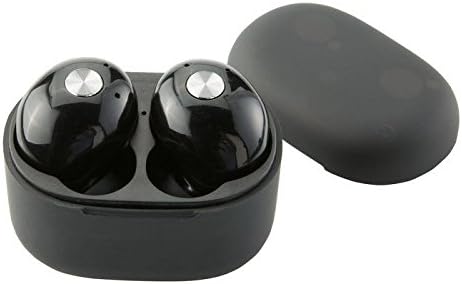
ምስል፡ መቀራረብ view of the earbuds within the charging case, illustrating proper placement for charging.
የብሉቱዝ ማጣመር
- የጆሮ ማዳመጫዎች መሙላታቸውን ያረጋግጡ።
- Remove both earbuds from the charging case. They will automatically enter pairing mode, indicated by flashing LED lights (refer to your product packaging for specific light patterns).
- በእርስዎ ዘመናዊ ስልክ ወይም ብሉቱዝ የነቃ መሣሪያ ላይ ወደ ብሉቱዝ ቅንብሮች ይሂዱ።
- ፈልግ new devices and select "BIG BLUE" (or similar name) from the list.
- Once connected, the earbud indicator lights will change, typically turning solid or off.
- ማጣመር ካልተሳካ፣ የጆሮ ማዳመጫዎቹን ወደ መያዣው መልሰው ያስቀምጡ፣ ይዝጉት እና ደረጃዎቹን ይድገሙት።
የአሠራር መመሪያዎች
ኃይል አብራ/ አጥፋ
- አብራ፡ የጆሮ ማዳመጫዎቹን ከኃይል መሙያ መያዣው ያስወግዱ። በራስ-ሰር ያበራሉ እና ከመጨረሻው የተጣመረ መሣሪያ ጋር ለመገናኘት ይሞክራሉ።
- ኃይል ዝጋ: የጆሮ ማዳመጫውን ወደ ቻርጅ መሙያው ይመልሱ እና ክዳኑን ይዝጉ። እነሱ በራስ-ሰር ያጠፋሉ እና ባትሪ መሙላት ይጀምራሉ።
Music Playback and Call Management
The earbuds feature integrated controls for media playback and call handling. Specific functions may vary slightly; refer to your product's quick start guide for exact button presses.
- አጫውት/ ለአፍታ አቁም፡ Typically a single press on either earbud.
- ቀጣይ ትራክ፡ Often a double press on the right earbud.
- ቀዳሚ ትራክ Often a double press on the left earbud.
- መልስ/ጥሪ ጨርስ፡ A single press on either earbud during an incoming call or active call.
- ጥሪን ውድቅ አድርግ፡ A long press on either earbud during an incoming call.
- የድምፅ ረዳት አግብር A triple press or long press on an earbud (check specific model instructions).

Image: A man wearing a Brookstone Big Blue True Wireless Earbud, demonstrating typical use.
ጥገና
ማጽዳት
- የጆሮ ማዳመጫውን እና የኃይል መሙያ መያዣውን ለማጽዳት ለስላሳ፣ ደረቅ፣ ከቆሸሸ ነጻ የሆነ ጨርቅ ይጠቀሙ።
- ሻካራ ማጽጃዎችን፣ ፈሳሾችን ወይም ኤሮሶልን የሚረጩ አይጠቀሙ።
- Gently clean ear tips and speaker grilles with a dry cotton swab to remove earwax or debris.
ማከማቻ
- ሁልጊዜ የጆሮ ማዳመጫዎቹን ለመጠበቅ እና እንዲከፍሉ ለማድረግ በማይጠቀሙበት ጊዜ ባትሪ መሙያ ሣጥናቸው ውስጥ ያከማቹ።
- ከከፍተኛ ሙቀት እና ቀጥተኛ የፀሐይ ብርሃን ርቀው በቀዝቃዛና ደረቅ ቦታ ያከማቹ።
የባትሪ እንክብካቤ
- የባትሪውን ዕድሜ ለማራዘም የጆሮ ማዳመጫዎቹን እና መያዣውን ብዙ ጊዜ ሙሉ በሙሉ ከመሙላት ይቆጠቡ።
- በተደጋጋሚ ጥቅም ላይ ባይውልም እንኳ መሳሪያውን በመደበኛነት ይሙሉት።
መላ መፈለግ
| ችግር | ሊሆን የሚችል መፍትሄ |
|---|---|
| የጆሮ ማዳመጫዎች ከመሳሪያ ጋር አይጣመሩም። |
|
| Sound skipping or cutting out. |
|
| አንድ የጆሮ ማዳመጫ ድምጽ የለውም። |
|
| የጆሮ ማዳመጫዎች ባትሪ አይሞላም። |
|
ዝርዝሮች
| ባህሪ | ዝርዝር |
|---|---|
| የሞዴል ቁጥር | BIG BLUE |
| ገመድ አልባ የመገናኛ ቴክኖሎጂ | ብሉቱዝ |
| የተካተቱ አካላት | የገመድ አልባ ባትሪ መሙያ መያዣ |
| ቁሳቁስ | ፕላስቲክ |
| የመቆጣጠሪያ ዓይነት | የሚዲያ ቁጥጥር |
| የኬብል ባህሪ | ያለ ገመድ |
| የእቃው ክብደት | 2.4 አውንስ (0.15 ፓውንድ) |
| የምርት ልኬቶች | 3.35 x 1.57 x 5.71 ኢንች |
| ልዩ ባህሪያት | Microphone Included, Noise Cancellation, Wireless |
| ቀለም | ጥቁር |
| የቅጽ ምክንያት | በጆሮ ውስጥ |
| UPC / GTIN | 883594061516 |
የዋስትና መረጃ
Brookstone products are designed with quality and reliability in mind. For specific warranty details regarding your Big Blue True Wireless Earbuds, please refer to the warranty card included in your product packaging or visit the official Brookstone webጣቢያ. ለማንኛውም የዋስትና ጥያቄዎች የግዢ ማረጋገጫዎን ያስቀምጡ።
የደንበኛ ድጋፍ
If you encounter any issues not covered in this manual or require further assistance, please contact Brookstone customer support. Contact information can typically be found on the product packaging or the official Brookstone webጣቢያ.


