1. መግቢያ
Thank you for choosing the Baseus Encok S06 Magnetic Bluetooth In-Ear Earphones. This manual provides essential information for the proper setup, operation, maintenance, and troubleshooting of your new earphones. Please read this manual thoroughly before use to ensure optimal performance and longevity of the product.
The Baseus Encok S06 features a dual battery design for extended playback, Bluetooth 4.1 for stable connectivity, and a magnetic design for convenient storage. It includes an in-built microphone with CVC Noise Suppression and a 3-button remote for easy control of music and calls.

ምስል 1.1፡ አልቋልview of the Baseus Encok S06 Earphones.
This image displays the complete Baseus Encok S06 earphones, highlighting their in-ear design, magnetic earbuds, and the inline control module. The black color and sleek design are visible.
2. በሳጥኑ ውስጥ ያለው
Upon unboxing your Baseus Encok S06 earphones, please verify that all the following components are present:
- Baseus Encok S06 Earphones
- Ear-hooks (various sizes)
- Ear-muffs (small and big sizes)
- የኃይል መሙያ ገመድ (ማይክሮ ዩኤስቢ)

ምስል 2.1፡ የምርት ፓኬጁ ይዘቶች።
This image shows all items included in the Baseus Encok S06 package: the earphones themselves, two pairs of ear-hooks, two pairs of ear-muffs (small and large), and a Micro USB charging cable.
3. ማዋቀር
3.1 የጆሮ ማዳመጫዎችን መሙላት
ከመጠቀምዎ በፊት የጆሮ ማዳመጫዎን ሙሉ በሙሉ ይሙሉ።
- Locate the charging port on the inline control module.
- Connect the provided Micro USB charging cable to the port.
- የኬብሉን ሌላኛውን ጫፍ ከዩኤስቢ የኃይል ምንጭ ጋር ያገናኙ (ለምሳሌ፡ የኮምፒውተር ዩኤስቢ ወደብ፣ የግድግዳ አስማሚ)።
- The indicator light will show charging status (refer to product specific LED behavior, typically red for charging, blue/off for fully charged).
- ሙሉ ቻርጅ ለማድረግ አብዛኛውን ጊዜ 1-2 ሰዓት ይወስዳል።
3.2 ከብሉቱዝ መሣሪያ ጋር ማጣመር
To connect your earphones to a smartphone, tablet, or other Bluetooth-enabled device:
- የጆሮ ማዳመጫዎች መጥፋታቸውን ያረጋግጡ።
- Press and hold the multi-function button (usually the center button on the inline remote) for approximately 5-7 seconds until the indicator light flashes red and blue alternately. This indicates pairing mode.
- በመሳሪያዎ ላይ ብሉቱዝን ያንቁ እና አዳዲስ መሳሪያዎችን ይፈልጉ።
- Select "Baseus Encok S06" (or similar name) from the list of available devices.
- አንዴ ከተገናኘ በኋላ፣ በጆሮ ማዳመጫው ላይ ያለው አመልካች መብራት በተለምዶ ሰማያዊ ቀስ ብሎ ያበራል ወይም ይጠፋል።
- የይለፍ ቃል ከተጠየቁ "0000" ያስገቡ.
የጆሮ ማዳመጫዎቹ ሲበሩ ከመጨረሻው የተጣመረ መሣሪያ ጋር በራስ-ሰር ለመገናኘት ይሞክራሉ።
4. የአሠራር መመሪያዎች
The Baseus Encok S06 features an intuitive 3-button inline remote for easy control.
| አዝራር/ድርጊት | ተግባር |
|---|---|
| ባለብዙ ተግባር ቁልፍ (መሃል) |
|
| የድምጽ መጨመሪያ (+) አዝራር |
|
| የድምጽ መጠን ወደ ታች (-) አዝራር |
|
The magnetic design allows the earbuds to snap together when not in use, preventing tangles and making them easy to wear around your neck.
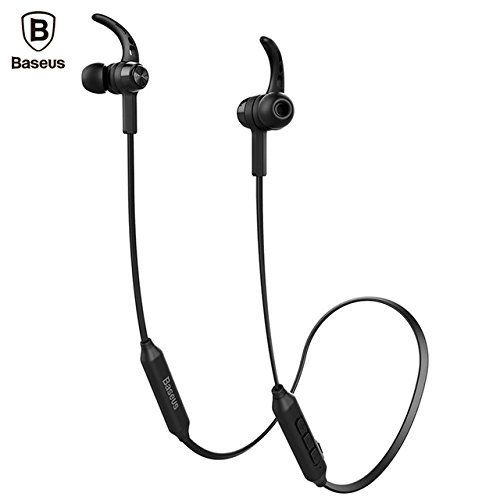
Image 4.1: Close-up of the inline control module.
ይህ ምስል በዝርዝር ያቀርባል view of the Baseus Encok S06 earphones, specifically highlighting the inline control module with its three buttons and the magnetic earbuds.
5. ጥገና
ትክክለኛ ጥገና የጆሮ ማዳመጫዎን ረጅም ዕድሜ እና ጥሩ አፈፃፀም ያረጋግጣል።
- ማጽዳት፡ Use a soft, dry, lint-free cloth to clean the earphones. Do not use harsh chemicals, cleaning solvents, or strong detergents. For ear tips, remove them and clean with a mild soap solution, then rinse thoroughly and dry completely before reattaching.
- ማከማቻ፡ When not in use, store the earphones in a cool, dry place, away from direct sunlight and extreme temperatures. The magnetic design helps keep the cables tangle-free.
- እርጥበትን ያስወግዱ; Do not expose the earphones to water or excessive moisture. While designed for daily use, they are not waterproof.
- በጥንቃቄ ይያዙ; Avoid dropping the earphones or subjecting them to strong impacts. Do not pull on the cable excessively.
6. መላ መፈለግ
If you encounter issues with your Baseus Encok S06 earphones, refer to the following common solutions:
| ችግር | ሊሆን የሚችል ምክንያት / መፍትሄ |
|---|---|
| የጆሮ ማዳመጫዎች አይበሩም። |
|
| ከመሳሪያ ጋር ማጣመር አይቻልም። |
|
| ምንም ድምጽ ወይም ዝቅተኛ ድምጽ የለም. |
|
| የጥሪ ጥራት ደካማ ነው። |
|
7. ዝርዝሮች
| ባህሪ | ዝርዝር |
|---|---|
| የሞዴል ስም | ENCKS6 |
| የምርት ስም | ቤዝየስ |
| የግንኙነት ቴክኖሎጂ | ገመድ አልባ (ብሉቱዝ) |
| ገመድ አልባ የመገናኛ ቴክኖሎጂ | ብሉቱዝ 4.1 |
| የጆሮ አቀማመጥ | በጆሮ ውስጥ |
| የቅጽ ምክንያት | በጆሮ ውስጥ |
| የመቆጣጠሪያ ዘዴ | Button (3-button inline remote) |
| ልዩ ባህሪያት | Magnetic design, Built-in microphone with CVC Noise Suppression, Dual Battery |
| የእቃው ክብደት | 60 ግራም |
8. ዋስትና እና ድጋፍ
8.1 የዋስትና መረጃ
ይህ ምርት ከ ሀ የ 6-ወር ዋስትና provided by the manufacturer from the date of purchase. Please retain your proof of purchase for warranty claims. The warranty covers manufacturing defects and malfunctions under normal use. It does not cover damage caused by misuse, accidents, unauthorized modifications, or normal wear and tear.
8.2 የደንበኛ ድጋፍ
For further assistance, technical support, or warranty inquiries, please contact Baseus customer service through their official webጣቢያው ወይም ምርቱን የገዙበት ቸርቻሪ።
ጠቃሚ፡- Do not attempt to disassemble or repair the earphones yourself, as this will void the warranty.