መግቢያ
This manual provides comprehensive instructions for the setup, operation, maintenance, and troubleshooting of your Thomson Universal 2-in-1 Zapper Remote Control ROC Z107. Please read this manual carefully before using the device to ensure optimal performance and longevity.
ምርት አልቋልview
The Thomson ROC Z107 is a universal remote control designed to operate two devices, typically a Television (TV) and a Set-Top Box (STB). It features large buttons for ease of use and includes a learning function for expanded compatibility.
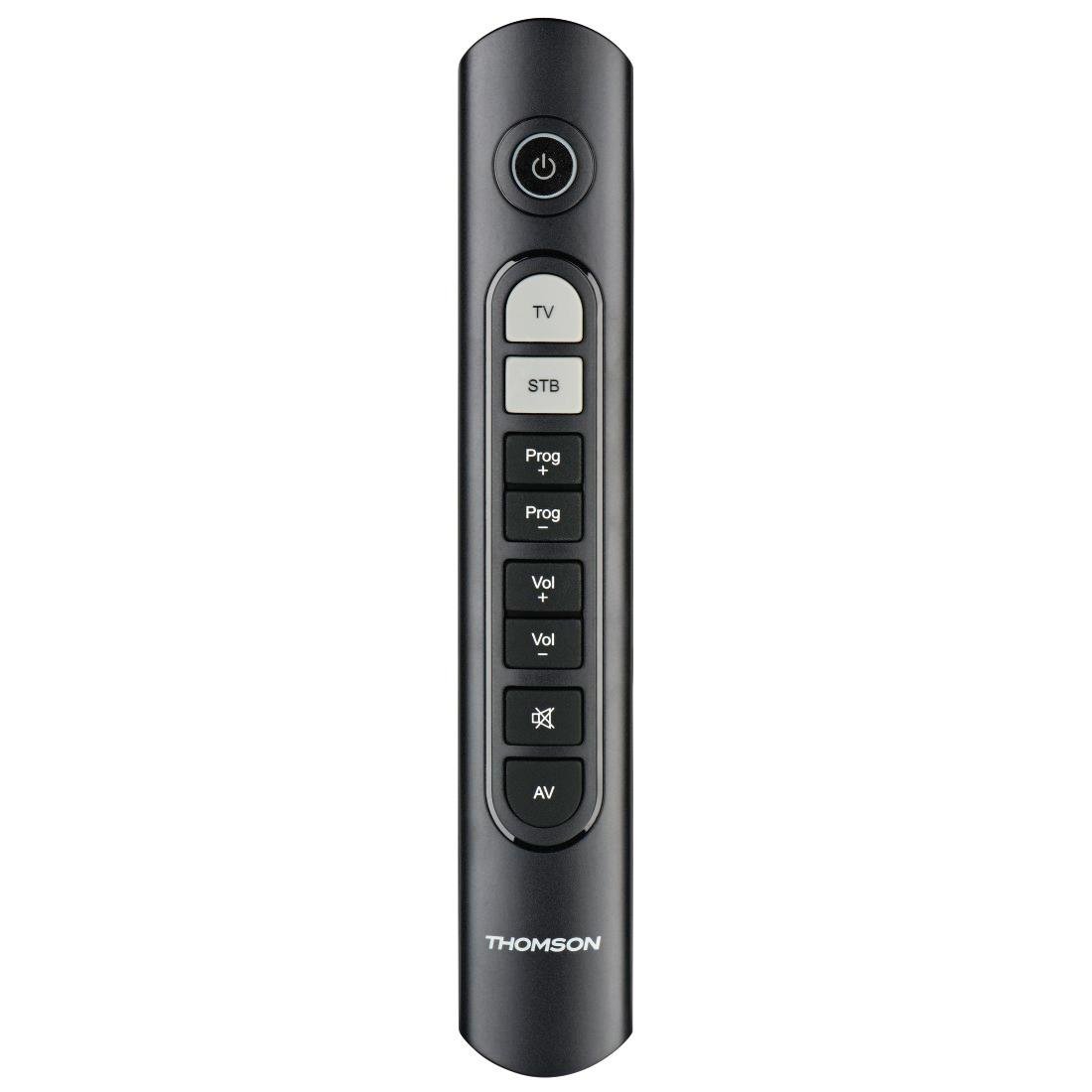
Image: Thomson Universal 2-in-1 Zapper Remote Control ROC Z107. This image displays the remote control from a slightly angled top-down perspective, highlighting its ergonomic design and the layout of its primary buttons.
ማዋቀር
1. የባትሪ ጭነት
- በርቀት መቆጣጠሪያው ጀርባ ላይ የባትሪውን ክፍል ሽፋን ይክፈቱ።
- Insert two AAA batteries, ensuring correct polarity (+ and -). Two AAA batteries are included with your purchase.
- የባትሪውን ክፍል ደህንነቱ በተጠበቀ ሁኔታ ይዝጉ።
2. Initial Programming (Pre-programmed Devices)
The remote control is pre-programmed for many popular brands such as LG, Sony, Samsung, Sharp, and Philips. For these brands, the remote may function immediately after battery installation without further setup. Test the remote with your TV and STB.
3. Learning Function (For Unlisted or Specific Functions)
If your device is not immediately compatible or if you wish to add specific functions from your original remote, use the learning function:
- Place the Thomson remote and your original remote control head-to-head, approximately 2-5 cm apart.
- Press and hold the desired device button (TV or STB) on the Thomson remote until the indicator light blinks.
- Press the button on the Thomson remote that you wish to program. The indicator light will blink slowly.
- Press the corresponding button on your original remote control. The indicator light on the Thomson remote will blink rapidly to confirm successful learning.
- አስፈላጊ ከሆነ ለሌሎች አዝራሮች ይድገሙት።
- Press the device button (TV or STB) again to exit learning mode.
4. Master Volume and Program Selection
This feature allows you to designate which device (TV or STB) controls the volume and program channels, regardless of which device mode the remote is currently in. Refer to the full user manual for specific steps on setting up master control functions.
የአሠራር መመሪያዎች
The Thomson ROC Z107 remote control features a simplified button layout for essential functions.

Image: Close-up of Thomson ROC Z107 remote control buttons. This image provides a detailed view of the remote's buttons, including Power, TV, STB, Program Up/Down, Volume Up/Down, Mute, and AV input selection.
- ማብሪያ ማጥፊያ (⏻): Turns the selected device (TV or STB) on or off.
- TV Button: Selects the Television control mode.
- STB Button: Selects the Set-Top Box control mode.
- Prog + / Prog - Buttons: Changes the program/channel up or down.
- Vol + / Vol - Buttons: ድምጹን ይጨምራል ወይም ይቀንሳል.
- ድምጸ-ከል አድርግ (🔇): የኦዲዮውን ድምጸ-ከል ያደርገዋል ወይም ያጠፋል።
- የኤቪ ቁልፍ፡ Switches the input source on the TV (e.g., HDMI 1, HDMI 2, AV).
ጥገና
የባትሪ መተካት
When the remote control's performance degrades or the indicator light does not respond, it is time to replace the batteries. Follow the battery installation steps outlined in the Setup section.
ማጽዳት
የርቀት መቆጣጠሪያውን ለማጽዳት ለስላሳ እና ደረቅ ጨርቅ ይጠቀሙ። ፈሳሽ ማጽጃዎችን ወይም የማጽጃ ቁሳቁሶችን አይጠቀሙ፣ ምክንያቱም እነዚህ መሳሪያዎች የርቀት መቆጣጠሪያውን ገጽ ወይም የውስጥ ክፍሎችን ሊጎዱ ይችላሉ።
መላ መፈለግ
- የርቀት ምላሽ አለመስጠት፡-
- ባትሪዎቹ በትክክል ገብተው አለመሞላቸውን ያረጋግጡ። አስፈላጊ ከሆነ ይተኩ።
- በርቀት መቆጣጠሪያው እና በመሳሪያው የ IR ተቀባይ መካከል ምንም አይነት እንቅፋት አለመኖሩን ያረጋግጡ።
- Verify that the remote is in the correct device mode (TV or STB).
- የተወሰኑ ተግባራት አይሰሩም:
- If a specific button does not work, it may not be programmed for your device or the device may not support that function. Use the learning function to program the button from your original remote.
- Some older devices may have limited compatibility with universal remotes.
- Remote range is limited:
- ባትሪዎች ትኩስ መሆናቸውን ያረጋግጡ።
- The maximum operating range is 10 meters. Operating beyond this distance may result in unreliable performance.
ዝርዝሮች
| የምርት ስም | ቶምሰን |
| የሞዴል ስም | ROC Z107 |
| የሞዴል ቁጥር | 00132672 |
| ቁሳቁስ | ፕላስቲክ |
| ቀለም | ጥቁር |
| መተላለፍ | Infrared (IR Wireless) |
| የሚደገፉ መሳሪያዎች ብዛት | 2 (TV, STB) |
| ተኳሃኝ ፔሪፈራሎች | Television, DTH, Set-Top Box |
| የኃይል ምንጭ | 2 x AAA ባትሪዎች (ተካቷል) |
| ከፍተኛው ክልል | 10 ሜትር |
| የምርት ልኬቶች | 31.5 x 15.5 x 4 ሴ.ሜ |
| የእቃው ክብደት | 170 ግራም |
| የአዝራሮች ብዛት | 9 |
ዋስትና
This product is covered by a manufacturer's warranty. Please refer to the warranty card included in the product packaging or contact Thomson customer support for detailed warranty information and terms.
ድጋፍ
For further assistance, technical support, or inquiries regarding your Thomson Universal 2-in-1 Zapper Remote Control ROC Z107, please visit the official Thomson webየደንበኛ አገልግሎት ክፍላቸውን ድህረ ገጽ ወይም ያነጋግሩ። የእውቂያ ዝርዝሮች በተለምዶ በምርቱ ማሸጊያ ወይም በብራንዱ ኦፊሴላዊ የመስመር ላይ መገኘት ላይ ይገኛሉ።