1. መግቢያ
This manual provides detailed instructions for the installation, operation, and maintenance of your Thomson SB260IBT 2.1 Channel Soundbar. Please read this manual thoroughly before using the product and retain it for future reference.
1.1 የደህንነት መረጃ
- የኃይል አቅርቦቱን ጥራዝ ያረጋግጡtage በምርት መለያው ላይ ከተገለጹት መስፈርቶች ጋር ይዛመዳል.
- Do not expose the soundbar or subwoofer to rain, moisture, or extreme temperatures.
- ክፍሉን በሙቀት ምንጮች አጠገብ ወይም በቀጥታ የፀሐይ ብርሃን ውስጥ ከማስቀመጥ ይቆጠቡ.
- ከመጠን በላይ ሙቀትን ለመከላከል በክፍሉ ዙሪያ ትክክለኛውን የአየር ዝውውርን ያረጋግጡ.
- ሐ አይክፈቱasinሰ; ሁሉንም አገልግሎቶች ብቁ ለሆኑ ሠራተኞች ያመልክቱ።
- ክፍሉን ለስላሳ እና ደረቅ ጨርቅ ብቻ ያጽዱ.
2. የጥቅል ይዘቶች
ሁሉም እቃዎች በጥቅሉ ውስጥ መኖራቸውን ያረጋግጡ፡-
- Thomson SB260IBT Soundbar
- Subwoofer
- የርቀት መቆጣጠሪያ
- የኃይል ገመድ
- Audio Cables (e.g., Optical, AUX - may vary by region)
- የተጠቃሚ መመሪያ
3. ምርት አብቅቷልview
3.1 Soundbar እና Subwoofer

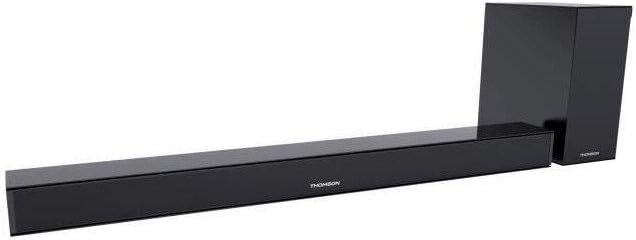
This image displays the Thomson SB260IBT soundbar unit alongside its accompanying subwoofer. The soundbar is a long, slender black unit, and the subwoofer is a compact black cube, both designed to complement modern home entertainment systems.
3.2 የመቆጣጠሪያ ፓነል እና ወደቦች
This image shows a close-up of the soundbar's side panel, revealing various control buttons and input/output ports. These include buttons for power, mode selection, volume control, and ports such as USB, SD card slot, and auxiliary input.
3.2.1 የፊት ፓነል
- የ LED አመልካች፡- የአሁኑን ሁነታ ወይም ሁኔታ ያሳያል.
- የ IR መቀበያ; ለርቀት መቆጣጠሪያ ምልክቶች።
3.2.2 የኋላ ፓነል
- የኃይል ግቤት፡ Connects to the AC power cable.
- ኦፕቲካል ግቤት፡- ለዲጂታል የድምጽ ግንኙነት ከቲቪ ወይም ሌላ መሳሪያ።
- AUX ግቤት፡ ለአናሎግ የድምጽ ግንኙነት የ3.5ሚሜ ገመድ ይጠቀሙ።
3.2.3 የጎን ፓነል
- የዩኤስቢ ወደብ፡ ኦዲዮ ለማጫወት files ከዩኤስቢ አንጻፊ.
- የኤስዲ ካርድ ማስገቢያ፡ ኦዲዮ ለማጫወት files ከ SD ካርድ.
- የመቆጣጠሪያ አዝራሮች; Power, Mode, Volume Up/Down.
3.2.4 የርቀት መቆጣጠሪያ
The remote control provides full functionality for power, input selection, volume adjustment, and playback controls.
4. ማዋቀር
4.1 አቀማመጥ
Place the soundbar on a stable, flat surface directly in front of your television. Position the subwoofer on the floor near the soundbar for optimal bass response. Ensure adequate ventilation around both units.
4.2 ከኃይል ጋር መገናኘት
- የኃይል ገመዱን ከድምጽ አሞሌው የኃይል ግብዓት ጋር ያገናኙ።
- የኃይል ገመዱን ሌላኛውን ጫፍ ወደ ግድግዳ መውጫ ይሰኩት.
- Connect the subwoofer to its power source (if separate).
4.3 የድምጽ ግንኙነቶች
4.3.1 የኦፕቲካል ግንኙነት
For high-quality digital audio, connect an optical cable from your TV's optical output to the soundbar's OPTICAL input. Select 'Optical' mode on the soundbar.
4.3.2 AUX ግንኙነት
Use a 3.5mm audio cable to connect your device's audio output (e.g., smartphone, MP3 player) to the soundbar's AUX input. Select 'AUX' mode on the soundbar.
4.3.3 የብሉቱዝ ግንኙነት
For wireless audio, select 'Bluetooth' mode on the soundbar. Refer to section 5.4 for detailed pairing instructions.
5. የአሠራር መመሪያዎች
5.1 ማብራት / ማጥፋት
የሚለውን ይጫኑ ኃይል አሃዱን ለማብራት ወይም ለማጥፋት በድምፅ አሞሌው ላይ ወይም በርቀት መቆጣጠሪያው ላይ ያለው አዝራር።
5.2 የግቤት ምርጫ
የሚለውን ይጫኑ ሁነታ button on the soundbar or remote control to cycle through available input sources: Bluetooth, Optical, AUX, USB, SD Card. The LED indicator will show the selected mode.
5.3 የድምጽ መቆጣጠሪያ
የሚለውን ተጠቀም ጥራዝ + እና ጥራዝ - የድምጽ መጠኑን ለማስተካከል በድምጽ አሞሌው ወይም በርቀት መቆጣጠሪያው ላይ ያሉ አዝራሮች።
5.4 የብሉቱዝ ማጣመር
- የድምፅ አሞሌውን ያብሩ እና ን ይጫኑ ሁነታ button to select Bluetooth mode. The LED indicator will flash, indicating it is in pairing mode.
- በብሉቱዝ የነቃለት መሳሪያዎ (ለምሳሌ፣ ስማርትፎን፣ ታብሌት) ላይ፣ ብሉቱዝን ያንቁ እና የሚገኙ መሳሪያዎችን ይፈልጉ።
- Select "SB260IBT" from the list of found devices to pair.
- Once successfully paired, the soundbar's LED indicator will stop flashing and remain solid. You can now play audio from your device through the soundbar.
5.5 ዩኤስቢ/ኤስዲ ካርድ መልሶ ማጫወት
Insert a USB drive or SD card (containing compatible audio files) into the corresponding port on the soundbar's side panel. The soundbar will automatically switch to USB/SD mode and begin playback. Use the remote control for playback functions such as Play/Pause, Next Track, and Previous Track.
6. ጥገና
6.1 ጽዳት
Disconnect the soundbar from the power supply before cleaning. Use a soft, dry cloth to gently wipe the surfaces. Do not use liquid cleaners, abrasive materials, or chemical solvents, as these may damage the finish.
6.2 ማከማቻ
If storing the unit for an extended period, disconnect it from power and store it in a cool, dry place, away from direct sunlight and extreme temperatures. It is recommended to keep the original packaging for storage.
7. መላ መፈለግ
| ችግር | መፍትሄ |
|---|---|
| ኃይል የለም | Check if the power cable is securely connected to the soundbar and the wall outlet. Ensure the wall outlet is functional. |
| ድምጽ የለም | Ensure the correct input source (e.g., Optical, AUX, Bluetooth) is selected. Check all audio cable connections. Increase the volume on both the soundbar and the connected device. |
| Bluetooth Disconnection or Failure to Pair | Ensure the device is within the Bluetooth operating range (approximately 10 meters). Turn off and on Bluetooth on your device, then try re-pairing. Ensure no other devices are actively connected to the soundbar. |
| የርቀት መቆጣጠሪያ አይሰራም | Check the battery in the remote control and replace if necessary. Ensure there are no obstacles between the remote control and the soundbar's IR receiver. |
8. ዝርዝሮች
- የሞዴል ስም፡- SB260IBT
- የምርት ስም፡ ቶምሰን
- የሰርጥ ውቅር፡ 2.1 ቻናል
- ከፍተኛ የውጤት ኃይል፡ 200 ዋት
- የግንኙነት ቴክኖሎጂ; ብሉቱዝ፣ ባለገመድ/ገመድ አልባ
- የግቤት አይነት: Multiple (Optical, AUX, USB, SD Card)
- የኃይል ምንጭ፡- ባለገመድ ኤሌክትሪክ
- የመቆጣጠሪያ ዘዴ፡- Via App, Remote Control, On-unit Buttons
- ልዩ ባህሪያት፡ ብሉቱዝ
- የሚመከሩ አጠቃቀሞች፡- For Computers, Gaming Consoles, Music Players, Smartphones or Tablets, Televisions
- የምርት መጠኖች: 100 x 15 x 7 ሴሜ (የድምጽ አሞሌ)
- የምርት ክብደት: Approximately 3 kg (Soundbar and Subwoofer combined)
- የክፍሎች ብዛት፡- 2 (Soundbar and Subwoofer)
- የውሃ መቋቋም; አይ
- የመጫኛ አይነት፡ የጠረጴዛ ጫፍ
9. ዋስትና እና ድጋፍ
9.1 የዋስትና መረጃ
This product comes with a limited warranty. Please refer to the warranty card included in your package for specific terms and conditions, including the warranty period and coverage details. Retain your proof of purchase for warranty claims.
9.2 የደንበኛ ድጋፍ
For technical assistance, troubleshooting, or service inquiries, please contact Thomson customer support. Contact details can typically be found on the manufacturer's official website or in your product documentation. Please have your model number (SB260IBT) and purchase information ready when contacting support.


