1. መግቢያ
This manual provides essential information for the safe and efficient operation of your Digi International WR21-L52A-DE1-TB Cellular Wireless Router. Please read this manual thoroughly before installation and use, and retain it for future reference. This device is designed to provide reliable cellular connectivity for various applications.
2. የደህንነት መረጃ
- የኃይል አቅርቦት; Use only the power adapter supplied with the device. Using an incorrect adapter may damage the device and void the warranty.
- የአየር ማናፈሻ; በራውተሩ ዙሪያ በቂ የአየር ዝውውር መኖሩን ያረጋግጡ። የአየር ማናፈሻ ክፍተቶችን አይዘጉ።
- አካባቢ፡ Avoid exposing the device to extreme temperatures, humidity, direct sunlight, or corrosive environments.
- አገልግሎት መስጠት፡ መሳሪያውን እራስዎ ለመክፈት ወይም ለመጠገን አይሞክሩ. ሁሉንም አገልግሎቶች ብቁ ለሆኑ ባለሙያዎች ያመልክቱ።
- አንቴናዎች Ensure antennas are securely connected before powering on the device.
3. የጥቅል ይዘቶች
ሁሉም እቃዎች በጥቅሉ ውስጥ መኖራቸውን ያረጋግጡ፡-
- Digi International WR21-L52A-DE1-TB Cellular Wireless Router
- የኃይል አስማሚ
- Antennas (quantity may vary)
- የኤተርኔት ገመድ
- ፈጣን ጅምር መመሪያ (ከተካተተ)
ማንኛውም እቃ ከጠፋ ወይም ከተበላሸ፣ ወዲያውኑ ሻጭዎን ያነጋግሩ።
4. ምርት አብቅቷልview
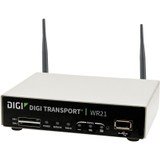
ምስል፡ ፊት ለፊት view of the Digi International WR21-L52A-DE1-TB Cellular Wireless Router. This image displays the compact form factor of the device, likely showing ports for antennas, power, and network connections.
The Digi International WR21-L52A-DE1-TB is a robust cellular wireless router designed for reliable and secure connectivity. It features multiple connectivity options and is suitable for various industrial and enterprise applications requiring remote access and data transfer over cellular networks.
5. ማዋቀር
5.1. የሲም ካርድ ጭነት
- ራውተር መጥፋቱን እና ከኃይል ምንጭ መቆራረጡን ያረጋግጡ።
- Locate the SIM card slot(s) on the device. Refer to the device's physical markings for exact location.
- Insert the activated cellular SIM card into the slot with the gold contacts facing down and the notched corner oriented correctly. Push until it clicks into place.
- If applicable, secure the SIM card tray or cover.
5.2. የአንቴና ግንኙነት
- Identify the cellular antenna ports (typically labeled 'MAIN' and 'DIV' or similar).
- Screw the provided cellular antennas onto the corresponding ports until finger-tight. Do not overtighten.
- ለተመቻቸ የምልክት መቀበያ አንቴናዎችን ያስቀምጡ።
5.3. የኃይል ግንኙነት
- የኃይል አስማሚውን ከራውተሩ የኃይል ግብዓት ወደብ ጋር ያገናኙ።
- የኃይል አስማሚውን ወደ ተስማሚ የኤሌክትሪክ ሶኬት ይሰኩት.
- The router will power on automatically or may require pressing a power button. Observe the LED indicators for power status.
5.4. የአውታረ መረብ ግንኙነት (አማራጭ)
- To connect a device via Ethernet, plug one end of an Ethernet cable into an available LAN port on the router.
- Plug the other end of the Ethernet cable into the network port of your computer or other network device.
6. የአሠራር መመሪያዎች
6.1. ማብራት / ማጥፋት
- አብራ፡ Connect the power adapter. The device will typically power on automatically. Observe the power LED.
- ኃይል ዝጋ: Disconnect the power adapter from the electrical outlet. For controlled shutdown, refer to the device's web interface or specific documentation for a software shutdown procedure if available.
6.2. ወደ ላይ መድረስ Web በይነገጽ
- Ensure your computer is connected to the router via Ethernet or Wi-Fi (if enabled).
- ክፈት ሀ web አሳሽ (ለምሳሌ Chrome፣ Firefox፣ Edge)።
- Enter the router's default IP address (e.g., 192.168.1.1 or 192.168.0.1) into the address bar and press Enter. Refer to the Quick Start Guide or device label for the exact default IP address.
- Enter the default username and password when prompted. These are typically found on a label on the device or in the Quick Start Guide.
- Upon successful login, you will access the router's configuration interface.
6.3. መሰረታዊ ውቅር
ውስጥ web በይነገጽ ፣ የተለያዩ ቅንብሮችን ማዋቀር ይችላሉ-
- Cellular Settings: Verify APN settings, signal strength, and connection status.
- የአውታረ መረብ ቅንብሮች፡- Configure LAN IP address, DHCP server, and port forwarding.
- ደህንነት፡ Change default login credentials, configure firewall rules, and VPN settings.
- የጽኑ ትዕዛዝ ዝመና Check for and apply firmware updates to ensure optimal performance and security.
7. ጥገና
- ማጽዳት፡ የራውተሩን ውጫዊ ክፍል ለማጽዳት ለስላሳ እና ደረቅ ጨርቅ ይጠቀሙ። ፈሳሽ ማጽጃዎችን ወይም ኤሮሶሎችን አይጠቀሙ።
- የጽኑዌር ዝማኔዎች ፦ የአምራቹን በመደበኛነት ያረጋግጡ webየጽኑዌር ዝማኔዎች ጣቢያ። የጽኑዌር ዝመናን መጠበቅ የቅርብ ጊዜ ባህሪያትን፣ የደህንነት ጥገናዎችን እና የአፈጻጸም ማሻሻያዎችን ያረጋግጣል።
- የአካባቢ ሁኔታዎች; Ensure the router is operating within its specified temperature and humidity ranges to prevent overheating or damage.
8. መላ መፈለግ
8.1. የተንቀሳቃሽ ስልክ ግንኙነት የለም
- Verify the SIM card is correctly inserted and activated with your cellular provider.
- Check antenna connections and ensure they are positioned for optimal signal.
- ወደ ውስጥ ይግቡ web interface to check cellular signal strength and connection status.
- ራውተሩን እንደገና ያስጀምሩ.
8.2. መድረስ አልተቻለም Web በይነገጽ
- ኮምፒውተርዎ በቀጥታ ከ ራውተር ጋር በኤተርኔት በኩል መገናኘቱን ያረጋግጡ።
- Verify your computer's IP address is in the same subnet as the router (e.g., if router is 192.168.1.1, computer should be 192.168.1.x).
- የአሳሽዎን መሸጎጫ ለማጽዳት ይሞክሩ ወይም የተለየ አሳሽ ይጠቀሙ።
- If you forgot the password, a factory reset might be necessary (refer to specific device documentation for this procedure, as it will erase all configurations).
8.3. ቀርፋፋ የግንኙነት ፍጥነት
- Check cellular signal strength in the web interface. Weak signal can lead to slow speeds.
- Ensure antennas are properly positioned and unobstructed.
- Verify your cellular data plan has not reached its data cap or is being throttled.
- Restart the router and connected devices.
9. ዝርዝሮች
| ባህሪ | መግለጫ |
|---|---|
| ሞዴል | WR21-L52A-DE1-TB |
| የምርት ስም | ዲጂ ኢንተርናሽናል |
| የግንኙነት ፕሮቶኮል | ሴሉላር |
| የግንኙነት ቴክኖሎጂ | ዩኤስቢ |
| የመቆጣጠሪያ ዘዴ | የርቀት |
| ልዩ ባህሪ | WPS |
| ተስማሚ መሣሪያዎች | የግል ኮምፒተር |
| የሚመከር አጠቃቀሞች | ቤት |
| ዩፒሲ | 747356312219 |
10. ዋስትና እና ድጋፍ
For detailed warranty information, please refer to the warranty card included with your product or visit the official Digi International website. Technical support is available through the manufacturer's support channels. Please have your product model number (WR21-L52A-DE1-TB) and serial number ready when contacting support.


