1. መግቢያ
ስለገዙ እናመሰግናለንasing the Bytech Massive Bluetooth Long Bar Speaker-BK. This manual provides essential information for the proper setup, operation, and maintenance of your new speaker. Please read this manual thoroughly before using the product to ensure optimal performance and longevity.
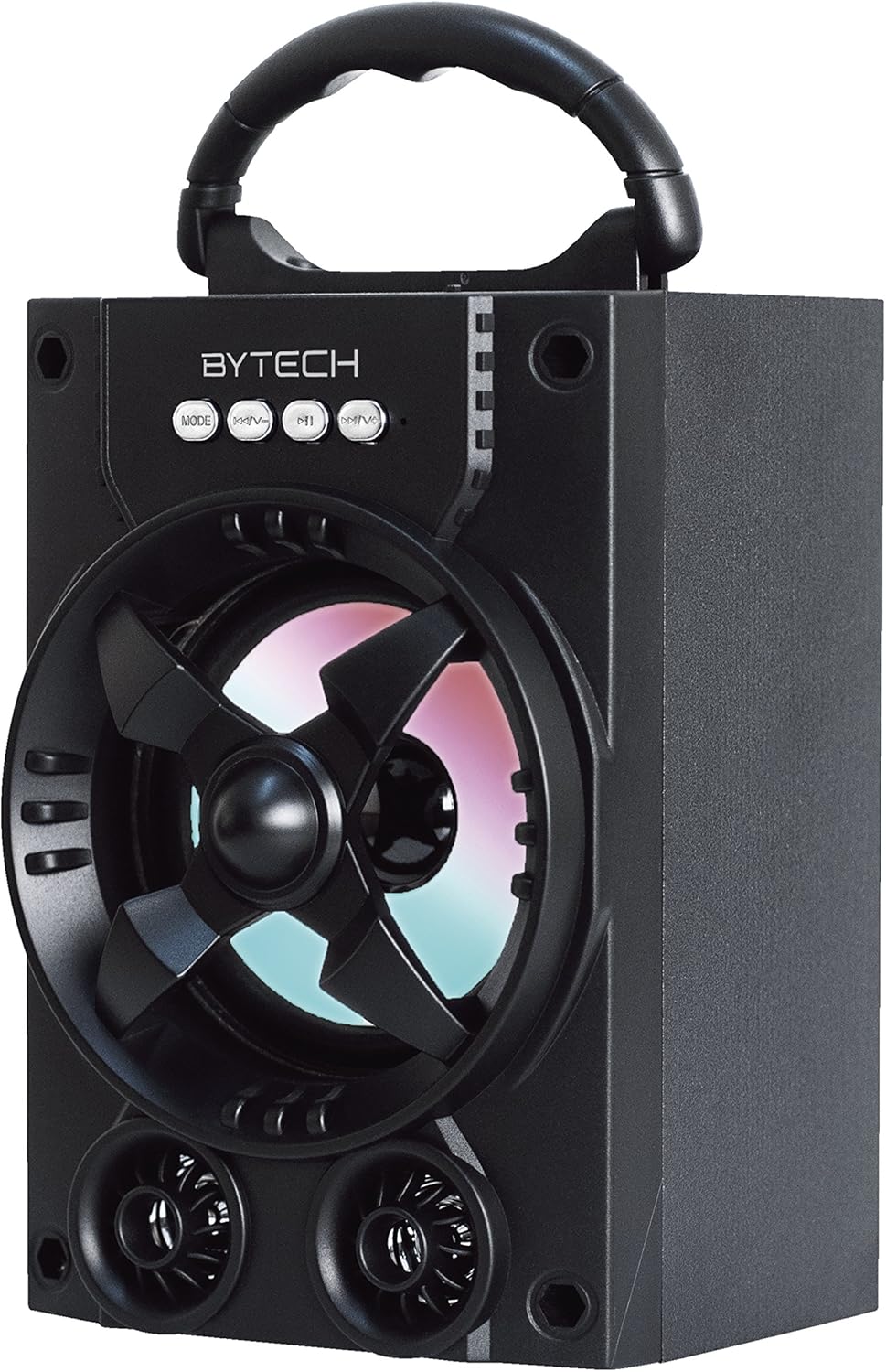
ምስል 1.1: የፊት view of the Bytech Massive Bluetooth Long Bar Speaker-BK, showcasing its design, handle, and speaker grille with LED lights.
2. የጥቅል ይዘቶች
እባክዎን ጥቅሉን ለሚከተሉት ነገሮች ያረጋግጡ፡
- Bytech Massive Bluetooth Long Bar Speaker-BK
- የዩኤስቢ ባትሪ መሙያ ገመድ
- የተጠቃሚ መመሪያ (ይህ ሰነድ)
ማንኛቸውም እቃዎች ከጠፉ ወይም ከተበላሹ፣ እባክዎ የደንበኛ ድጋፍን ያግኙ።
3. የምርት ባህሪዎች
- LED Performance Lights: Dynamic LED lights that synchronize with your music for an enhanced audio-visual experience.
- Convenient Carrying Handle: Integrated handle for easy portability, allowing you to take your music anywhere.
- Universal Bluetooth Connectivity: Seamlessly connect wirelessly to your smartphone, tablet, or other Bluetooth-enabled devices.
- የዙሪያ ድምፅ Designed to deliver a high-quality surround sound experience.
- ተንቀሳቃሽ ንድፍ; Ideal for various settings, including parties, outdoor gatherings, and personal use.

Figure 1.2: The speaker shown with its retail packaging, illustrating its key features such as multi-color LED lights, Bluetooth connectivity, and surround sound capability.
4. መቆጣጠሪያዎች እና ጠቋሚዎች
The speaker features intuitive controls and indicators for easy operation:
- MODE አዝራር፡- Press to switch between available input modes (e.g., Bluetooth).
- ቪ- አዝራር፡- Press to decrease volume. Long press to skip to the previous track.
- ቪ+ አዝራር፡- Press to increase volume. Long press to skip to the next track.
- መ አዝራር፡- (Function not explicitly detailed, typically for mode or mute)
- የ LED መብራቶች; Indicate power status, charging status, and provide dynamic light effects during audio playback.
5. የማዋቀር መመሪያ
5.1 ድምጽ ማጉያውን መሙላት
- የዩኤስቢ ባትሪ መሙያ ገመዱን ትንሽ ጫፍ በድምጽ ማጉያው ላይ ካለው የኃይል መሙያ ወደብ ያገናኙ።
- ትልቁን የዩኤስቢ ባትሪ መሙያ ገመድ ከዩኤስቢ ሃይል አስማሚ (ያልተካተተ) ወይም ከኮምፒዩተር ዩኤስቢ ወደብ ጋር ያገናኙ።
- የ LED አመልካች የኃይል መሙያ ሁኔታን ያሳያል (ለምሳሌ፣ ለመሙላት ቀይ፣ ሙሉ በሙሉ ሲሞላ ጠፍቷል)።
- ለመጀመሪያ ጊዜ ከመጠቀምዎ በፊት ሙሉ በሙሉ እስኪሞላ ድረስ በግምት 3-4 ሰዓታት ይፍቀዱ።
5.2 ማብራት / ማጥፋት
- To power on, press and hold the Power button (location not specified, typically near charging port or on control panel) for a few seconds until you hear an audible prompt or see the LED lights activate.
- ለማጥፋት፣ ድምጽ ማጉያው እስኪዘጋ ድረስ የኃይል አዝራሩን እንደገና ተጭነው ይያዙ።
5.3 የብሉቱዝ ማጣመር
- Ensure the speaker is powered on and in Bluetooth pairing mode (indicated by a flashing LED light or audible prompt).
- በስማርትፎንዎ ወይም በጡባዊዎ ላይ ወደ ብሉቱዝ ቅንብሮች ይሂዱ።
- ፈልግ available devices. The speaker will appear as "BYTECH" or a similar name.
- ማጣመርን ለመጀመር ከዝርዝሩ ውስጥ ተናጋሪውን ይምረጡ።
- Once successfully paired, the LED indicator will typically become solid, and you may hear a confirmation tone.
6. የአሠራር መመሪያዎች
6.1 ኦዲዮን በብሉቱዝ ማጫወት
- After successful Bluetooth pairing, open your preferred music application on your connected device.
- Select and play your desired audio. The sound will be streamed wirelessly to the speaker.
- Use the V+ and V- buttons on the speaker or your connected device to adjust the volume.
- Long press V+ or V- to skip tracks.
6.2 LED Performance Lights
The speaker features integrated LED lights that enhance your listening experience. These lights typically activate automatically when the speaker is powered on and playing audio. Specific controls for light modes are not detailed, but they are designed to provide dynamic visual effects.
6.3 ሁነታ መቀየር
የሚለውን ይጫኑ MODE button to cycle through available input modes. While Bluetooth is the primary connectivity, other modes (if available, such as FM radio or AUX input) can be accessed via this button.
7. ጥገና እና እንክብካቤ
- ማጽዳት፡ የድምጽ ማጉያውን ውጫዊ ክፍል ለማጽዳት ለስላሳ እና ደረቅ ጨርቅ ይጠቀሙ. ሻካራ ማጽጃዎችን፣ ሰምዎችን ወይም ፈሳሾችን አይጠቀሙ።
- ማከማቻ፡ ረዘም ላለ ጊዜ ጥቅም ላይ በማይውልበት ጊዜ ድምጽ ማጉያውን በቀጥታ ከፀሀይ ብርሀን እና ከከፍተኛ ሙቀት ርቆ በቀዝቃዛና ደረቅ ቦታ ያከማቹ።
- የባትሪ እንክብካቤ To prolong battery life, avoid fully discharging the battery frequently. Recharge the speaker regularly, even if not in use, to maintain battery health.
- የውሃ መቋቋም; ይህ ምርት ነው አይደለም waterproof. Avoid exposure to water, rain, or excessive moisture to prevent damage.
8. መላ መፈለግ
ከተናጋሪዎ ጋር ችግሮች ካጋጠሙዎት የሚከተሉትን የተለመዱ ችግሮች እና መፍትሄዎች ይመልከቱ፡
| ችግር | ሊሆን የሚችል ምክንያት | መፍትሄ |
|---|---|---|
| ተናጋሪው አይበራም። | ዝቅተኛ ባትሪ. | ድምጽ ማጉያውን ሙሉ በሙሉ ይሙሉ። |
| ከተናጋሪው ምንም ድምፅ የለም። | Volume too low; Not paired; Incorrect mode. | Increase volume on speaker and device; Ensure successful Bluetooth pairing; Press MODE button to select correct input. |
| የብሉቱዝ ግንኙነት ያልተረጋጋ ወይም አልተሳካም። | Device too far; Interference; Pairing issue. | Move device closer to speaker (within 33 ft/10m); Avoid obstacles; Forget device on your phone and re-pair. |
| የ LED መብራቶች አይሰሩም. | Speaker not powered on or playing audio. | Ensure speaker is on and audio is playing. |
9. ዝርዝሮች
| ባህሪ | ዝርዝር |
|---|---|
| የምርት ስም | ባይቴክ |
| የሞዴል ስም | ባይቴክ |
| የንጥል ሞዴል ቁጥር | BCAUBS134BK |
| የድምጽ ማጉያ አይነት | የዙሪያ ድምጽ |
| የግንኙነት ቴክኖሎጂ | ብሉቱዝ |
| ገመድ አልባ የመገናኛ ቴክኖሎጂ | ብሉቱዝ |
| ተስማሚ መሣሪያዎች | ስማርትፎን |
| የድምጽ ማጉያ ከፍተኛ የውጤት ኃይል | 20 ዋት |
| የድግግሞሽ ምላሽ | 20 kHz |
| እክል | 1 ኦኤም |
| የድምጽ ማጉያ መጠን | 5 ኢንች |
| የኃይል ምንጭ | ባለገመድ ኤሌክትሪክ (ለመሙላት) |
| የባትሪ ዓይነት | 1 ሊቲየም አዮን ባትሪ ያስፈልጋል |
| ቀለም | ጥቁር |
| የምርት ልኬቶች | 4.75 x 5.5 x 8.5 ኢንች |
| የእቃው ክብደት | 1.3 ፓውንድ |
| ውሃ የማይገባ ነው። | አይ |
| የትውልድ ሀገር | ቻይና |
| ዩፒሲ | 805112038121 |
10. የዋስትና መረጃ
Bytech products are manufactured to the highest quality standards. For specific warranty terms and conditions, please refer to the warranty card included with your purchase or visit the official Bytech webጣቢያ. ለዋስትና ጥያቄዎች የግዢ ማረጋገጫዎን ያስቀምጡ።
11. የደንበኛ ድጋፍ
For technical assistance, troubleshooting, or general inquiries, please contact Bytech customer support. Contact information can typically be found on the product packaging, the official Bytech webጣቢያ፣ ወይም የግዢ ደረሰኝዎ።
ማስታወሻ፡ በቀረበው መረጃ መሰረት ከሻጩ ምንም አይነት ይፋዊ የምርት ቪዲዮዎች ለመክተት አልተገኙም።


