1. መግቢያ
The POWERTECH MP3752 is an intelligent and lightweight solar charge controller designed to manage the power flow from your solar panels to your battery bank. Utilizing Pulse Width Modulation (PWM) technology, it ensures efficient and safe battery charging. This controller offers a set-and-forget operation, providing maximum charge into your batteries without constant monitoring. It integrates essential safety features such as overload, short-circuit, over-discharge, and reverse-polarity protection. Additionally, a convenient USB port on the front panel allows for up to 1.2A charging, useful for mobile devices during power outages. The unit supports various battery types including sealed lead-acid, Gel, and flooded cells, and automatically selects the optimal charging mode (bulk, equalise, float).
2. የደህንነት መረጃ
Please read all instructions carefully before installation and operation. Failure to follow these instructions may result in damage to the unit, battery, or personal injury.
- ኃይል ከመጠቀምዎ በፊት ሁሉም ግንኙነቶች ትክክለኛ እና ደህንነታቸው የተጠበቀ መሆናቸውን ያረጋግጡ።
- Do not connect the solar controller to an AC power source.
- መቆጣጠሪያውን በደንብ በሚተነፍሰው ቦታ ላይ ይጫኑ, ከሚቃጠሉ ቁሳቁሶች እና በቀጥታ የፀሐይ ብርሃን.
- Avoid short-circuiting the battery terminals or solar panel terminals.
- Always connect the battery first, then the solar panel, and finally the load. Disconnect in reverse order.
- This device is not waterproof; protect it from moisture and water.
- ብቃት ያላቸው ባለሙያዎች ብቻ ተከላ እና ጥገና ማድረግ አለባቸው.
3. የምርት ባህሪዎች
- Automatic charge mode selection (Bulk, Equalise, Float).
- Suitable for both 12V and 24V battery banks.
- Integrated USB charging port (5V, 1.2A max) on the front panel.
- Supports sealed lead-acid, Gel, and flooded battery types.
- Comprehensive protection features: overload, short-circuit, over-discharge, reverse-polarity.
- Pulse Width Modulation (PWM) charging technology.
4. የጥቅል ይዘቶች
እባኮትን በደረሰኝ ጊዜ የጥቅል ይዘቱን ያረጋግጡ፡-
- 1 x POWERTECH MP3752 Solar Controller
- 1 x የተጠቃሚ መመሪያ (ይህ ሰነድ)
5. ምርት አብቅቷልview እና ግንኙነቶች
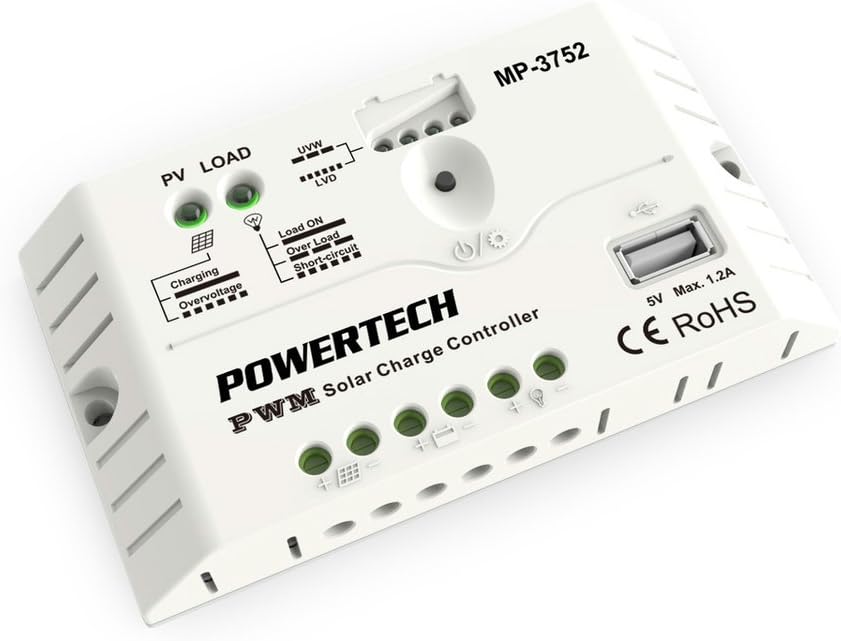
ምስል 1: የፊት view of the POWERTECH MP3752 Solar Controller. This image displays the PV LOAD, UVW, LVD, Load ON, Over Load, Short-Circuit indicators, the USB port, and the connection terminals for solar panels, battery, and load.
The MP3752 controller features clearly marked terminals for easy connection. Refer to Figure 1 for a visual guide to the controller's layout and indicators.
የግንኙነት ተርሚናሎች፡-
- Solar Panel Input (PV): Connect your solar panel array here. Ensure correct polarity (+ and -).
- የባትሪ ግንኙነት፡- Connect your 12V or 24V battery bank here. Observe correct polarity (+ and -).
- የጭነት ውጤት፡ Connect your DC loads (e.g., lights, fans) here. Observe correct polarity (+ and -).
- የዩኤስቢ ወደብ፡ 5V, 1.2A max output for charging small electronic devices.
6. ማዋቀር እና መጫን
የፀሐይ ኃይል መሙያ መቆጣጠሪያዎን በትክክል ለመጫን የሚከተሉትን ደረጃዎች ይከተሉ
- መጫን፡ Choose a dry, well-ventilated indoor location, away from direct sunlight, high temperatures, and moisture. Ensure sufficient air circulation around the controller.
- የባትሪ ግንኙነት፡-
- Connect the positive (+) terminal of the battery to the battery positive (+) terminal on the controller.
- Connect the negative (-) terminal of the battery to the battery negative (-) terminal on the controller.
- The controller will automatically detect if it's a 12V or 24V system.
- የፀሐይ ፓነል ግንኙነት;
- Connect the positive (+) terminal of the solar panel to the solar panel positive (+) terminal on the controller.
- Connect the negative (-) terminal of the solar panel to the solar panel negative (-) terminal on the controller.
- Ensure the open-circuit voltage of the solar panel does not exceed the maximum input voltage of the controller (typically 50V for 12/24V systems).
- የግንኙነት ጭነት
- Connect the positive (+) terminal of your DC load to the load positive (+) terminal on the controller.
- Connect the negative (-) terminal of your DC load to the load negative (-) terminal on the controller.
- Do not exceed the maximum rated current for the load output (20A).
- ግንኙነቶችን ያረጋግጡ፡ Double-check all connections for correct polarity and tightness before proceeding.

Figure 2: The POWERTECH MP3752 Solar Controller shown in its packaging, illustrating its application with solar panels. This image provides a contextual view of the product's intended use.
7. የአሠራር መመሪያዎች
7.1. Automatic System Voltagሠ እውቅና
The controller automatically detects whether the connected battery bank is 12V or 24V upon initial connection. Ensure the battery is connected first for proper voltagሠ መለየት።
7.2. የመሙያ ሁነታዎች
The MP3752 employs intelligent PWM charging, automatically cycling through different stages to optimize battery health and lifespan:
- የጅምላ ክፍያ Delivers maximum current to rapidly bring the battery to approximately 80% charge.
- Equalise Charge: Periodically applies a higher voltage to equalize the charge among battery cells, preventing sulfation and extending battery life (for flooded batteries).
- ተንሳፋፊ ክፍያ Maintains the battery at a full charge by providing a small, constant voltage, compensating for self-discharge.
7.3. Load Control
The load output is controlled by the controller to prevent over-discharge of the battery. When the battery voltagሠ ከዝቅተኛው ጥራዝ በታች ይወርዳልtage Disconnect (LVD) threshold, the load output will be automatically disconnected. It will reconnect once the battery has recharged to the Low Voltage Reconnect (LVR) threshold.
Press the power button on the controller to manually turn the load output ON or OFF.
7.4. የዩኤስቢ ኃይል መሙያ ወደብ
The 5V, 1.2A USB port can be used to charge small electronic devices like smartphones or tablets. This port is active as long as the battery has sufficient charge.
8. ጠቋሚዎች
The POWERTECH MP3752 features several LED indicators to provide real-time status information:
- PV LOAD (Solar Panel Indicator):
- አረንጓዴ፥ Solar panel is connected and generating power.
- ጠፍቷል፡ No solar input or insufficient light.
- የኃይል መሙያ አመልካች፡-
- አረንጓዴ፥ ባትሪ እየሞላ ነው።
- ጠፍቷል፡ Battery is fully charged or not charging.
- ከመጠን በላይ መጨናነቅtagሠ አመልካች፡-
- ቀይ፥ የግቤት ጥራዝtage from solar panel is too high, or battery voltage is overcharge protection level.
- UVW (Battery Voltage Indicator): Multiple LEDs indicating battery charge level.
- LVD (ዝቅተኛ ጥራዝtage Disconnect Indicator):
- ቀይ፥ የባትሪ ጥራዝtage is low, load output has been disconnected.
- Load ON Indicator:
- አረንጓዴ፥ Load output is active.
- Over Load Indicator:
- ቀይ፥ Load current exceeds the maximum rated current. Load output may be temporarily disconnected.
- Short-Circuit Indicator:
- ቀይ፥ Short-circuit detected on the load output. Load output will be disconnected.
9. ጥገና
To ensure optimal performance and longevity of your solar charge controller, regular maintenance is recommended:
- ማጽዳት፡ Periodically clean the exterior of the controller with a dry, soft cloth. Do not use solvents or abrasive cleaners.
- ግንኙነቶች፡ Annually check all wiring connections for tightness and corrosion. Loose connections can cause overheating and poor performance.
- የአየር ማናፈሻ; Ensure that the ventilation openings are not blocked and that there is adequate airflow around the unit.
- ምርመራ፡- የአካላዊ ጉዳት፣ የቀለም ለውጥ ወይም ያልተለመዱ ሽታዎች ካሉ መቆጣጠሪያውን ይመርምሩ።
10. መላ መፈለግ
| ችግር | ሊሆን የሚችል ምክንያት | መፍትሄ |
|---|---|---|
| No charging from solar panel. |
|
|
| Load output not working. |
|
|
| ከመጠን በላይ መጨናነቅtagኢ አመልካች በርቷል። |
|
|
11. ዝርዝሮች
| መለኪያ | ዋጋ |
|---|---|
| የሞዴል ቁጥር | MP3752 (03617080) |
| ስርዓት ጥራዝtage | 12V/24V Auto-sensing |
| ከፍተኛ. የአሁኑን ክፍያ | 20 ኤ |
| ከፍተኛ. የአሁኑን ጫን | 20 ኤ |
| የዩኤስቢ ውፅዓት | 5V፣ 1.2A ከፍተኛ |
| የኃይል መሙያ ዓይነት | PWM (Bulk, Equalise, Float) |
| የሚደገፉ የባትሪ ዓይነቶች | Sealed Lead-Acid, Gel, Flooded |
| የምርት ልኬቶች | 5.83 x 3.39 x 1.38 ኢንች |
| የእቃው ክብደት | 5.6 አውንስ |
| አምራች | POWERTECH |
| የምርት ስም | ጄይካር |
12. ዋስትና እና ድጋፍ
This product is covered by a standard manufacturer's warranty against defects in materials and workmanship. Please refer to your purchase documentation for specific warranty terms and duration. For technical support, troubleshooting assistance, or warranty claims, please contact your retailer or the manufacturer directly.
ማሳሰቢያ፡- ያልተፈቀደ የምርቱን መበታተን ወይም ማሻሻያ ዋስትናውን ያሳጣዋል።