መግቢያ
This manual provides essential information for the safe and efficient operation of your Behringer EUROPORT MPA200BT portable PA system. Please read these instructions thoroughly before using the device to ensure proper setup, usage, and maintenance. Retain this manual for future reference.
The Behringer EUROPORT MPA200BT is an all-in-one portable PA system designed for various applications, featuring 200 watts of power, Bluetooth connectivity for audio streaming, and a wireless microphone for vocal performances or presentations. Its battery operation allows for use in locations without direct power access.
አስፈላጊ የደህንነት መመሪያዎች
የኤሌክትሪክ መሳሪያዎችን ሲጠቀሙ ሁል ጊዜ እነዚህን መሰረታዊ የደህንነት ጥንቃቄዎች ይከተሉ:
- ምርቱን ከመጠቀምዎ በፊት ሁሉንም መመሪያዎች ያንብቡ.
- Do not use this product near water or in wet environments.
- በደረቅ ጨርቅ ብቻ አጽዳ.
- የአየር ማናፈሻ ክፍተቶችን አያግዱ። በአምራቹ መመሪያ መሰረት ይጫኑ.
- እንደ ራዲያተሮች፣ ሙቀት መመዝገቢያዎች፣ ምድጃዎች፣ ወይም ሌሎች መሳሪያዎችን (ያጠቃልለው) ካሉ የሙቀት ምንጮች አጠገብ አይጫኑ። ampማሞቂያዎች) ሙቀትን ያመነጫሉ.
- የፖላራይዝድ ወይም የመሠረት አይነት መሰኪያ የደህንነት ዓላማን አያሸንፉ። የፖላራይዝድ መሰኪያ አንዱ ከሌላው የሚበልጥ ሁለት ቢላዎች አሉት። የመሠረት ዓይነት መሰኪያ ሁለት ቢላዎች እና ሦስተኛው የመሠረት ፕሮንግ አለው። ለደህንነትዎ ሲባል ሰፊው ምላጭ ወይም ሶስተኛው ዘንበል ተዘጋጅቷል. የቀረበው መሰኪያ ወደ መውጫዎ የማይገባ ከሆነ፣ ጊዜው ያለፈበትን መውጫ ለመተካት የኤሌትሪክ ባለሙያ ያማክሩ።
- የኤሌክትሪክ ገመዱን ከመራመድ ወይም ከመቆንጠጥ ይከላከሉ, በተለይም በፕላጎች, ምቹ መያዣዎች እና ከመሳሪያው የሚወጡበት ቦታ.
- በአምራቹ የተገለጹ አባሪዎችን/መለዋወጫዎችን ብቻ ይጠቀሙ።
- ይህንን መሳሪያ በመብረቅ አውሎ ንፋስ ጊዜ ወይም ለረጅም ጊዜ ጥቅም ላይ በማይውልበት ጊዜ ይንቀሉት።
- ሁሉንም አገልግሎቶች ብቁ ለሆኑ የአገልግሎት ሰራተኞች ያመልክቱ። አፓርትመንቱ በማናቸውም መንገድ ጉዳት ከደረሰ በኋላ ማገልገል ያስፈልጋል፣ ለምሳሌ የኃይል ማስተላለፊያ ገመድ ወይም መሰኪያ ሲበላሽ፣ ፈሳሽ ሲፈስ ወይም ዕቃው ውስጥ ሲወድቅ፣ መሳሪያው ለዝናብ ወይም ለእርጥበት ሲጋለጥ፣ መደበኛውን የማይሰራ ከሆነ። , ወይም ተጥሏል.
የጥቅል ይዘቶች
Upon unpacking your Behringer EUROPORT MPA200BT, please verify that all components are present and in good condition:
- Behringer EUROPORT MPA200BT Portable PA System
- Wireless Microphone (ULM300M)
- USB Receiver for Wireless Microphone (ULM300USB)
- የኃይል ገመድ
- የተጠቃሚ መመሪያ (ይህ ሰነድ)

Image: The Behringer EUROPORT MPA200BT portable PA system shown with its accompanying wireless microphone.
ምርት አልቋልview: መቆጣጠሪያዎች እና ግንኙነቶች
Familiarize yourself with the various controls and connection points on your MPA200BT unit.

Image: Rear panel of the MPA200BT, highlighting the main control interface, inputs, and outputs.

ምስል፡ ዝርዝር view of the MPA200BT's control panel, including display, rotary encoder, and buttons.
የቁጥጥር ፓነል ባህሪዎች
- ማሳያ ማያ: Shows current settings, input levels, and Bluetooth status.
- ሮታሪ ኢንኮደር፡ Used to navigate menus and adjust parameters. Press to confirm selections.
- PROCESS Button: Activates or deactivates sound processing effects.
- የማዋቀር አዝራር፡- የስርዓት ማቀናበሪያ ምናሌውን ያስገባል.
- መውጫ አዝራር፡- Exits current menu or setting.
- የገባ አዝራር ፦ በምናሌዎች ውስጥ ምርጫዎችን ያረጋግጣል።
- የብሉቱዝ አዝራር፡- የብሉቱዝ ማጣመሪያ ሁነታን ይጀምራል።
የግቤት/ውጤት ግንኙነቶች፡-
- INPUT 1 & 2 (XLR/TRS Combo Jacks): For connecting microphones or line-level instruments.
- WIRELESS SYSTEM (USB Port): For connecting the ULM300USB wireless microphone receiver.
- MP3 Input (3.5mm Stereo Jack): ውጫዊ የድምጽ ማጫወቻዎችን ለማገናኘት።
- MIX OUTPUT (XLR): For sending the mixed audio signal to another PA system or recording device.
- የኤሲ የኃይል ማስገቢያ የኃይል ገመዱን ለማገናኘት.
ማዋቀር
- የኃይል ግንኙነት;
Connect the supplied power cable to the AC Power Inlet on the rear of the MPA200BT and then to a suitable power outlet. The unit can also operate on its internal battery.
- የመጀመሪያ ኃይል በርቷል፡
Press the power switch to turn on the unit. The display will illuminate.
- አቀማመጥ፡
Place the MPA200BT on a stable, flat surface or mount it on a speaker stand (sold separately). Ensure proper ventilation around the unit.
- ግቤቶችን በማገናኘት ላይ
- ባለገመድ ማይክሮፎኖች/መሳሪያዎች፡ Connect to INPUT 1 or INPUT 2 using XLR or 1/4" TRS cables.
- External Audio Players: Connect to the MP3 Input using a 3.5mm stereo cable.
የአሠራር መመሪያዎች
የብሉቱዝ ኦዲዮ ዥረት

Image: The Bluetooth logo, representing wireless audio streaming capability.
- Ensure the MPA200BT is powered on.
- የሚለውን ይጫኑ ብሉቱዝ button on the control panel. The Bluetooth icon on the display will flash, indicating pairing mode.
- On your smartphone or Bluetooth-enabled device, navigate to the Bluetooth settings and select "BEHRINGER MPA200BT" from the list of available devices.
- Once paired, the Bluetooth icon on the MPA200BT display will stop flashing and remain solid.
- You can now stream audio from your device to the MPA200BT. Adjust the volume using your device's controls and the MPA200BT's master volume.
Wireless Microphone Usage (ULM300M/ULM300USB)
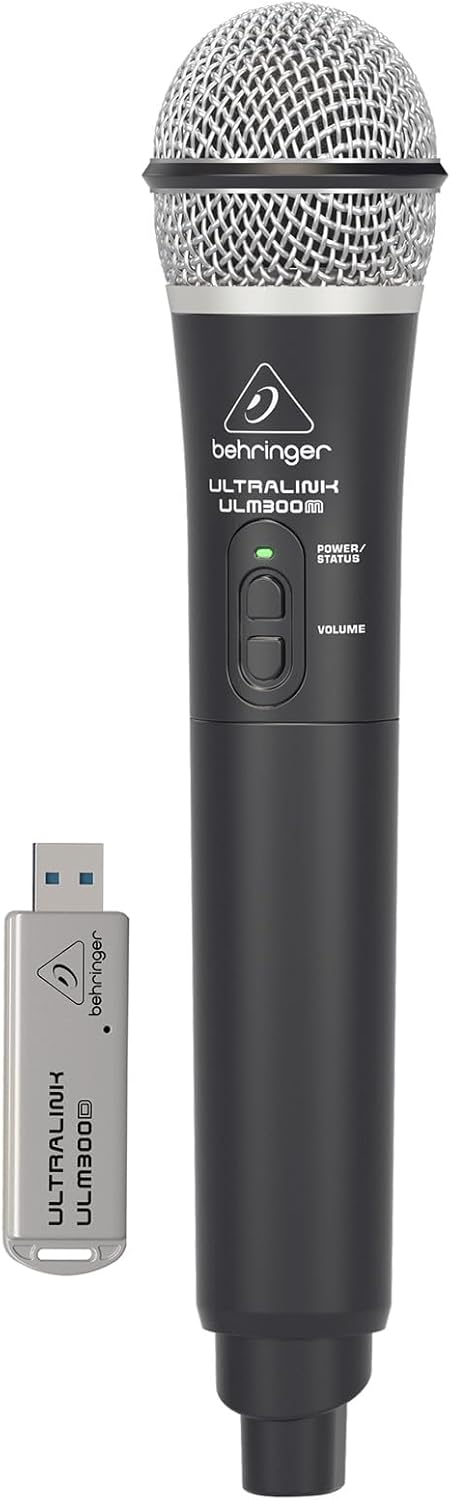
Image: The Behringer ULM300M wireless microphone shown with its USB receiver, the ULM300USB.
- Insert the ULM300USB receiver into the ሽቦ አልባ ስርዓት USB port on the MPA200BT.
- Ensure the ULM300M wireless microphone has fresh batteries installed.
- Power on the wireless microphone. The status LED on both the microphone and the receiver should indicate a successful connection (usually a solid green light).
- Adjust the microphone's volume using the controls on the microphone itself and the MPA200BT's input gain settings.
Remote Control via Smartphone App

Image: A smartphone screen showing the graphical user interface of the Behringer remote control application, used to manage the PA system settings.
The MPA200BT can be controlled remotely using a dedicated smartphone application. This allows for adjustments to volume, EQ, and effects from a distance.
- Download the official Behringer MPA200BT control app from your device's app store (iOS/Android).
- Ensure your smartphone is connected to the MPA200BT via Bluetooth (as described in the "Bluetooth Audio Streaming" section).
- Open the app. It should automatically detect and connect to your MPA200BT unit.
- Use the app's interface to control various parameters of the PA system.
የባትሪ አሠራር
The MPA200BT features an internal rechargeable battery for portable use.
- The battery charges automatically when the unit is connected to AC power.
- A battery level indicator on the display shows the remaining charge.
- For optimal battery life, fully charge the unit before its first use and periodically when not in use for extended periods.
ጥገና
- ማጽዳት፡ የክፍሉን ውጫዊ ክፍል ለማጽዳት ለስላሳ እና ደረቅ ጨርቅ ይጠቀሙ. ገላጭ ማጽጃዎችን ወይም ፈሳሾችን አይጠቀሙ.
- ማከማቻ፡ When not in use, store the MPA200BT in a cool, dry place, away from direct sunlight and extreme temperatures.
- የባትሪ እንክብካቤ If storing for extended periods, ensure the battery is partially charged (around 50%) and recharge it every few months to prevent deep discharge.
- የአየር ማናፈሻ; Ensure that the ventilation openings are not obstructed during operation to prevent overheating.
መላ መፈለግ
| ችግር | ሊሆን የሚችል ምክንያት | መፍትሄ |
|---|---|---|
| ኃይል የለም | Power cable not connected; unit not switched on; battery depleted. | Check power cable connection; ensure power switch is ON; charge battery. |
| ምንም የድምፅ ውፅዓት የለም። | Volume too low; input source not connected or selected; faulty cable; microphone off. | Increase master volume and input gain; check input connections; test cables; ensure microphone is powered on and paired. |
| የብሉቱዝ ማጣመር አልተሳካም። | MPA200BT not in pairing mode; device too far; interference. | Press Bluetooth button to enter pairing mode; move device closer; restart both devices. |
| ገመድ አልባ ማይክሮፎን አይሰራም | USB receiver not connected; microphone off; depleted batteries in microphone; interference. | Ensure ULM300USB is fully inserted; power on microphone; replace microphone batteries; ensure clear line of sight. |
| Squealing/Feedback | ማይክሮፎኑ ከድምጽ ማጉያው በጣም ቅርብ ነው፤ ማይክሮፎኑ በጣም ከፍተኛ ይሆናል። | Move microphone further from speaker; reduce microphone input gain. |
ዝርዝሮች
| ባህሪ | ዝርዝር |
|---|---|
| ሞዴል | ዩሮፖርት MPA200BT |
| የውጤት ዋትtage | 200 ዋት |
| የኃይል ምንጭ | Battery Powered / AC Power |
| የግንኙነት ቴክኖሎጂ | ብሉቱዝ |
| የሰርጦች ብዛት | 2 |
| የእቃው ክብደት | 12.1 ኪግ (26.6 ፓውንድ) |
| የምርት ልኬቶች (L x W x H) | 11.02 x 10.11 x 16.53 ኢንች |
| የመጫኛ አይነት | የጠረጴዛ ጫፍ |
| ተስማሚ መሣሪያዎች | ስማርትፎን |
| አምራች | የሙዚቃ ትሪብ ዩኤስ |
ዋስትና እና ድጋፍ
ለዝርዝር የዋስትና መረጃ እና ቴክኒካዊ ድጋፍ፣ እባክዎን ኦፊሴላዊውን ቤህሪንገርን ይመልከቱ webጣቢያ ወይም የደንበኛ አገልግሎታቸውን ያነጋግሩ። የግዢ ደረሰኝህን እንደ ግዢ ማረጋገጫ አቆይ።
የመስመር ላይ መርጃዎች፡- www.behringer.com
አምራች፡ የሙዚቃ ትሪብ ዩኤስ
ይፋዊ የምርት ቪዲዮዎች
No relevant official product videos from the seller were found in the provided data for embedding.


