1. መግቢያ እና በላይview
The Dio DiOCAMRI01 is an advanced 360° HD WiFi camera designed for indoor surveillance, offering comprehensive monitoring while prioritizing user privacy. This camera features a motorized lens, 1080p resolution, and infrared night vision, ensuring clear visuals day and night. Its unique geo-fencing capability automatically activates a privacy mode when you are home, retracting the lens to ensure your personal space remains private. The camera also includes motion and noise detection, two-way audio communication, and local recording options via a Micro SD card.
This manual provides essential information for the proper installation, operation, and maintenance of your DiOCAMRI01 camera.
2. የደህንነት መረጃ
- ከመጠቀምዎ በፊት ሁሉንም መመሪያዎች በጥንቃቄ ያንብቡ.
- ከመሳሪያው ጋር የቀረበውን የኃይል አስማሚ ብቻ ይጠቀሙ።
- Do not expose the camera to water, moisture, or extreme temperatures.
- ካሜራውን በሙቀት ምንጮች አጠገብ ወይም በቀጥታ የፀሐይ ብርሃን ውስጥ ከማስቀመጥ ይቆጠቡ።
- ካሜራውን እራስዎ ለመበተን ወይም ለመጠገን አይሞክሩ. ሁሉንም አገልግሎቶች ብቁ ለሆኑ ባለሙያዎች ያመልክቱ።
- Ensure the camera is securely mounted if using wall or ceiling installation.
3. የጥቅል ይዘቶች
ሁሉም ክፍሎች በጥቅልዎ ውስጥ መኖራቸውን ያረጋግጡ፡-
- DiOCAMRI01 HD WiFi Camera
- የኃይል አስማሚ
- Mounting Kit (screws, wall plugs, mounting bracket)
- የተጠቃሚ መመሪያ (ይህ ሰነድ)
4. የምርት ባህሪዎች
- የርቀት ክትትል; Day and night vision (infrared night vision up to 10m).
- Wide-Angle Motorized Lens: Offers 360° horizontal and 150° vertical rotation for comprehensive coverage.
- የግላዊነት ጥበቃ፡ Geo-fencing feature automatically puts the camera in standby mode and closes the lens when the owner is present. Manual standby mode is also available via the app.
- Motion and Noise Detection: Adjustable sensitivity with 3 levels. Sends direct notifications to your smartphone.
- ባለሁለት መንገድ ኦዲዮ፡- Built-in microphone and intercom function allow you to hear and speak through the camera.
- የአካባቢ ቀረጻ፡ Supports Micro SD card (up to 128GB, not included) for manual or automatic recording upon detection. Remote viewing of recordings is available via the smartphone app.
- ቀላል ማዋቀር; Quick and intuitive installation via the DiO Cam+ mobile application.
- ተጣጣፊ መጫኛ; Designed for discreet integration, can be mounted on a wall, ceiling, or placed on a shelf.
5. ማዋቀር
5.1 የመጀመሪያ ማዋቀር
- የኃይል ግንኙነት; Connect the camera to a power outlet using the provided power adapter. The camera will power on.
- Download DiO Cam+ App: ፈልግ "DiO Cam+" in your smartphone's app store (iOS or Android) and download the application.
- ይመዝገቡ/ይግቡ፡ መተግበሪያውን ይክፈቱ እና በማያ ገጹ ላይ ያሉትን መመሪያዎች ይከተሉ እና መለያ ይፍጠሩ ወይም አስቀድመው ካለዎት ይግቡ።
- ካሜራ አክል፡ Within the DiO Cam+ app, select the option to add a new device. Follow the in-app wizard to connect your camera to your Wi-Fi network. This typically involves scanning a QR code on the camera or entering Wi-Fi credentials.
- አቀማመጥ፡- Position the camera in your desired location. It can be placed on a flat surface, or mounted on a wall or ceiling using the included mounting kit. Ensure the camera has a clear line of sight to the area you wish to monitor.
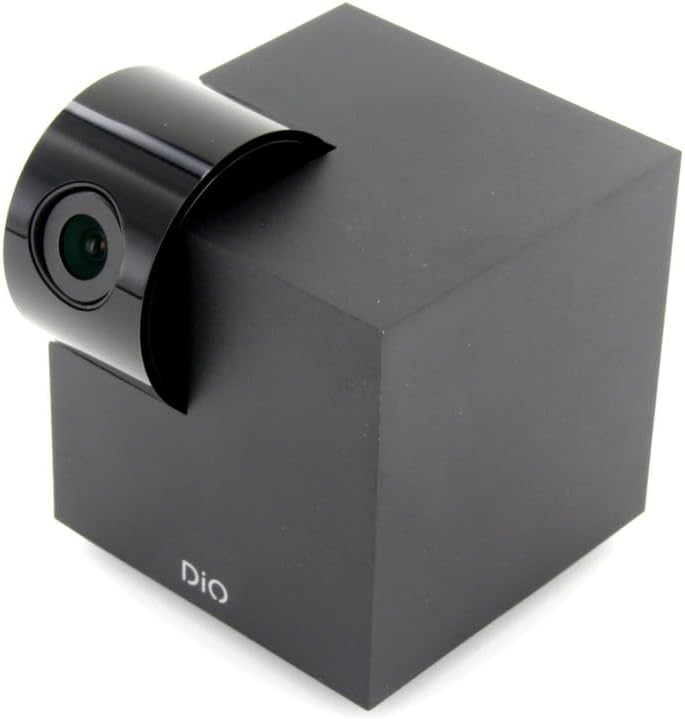
Figure 5.1: The DiOCAMRI01 camera in its standard upright position.

Figure 5.2: Camera placed on a shelf, demonstrating discreet integration.

Figure 5.3: Camera mounted on a ceiling for overhead surveillance.
5.2 የማይክሮ ኤስዲ ካርድ መጫን (አማራጭ)
To enable local video recording, insert a Micro SD card (up to 128GB, not included) into the designated slot on the camera. Ensure the camera is powered off before inserting or removing the card.
5.3 የካሜራ መዳረሻን መጋራት
The DiO Cam+ app allows you to easily share access to your camera with family members or trusted friends. Navigate to the camera settings within the app and select the sharing option to invite others to view የቀጥታ ምግብ እና ቅጂዎች።
6. የአሠራር መመሪያዎች
6.1 ቀጥታ ስርጭት View እና የርቀት መቆጣጠሪያ
Once connected, open the DiO Cam+ app to access the live video feed from your camera. From the live view ማያ ገጽ፣ የሚከተሉትን ማድረግ ይችላሉ፦
- አስተካክል። View አንግል Use the on-screen controls to remotely rotate the camera lens up to 350° horizontally and 150° vertically to cover all corners of your room.
- ባለሁለት መንገድ ኦዲዮ፡- በካሜራው ድምጽ ማጉያ በኩል ለመናገር የማይክሮፎኑን አዶ መታ ያድርጉ እና ከካሜራው ማይክሮፎን ድምጽ ያዳምጡ።
- Take Snapshots/Record Video: Capture still images or start manual video recordings directly from the live view.

Figure 6.1: Camera interacting with the DiO Cam+ smartphone application.

ምስል 6.2: ጎን view of the camera, highlighting the rotating lens mechanism.
6.2 Privacy Features (Geo-Fencing and Manual Standby)
The DiOCAMRI01 camera offers advanced privacy protection:
- ጂኦ-አጥር፡ Configure geo-fencing in the app to automatically switch the camera to privacy mode when your smartphone enters a predefined home zone. In privacy mode, the camera lens will retract, ensuring no recording or live viewመከሰት ይከሰታል።
- Manual Standby: You can manually activate or deactivate the camera's standby mode (privacy mode) at any time through the DiO Cam+ app.
- Scheduled Standby: Set a schedule within the app for the camera to automatically enter or exit standby mode at specific times.

Figure 6.3: Camera with lens retracted, indicating privacy mode.
6.3 የእንቅስቃሴ እና የጫጫታ መለየት
The camera can detect motion and noise within its field of view. When triggered, it will send a notification to your smartphone and can automatically begin recording to the Micro SD card.
- የስሜታዊነት ማስተካከያ; Adjust the detection sensitivity (3 levels) in the app settings to minimize false alarms.
- የመቅጃ አማራጮች Configure recording duration (1, 3, or 5 minutes per clip) or continuous recording if a Micro SD card is installed.
7. ጥገና
- ማጽዳት፡ Use a soft, dry cloth to clean the camera body and lens. Do not use liquid cleaners or abrasive materials.
- የሶፍትዌር ማሻሻያ Regularly check the DiO Cam+ app for firmware updates to ensure optimal performance and security. Follow the in-app instructions for any available updates.
- የማይክሮ ኤስዲ ካርድ አስተዳደር፡ በየጊዜው እንደገናview and manage recordings on your Micro SD card. Format the card through the app if necessary to maintain performance.
8. መላ መፈለግ
- ካሜራ ከመስመር ውጭ; Ensure the camera is powered on and connected to your Wi-Fi network. Check your Wi-Fi router and internet connection. Try restarting the camera and your router.
- ከመተግበሪያው ጋር መገናኘት አይቻልም፦ Verify your Wi-Fi password. Ensure your smartphone is connected to a 2.4GHz Wi-Fi network during initial setup, as the camera may not support 5GHz networks.
- ደካማ የቪዲዮ ጥራት፡ Check your internet connection speed. Ensure the camera lens is clean and free from obstructions. Adjust camera placement for optimal lighting.
- Motion/Noise Detection Not Working: Check the sensitivity settings in the app. Ensure the detection zones are correctly configured.
- ወደ SD ካርድ መቅዳት የለም፦ Ensure the Micro SD card is correctly inserted and formatted. Check if the card is full. The camera supports up to 128GB.
- የግላዊነት ሁነታ እያነቃ አይደለም፡ Verify that geo-fencing is enabled and configured correctly in the app, and that your smartphone's location services are active.
9. ዝርዝሮች
| ባህሪ | ዝርዝር መግለጫ |
|---|---|
| የሞዴል ቁጥር | DIOCAM-RI01 |
| የመጫኛ አይነት | የግድግዳ ተራራ |
| የቪዲዮ ቀረጻ ጥራት | 1080 ፒ |
| ቀለም | ነጭ |
| የእቃዎች ብዛት | 1 |
| የተካተቱ አካላት | DiOCAMRI01 WiFi HD 360° Rotating 1080P 2MP Camera with Geo-Fencing |
| ገመድ አልባ የመገናኛ ቴክኖሎጂ | ዋይ ፋይ |
| የቅጽ ምክንያት | Dome (Cube with rotating lens) |
| ውጤታማ የቪዲዮ ጥራት | 1080 |
| Viewማእዘን | 360 ዲግሪ (አግድም) |
| የምሽት ራዕይ ክልል | 10 ሜትር |
| ቁሳቁስ | ብረት |
| ጥራዝtage | 5 ቮልት |
| ዋትtage | 5 ዋት |
| የንጥል መጠኖች (L x W x H) | 9.4 x 4.9 x 31.9 ሴንቲሜትር |
| አምራች | ቺኮን |
| ልዩ ባህሪያት | Local Recording, Night Vision |
| ባትሪዎች ተካትተዋል። | አይ |
| ባትሪዎች ያስፈልጋሉ። | አይ |
| የሚመከር አጠቃቀሞች | የእንቅስቃሴ ምርመራ፣ የሌሊት እይታ |
| የግንኙነት ቴክኖሎጂ | ገመድ አልባ |
| የቤት ውስጥ / የውጪ አጠቃቀም | የቤት ውስጥ |
| ተስማሚ መሣሪያዎች | ስማርትፎን |
| የኃይል ምንጭ | Battery Powered (Note: Product specs indicate 'No batteries required', implying external power) |
| የግንኙነት ፕሮቶኮል | ዋይ ፋይ |
| የመቆጣጠሪያ አይነት | አንድሮይድ |
10. ዋስትና እና ድጋፍ
For information regarding warranty coverage, technical support, or service, please refer to the official Dio webየግዢ ቦታዎን ይጎብኙ ወይም ያነጋግሩ። የግዢ ማስረጃዎን ለዋስትና ጥያቄዎች ያስቀምጡ።
አምራች፡ ቺኮን


