መግቢያ
This manual provides essential instructions for the Lexmark E460DN laser printer. Designed for small and midsize workgroups, the E460DN offers efficient, high-quality monochrome printing with advanced features. This document covers unpacking, setup, operation, maintenance, and troubleshooting to ensure optimal performance of your device.
The Lexmark E460DN is a Certified Refurbished product, meaning it has been tested and certified to function like new. It includes a toner drum and comes with a 90-day warranty.
ምርት አልቋልview
The Lexmark E460DN is a compact laser printer featuring a light gray and dark gray exterior. It is equipped with a user-friendly control panel and supports various paper handling options.
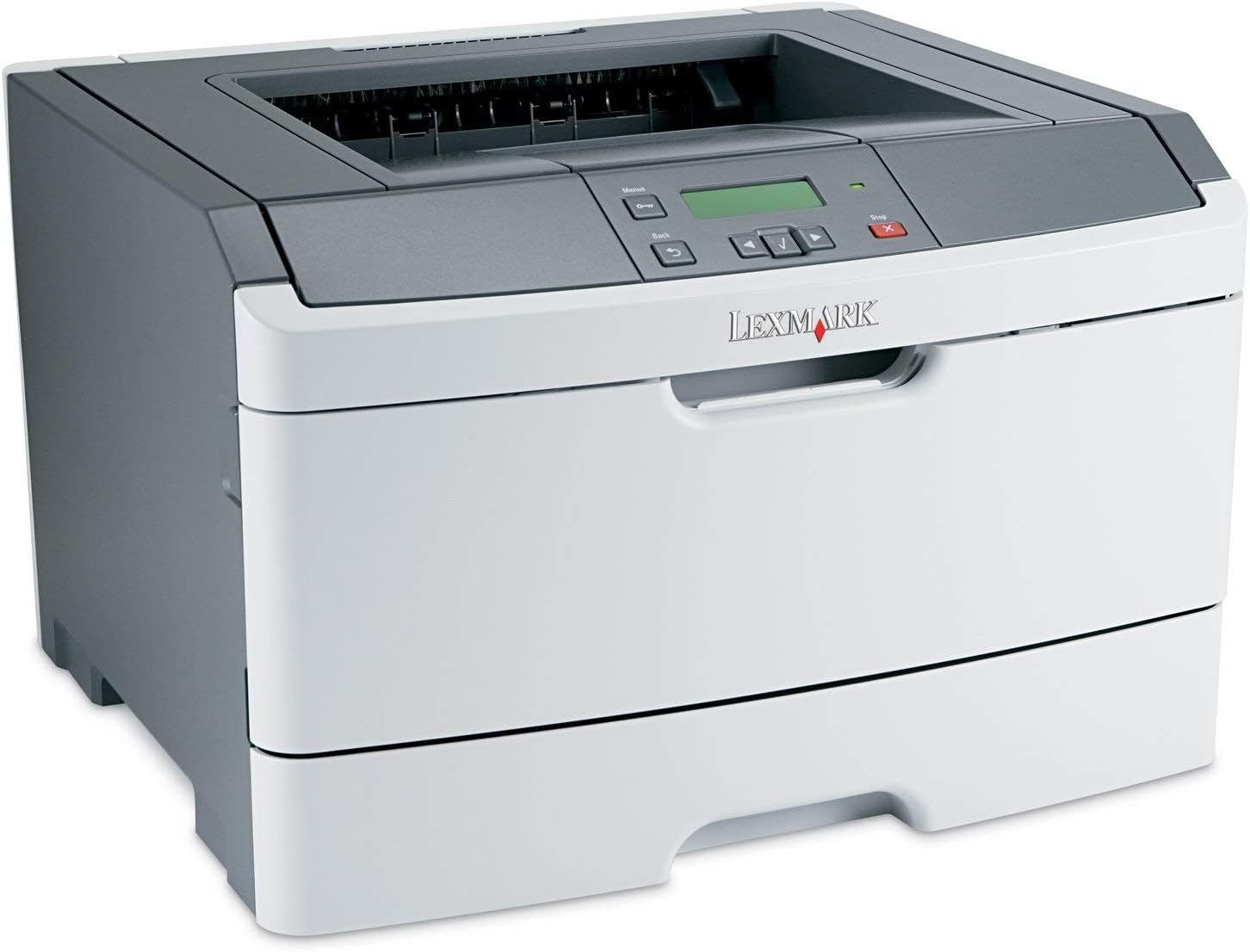
ምስል 1፡ ፊት ለፊት view of the Lexmark E460DN Laser Printer. The image displays the printer's light gray body with a dark gray top section, including the output tray and control panel. The Lexmark logo is visible on the front panel.
ቁልፍ ባህሪዎች
- ፈጣን የህትመት ፍጥነት; Up to 40 pages per minute (ppm) for monochrome documents.
- High Print Quality: True 1200 x 1200 dpi resolution for sharp text and graphics.
- Automatic Duplexing: Standard feature for two-sided printing, reducing paper consumption.
- ለአውታረ መረብ ዝግጁ፦ Ethernet connectivity for shared use in workgroup environments.
- ለተጠቃሚ ምቹ በይነገጽ፡ Four-line operator panel for easy navigation and control.
- የተሻሻለ ደህንነት; Numeric pad for confidential printing.
- ውጤታማ አሠራር; Instant warm-up fuser for fast first-page-out times and reduced power consumption.
የማዋቀር መመሪያዎች
- ማተሚያውን ይንቀሉት፡- አታሚውን ከማሸጊያው በጥንቃቄ ያስወግዱት። ሁሉንም የማሸጊያ ቁሳቁሶች፣ ቴፖች እና የመከላከያ ፊልሞችን ያስወግዱ።
- ማተሚያውን ያስቀምጡ; Position the printer on a stable, level surface with adequate ventilation. Ensure sufficient space around the printer for paper loading and output.
- የግንኙነት ኃይል; Plug the power cord into the printer's power inlet, then into a grounded electrical outlet.
- Install Toner/Drum (if applicable): If the toner cartridge and imaging drum are not pre-installed, follow the instructions provided with the consumables to install them. For refurbished units, these components are typically pre-installed.
- የጭነት ወረቀት Open the paper tray and adjust the paper guides to fit the paper size. Load the desired print media (e.g., plain paper, envelopes) into the tray.
- ከአውታረ መረብ/ኮምፒውተር ጋር ይገናኙ፦
- ኤተርኔት (ገመድ ያለው): የኤተርኔት ገመድ ከአታሚው የኤተርኔት ወደብ ወደ አውታረ መረብዎ ራውተር ወይም መቀየሪያ ያገናኙ።
- USB (Optional, if available): የዩኤስቢ ገመድ ከአታሚው ወደ ኮምፒውተርዎ ያገናኙ።
- ነጂዎችን ጫን; Turn on the printer. Install the appropriate printer drivers on your computer. Drivers can usually be found on the manufacturer's webጣቢያ.
- Perform a Test Print: After driver installation, print a test page to confirm proper setup and connectivity.
የአሠራር መመሪያዎች
የቁጥጥር ፓነል ዳሰሳ፡-
The Lexmark E460DN features a four-line display and several buttons for navigating menus and controlling printer functions. Use the arrow buttons to scroll through options and the 'Menu' or 'Select' button to confirm selections. The 'Back' button allows you to return to previous menus, and the 'Stop' button can cancel print jobs.
Basic Printing:
- አታሚው መብራቱን እና ከኮምፒዩተርዎ ወይም አውታረ መረብዎ ጋር መገናኘቱን ያረጋግጡ።
- በኮምፒተርዎ ላይ ለማተም የሚፈልጉትን ሰነድ ይክፈቱ።
- ይምረጡ File > አትም (ወይም በመተግበሪያዎ ውስጥ ያለው ተመጣጣኝ ትዕዛዝ)።
- Choose the Lexmark E460DN from the list of available printers.
- የህትመት ቅንብሮችን እንደ አስፈላጊነቱ ያስተካክሉ (ለምሳሌ፣ የቅጂዎች ብዛት፣ የወረቀት መጠን፣ የህትመት ጥራት)።
- For two-sided printing, select the duplex option in your printer settings. The E460DN supports automatic duplexing.
- ጠቅ ያድርጉ አትም.
ሚስጥራዊ ህትመት፡
The printer supports confidential printing using a numeric pad. When sending a confidential print job from your computer, you will be prompted to enter a PIN. To release the job at the printer, enter the same PIN using the control panel's numeric pad.
ጥገና
Toner Cartridge and Imaging Drum Replacement:
The Lexmark E460DN uses a combined toner cartridge and imaging drum unit. The printer's control panel will display early-warning alerts for low toner. When prompted:
- የአታሚውን የፊት መግቢያ በር ይክፈቱ።
- Carefully remove the old toner/drum unit by pulling it straight out.
- Unpack the new toner/drum unit and gently shake it to distribute the toner.
- Insert the new unit into the printer until it clicks into place.
- የመግቢያ በርን ዝጋ።
Dispose of used toner cartridges according to local regulations or return them to Lexmark for recycling.
ማተሚያውን ማጽዳት;
- ውጫዊ፡ ውጫዊ ገጽታዎችን ለስላሳ, መamp፣ ከጥጥ ነፃ የሆነ ጨርቅ። ገላጭ ማጽጃዎችን ወይም ፈሳሾችን አይጠቀሙ.
- የውስጥ፡ Periodically clean the paper path and other accessible interior areas to remove dust and paper debris. Refer to the printer's on-screen messages or full service manual for detailed internal cleaning procedures.
መላ መፈለግ
This section provides solutions to common issues you may encounter with your Lexmark E460DN printer. For more complex problems, consult the full service manual or Lexmark support.
የተለመዱ ጉዳዮች እና መፍትሄዎች:
- አታሚ ምላሽ አይሰጥም፡-
- የኃይል ግንኙነቶችን ያረጋግጡ እና አታሚው መብራቱን ያረጋግጡ።
- የአውታረ መረብ ወይም የዩኤስቢ ገመድ ግንኙነቶችን ያረጋግጡ።
- አታሚውን እና ኮምፒተርዎን እንደገና ያስጀምሩ.
- የአታሚ ሾፌሮች በትክክል መጫኑን እና መዘመኑን ያረጋግጡ።
- የወረቀት መጨናነቅ;
- Follow the instructions on the printer's display or in the full service manual to locate and clear jammed paper.
- ወረቀቱ በትክክል መጫኑን እና በትሪው ውስጥ ከመጠን በላይ አለመሞላቱን ያረጋግጡ።
- የሚመከሩ የወረቀት አይነቶችን ይጠቀሙ።
- ደካማ የህትመት ጥራት፡-
- Check toner levels. Replace the toner/drum unit if low or empty.
- Ensure the imaging drum is clean and free from damage.
- Perform a print quality test from the printer's menu to diagnose issues.
- Clean the printer's interior as described in the maintenance section.
- የስህተት መልዕክቶች፡-
Refer to the customizable operator panel messaging for specific error codes or descriptions. Consult the full service manual for detailed explanations and solutions for each error message.
ዝርዝሮች
| ባህሪ | ዝርዝር መግለጫ |
|---|---|
| የሞዴል ቁጥር | E460DN |
| የህትመት ቴክኖሎጂ | ሌዘር |
| የአታሚ ውፅዓት | ሞኖክሮም |
| ከፍተኛ የህትመት ፍጥነት (ሞኖክሮም) | Up to 40 ppm (letter-size paper) |
| የህትመት ጥራት | 1200 x 1200 ዲፒአይ |
| Duplex ማተሚያ | Automatic (Dual-sided printing) |
| የግንኙነት ቴክኖሎጂ | Wired; Ethernet |
| የሃርድዌር በይነገጽ | ኤተርኔት |
| የማህደረ ትውስታ ማከማቻ አቅም | 64 ሜባ |
| ከፍተኛው የግቤት ሉህ አቅም | 300 ሉሆች |
| የውጤት ሉህ አቅም | 150 ሉሆች |
| የህትመት ሚዲያ ይደገፋል | ኤንቬሎፕ ፣ ተራ ወረቀት |
| የምርት ልኬቶች | 14.55 x 15.98 x 10.2 ኢንች |
| ቀለም | ፈካ ያለ ግራጫ / ጥቁር ግራጫ |
| ዩፒሲ | 748926547406 |
ዋስትና እና ድጋፍ
This Lexmark E460DN printer is a Certified Refurbished product and comes with a 90-ቀን የተወሰነ ዋስትና. ይህ ዋስትና በመደበኛ አጠቃቀም ላይ የቁሳቁሶች እና የአሠራር ጉድለቶችን ይሸፍናል ።
For warranty claims, technical support, or further assistance, please refer to the documentation provided with your refurbished product or contact the seller directly. Additional support resources may be available on the official Lexmark webጣቢያ.


