1. መግቢያ
This manual provides essential information for the safe and efficient operation of your Behringer NX3000D Ultra-Lightweight 3000 Watt Class-D Power Amplifier. Please read it thoroughly before use to ensure optimal performance and longevity of your device.
ቁልፍ ባህሪዎች
- Delivers 2 x 1500 Watts into 2 Ohms; 2 x 900 Watts into 4 Ohms; 3000 Watts into 4 Ohms (Bridge mode).
- Weighs less than 7.9 lbs / 3.6 kg, ensuring portability.
- Features revolutionary cool-running high-density Class-D technology for ultimate reliability and near-zero thermal buildup.
- Equipped with an ultra-efficient switch-mode power supply for noise-free audio, superior transient response, and low power consumption.
- High-performance DSP and 24-bit/96 kHz converters provide ultimate signal integrity and extreme dynamic range.
- DSP section includes sophisticated delay, crossover (3 filter types, up to 48 dB/octave), EQ (8 parametric, 2 dynamic), dynamics processing, and lockable security settings.
2. ጠቃሚ የደህንነት መመሪያዎች
የእርስዎን ሲጠቀሙ ሁል ጊዜ እነዚህን መሰረታዊ የደህንነት ጥንቃቄዎች ይከተሉ ampማስታገሻ ፦
- እነዚህን መመሪያዎች ያንብቡ.
- እነዚህን መመሪያዎች ጠብቅ.
- ሁሉንም ማስጠንቀቂያዎች ያዳምጡ።
- ሁሉንም መመሪያዎች ይከተሉ.
- ይህንን መሳሪያ በውሃ አጠገብ አይጠቀሙ.
- በደረቅ ጨርቅ ብቻ አጽዳ.
- የአየር ማናፈሻ ክፍተቶችን አያግዱ። በአምራቹ መመሪያ መሰረት ይጫኑ.
- እንደ ራዲያተሮች፣ ሙቀት መመዝገቢያዎች፣ ምድጃዎች፣ ወይም ሌሎች መሳሪያዎችን (ያጠቃልለው) ካሉ የሙቀት ምንጮች አጠገብ አይጫኑ። ampማሞቂያዎች) ሙቀትን ያመነጫሉ.
- የፖላራይዝድ ወይም የመሠረት አይነት መሰኪያ የደህንነት ዓላማን አያሸንፉ። የፖላራይዝድ መሰኪያ አንዱ ከሌላው የሚበልጥ ሁለት ቢላዎች አሉት። የመሠረት ዓይነት መሰኪያ ሁለት ቢላዎች እና ሦስተኛው የመሠረት ፕሮንግ አለው። ለደህንነትዎ ሲባል ሰፊው ምላጭ ወይም ሶስተኛው ዘንበል ተዘጋጅቷል. የቀረበው መሰኪያ ወደ መውጫዎ የማይገባ ከሆነ፣ ጊዜው ያለፈበትን መውጫ ለመተካት የኤሌትሪክ ባለሙያ ያማክሩ።
- የኤሌክትሪክ ገመዱን ከመራመድ ወይም ከመቆንጠጥ ይከላከሉ, በተለይም በፕላጎች, ምቹ መያዣዎች እና ከመሳሪያው የሚወጡበት ቦታ.
- በአምራቹ የተገለጹ አባሪዎችን/መለዋወጫዎችን ብቻ ይጠቀሙ።
- በአምራቹ በተጠቀሰው ጋሪ፣ ቁም፣ ትሪፕድ፣ ቅንፍ ወይም ጠረጴዛ ብቻ ይጠቀሙ ወይም በመሳሪያው ይሸጣል። ጋሪ ጥቅም ላይ በሚውልበት ጊዜ ከጫፍ በላይ ጉዳት እንዳይደርስ የጋሪውን/የመሳሪያውን ጥምረት ሲያንቀሳቅሱ ይጠንቀቁ።
- ይህንን መሳሪያ በመብረቅ አውሎ ንፋስ ጊዜ ወይም ለረጅም ጊዜ ጥቅም ላይ በማይውልበት ጊዜ ይንቀሉት።
- ሁሉንም አገልግሎቶች ብቁ ለሆኑ የአገልግሎት ሰራተኞች ያመልክቱ። አፓርትመንቱ በማናቸውም መንገድ ጉዳት ከደረሰ በኋላ ማገልገል ያስፈልጋል፣ ለምሳሌ የኃይል ማስተላለፊያ ገመድ ወይም መሰኪያ ሲበላሽ፣ ፈሳሽ ሲፈስ ወይም ዕቃው ውስጥ ሲወድቅ፣ መሳሪያው ለዝናብ ወይም ለእርጥበት ሲጋለጥ፣ መደበኛውን የማይሰራ ከሆነ። , ወይም ተጥሏል.
3. በሳጥኑ ውስጥ ያለው
Upon unpacking your Behringer NX3000D, ensure all items listed below are present and in good condition:
- Behringer NX3000D 3000W Ultra-Lightweight Class-D Power Ampማብሰያ
- የኃይል ገመድ
- Quick Start Guide (this document serves as the comprehensive manual)
ማንኛቸውም እቃዎች ከጠፉ ወይም ከተበላሹ እባክዎን ወዲያውኑ አከፋፋይዎን ያነጋግሩ።
4. ምርት አብቅቷልview
Familiarize yourself with the front and rear panels of your NX3000D ampማብሰያ
4.1 የፊት ፓነል

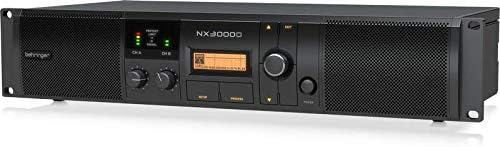
ምስል፡ ፊት ለፊት view of the Behringer NX3000D Power Amplifier, showing the main display, control knobs for channels A and B, and status indicators.
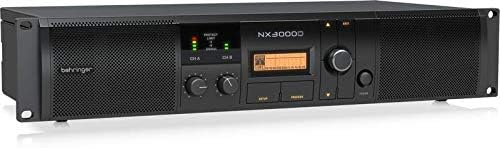
ምስል፡ የማዕዘን ፊት view of the Behringer NX3000D Power Amplifier, highlighting the rack-mountable design and ventilation grilles.
- የኃይል ቁልፍ፡- ይለውጠዋል ampማብሪያ / ማጥፊያ አብራ ወይም አጥፋ።
- Level Controls (CH A/CH B): ለእያንዳንዱ ሰርጥ የግቤት ትብነትን ያስተካክሉ።
- LCD ማሳያ፡- Shows DSP settings, operating modes, and status information.
- Navigation Buttons (SETUP, PROCESS, UP/DOWN, EXIT): Used to navigate and adjust DSP parameters.
- LED Indicators (SIGNAL, LIMIT, PROTECT): Provide visual feedback on signal presence, clipping, and protection status.
4.2 የኋላ ፓነል

ምስል: የኋላ view of the Behringer NX3000D Power Amplifier, displaying input and output connectors, cooling fan, and power inlet.
ምስል፡ አንግል ያለው የኋላ view of the Behringer NX3000D Power Amplifier, showing the USB port for PC connection and additional ventilation.
- የኤሲ ግቤት፡- በተሰጠው የኃይል ገመድ በመጠቀም ከዋናው የኃይል አቅርቦት ጋር ይገናኛል።
- Input Connectors (CH A/CH B): XLR/TRS combo jacks for connecting audio sources.
- Output Connectors (CH A/CH B): Twist-lock speaker connectors for connecting loudspeakers.
- የዩኤስቢ ወደብ፡ For connecting to a computer for DSP control and firmware updates.
- የማቀዝቀዝ አድናቂ፡ Ensures proper thermal management of the ampማብሰያ
5. ማዋቀር
Follow these steps to set up your Behringer NX3000D ampማስታገሻ ፦
- አቀማመጥ፡- አስቀምጥ amplifier in a well-ventilated area, away from direct sunlight, heat sources, and moisture. Ensure adequate space around the unit for airflow. For rack mounting, secure the amplifier using appropriate rack screws.
- የኃይል ግንኙነት; Connect the supplied AC power cable to the AC input on the rear panel of the amplifier and then to a suitable power outlet. Ensure the ampየሊፋየር የኃይል ማብሪያ / ማጥፊያ ከመገናኘቱ በፊት ጠፍቷል ቦታ ላይ ነው።
- የግቤት ግንኙነቶች፡- Connect your audio source (e.g., mixer, audio interface) to the Input Connectors (CH A and/or CH B) on the rear panel using XLR or 1/4" TRS cables.
- የውጤት ግንኙነቶች Connect your passive loudspeakers to the Output Connectors (CH A and/or CH B) using high-quality speaker cables with twist-lock connectors. Ensure correct polarity (+ to + and - to -) and that the impedance of your speakers matches the amplifier's capabilities (2 Ohms, 4 Ohms, or Bridge mode 4 Ohms).
- የመጀመሪያ ኃይል በርቷል፡ With all connections secure and input levels turned down, switch the amplifier's power button to the ON position. The display will illuminate, and the unit will perform a self-test.
6. በመስራት ላይ Ampማብሰያ
The Behringer NX3000D features advanced DSP control for precise sound optimization.
6.1 መሠረታዊ አሠራር
- የማስተካከያ ደረጃዎች: Slowly increase the Level Controls for CH A and/or CH B until the desired volume is achieved. Monitor the SIGNAL and LIMIT LEDs to prevent clipping. The SIGNAL LED indicates audio presence, while the LIMIT LED indicates that the signal is approaching clipping.
- የመከታተያ ሁኔታ፡ The PROTECT LED will illuminate if the amplifier enters protection mode due to overheating, short circuits, or other issues. If this occurs, turn off the amplifier, resolve the issue, and then power it back on.
6.2 የ DSP መቆጣጠሪያ
The integrated DSP allows for comprehensive sound shaping and system management:
- Accessing DSP Settings: የሚለውን ተጠቀም ማዋቀር button to enter the main DSP menu. Navigate through options using the ወደላይ/ወደታች buttons and confirm selections with the rotary encoder.
- የመስቀል በዓል Configure high-pass and low-pass filters for each channel. Choose from 3 filter types (e.g., Butterworth, Linkwitz-Riley) and slopes up to 48 dB/octave. This is crucial for integrating subwoofers or bi-ampስርዓቶች.
- ማመጣጠን (EQ)፦ Utilize the 8 parametric EQs and 2 dynamic EQs per channel to fine-tune the frequency response. This helps in correcting room acoustics or tailoring the sound to specific preferences.
- መዘግየት፡- Apply delay to individual channels to align speakers in different physical positions, ensuring phase coherence.
- ዳይናሚክስ ፕሮሰሲንግ፡ Adjust compression, limiting, and gating settings to control the dynamic range of your audio.
- SmartSense Loudspeaker Impedance Compensation: This feature automatically adjusts the amplifier's output to match the loudspeaker impedance, providing consistent power delivery and improved sound quality.
- የደህንነት ቅንብሮች፡- Lock DSP settings to prevent unauthorized changes, ideal for fixed installations.
For detailed DSP parameter adjustments, refer to the full software manual available on the Behringer website or connect the amplifier to a PC via the USB port for software control.
7. ጥገና
ትክክለኛ ጥገና የእንስሳዎን ረጅም ዕድሜ እና ከፍተኛ አፈፃፀም ያረጋግጣል ampማብሰያ
- ማጽዳት፡ የውጭውን ክፍል በመደበኛነት ያጽዱ ampለስላሳና ደረቅ ጨርቅ ያለው ሊፋየር። ፈሳሽ ማጽጃዎችን ወይም መሟሟቶችን አይጠቀሙ። የአየር ማናፈሻ ግሪሎች ከአቧራና ከቆሻሻ የፀዱ መሆናቸውን ያረጋግጡ።
- የአየር ማናፈሻ; ሁልጊዜ መሆኑን ያረጋግጡ amplifier's ventilation openings are not obstructed. Overheating can lead to reduced performance and potential damage.
- ማከማቻ፡ በማከማቸት ከሆነ amplifier for an extended period, disconnect it from power, clean it, and store it in a cool, dry place, preferably in its original packaging or a protective case.
8. መላ መፈለግ
If you encounter issues with your Behringer NX3000D, consult the table below for common problems and solutions.
| ችግር | ሊሆን የሚችል ምክንያት | መፍትሄ |
|---|---|---|
| ኃይል የለም | Power cable disconnected; Power outlet faulty; Ampየሊፋየር ፊውዝ ተነፋ። | Check power cable connection; Test outlet with another device; Contact qualified service personnel for fuse replacement. |
| ምንም የድምፅ ውፅዓት የለም። | Input/output cables disconnected or faulty; Speaker impedance mismatch; Amplifier in protect mode; Input levels too low. | Check all cable connections; Verify speaker impedance; Check PROTECT LED and resolve underlying issue; Increase input levels gradually. |
| የተዛባ ድምጽ | Input signal too high (clipping); Speaker impedance mismatch; Faulty cables or speakers. | Reduce input signal (monitor LIMIT LED); Verify speaker impedance; Test with different cables/speakers. |
| Amplifier overheats (PROTECT LED on) | Insufficient ventilation; Excessive load (low impedance speakers); Prolonged high-power operation. | Ensure proper ventilation; Use speakers with correct impedance; Reduce output level or allow cooling time. |
If the problem persists after attempting these solutions, please contact Behringer support or a qualified service technician.
9. ቴክኒካዊ ዝርዝሮች
| ባህሪ | ዝርዝር መግለጫ |
|---|---|
| የምርት ስም | Behringer |
| የሞዴል ቁጥር | NX3000D |
| የውጤት ዋትtage | 2 x 1500 Watts (2 Ohms); 2 x 900 Watts (4 Ohms); 3000 Watts (4 Ohms Bridge mode) |
| ተናጋሪ Ampየመፍቻ ዓይነት | ክፍል-መ |
| የእቃው ክብደት | 7.92 ፓውንድ / 3.6 ኪ.ግ |
| የምርት ልኬቶች | 19.02 x 9.09 x 3.7 ኢንች |
| የማገናኛ አይነት | Twist-lock (Outputs), XLR/TRS Combo (Inputs) |
| የኃይል ምንጭ | ባለገመድ ኤሌክትሪክ |
| ጥራዝtage | 100 ቪ |
| ቀለም | ጥቁር |
| DSP | High-performance DSP with 24-bit/96 kHz converters, delay, crossover, EQ, dynamics processing, SmartSense Impedance Compensation |
10. ዋስትና እና ድጋፍ
10.1 የምርት ዋስትና
The Behringer NX3000D amplifier typically comes with a የ 3 ዓመት የተወሰነ ዋስትና, indicating its design and engineering quality. Please refer to the warranty card included with your product or visit the official Behringer webለዝርዝር ውሎች እና ሁኔታዎች ጣቢያ.

Image: Behringer logo with a '3 Years Warranty' badge, indicating the product is designed and engineered in Germany.
10.2 የቴክኒክ ድጋፍ
For technical assistance, troubleshooting beyond this manual, or service inquiries, please visit the official Behringer website or contact their customer support. You can find more information and resources at the የቤሪንገር መደብር.


