1. ምርት አብቅቷልview
The GREENCYCLE Smart Wireless Light Switch and Receiver system provides a convenient solution for controlling lights and appliances. This kit includes a wireless switch panel and a compact receiver module. It supports traditional manual control, remote control via a smartphone application, and voice control through Amazon Alexa and Google Home. The system is designed for easy installation without the need for new wiring to the switch location, offering flexibility in placement and control.

ምስል 1፡ GREENCYCLE Smart Wireless Light Switch and Receiver. The image displays the white, rectangular wireless switch panel on the left and the smaller, white receiver module with an antenna on the right. The receiver has input/output labels and a warning sticker.
2. የጥቅል ይዘቶች
ሁሉም እቃዎች በጥቅልዎ ውስጥ መኖራቸውን ያረጋግጡ፡-
- 1 x Wireless Switch Panel
- 1 x Receiver Module
- 2 x Adhesive Rubbers
- 1 x የተጠቃሚ መመሪያ
3. ዝርዝሮች
| የሞዴል ቁጥር | M-KS-WLSWH-1B-1PK+WLREV-WIFI-1PK-001 |
| ግብዓት Voltagኢ (ተቀባይ) | AC 80-270V፣ 50/60Hz |
| ከፍተኛ ጭነት (ተቀባይ) | 10A / 1000W (LED) |
| የገመድ አልባ ድግግሞሽ | 433MHz (Switch to Receiver) |
| የ Wi-Fi መደበኛ | 2.4GHz (Receiver to Router) |
| Outdoor Transmission Distance | > 500 ሚ |
| Indoor Transmission Distance | >40m (through walls) |
| ባትሪ ቀይር | CR2032 button lithium battery |
| Switch Battery Lifetime | Up to 20 years (approx. 4-6 years with 10 operations/day) |
| Switch Button Life | 800,000 ጊዜ |
| Receiver Life | 400,000 ጊዜ |
| Switch Waterproof Rating | IP54 |
| ቁሳቁስ | ፖሊካርቦኔት |
| የምስክር ወረቀቶች | CE, CQC, FCC, RoHS |

ምስል 2፡ Dimensions of the Wireless Switch (3.38 x 3.38 inches) and Receiver (2.95 x 1.10 x 1.12 inches).
4. ጠቃሚ የደህንነት መረጃ
ከመጫንና ከመጠቀምዎ በፊት ሁሉንም የደህንነት መመሪያዎች ያንብቡና ይረዱ። እነዚህን መመሪያዎች አለመከተል የኤሌክትሪክ ንዝረት፣ እሳት ወይም ሌሎች አደጋዎችን ሊያስከትል ይችላል።
- ማስጠንቀቂያ፡- Always turn off power at the circuit breaker before installing or servicing the receiver module.
- መጫኑ ብቃት ባለው ኤሌክትሪክ ባለሙያ ወይም በአካባቢው ኤሌክትሪክ ኮዶች መሰረት መከናወን አለበት.
- ከከፍተኛው የ10A / 1000W ጭነት ደረጃ አይበልጡ።
- Ensure proper wiring connections (Live In, Neutral In, Live Out, Neutral Out) as indicated on the receiver.
- The wireless switch is IP54 water-resistant, suitable for damp environments like bathrooms, but should not be submerged in water.
- ምርቱን ህጻናት በማይደርሱበት ቦታ ያስቀምጡት.
5. ማዋቀር እና መጫን
5.1 የመቀበያ ሽቦ
- ኃይል ያጥፉ; የመብራት መሳሪያውን የሚቆጣጠረውን የወረዳ ማብሪያ/ማጥፊያ ያግኙና ኃይሉን ያጥፉ። ኃይሉ መጥፋቱን በቮልት ያረጋግጡtagሠ ሞካሪ።
- መቀበያውን ያገናኙ: The receiver module should be wired between the power supply and the light fixture. Refer to the wiring diagram below.
- ያገናኙት። ውስጥ መኖር wire from the power supply to the 'L IN' terminal on the receiver.
- ያገናኙት። ገለልተኛ ውስጥ wire from the power supply to the 'N IN' terminal on the receiver.
- ያገናኙት። ኑሩ wire to the light fixture to the 'L OUT' terminal on the receiver.
- ያገናኙት። ገለልተኛ ውጭ wire to the light fixture to the 'N OUT' terminal on the receiver.
- Secure the receiver: The compact receiver can be placed inside a wiring box, canopy, or electrical box.
- ኃይልን ወደነበረበት መመለስ; Once all connections are secure, turn the power back on at the circuit breaker.

ምስል 3፡ Wiring diagram showing the receiver connected between the power source (AC 80-270V) and the lamp. Live and Neutral input wires connect to 'IN', and Live and Neutral output wires connect to 'OUT'.
5.2 Wireless Switch Placement
The wireless switch requires no wiring and can be mounted anywhere using the provided adhesive rubbers or screws (not included).
- Clean the desired surface for mounting.
- Peel off the backing from the adhesive rubbers and firmly press the switch panel onto the surface.
- Alternatively, use screws to secure the switch panel to a wall or junction box.

ምስል 4፡ Examples of the wireless switch installed in different rooms, demonstrating its flexible placement without wiring.
5.3 Pairing the Wireless Switch with the Receiver
The switch and receiver are typically pre-paired. If re-pairing is needed or for multi-way control setup:
- ተቀባዩ መብራቱን ያረጋግጡ።
- Press and hold the pairing button on the receiver (refer to receiver diagram for location, usually a small button or indicator). The indicator light on the receiver will start blinking.
- While the receiver indicator is blinking, press the desired button on the wireless switch panel.
- The receiver's indicator light will stop blinking or flash a confirmation, indicating successful pairing.
- To set up multi-way control, repeat steps 2-3 with additional wireless switch panels.
5.4 ከWi-Fi እና ከመተግበሪያ ማዋቀር ጋር መገናኘት
To enable smart control features, connect the receiver to your home Wi-Fi network and set up the companion application.
- መተግበሪያውን ያውርዱ፡- ፈልግ the "Wireless Smart" app on the Apple App Store (for iOS) or Google Play Store (for Android) and install it on your smartphone.
- ይመዝገቡ/ይግቡ፡ መለያ ለመፍጠር ወይም ለመግባት መተግበሪያውን ይክፈቱ እና በስክሪኑ ላይ ያሉትን መመሪያዎች ይከተሉ።
- መሣሪያ አክል፡ In the app, select the option to add a new device. Follow the app's instructions to put the receiver into Wi-Fi pairing mode (this usually involves a specific power cycle or button press on the receiver).
- ከWi-Fi ጋር ይገናኙ፡ Enter your 2.4GHz Wi-Fi network name and password when prompted by the app. The receiver will connect to your home network.
- Name the Device: Assign a descriptive name to your smart switch (e.g., "Living Room Light") for easy identification and voice control.

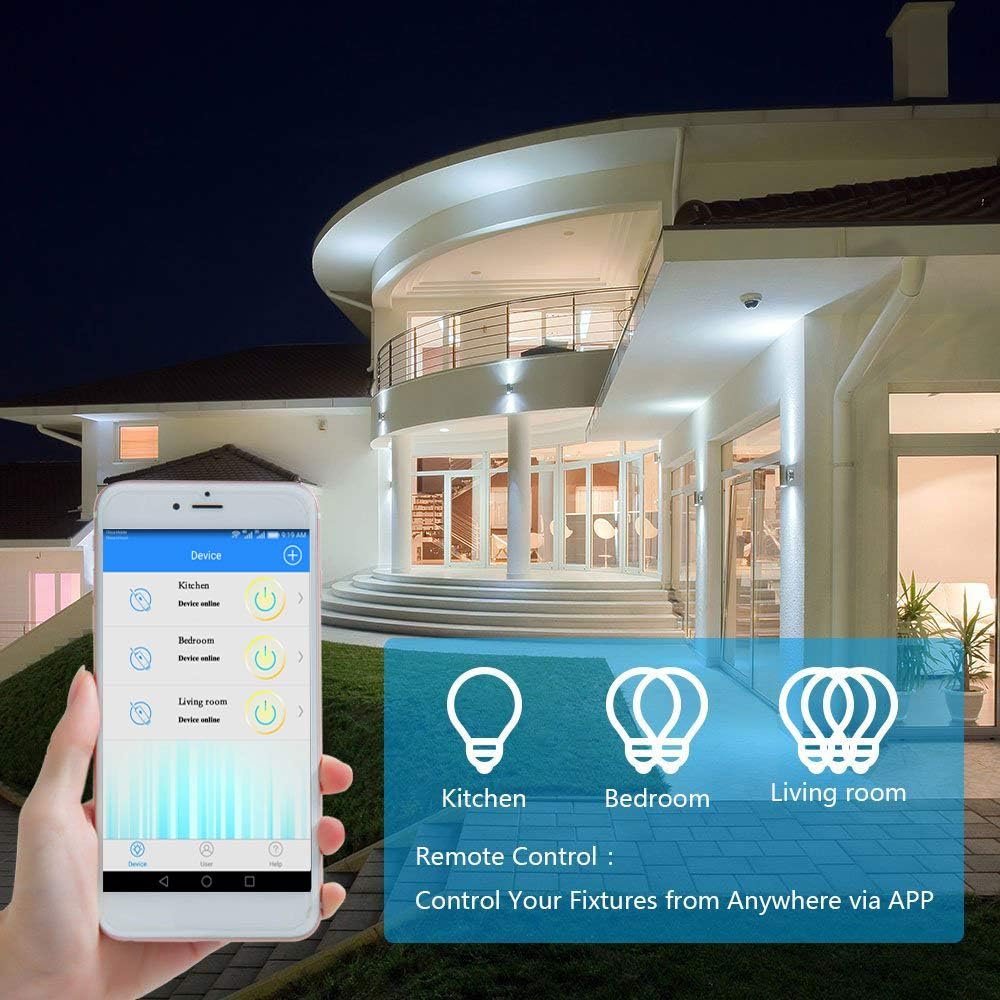
ምስል 5፡ A smartphone displaying the "Wireless Smart" app interface, showing control over various light fixtures (Kitchen, Bedroom, Living Room).
6. የአሠራር መመሪያዎች
6.1 በእጅ መቆጣጠሪያ
Press the wireless switch panel to toggle the connected light or appliance on and off. The switch transmits a 433MHz signal to the receiver.
6.2 የመተግበሪያ ቁጥጥር
Use the "Wireless Smart" application on your smartphone to control your lights from anywhere with an internet connection.
- Open the "Wireless Smart" app.
- Select the desired smart switch from your device list.
- Tap the on/off icon to toggle the light.
- If the connected light fixture supports dimming and the app provides the function, you can adjust brightness levels.
6.3 የድምጽ ቁጥጥር (አማዞን አሌክሳ እና ጉግል ሆም)
Integrate your GREENCYCLE Smart Wireless Light Switch with Amazon Alexa or Google Home for convenient voice control.
- አገናኝ መለያ፡ In your Alexa or Google Home app, navigate to the 'Skills' or 'Works with Google' section. ፈልግ and enable the "Wireless Smart" skill/service. Link your "Wireless Smart" account.
- መሣሪያዎችን ያግኙ ፦ የድምጽ ረዳትዎን በመተግበሪያው ውስጥ "መሳሪያዎችን ፈልግ" ወይም የመሣሪያ ግኝትን በእጅ እንዲጀምር ይጠይቁ።
- የድምጽ ትዕዛዞች፡- አንዴ ከተገኘ በኋላ የሚከተሉትን ትዕዛዞች መጠቀም ይችላሉ፦
- «አሌክሳ፣ [የመሣሪያ ስም]ን አብራ»
- «ሄይ ጉግል፣ [የመሳሪያ ስም]ን አጥፋ»
- "Alexa, set [Device Name] to 50%" (if dimming is supported)
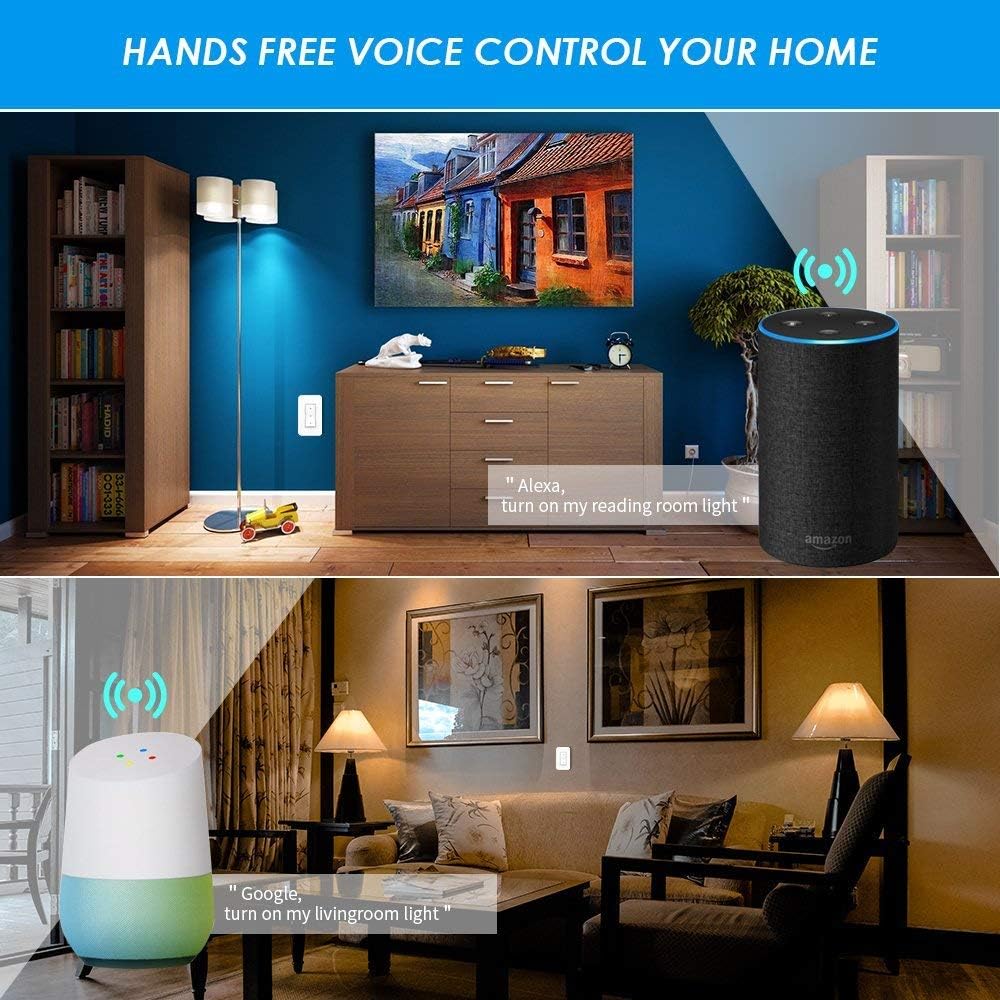
ምስል 6፡ Examples of voice control in a home setting, showing an Amazon Echo and Google Home device responding to commands to control lights.
6.4 የጊዜ ተግባር
Utilize the app's timing functions to automate your lights and appliances.
- Scheduled Timer: Set specific times for your lights to turn on or off daily.
- ቆጣሪ ቆጣሪ ከተወሰነ ጊዜ በኋላ መብራቱ እንዲጠፋ ሰዓት ቆጣሪ ያዘጋጁ።
- የዙር ሰዓት ቆጣሪ፡ ተደጋጋሚ የማብራት/የማጥፋት ዑደቶችን ያዋቅሩ።
- Sunrise/Sunset Sync: Schedule lights to turn on or off based on local sunrise and sunset times.
ምስል 7፡ Screenshots from the app demonstrating scheduled timers for lights, including daily on/off times and synchronization with sunrise/sunset.
7. ጥገና
7.1 ጽዳት
Wipe the wireless switch panel and receiver with a soft, dry cloth. Do not use abrasive cleaners or solvents, as these may damage the surface or internal components.
7.2 Wireless Switch Battery Replacement
The wireless switch is powered by a CR2032 button lithium battery, which has a long lifespan (up to 20 years, or 4-6 years with typical use). If the switch becomes unresponsive, the battery may need replacement.
- Carefully pry open the back cover of the wireless switch panel.
- የድሮውን CR2032 ባትሪ ያስወግዱ።
- አወንታዊው (+) ጎን ወደላይ የሚያይ አዲስ የCR2032 ባትሪ ያስገቡ።
- የኋላ ሽፋኑን ደህንነቱ በተጠበቀ ሁኔታ ወደ ቦታው ይሰኩት።
8. መላ መፈለግ
8.1 Light Not Responding to Wireless Switch
- Check Receiver Power: Ensure the receiver is properly wired and receiving power.
- ማጣመርን ያረጋግጡ፡ Re-pair the wireless switch with the receiver (refer to Section 5.3).
- የባትሪ ፍተሻ፡- Replace the CR2032 battery in the wireless switch (refer to Section 7.2).
- የርቀት/እንቅፋቶች፡ Ensure the switch is within the effective range of the receiver (up to 40m indoors) and there are no excessive obstructions.
8.2 App/Voice Control Not Working
- የWi-Fi ግንኙነት፡- Verify that your receiver is connected to your 2.4GHz Wi-Fi network. Check your router and internet connection.
- የመተግበሪያ ሁኔታ፡- Ensure the "Wireless Smart" app shows the device as "Online".
- መለያ ማገናኘት፡ Confirm that your "Wireless Smart" account is correctly linked to Amazon Alexa or Google Home.
- የመሣሪያ ስም፡- Use the exact device name configured in the app for voice commands.
- የራውተር ጣልቃገብነት፡ If you have a dual-band router, ensure the receiver is connected to the 2.4GHz band.
8.3 Light Flickers or Does Not Turn On/Off Correctly
- የመጫን ተኳኋኝነት Ensure the connected light fixture's wattage does not exceed the receiver's maximum load (1000W).
- የገመድ ፍተሻ፡- Double-check all wiring connections to the receiver (Live In, Neutral In, Live Out, Neutral Out) for looseness or incorrect placement.
- የማደብዘዝ ተግባር; If attempting to dim, ensure the light bulb itself is dimmable and the app supports dimming for this specific device.
9. ዋስትና እና ድጋፍ
For warranty information or technical support, please contact GREENCYCLE customer service. Refer to the product packaging or the GREENCYCLE official webበጣም ወቅታዊ የእውቂያ ዝርዝሮች ለማግኘት ጣቢያ.
አምራች፡ GREENCYCLE TECH INC.


