SERVO 225 Mobile Phone User Manual
Model: SERVO 225
1. መግቢያ
This user manual provides comprehensive instructions for the operation and maintenance of your new SERVO 225 mobile phone. Please read this manual carefully before using the device to ensure proper functionality and to maximize its lifespan. The SERVO 225 is a compact and reliable mobile phone featuring dual SIM capability, a 2.4-inch display, and essential functions for daily communication.

ምስል 1.1: የፊት እና የኋላ view of the SERVO 225 mobile phone, showcasing its compact design and keypad.
2. የደህንነት መረጃ
- መሣሪያውን አይሰብስቡ ወይም አይቀይሩት።
- መሳሪያውን ከውሃ እና እርጥበት ያርቁ.
- ኦሪጅናል ወይም የተረጋገጡ መለዋወጫዎችን ብቻ ይጠቀሙ።
- ከፍተኛ የሙቀት መጠንን ያስወግዱ.
- በሚያሽከረክሩበት ጊዜ ስልኩን አይጠቀሙ.
- በአካባቢያዊ ደንቦች መሰረት ባትሪዎችን እና መሳሪያውን በሃላፊነት ያስወግዱ.
- Before first use, ensure to remove any insulating tape from the battery terminals.
3. የጥቅል ይዘቶች
እባክዎ የጥቅልዎን ይዘት ያረጋግጡ። ማንኛቸውም ነገሮች ከጠፉ ወይም ከተበላሹ፣ ቸርቻሪዎን ያነጋግሩ።
- 1 x SERVO 225 Mobile Phone
- 1 x Battery (1400 mAh Li-ion)
- 1 x ኃይል መሙያ
- 1 x መከላከያ መያዣ
- 1 x የተጠቃሚ መመሪያ (ይህ ሰነድ)

Figure 3.1: The SERVO 225 package contents, including the phone, battery, charger, and protective case.
4. ምርት አብቅቷልview
The SERVO 225 features a classic candy bar design with a physical keypad and a 2.4-inch display. It supports dual SIM cards for flexible network usage.
4.1. አካላዊ ባህሪያት
- ማሳያ፡- 2.4-inch VGA screen.
- የቁልፍ ሰሌዳ Standard alphanumeric keypad with navigation keys.
- ካሜራ፡ 0.3 Megapixel CMOS camera with flash on the rear.
- የኋላ ሽፋን፡ Features a mechanical back cover, available in various colors like Black, Brown, and Gold.
- መጠኖች፡- በግምት 122 x 52 x 11 ሚሜ (4.80 x 2.05 x 0.43 ኢንች)።
- ክብደት፡ በግምት 80 ግራም.

Figure 4.1: Close-up of the SERVO 225's rear, highlighting the camera and dual LED flash for improved low-light photography.

Figure 4.2: Various color options for the SERVO 225, demonstrating the 2.4-inch screen size.
5. ማዋቀር
5.1. የባትሪ መጫን እና መሙላት
- የስልኩን የኋላ ሽፋን ከስልኩ ላይ በቀስታ በመክፈት ያስወግዱት።
- If present, remove the insulating tape from the battery terminals.
- Insert the 1400 mAh Li-ion battery into the battery compartment, ensuring the gold contacts align with the phone's terminals.
- የኋላ ሽፋኑን ይተኩት፣ እስኪጫን ድረስ በጥብቅ ይጫኑት።
- Connect the charger to the phone's charging port and plug it into a power outlet. Charge the battery fully before first use.

Figure 5.1: The 1400 mAh battery and the phone's zinc alloy paint shell design.
5.2. ሲም ካርዶች እና ሚሞሪ ካርድ ማስገባት
The SERVO 225 supports dual SIM cards (Dual GSM) and a T-Flash memory card (up to 32GB, not included).
- With the back cover and battery removed, locate the SIM card slots. The phone supports two SIM cards.
- Carefully insert your SIM cards into the designated slots with the gold contacts facing down.
- Locate the T-Flash (microSD) card slot. Insert the memory card until it clicks into place.
- ባትሪውን እና የኋላ ሽፋኑን እንደገና ይጫኑ.
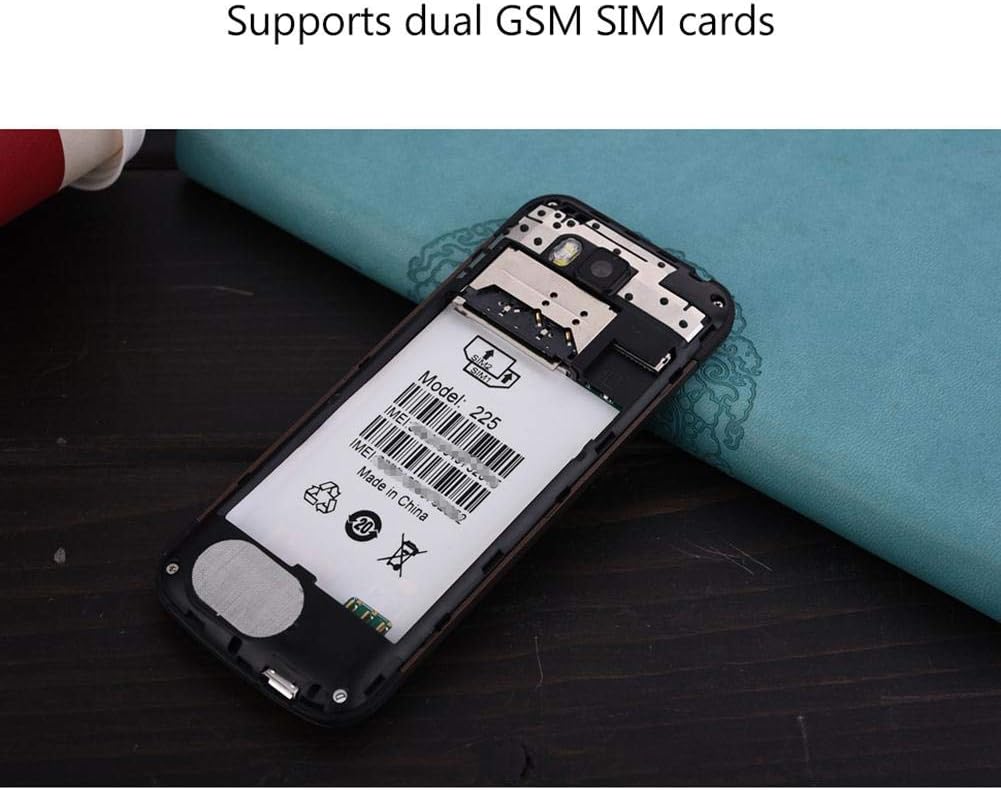
ምስል 5.2 - ውስጣዊ view of the SERVO 225, illustrating the dual SIM card slots and the memory card slot.
6. የአሠራር መመሪያዎች
6.1. ማብራት / ማጥፋት
- ለማብራት፡- ማያ ገጹ እስኪበራ ድረስ የኃይል/ማብቂያ ጥሪ ቁልፉን ተጭነው ይያዙ።
- ለማጥፋት፡- የመብራት ማጥፋት አማራጮች እስኪታዩ ድረስ የኃይል/ማብቂያ ጥሪ ቁልፉን ተጭነው ይያዙ እና ከዚያ "Power off" የሚለውን ይምረጡ።
6.2. መሰረታዊ ተግባራት
- ጥሪዎችን ማድረግ; በቁልፍ ሰሌዳው ላይ የስልክ ቁጥሩን ያስገቡ እና የጥሪ ቁልፉን ይጫኑ።
- ጥሪዎችን በመመለስ ላይ፡- ስልኩ ሲደውል የጥሪ ቁልፉን ይጫኑ።
- መልዕክቶችን በመላክ ላይ፡- Navigate to the "Messages" menu, select "Write message", enter your text, and send to the desired recipient.
- የምናሌ ዳሰሳ፡- Use the navigation keys (up, down, left, right) to browse through menus and the center key to select.
6.3. ቁልፍ ባህሪያት
- ብሉቱዝ፡ Connect to other Bluetooth-enabled devices for file transfer or hands-free communication.
- ኤፍኤም ሬዲዮ Listen to your favorite radio stations. Requires headphones to be plugged in as an antenna.
- የMP3/MP4 ማጫወቻ፡ ኦዲዮ እና ቪዲዮ አጫውት። fileበማህደረ ትውስታ ካርድዎ ላይ ተቀምጧል።
- GPRS/WAP: Access basic internet services and WAP sites.
- ካሜራ፡ Capture photos with the 0.3MP rear camera.
- ተጨማሪ መሳሪያዎች፡- Calendar, Sound Recorder, Calculator, World Clock, Alarm.
7. ጥገና
- ማጽዳት፡ Use a soft, dry cloth to clean the phone's surface. Do not use liquid cleaners or aerosols.
- ማከማቻ፡ ስልኩን ለረጅም ጊዜ ጥቅም ላይ በማይውልበት ጊዜ ቀዝቃዛና ደረቅ ቦታ ያስቀምጡት።
- የባትሪ እንክብካቤ Avoid overcharging or completely draining the battery frequently to prolong its life.
8. መላ መፈለግ
| ችግር | ሊሆን የሚችል ምክንያት | መፍትሄ |
|---|---|---|
| ስልክ አይበራም። | ባትሪ ዝቅተኛ ነው ወይም በትክክል አልተጫነም። | Charge the battery. Ensure battery is properly inserted and insulating tape is removed. |
| ምንም የአውታረ መረብ ምልክት የለም። | ሲም ካርዱ በትክክል አልገባም ወይም ከኔትወርክ ሽፋን ውጪ ነው። | ሲም ካርዱን እንደገና ያስገቡ። የተሻለ የኔትወርክ ሽፋን ወዳለው አካባቢ ይሂዱ። |
| ጥሪዎችን ማድረግ ወይም መቀበል አይቻልም። | No network, SIM card issue, or call barring enabled. | Check network signal. Verify SIM card. Disable call barring if active. |
| የማህደረ ትውስታ ካርድ አልተገኘም። | Memory card not inserted correctly or corrupted. | Reinsert memory card. Try a different memory card. |
9. ዝርዝሮች
| ባህሪ | ዝርዝር መግለጫ |
|---|---|
| የምርት ስም | ሰርቪ |
| ሞዴል | 225 |
| ማሳያ | 2.4-inch VGA |
| መድረክ | Spreadtrum6531CA |
| የሲም ዓይነት | Dual SIM, Dual Standby (Dual GSM) |
| የአውታረ መረብ ድግግሞሽ | GSM850/900/1800/1900 MHz (2G) |
| የውስጥ ማህደረ ትውስታ | 32MB RAM, 32MB ROM |
| ሊሰፋ የሚችል ማህደረ ትውስታ | Up to 32GB (T-Flash / microSD card, not included) |
| ካሜራ | 0.3 Megapixel CMOS (Rear) with Flash |
| ባትሪ | 1400 mAh Li-ion |
| የንግግር ጊዜ | በግምት. 6 ሰዓታት |
| መጠኖች | 122 x 52 x 11 ሚሜ (4.80 x 2.05 x 0.43 ኢንች) |
| ክብደት | በግምት. 80 ግ |
| ግንኙነት | ብሉቱዝ |
| ሌሎች ባህሪያት | FM Radio, MP3/MP4 Player, GPRS, WAP, Calendar, Recorder, Calculator, World Clock, Alarm |
10. ዋስትና እና ድጋፍ
Your SERVO 225 mobile phone comes with a standard manufacturer's warranty. Please refer to the warranty card included in your package for specific terms and conditions. For technical support, troubleshooting assistance, or warranty claims, please contact your point of purchase or the official SERVO customer service channels.
ለዋስትና ዓላማ የግዢ ደረሰኝዎን እንደ ግዢ ማረጋገጫ ያቆዩት።


