መግቢያ
Thank you for choosing the MARVO KG925G Mechanical Gaming Keyboard. This manual provides essential information for setting up, operating, maintaining, and troubleshooting your new keyboard. Please read this manual carefully before use to ensure optimal performance and longevity of your device.
የጥቅል ይዘቶች
ሁሉም እቃዎች በጥቅሉ ውስጥ መኖራቸውን ያረጋግጡ፡-
- MARVO KG925G Mechanical Gaming Keyboard
- የተጠቃሚ መመሪያ (ይህ ሰነድ)
ማዋቀር
የስርዓት መስፈርቶች
- ስርዓተ ክወና: ዊንዶውስ 8 ወይም ከዚያ በኋላ
- የዩኤስቢ 2.0 ወደብ ይገኛል።
የቁልፍ ሰሌዳውን በማገናኘት ላይ
- በኮምፒተርዎ ላይ የሚገኝ የዩኤስቢ 2.0 ወደብ ያግኙ።
- Plug the USB connector of the MARVO KG925G keyboard into the USB port.
- የስርዓተ ክወናው አስፈላጊ የሆኑትን አሽከርካሪዎች በራስ-ሰር ያገኝና ይጭናል. ይህ ሂደት ጥቂት ጊዜ ሊወስድ ይችላል።
- Once the drivers are installed, the keyboard's backlighting will illuminate, indicating it is ready for use.
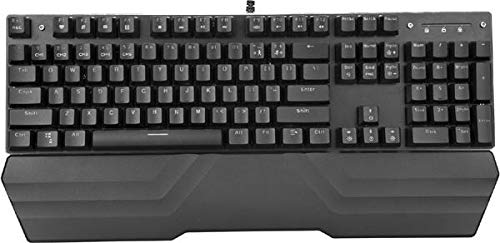
Image: The MARVO KG925G Mechanical Gaming Keyboard with its USB cable connected, ready for use. The keyboard features a wrist rest and illuminated keys.
የአሠራር መመሪያዎች
መሰረታዊ የቁልፍ ሰሌዳ ተግባራት
The MARVO KG925G functions as a standard QWERTY keyboard for typing and general computer use.
የመልቲሚዲያ ቁልፎች
The keyboard includes dedicated multimedia functions, typically accessed via the Fn key combined with the F-keys (F1-F12). Refer to the keycap legends for specific functions such as volume control, media playback, and launching applications.
- Fn + F1-F12፡ Access various multimedia and system functions.
የኋላ መብራት መቆጣጠሪያ
The MARVO KG925G features customizable backlighting. Specific key combinations are used to change lighting modes, brightness, and speed. Consult the keyboard's keycap legends or the manufacturer's website for detailed instructions on advanced lighting customization.
- የመብራት ሁነታዎች; Typically cycled using a dedicated key or Fn + a specific key (e.g., Scroll Lock, Pause Break, or a dedicated lighting key).
- የብሩህነት ማስተካከያ; Often controlled by Fn + Up/Down arrow keys.
ጥገና እና እንክብካቤ
ትክክለኛው ጥገና የቁልፍ ሰሌዳዎን ረጅም ጊዜ እና አፈፃፀም ያረጋግጣል.
- ማጽዳት፡ የቁልፍ ሰሌዳውን ወለል ለማጽዳት ለስላሳና ደረቅ ጨርቅ ይጠቀሙ። ለጥልቅ ጽዳት፣ አቧራና ፍርስራሽ ከቁልፍ ክዳኖቹ መካከል ለማስወገድ የተጨመቀ አየር በቆርቆሮ ይጠቀሙ። ጠበኛ ኬሚካሎችን ወይም ጠለፋ ቁሳቁሶችን ከመጠቀም ይቆጠቡ።
- መፍሰስ In case of liquid spills, immediately unplug the keyboard from your computer. Turn it upside down to drain any liquid and allow it to dry completely for at least 24-48 hours before reconnecting. Do not attempt to use the keyboard while it is wet.
- ማከማቻ፡ የቁልፍ ሰሌዳውን በቀጥታ ከፀሀይ ብርሀን እና ከከፍተኛ ሙቀት ርቆ በቀዝቃዛና ደረቅ ቦታ ያከማቹ።
መላ መፈለግ
If you encounter issues with your MARVO KG925G keyboard, refer to the following common solutions:
| ችግር | ሊሆን የሚችል መፍትሄ |
|---|---|
| የቁልፍ ሰሌዳ ምላሽ እየሰጠ አይደለም። |
|
| Backlighting is not working. |
|
| ቁልፎች በትክክል አልተመዘገቡም። |
|
ዝርዝሮች
- ሞዴል፡ KG925G
- የምርት ስም፡ ማርቮ
- ግንኙነት፡ ዩኤስቢ 2.0
- የቁልፍ ሰሌዳ ዓይነት፡- መካኒካል ጨዋታ ቁልፍ ሰሌዳ
- ባህሪያት፡ Illumination, Wrist Rest, Multimedia Keys
- ተስማሚ ስርዓተ ክወና፡ ዊንዶውስ 8 እና ከዚያ በላይ
- መጠኖች፡- በግምት 47.5 x 18.7 x 8.4 ሴሜ (18.7 x 7.4 x 3.3 ኢንች)
ዋስትና እና ድጋፍ
For warranty information and technical support, please refer to the warranty card included with your product or visit the official MARVO webጣቢያ. ለዋስትና ጥያቄዎች የግዢ ማረጋገጫዎን ያስቀምጡ።


