1. መግቢያ
ስለገዙ እናመሰግናለንasing the Alpha EK-60 61-Key Electronic Piano Keyboard. This manual provides detailed instructions for the proper setup, operation, and maintenance of your new instrument. The EK-60 is designed to offer a rich musical experience with its versatile features, including a wide range of tones and rhythms, intelligent teaching functions, and various connectivity options. Please read this manual thoroughly before using the product to ensure optimal performance and longevity.
2. የደህንነት መረጃ
የኤሌክትሪክ ንዝረትን፣ እሳትን ወይም በመሳሪያው ላይ የሚደርሰውን ጉዳት ለመከላከል የሚከተሉትን ጥንቃቄዎች መከተል አለብዎት፡
- Do not expose the keyboard to rain or moisture.
- Do not place objects filled with liquids, such as vases, on the keyboard.
- የአየር ማናፈሻ ክፍተቶችን አያግዱ።
- የተገለጸውን የኃይል አስማሚ ብቻ ይጠቀሙ።
- ክፍሉን አያፈርሱ ወይም አያሻሽሉት። ሁሉንም አገልግሎት ለሚሰጡ ባለሙያዎች ያስተላልፉ።
- ትናንሽ ልጆች በማይደርሱበት ቦታ ያስቀምጡ.
3. የጥቅል ይዘቶች
እባኮትን ሁሉም የሚከተሉት እቃዎች በጥቅልዎ ውስጥ መካተታቸውን ያረጋግጡ፡
- 1 x Alpha 61-Key Standard Keyboard EK-60
- 1 x ሊስተካከል የሚችል ማቆሚያ
- 1 x የሙዚቃ ወረቀት መያዣ
- 1 x የኃይል አስማሚ
- 1 x የተጠቃሚ መመሪያ (ይህ ሰነድ)
4. ምርት አብቅቷልview
Familiarize yourself with the components of your Alpha EK-60 keyboard.
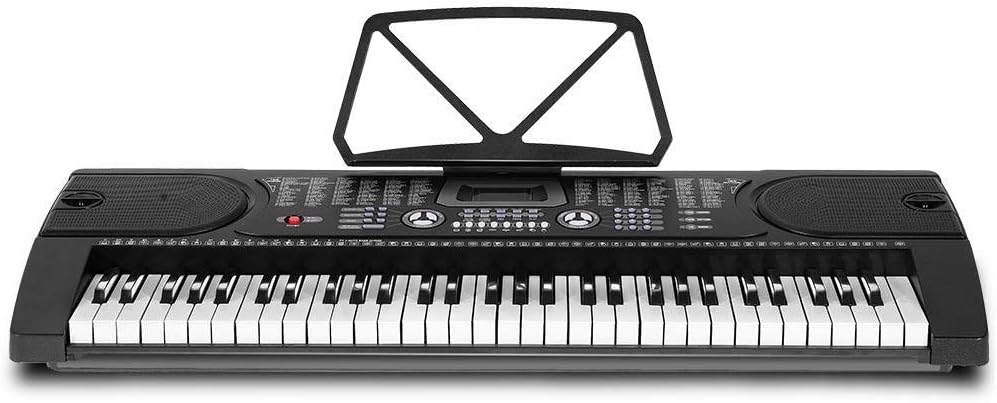
ምስል 4.1፡ ከላይ ወደ ታች view of the Alpha EK-60 keyboard, highlighting the control panel, integrated speakers, and the 61 standard piano keys.

Figure 4.2: Detail of the LED display for convenient settings adjustment and the battery compartment for portable use.

ምስል 4.3፡ View of the multiple jacks including Audio Input, Microphone Input, and Headphone Output for versatile connectivity.
ቁልፍ ባህሪዎች
- 61-Key Standard Piano Keyboard
- LED display for easy navigation
- 24 ማሳያ ዘፈኖች
- 255 timbres (instrument sounds)
- 255 rhythms (accompaniment styles)
- 61 kinds of keyboard percussions
- 8 Panel Percussions
- Master volume, accompaniment volume, and tempo control
- Intelligent teaching function: one-key, follow and ensemble function
- ሪትም ፕሮግራሚንግ ተግባር
- Auto chord and chord timbre option
- የመቅዳት እና የመልሶ ማጫወት ተግባር
- Sustain and vibrato effects
- Microphone input and speaker output
- Headphone jack for silent practice
- Battery powered option (6 x AA-size batteries, not included)
5. ማዋቀር
5.1 ማቆሚያውን መሰብሰብ
- Unpack all components of the adjustable stand.
- Connect the horizontal support bars to the vertical legs, ensuring they are securely fastened.
- Adjust the height of the stand to your preferred playing position using the adjustment knobs. The stand is adjustable from 59cm to 79cm in height.
- Place the keyboard securely on top of the assembled stand.
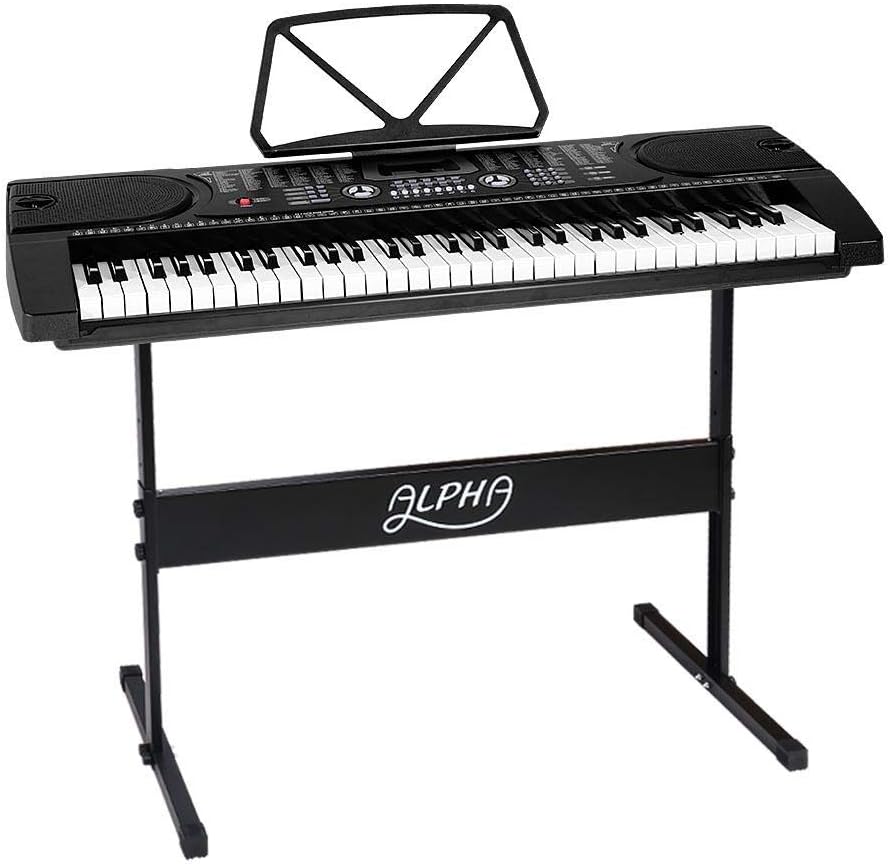
Figure 5.1: The Alpha EK-60 keyboard fully assembled on its adjustable stand, ready for use.
5.2 የቁልፍ ሰሌዳውን ማብቃት
The Alpha EK-60 can be powered by the included AC adaptor or by batteries.
የኤሲ አስማሚውን በመጠቀም-
- Connect the DC plug of the power adaptor to the DC 9V input jack on the rear of the keyboard.
- የኤሲ አስማሚውን ወደ መደበኛ የግድግዳ ሶኬት ይሰኩ።
ባትሪዎችን መጠቀም;
- የባትሪውን ክፍል በቁልፍ ሰሌዳው ስር ያግኙት።
- የባትሪውን ክፍል ክዳን ይክፈቱ.
- Insert 6 x AA-size batteries (not included), ensuring correct polarity (+/-).
- የባትሪውን ክፍል ደህንነቱ በተጠበቀ ሁኔታ ይዝጉ።
Note: When using batteries, disconnect the AC adaptor. The keyboard will automatically switch to battery power if the adaptor is removed.
6. የአሠራር መመሪያዎች
6.1 መሠረታዊ አሠራር
- ማብራት/ማጥፋት፡ የሚለውን ይጫኑ ኃይል ቁልፍ ሰሌዳውን ለማብራት ወይም ለማጥፋት.
- የድምጽ መቆጣጠሪያ፡- የሚለውን ተጠቀም ማስተር ቮልዩም አጠቃላይ የድምፅ ደረጃን ለማስተካከል ቁልፉን ይጫኑ።
- የቴምፖ ቁጥጥር; የሚለውን ተጠቀም TEMPO buttons to adjust the speed of rhythms and demo songs.
6.2 የቃና እና የሪትም ምርጫ
- Tones (Timbre): የሚለውን ይጫኑ ቲምበር button, then use the number pad or +/- buttons to select from 255 different instrument sounds. The selected timbre number will appear on the LED display.
- ሪትሞች፡ የሚለውን ይጫኑ ሪትም button, then use the number pad or +/- buttons to select from 255 accompaniment rhythms. Press ጀምር/አቁም ሪትሙን ለመጀመር ወይም ለመጨረስ።
6.3 Intelligent Teaching Function
The EK-60 features a 3-step intelligent teaching system to help you learn to play.
- አንድ-ቁልፍ; Plays the melody of a demo song by pressing any key.
- ተከተል፡- Waits for you to play the correct note before proceeding with the melody.
- አንድ ላየ: Plays the accompaniment while you play the melody.
To use, select a demo song, then press the desired teaching mode button (አንድ-ቁልፍ, ተከተሉ, ወይም ENSEMBLE).
6.4 መቅዳት እና መልሶ ማጫወት
The keyboard allows you to record your performances.
- የሚለውን ይጫኑ REC button to start recording. The LED display will indicate recording mode.
- የፈለከውን ዜማ አጫውት።
- የሚለውን ይጫኑ ተጫወት ቀረጻውን ለማቆም እና የተቀዳውን አፈጻጸምዎን ለማጫወት አዝራር።
6.5 ግንኙነት
- የጆሮ ማዳመጫ ጃክ የጆሮ ማዳመጫዎችን ከ የጆሮ ማዳመጫ jack for silent practice.
- የማይክሮፎን ግቤት፡ ማይክሮፎን ከ ጋር ያገናኙ MIC ግብዓት jack to sing along while playing.
- የድምጽ ግቤት/ውፅዓት፡- የሚለውን ተጠቀም ኦዲቶ ግብዓት to connect external audio devices (e.g., MP3 player) and the ኦዲኦክ ውጭ to connect to external speakers or an ampማብሰያ
7. ጥገና
Proper care will ensure the longevity of your Alpha EK-60 keyboard.
- ማጽዳት፡ የቁልፍ ሰሌዳውን ለስላሳና ደረቅ ጨርቅ ይጥረጉ። ለጠንካራ ቆሻሻ፣ ትንሽ ዲ ይጠቀሙ።amp cloth and then wipe dry immediately. Do not use abrasive cleaners, waxes, or solvents.
- ማከማቻ፡ When not in use for extended periods, store the keyboard in a cool, dry place away from direct sunlight and extreme temperatures. If using batteries, remove them before long-term storage to prevent leakage.
- አያያዝ፡ የቁልፍ ሰሌዳውን ከመጣል ወይም ለጠንካራ ተጽእኖዎች ከማድረግ ይቆጠቡ.
8. መላ መፈለግ
If you encounter any issues with your keyboard, refer to the following table for common problems and solutions.
| ችግር | ሊሆን የሚችል ምክንያት | መፍትሄ |
|---|---|---|
| ድምጽ የለም። | Volume is too low; Power is off; Headphones connected; Faulty power connection. | Increase master volume; Turn on power; Disconnect headphones; Check power adaptor or replace batteries. |
| ቁልፎች ምላሽ አይሰጡም | Keyboard is in a teaching mode; Internal malfunction. | Exit teaching mode; Power cycle the keyboard. If issue persists, contact support. |
| Rhythm/Demo song not playing | Rhythm/Demo song not selected; START/STOP button not pressed. | Select a rhythm/demo song; Press START/STOP. |
| የተዛባ ድምጽ | Volume too high; External device connected incorrectly. | Reduce volume; Check connections of external devices. |
እነዚህን መፍትሄዎች ከሞከሩ በኋላ ችግሩ ከቀጠለ፣ እባክዎ የደንበኛ ድጋፍን ያግኙ።
9. ዝርዝሮች
| ባህሪ | መግለጫ |
|---|---|
| ሞዴል | EK-60 |
| ቁልፎች | 61 Standard Piano Keys |
| Key Width | 1.9 ሴ.ሜ |
| Tones (Timbres) | 255 |
| ዜማዎች | 255 |
| ማሳያ ዘፈኖች | 24 |
| ከፍተኛ ፖሊፊኒ | 8 |
| ግንኙነት | Audio Input, Audio Output, Headphone Jack (3.5mm), Microphone Input (3.5mm) |
| የኃይል አቅርቦት | AC Adaptor (DC 9V) or 6 x AA-size batteries (not included) |
| ልኬቶች (የቁልፍ ሰሌዳ) | 86 ሴሜ (ኤል) x 32.5 ሴሜ (ወ) |
| Dimensions (Overall with Stand) | 86cm (L) x 32.5cm (W) x 59-79cm (H) |
| ክብደት | 6.2 ኪ |
| ቀለም | ጥቁር |

Figure 9.1: Detailed dimensions of the Alpha EK-60 keyboard and its adjustable stand.
10. ዋስትና እና ድጋፍ
10.1 የዋስትና መረጃ
The Alpha EK-60 keyboard comes with a የ 1 ዓመት ዋስትና from the date of purchase. This warranty covers manufacturing defects and ensures the product is free from defects in material and workmanship under normal use. It does not cover damage caused by misuse, accident, unauthorized modification, or normal wear and tear.
10.2 የደንበኛ ድጋፍ
For any queries, technical assistance, or warranty claims, please contact the seller or manufacturer directly. Please have your purchase receipt and product model number (EK-60) ready when contacting support.


