1. ምርት አብቅቷልview
የ MOOER ማይክሮ ፕሪamp 18 Custom 100 (MMPA18) is a compact digital preamp pedal designed to accurately recreate the sound, dynamics, and response of popular tube amplifiers. Utilizing advanced digital technology, this pedal offers a versatile solution for guitarists seeking high-quality amplifier tones in a miniature form factor.
Key features include dual channels for diverse tonal options, an integrated speaker cabinet simulation for direct recording or PA connection, and dual operating modes to adapt to various performance and recording setups.
2. ባህሪያት
- Sonically accurate digital recreations of classic tube ampሊፋይ ቅድመamp ክፍሎች.
- Dual channels for versatile clean and gain tones.
- Integrated speaker cabinet simulation for direct output.
- Dual operating modes to suit various user needs.
- የታመቀ እና ዘላቂ ንድፍ።
3. መቆጣጠሪያዎች እና ግንኙነቶች
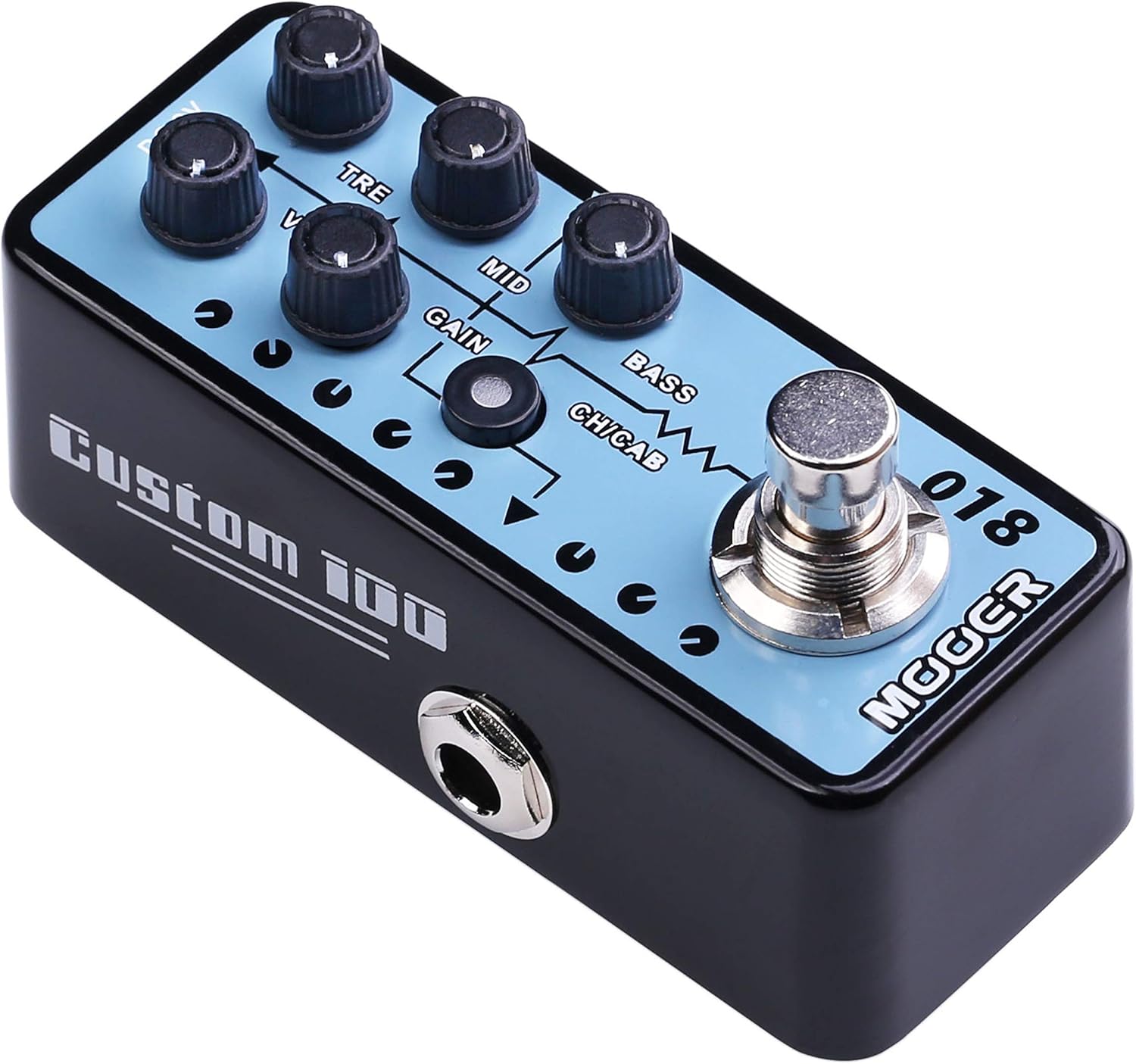
ምስል 1: ከፍተኛ view የ MOOER ማይክሮ ፕሪamp 18 Custom 100, highlighting the control knobs and footswitch.
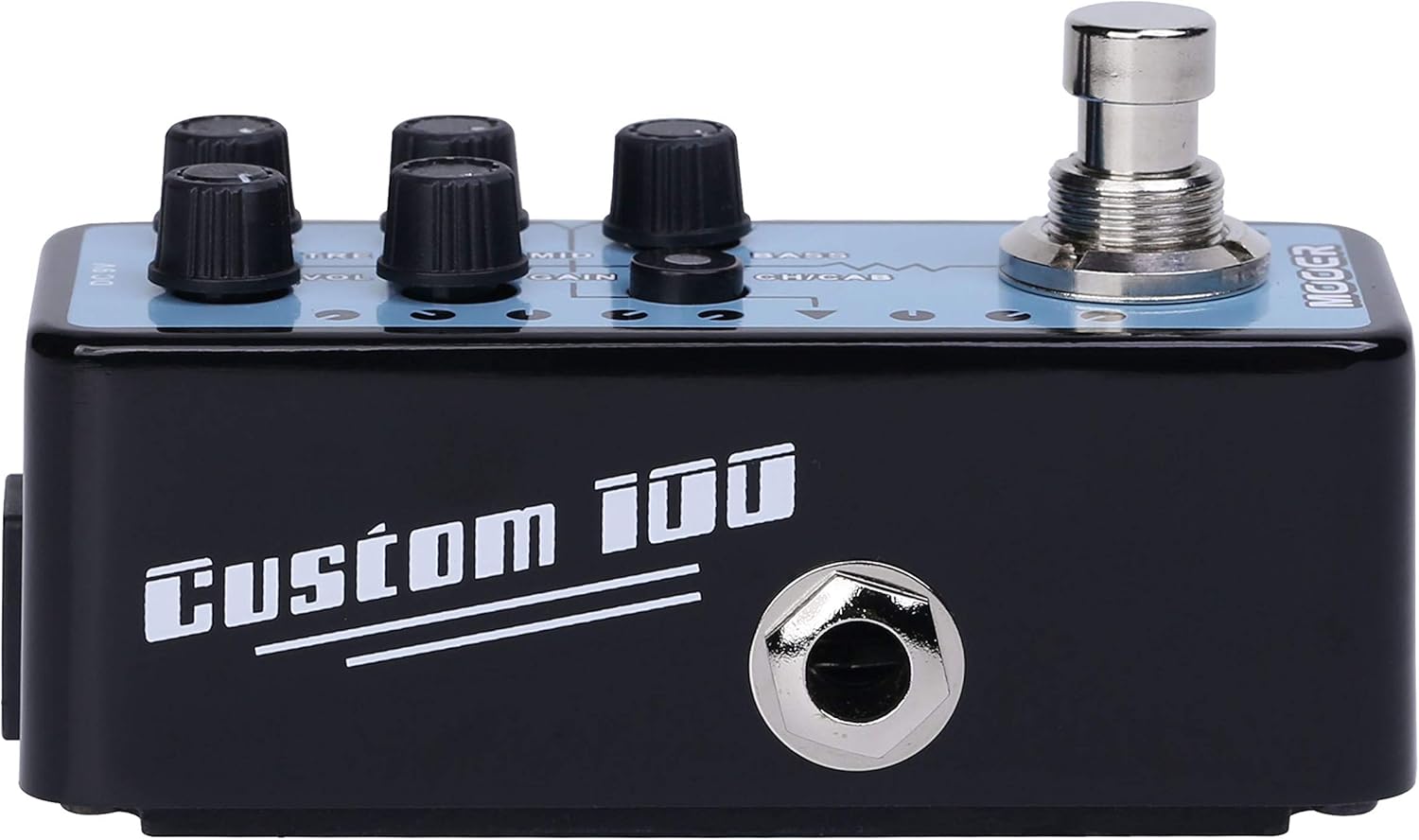
ምስል 2: ጎን view የ MOOER ማይክሮ ፕሪamp 18 Custom 100, illustrating the 1/4" input and output jacks.
መቆጣጠሪያዎች፡-
- VOL (ድምጽ) የቅድሚያውን አጠቃላይ የውጤት ደረጃ ያስተካክላልamp.
- ትሬብል (ትሬብል): ከፍተኛ-ድግግሞሹን ምላሽ ይቆጣጠራል።
- MID (Middle): የመሃል ክልል ድግግሞሽ ምላሽን ያስተካክላል።
- ረብ ከመጠን በላይ የመንዳት/የማዛባት መጠንን ይቆጣጠራል።
- ቤዝ ዝቅተኛ-ድግግሞሹን ምላሽ ያስተካክላል።
- CH/CAB (Channel/Cabinet Simulation Switch): This switch serves two functions:
- In normal operation, it switches between the two available channels (e.g., Clean and Gain).
- When held down, it toggles the integrated speaker cabinet simulation on or off.
- የእግር ኳስ ተጫዋች Engages or bypasses the pedal.
ግንኙነቶች፡
- Input Jack (1/4" / 6.35mm): ጊታርዎን ወይም ሌላ መሳሪያዎን እዚህ ያገናኙ።
- Output Jack (1/4" / 6.35mm): ከእርስዎ ጋር ይገናኙ ampሊፋየር፣ የድምጽ በይነገጽ ወይም ሌሎች ተጽዕኖዎች ፔዳል።
- DC 9V ግብዓት፡- Connect a 9V DC power adapter (center negative, 300mA minimum).
- USB 2.0 (Hardware Interface): For firmware updates or potential software integration.
4. ማዋቀር እና አሠራር
የመጀመሪያ ማዋቀር፡-
- የእርስዎን ያረጋግጡ amplifier and other audio equipment are turned off.
- ጊታርዎን ከ ጋር ያገናኙት። ግቤት ጃክ of the MMPA18.
- ያገናኙት። የውጤት ጃክ of the MMPA18 to the input of your ampሊፋይ ወይም የድምጽ በይነገጽ.
- Connect a 9V DC power adapter (center negative, 300mA minimum) to the ዲሲ 9V ግብዓት.
- የእርስዎን ያብሩት። amplifier and other audio equipment.
መሰረታዊ ተግባር፡-
- Engaging/Bypassing: Press the footswitch to turn the preamp effect on or off. The LED indicator will illuminate when the effect is active.
- የሰርጥ መቀየሪያ፡- በአጭሩ ይጫኑ CH/CAB switch to toggle between the two channels (e.g., a clean channel and a gain channel). The LED color or state may change to indicate the active channel.
- የካቢኔ ማስመሰል; ተጭነው ይያዙት። CH/CAB switch for a few seconds to activate or deactivate the integrated speaker cabinet simulation. This is particularly useful when connecting directly to a mixing console, audio interface, or headphones, providing a more natural, mic'd cabinet sound.
- የድምፅ ማስተካከያ; የሚለውን ተጠቀም VOL, TRE, MID, GAIN, እና BASS knobs to sculpt your desired tone. Experiment with different settings for each channel.
5. ጥገና
- ማጽዳት፡ ፔዳሉን ለማጽዳት ለስላሳ እና ደረቅ ጨርቅ ይጠቀሙ. ገላጭ ማጽጃዎችን ወይም ፈሳሾችን ያስወግዱ።
- ማከማቻ፡ ፔዳሉን በቀጥታ ከፀሀይ ብርሀን እና ከከፍተኛ ሙቀት ርቆ በቀዝቃዛና ደረቅ ቦታ ያከማቹ።
- የኃይል አቅርቦት; Always use a compatible 9V DC (center negative) power supply with a minimum of 300mA. Using an incorrect power supply can damage the unit and void the warranty.
- ግንኙነቶች፡ በየጊዜው የኬብል ግንኙነቶችን በሙሉ መበላሸትና መቀደድ ያረጋግጡ። ጃክሶቹ ከአቧራና ከቆሻሻ የፀዱ መሆናቸውን ያረጋግጡ።
6. መላ መፈለግ
- ድምጽ የለም፡
- ሁሉንም የኬብል ግንኙነቶች (ጊታር፣ ፔዳል፣ amplifier, power supply).
- የኃይል አቅርቦቱ በትክክል መገናኘቱን እና ኃይል መስጠቱን ያረጋግጡ።
- Verify the pedal is engaged (LED illuminated).
- Check the volume settings on the pedal and your ampማብሰያ
- Poor Sound Quality / Excessive Noise:
- ሁሉም ኬብሎች በጥሩ ሁኔታ ላይ መሆናቸውን እና በአግባቡ የተጠበቁ መሆናቸውን ያረጋግጡ።
- Try a different power supply to rule out power-related noise.
- Adjust the GAIN knob; very high gain settings can introduce noise.
- If using the cabinet simulation, ensure it is appropriate for your output device.
- Ensure the pedal is not placed too close to power transformers or other sources of electromagnetic interference.
- ፔዳል ምላሽ አይሰጥም፦
- የኃይል አቅርቦቱን ያላቅቁ እና እንደገና ያገናኙት።
- ችግሩ ከቀጠለ የMOOER ድጋፍን ያነጋግሩ።
- ከመጠን በላይ ማሞቅ; While normal operation may cause some warmth, excessive heat could indicate an issue. Ensure proper ventilation and use the correct power supply. If the pedal becomes unusually hot, discontinue use and contact support.
7. ዝርዝሮች
| ዝርዝር መግለጫ | ዋጋ |
|---|---|
| የሞዴል ቁጥር | MMPA18 |
| የእቃው ክብደት | 5.8 አውንስ (165 ግራም) |
| የምርት ልኬቶች | 3.54 x 3.54 x 3.54 ኢንች |
| ተስማሚ መሣሪያዎች | Musical Instrument(s) |
| የማገናኛ አይነት | 1/4" (6.35mm) Jack, 1/8" (3.5mm) Jack |
| የሃርድዌር በይነገጽ | ዩኤስቢ 2.0 |
| የሲግናል ቅርጸት | ዲጂታል |
| የውጤት ዋትtage | 100 ዋት |
| የኃይል ምንጭ | የ AC አስማሚ |
| ጥራዝtage | 9 ቮልት |
| የምርት ስም | ሞተር |
| ቀለም | Mehrfarbig |
8. ዋስትና እና ድጋፍ
MOOER products are designed for reliability and performance. For specific warranty information, please refer to the warranty card included with your product or visit the official MOOER website. In case of any issues or technical support needs, please contact MOOER customer service through their official channels.
ለተጨማሪ እርዳታ፣ ን መጎብኘት ይችላሉ። MOOER መደብር በአማዞን ላይ.


