1. መግቢያ
This manual provides instructions for the SAFFUN 2.4 GHz Wireless USB Controller, designed for a retro gaming experience. This controller is compatible with various platforms including Windows PC, Mac, Linux, and Raspberry Pi systems. Please read this manual thoroughly before use to ensure proper setup and operation.
2. ምርት አብቅቷልview
The SAFFUN Wireless USB Controller offers a classic SNES-style design with modern wireless connectivity. It features a 2.4 GHz wireless RF connection, providing a range of up to 10 meters for flexible gameplay.
ቁልፍ ባህሪዎች
- የ2.4 GHz ገመድ አልባ ግንኙነት፦ Offers a stable connection with up to 10 meters range.
- ይሰኩ እና ይጫወቱ፡ Generic USB controller that requires no additional setup for most compatible systems.
- ስሜታዊ አዝራሮች፦ Designed for precision control.
- የተራዘመ የባትሪ ህይወት፡ Up to 3 years battery life with a 240mA capacity.
- ፈጣን ኃይል መሙላት; ለሙሉ ክፍያ በግምት 1 ሰዓት።
የመቆጣጠሪያ ክፍሎች፡
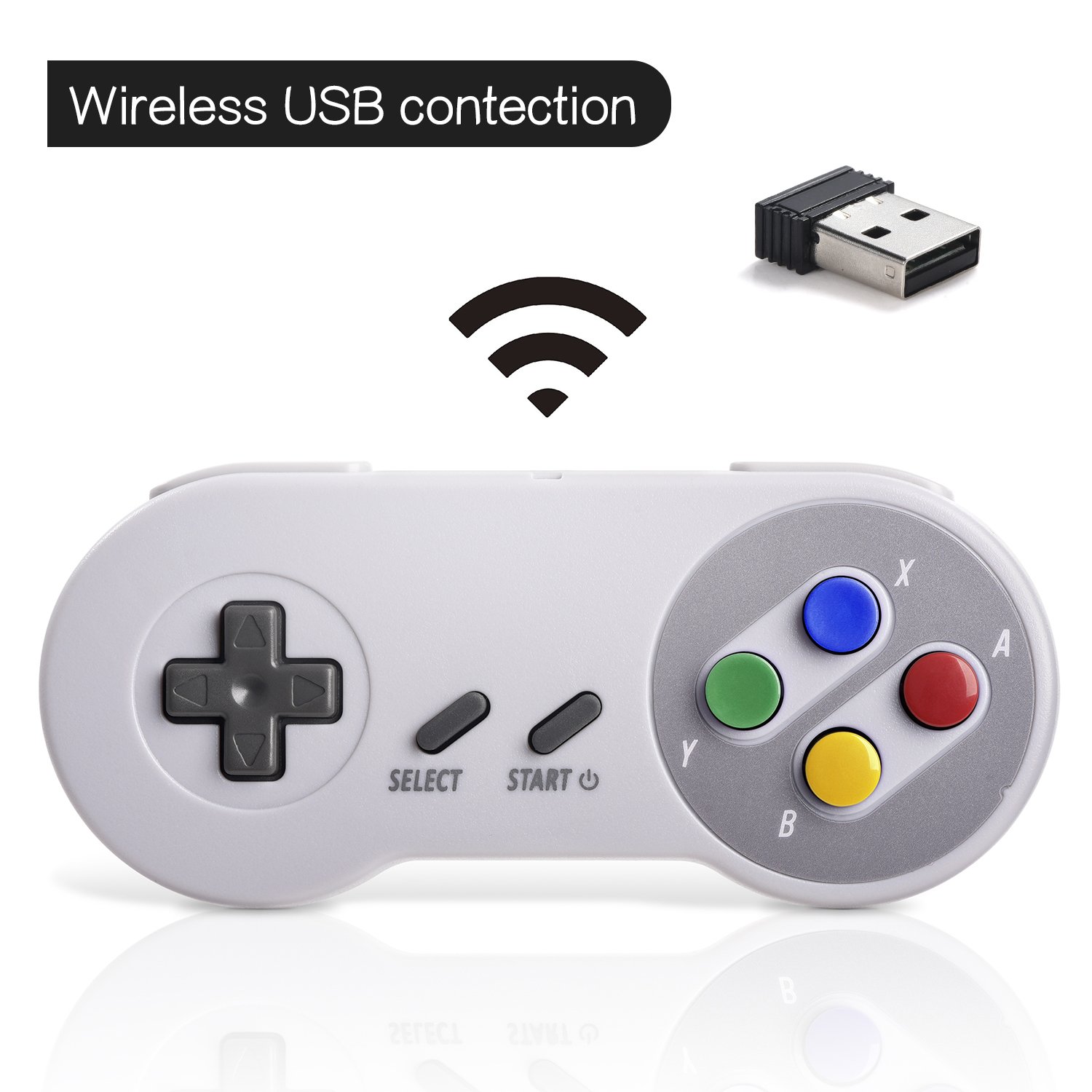

3. ማዋቀር
የመጀመሪያ ግንኙነት፡-
- Insert the 2.4 GHz USB receiver into an available USB port on your PC, Mac, Linux device, or Raspberry Pi.
- Press the 'START' button on the controller to power it on. The controller should automatically connect to the USB receiver. A red indicator light on the controller will confirm connection status.
- If your program or application accepts USB controller input, the controller should be ready for use.
Pairing and Resetting:
If the controller does not pair automatically or experiences connection issues, you may need to reset it:
- የዩኤስቢ መቀበያ ደህንነቱ በተጠበቀ ሁኔታ ወደ መሳሪያዎ መሰካቱን ያረጋግጡ።
- ተጭነው ይያዙት። ምረጥ, ጀምር, እና D-PAD DOWN buttons simultaneously on the controller to initiate a reset and re-pairing sequence.
- The controller should then attempt to re-establish a connection with the USB receiver.

4. የአሠራር መመሪያዎች
The controller functions similarly to a classic SNES controller. The buttons are mapped as follows:
- ዲ-ፓድ፡ Directional control (Up, Down, Left, Right).
- አዝራር ምረጥ ፦ Typically used for menu selections or secondary functions.
- የጀምር አዝራር፡- Used to pause games, confirm selections, or power on/off the controller.
- Action Buttons (Y, X, A, B): Primary action buttons for gameplay.
- የትከሻ አዝራሮች (L፣ R)፦ Located on the top edge of the controller for additional in-game actions.
For specific button assignments within games or emulators, refer to the in-game settings or emulator configuration options.
5. ተኳሃኝነት
የሚደገፉ ስርዓተ ክወናዎች;
- Windows (98, ME, 2000, 2003, XP, Vista, 7, 8, 8.1, 10)
- Linux (Ubuntu, Linux Mint, Android Linux via USB OTG cable)
- Mac OS X and beyond
- Retrogaming operating systems (RetroPie, Recalbox, Happi Game Center, Lakka, ChameleonPi, Piplay)
የሚደገፉ መሳሪያዎች፡-
- PC, Notebook Computer, Laptop Computer
- Android Smartphone (via USB OTG cable)
- Raspberry Pi (RPI, Raspberry pie): Raspberry Pi 1 Model B, Model A, Raspberry Pi 1 Model B+, Raspberry Pi Zero, Raspberry Pi 2, Raspberry Pi 3 Model B, Raspberry Pi 3, Retro Pie

Unsupported Devices:
- አንድሮይድ ቲቪ ሳጥን
- ሲ64 (ኮሞዶር 64)
- Google Chromebook
- የእሳት ቲቪ
- በእንፋሎት
- ቴስላ
- Nintendo NES Classic Edition Console, NES Mini Console, Nintendo SNES Classic Edition Console, SNES Mini Console

የሚደገፉ የጨዋታ አምሳያዎች፡-
- NES, SNES, Snes9x, ZSNES, Higan
- Handheld GBA emulator
- Sega Genesis emulator
- Sega OpenEmu (Only supports OS X)
- RetroArch (Works well on Android)
- BSNES (Ideal for two-player action)
6. ባትሪ መሙላት እና የባትሪ ህይወት
The controller is equipped with a rechargeable battery. To charge the controller:
- Connect the provided charging cable to the micro USB port on the top edge of the controller.
- የኬብሉን ሌላኛውን ጫፍ ከመደበኛ የዩኤስቢ የኃይል ምንጭ (ለምሳሌ የኮምፒውተር ዩኤስቢ ወደብ፣ የዩኤስቢ ግድግዳ አስማሚ) ጋር ያገናኙ።
- The red indicator light on the controller will flash while charging and remain solid when fully charged.
የባትሪ ዝርዝሮች፡
- የባትሪ አቅም: 240mA
- የኃይል መሙያ ጊዜ: በግምት 1 ሰዓት
- ኃይል መሙላትtagሠ: 3.7 ቪ
- Usage time: Up to 3 hours on a full charge
- የባትሪ ደረጃ አመልካች፡ አዎ
7. መላ መፈለግ
የግንኙነት ጉዳዮች፡-
- ተቆጣጣሪው ምላሽ አይሰጥም፡- Ensure the USB receiver is properly inserted into a working USB port. Verify the controller is powered on by pressing the 'START' button.
- የማያቋርጥ ግንኙነት; Move closer to the USB receiver to ensure you are within the 10-meter range. Check for potential interference from other 2.4 GHz wireless devices.
- እንደገና ማጣመር፡ If connection is lost or unstable, perform the reset procedure by holding SELECT + START + D-PAD DOWN simultaneously.
Input/Button Mapping Problems:
- Incorrect button functions: Check the in-game or emulator settings to ensure the controller buttons are correctly mapped. Some emulators may require manual configuration.
- Controller not recognized as SNES type: Some systems or games might incorrectly identify the controller. If possible, manually select a generic USB gamepad or SNES controller profile በሶፍትዌር ቅንብሮች ውስጥ።
የመሙላት ችግሮች፡-
- ተቆጣጣሪው ኃይል እየሞላ አይደለም; Ensure the charging cable is securely connected to both the controller and the power source. Try a different USB port or charging adapter. Check if the red indicator light flashes during charging.
8. ዝርዝሮች
| ባህሪ | ዝርዝር |
|---|---|
| የሞዴል ቁጥር | 8541667389 |
| ግንኙነት | 2.4 GHz Wireless RF |
| ገመድ አልባ ክልል | እስከ 10 ሜትር |
| የምርት ልኬቶች | 5.51 x 2.36 x 0.79 ኢንች |
| የእቃው ክብደት | 8.1 አውንስ |
| የባትሪ ዓይነት | Rechargeable (1 A battery included) |
| የባትሪ አቅም | 240mA |
| የኃይል መሙያ ጊዜ | 1 ሰዓት |
| ኃይል መሙላት Voltage | 3.7 ቪ |
| የአጠቃቀም ጊዜ | 3 ሰዓታት |
| አምራች | SAFFUN |
| የመጀመሪያ ቀን ይገኛል። | ግንቦት 8 ቀን 2018 |
9. ዋስትና እና ድጋፍ
SAFFUN is registered with the United States Patent and Trademark Office. We are committed to 100% customer satisfaction.
- ዋስትና፡- We provide a hassle-free 12-month replacement warranty.
- የደንበኛ አገልግሎት፡ For any questions or support, please feel free to contact us.
