1. መግቢያ
This manual provides essential information for the safe and efficient operation of your Intex SH4004 40-inch HD Ready LED Smart TV. Please read these instructions carefully before using the product and retain them for future reference. Your Intex SH4004 TV features a 40-inch HD Ready LED display, smart TV capabilities with Android OS, built-in Wi-Fi, and multiple connectivity options.
2. የደህንነት መረጃ
ይህንን ቴሌቪዥን ሲጠቀሙ የእሳት፣ የኤሌትሪክ ንዝረት እና የመቁሰል አደጋን ለመቀነስ ሁል ጊዜ መሰረታዊ የደህንነት ጥንቃቄዎችን ይከተሉ።
- የኃይል ምንጭ፡- ቴሌቪዥኑ በተጠቀሰው ቮልት ውስጥ ካለው የኃይል አቅርቦት ጋር መገናኘቱን ያረጋግጡtagሠ ክልል. የኃይል ማሰራጫዎችን ከመጠን በላይ አይጫኑ.
- የአየር ማናፈሻ; የአየር ማናፈሻ ክፍተቶችን አያግዱ. ከመጠን በላይ ሙቀትን ለመከላከል ለትክክለኛው የአየር ፍሰት በቴሌቪዥኑ ዙሪያ በቂ ቦታ ይፍቀዱ.
- ውሃ እና እርጥበት; ቴሌቪዥኑን ለዝናብ እና ለእርጥበት አያጋልጡት። በፈሳሽ የተሞሉ ዕቃዎችን ለምሳሌ የአበባ ማስቀመጫዎች በቴሌቪዥኑ ላይ አታስቀምጡ።
- ማጽዳት፡ ከማጽዳትዎ በፊት ቴሌቪዥኑን ከኃይል መውጫው ያላቅቁት። ለስላሳ እና ደረቅ ጨርቅ ይጠቀሙ። ፈሳሽ ማጽጃዎችን ወይም ኤሮሶል ማጽጃዎችን አይጠቀሙ።
- አቀማመጥ፡- ቴሌቪዥኑን በተረጋጋና ደረጃ ላይ ያድርጉት። በቀጥታ የፀሐይ ብርሃን ውስጥ ወይም በሙቀት ምንጮች አጠገብ ማስቀመጥ ያስወግዱ.
- አገልግሎት መስጠት፡ ይህንን ምርት እራስዎ ለማገልገል አይሞክሩ። ሁሉንም አገልግሎት ወደ ብቃት ላለው የአገልግሎት ሠራተኛ ያማክሩ።
3. የጥቅል ይዘቶች
ሁሉም እቃዎች በጥቅሉ ውስጥ መኖራቸውን ያረጋግጡ፡-
- Intex SH4004 40-inch HD Ready LED Smart TV
- የርቀት መቆጣጠሪያ
- የቲቪ ማቆሚያ (2 ቁርጥራጮች)
- ለቲቪ ማቆሚያ ብሎኖች
- የኃይል ገመድ
- የተጠቃሚ መመሪያ
4. ምርት አብቅቷልview
4.1 ፊት View
The front of the Intex SH4004 TV features the 40-inch LED display and the Intex brand logo at the bottom center.

ምስል 4.1: የፊት view of the Intex SH4004 Smart TV.
4.2 የኋላ View እና የግንኙነት ወደቦች
The rear panel houses various input and output ports for connecting external devices.

ምስል 4.2: የኋላ view of the Intex SH4004 Smart TV, highlighting port locations.
የሚገኙ ወደቦች፡
- HDMI ወደቦች (x2) For connecting set-top boxes, Blu-ray players, gaming consoles, and other HDMI-enabled devices.
- የዩኤስቢ ወደብ (x1) For connecting USB hard drives, flash drives, and other USB devices for media playback.
- የአንቴና ግቤት፡ For connecting an aerial for terrestrial TV channels.
- የድምጽ/የቪዲዮ ግብዓቶች፡- For connecting older devices using composite cables.
- የኢተርኔት ወደብ ለገመድ የበይነመረብ ግንኙነት።
4.3 ልኬቶች
The physical dimensions of the TV are important for placement and installation.
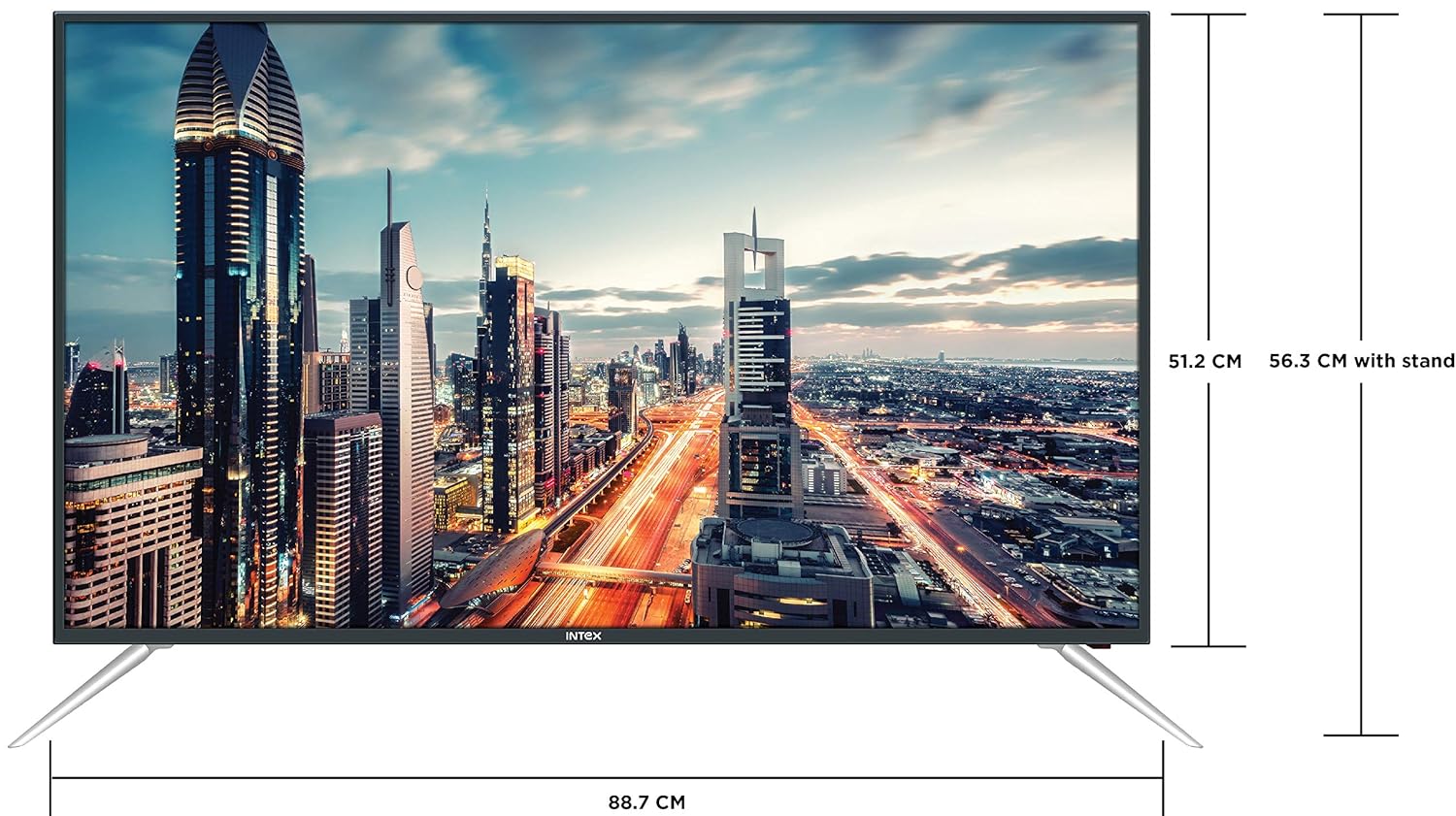
Figure 4.3: Intex SH4004 Smart TV dimensions.
- የስክሪን መጠን፡ 40 ኢንች (98 ሴሜ)
- ስፋት፡ በግምት 88.7 ሴ.ሜ
- ቁመት (ያለ ማቆሚያ): በግምት 51.2 ሴ.ሜ
- ቁመት (ከቆመበት ጋር) በግምት 56.3 ሴ.ሜ
- የጥቅል መጠኖች: 102 x 60.5 x 16 ሴ.ሜ
- የእቃው ክብደት፡ 10.8 ኪ.ግ
5. ማዋቀር
5.1 የቲቪ መቆሚያውን ማያያዝ
- ማያ ገጹን እንዳይጎዳ በጥንቃቄ ቴሌቪዥኑን ፊት-ወደታች ለስላሳ እና ንጹህ ቦታ ያድርጉት።
- Align the stand pieces with the corresponding slots at the bottom of the TV.
- የተቀመጡትን ዊንጮችን በመጠቀም የማቆሚያ ክፍሎችን ይጠብቁ. በጥብቅ መያዛቸውን ያረጋግጡ።
5.2 ግድግዳ መትከል
If you prefer to wall mount your TV, please contact Intex support for professional installation. Refer to the Warranty and Support section for contact details. Ensure you use a compatible VESA wall mount kit (not included) and follow its instructions carefully.
5.3 የማገናኘት ኃይል
የኃይል ገመዱን ከቴሌቪዥኑ የኃይል ግብዓት ጋር ያገናኙ እና ከዚያ ሌላውን ጫፍ ወደ ግድግዳ መውጫ ይሰኩት።
5.4 የውጭ መሳሪያዎችን ማገናኘት
- ኤችዲኤምአይ: Use an HDMI cable to connect devices like set-top boxes, gaming consoles, or Blu-ray players to the HDMI ports on the TV's rear panel.
- ዩኤስቢ፡ Insert USB flash drives or external hard drives into the USB port for media playback.
- አንቴና፡ Connect your antenna cable to the ANTENNA IN port for receiving broadcast channels.
5.5 የመነሻ ማዋቀር አዋቂ
መጀመሪያ ሲበራ ቴሌቪዥኑ በመጀመሪያ የማዋቀር ሂደት ውስጥ ይመራዎታል፡-
- የቋንቋ ምርጫ፡- የእርስዎን ተወዳጅ ቋንቋ ይምረጡ።
- የአውታረ መረብ ማዋቀር፡- ከWi-Fi አውታረ መረብዎ ጋር ይገናኙ ወይም ባለገመድ የኢተርኔት ግንኙነት ይጠቀሙ። ከተጠየቀ የWi-Fi የይለፍ ቃልዎን ያስገቡ።
- የሰርጥ ቅኝት ፦ ቴሌቪዥኑ የሚገኙትን የስርጭት ቻናሎች ይቃኛል።
- የሰዓት ሰቅ የአካባቢዎን የሰዓት ሰቅ ያዘጋጁ።
6. የአሠራር መመሪያዎች
6.1 የርቀት መቆጣጠሪያ ተግባራት
The remote control allows you to navigate the TV's features. Common buttons include Power, Volume Up/Down, Channel Up/Down, Input Source, Menu, Navigation (Up/Down/Left/Right), OK, Back, Home, and Smart TV app shortcuts.
6.2 መሰረታዊ የቲቪ ተግባራት
- ማብራት/ማጥፋት፡ በርቀት ወይም በቲቪ ላይ የኃይል አዝራሩን ይጫኑ።
- የድምጽ ማስተካከያ; የድምጽ መጨመሪያ/ወደታች ቁልፎችን ተጠቀም።
- የሰርጥ ምርጫ፡- የሰርጥ ወደላይ/ወደታች አዝራሮችን ይጠቀሙ ወይም የሰርጥ ቁጥሮችን በቀጥታ ያስገቡ።
- የግቤት ምንጭ፡- Press the Input/Source button to switch between HDMI, USB, AV, and TV inputs.
6.3 Smart TV Features (Android OS)
Your Intex SH4004 runs on Android OS, providing access to various smart features:
- የWi-Fi ግንኙነት፡- ወደ በይነመረብ ለመድረስ ከቤትዎ አውታረ መረብ ጋር ይገናኙ።
- የመተግበሪያ መደብር Download and install applications. Supported internet services include Sony, TV Store, YouTube, and Zee5.
- የሚዲያ መልሶ ማጫወት ቪዲዮዎችን፣ ሙዚቃዎችን እና view ከተገናኙ የዩኤስቢ መሳሪያዎች የተነሱ ፎቶዎች።
- Motion Sensor Gaming: The TV supports motion sensor gaming. An in-built tennis game is included for entertainment.
- ዘመናዊ የኃይል ቁጠባ; Features designed to optimize energy consumption.
- Eye Safe-T Matrix: Display technology aimed at reducing eye strain.
7. ጥገና
7.1 ቴሌቪዥኑን ማጽዳት
- ከማጽዳትዎ በፊት ሁልጊዜ ቴሌቪዥኑን ይንቀሉ.
- ስክሪኑን እና ካቢኔውን በቀስታ ለማጽዳት ለስላሳ፣ ደረቅ፣ ከተሸፈነ ጨርቅ ነጻ የሆነ ጨርቅ ይጠቀሙ።
- በስክሪኑ ላይ ላሉት ግትር ምልክቶች፣ በትንሹ መampen the cloth with water or a specialized screen cleaner (ensure it's suitable for LED screens) and wipe gently. Do not spray liquid directly onto the screen.
- ሻካራ ማጽጃዎችን፣ ሰምዎችን ወይም ፈሳሾችን ከመጠቀም ይቆጠቡ።
7.2 አጠቃላይ እንክብካቤ
- ቴሌቪዥኑን ከፀሀይ ብርሀን እና ሙቀት ምንጮች ያርቁ.
- በቴሌቪዥኑ ዙሪያ ትክክለኛ አየር ማናፈሻን ያረጋግጡ።
- ቴሌቪዥኑ ረዘም ላለ ጊዜ ጥቅም ላይ የማይውል ከሆነ ከኃይል ማመንጫው ይንቀሉት።
8. መላ መፈለግ
Before contacting support, try these basic troubleshooting steps for common issues.
| ችግር | ሊሆን የሚችል ምክንያት | መፍትሄ |
|---|---|---|
| ኃይል የለም | Power cable disconnected; Power outlet fault. | Check power cable connection; Try a different outlet; Press power button on TV/remote. |
| ምንም ስዕል የለም፣ ግን ድምጽ አሁን አለ። | የተሳሳተ የግቤት ምንጭ ተመርጧል፤ የውጫዊ መሳሪያ ችግር። | Press the 'Input/Source' button to select the correct input; Check external device connections. |
| ምንም ድምፅ የለም፣ ግን ሥዕል አሁን አለ። | የድምጽ መጠኑ ተዘግቷል ወይም በጣም ዝቅተኛ ነው፤ የውጫዊ የድምጽ ስርዓት ችግር። | Unmute volume or increase level; Check audio cables to external sound system. |
| የWi-Fi ግንኙነት ጉዳዮች | Incorrect password; Router too far; Router issue. | Re-enter Wi-Fi password; Move TV closer to router or use Ethernet; Restart router. |
| የርቀት መቆጣጠሪያ አይሰራም | ባትሪዎች ተሟጠዋል; በርቀት እና በቲቪ መካከል ያለው እገዳ። | Replace remote batteries; Remove any obstructions; Point remote directly at TV sensor. |
9. ዝርዝሮች
Detailed technical specifications for the Intex SH4004 Smart TV.
| ባህሪ | ዝርዝር መግለጫ |
|---|---|
| የምርት ስም | ኢንቴክስ |
| የሞዴል ስም | SH4004 |
| የማሳያ ቴክኖሎጂ | LED |
| የስክሪን መጠን | 40 ኢንች (98 ሴ.ሜ) |
| ጥራት | HD ዝግጁ (1366 x 768 ፒክስል) |
| የማደስ ደረጃ | 60 Hz |
| Viewማእዘን | 178 ዲግሪዎች |
| ምጥጥነ ገጽታ | 16፡9 |
| ስርዓተ ክወና | አንድሮይድ |
| ፕሮሰሰር | 1.2GHz Quad core Mali 450 |
| ራም | 512 ሜባ |
| የውስጥ ማህደረ ትውስታ | 4 ጊባ |
| ግንኙነት | 2 HDMI ports, 1 USB port, Built-In-Wifi, Ethernet |
| የድምፅ ውፅዓት | 20 Watts (2 speakers, Stereo) |
| የሚደገፉ የበይነመረብ አገልግሎቶች | Sony, TV Store, Youtube, Zee5 |
| የመጫኛ አይነት | የግድግዳ መጫኛ / የጠረጴዛ ጫፍ |
| የእቃው ክብደት | 10.8 ኪ.ግ |
10. ዋስትና እና ድጋፍ
የዋስትና መረጃ፡-
- The product comes with a 1-year manufacturer warranty from the date of purchase.
- An additional 2 years of extended warranty is provided by Intex.
Installation and Support:
For requesting installation, wall mounting, or a product demonstration after delivery, please contact Intex support directly.
Intex Support Contact:
- ስልክ፡ 0120-4895555
When contacting support, please provide the product's model name (SH4004) and seller's details as mentioned on your invoice.


