1. መግቢያ
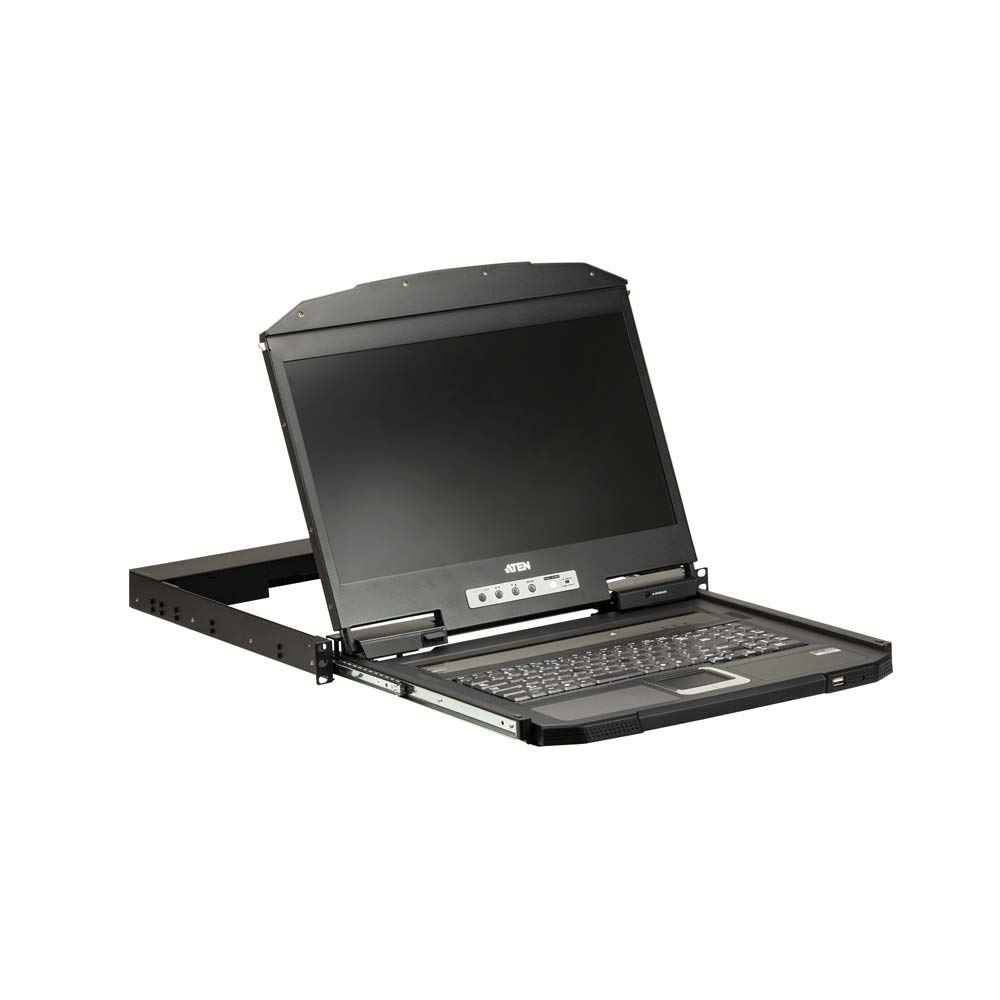
The ATEN CL3700NW is a 19-inch Ultra Short Depth Wide Screen LCD Console designed for efficient system management in server rooms and data centers. This console integrates an 18.5-inch TFT active matrix display, keyboard, and touchpad into a 1U rack-mountable sliding housing. It supports HDMI and USB connectivity, offering a compact and convenient solution for accessing and controlling connected computers.
2. የምርት ባህሪዎች
- ማሳያ፡- 18.5-inch TFT active matrix with FHD 1080p (1920 x 1080) resolution.
- Viewአንግል ውስጥ; 178 degrees (horizontal and vertical).
- ግንኙነት፡ HDMI and USB interfaces.
- የንፅፅር ውድር 1000:1 (calculated based on luminance of 350 cd/m²).
- ቀለም፡ ጥቁር አጨራረስ.
- የኃይል ፍጆታ; 100-240 ዋት.
- ክብደት፡ Approximately 4 kilograms (8.82 pounds).
3. ምርት አብቅቷልview
ምስል 1: መቀራረብ view of the ATEN CL3700NW LCD console screen.

ምስል 2: የፊት view of the ATEN CL3700NW LCD console, showing the closed unit.

Figure 3: The ATEN CL3700NW console with the keyboard and touchpad tray extended for use.
4. ማዋቀር እና መጫን
- የመደርደሪያ መጫኛ; Install the CL3700NW console into a standard 1U rack space using the provided mounting kit. Ensure secure fastening to prevent movement.
- የቪዲዮ ገመድ አያይዝ፡ Connect an HDMI cable from the console's HDMI input port to the HDMI output port of the computer or KVM switch.
- የዩኤስቢ ገመድ ያገናኙ፡ Connect a USB cable from the console's USB port to a USB port on the computer or KVM switch. This provides keyboard and mouse functionality.
- የግንኙነት ኃይል; Connect the power adapter to the console's power input and then plug it into an AC power source.
- አብራ፡ Press the power button on the console. The LCD display should illuminate, and the system will begin to boot.
5. ኦፕሬሽን
- ኮንሶሉን በመክፈት ላይ፡- Gently pull the console tray out from the rack until it locks into place. Lift the LCD panel to the desired viewአንግል።
- የቁልፍ ሰሌዳ እና የመዳሰሻ ሰሌዳ; Use the integrated keyboard and touchpad for input. Standard keyboard shortcuts and mouse gestures apply.
- የማሳያ ቅንብሮችን ማስተካከል; Use the OSD (On-Screen Display) buttons, typically located near the screen, to adjust brightness, contrast, and other display parameters. Refer to the OSD menu for specific options.
- ኮንሶሉን መዝጋት፡ Lower the LCD panel, then push the console tray back into the rack until it clicks into its locked position.
6. ጥገና
- ማያ ገጹን ማጽዳት; ለስላሳ፣ ከቆሸሸ ነፃ የሆነ ጨርቅ በትንሹ ተጠቀምampየማያበላሽ የማያ ስክሪን ማጽጃ በመጠቀም የተሰራ። ማጽጃውን በቀጥታ በማያ ገጹ ላይ አይረጩ።
- Cleaning the Keyboard/Touchpad: Use a soft brush or compressed air to remove dust and debris. A slightly damp cloth can be used for surface cleaning.
- የአየር ማናፈሻ; Ensure that the console's ventilation openings are clear of obstructions to prevent overheating.
- የኬብል አስተዳደር Periodically check all connected cables for secure connections and signs of wear.
7. መላ መፈለግ
- ማሳያ የለም፡
- Ensure the console is powered on and the power adapter is securely connected.
- Verify the HDMI cable is correctly connected to both the console and the computer/KVM.
- Check the computer/KVM video output settings.
- No Keyboard/Mouse Input:
- Ensure the USB cable is securely connected to both the console and the computer/KVM.
- Try connecting the USB cable to a different USB port on the computer/KVM.
- Restart the connected computer.
- ብልጭ ድርግም የሚሉ ወይም የተዛባ ማሳያ;
- የኤችዲኤምአይ ገመዱን ለጉዳት ወይም ለላላ ግንኙነቶች ያረጋግጡ።
- Adjust the display resolution and refresh rate on the connected computer to match the console's specifications.
8. ዝርዝሮች
| ባህሪ | ዝርዝር መግለጫ |
|---|---|
| የሞዴል ስም | CL3700NW |
| የስክሪን መጠን | 18.5 ኢንች |
| የማያ ጥራት | 1920 x 1080 (ኤፍኤችዲ 1080 ፒ) |
| የማሳያ ዓይነት | TFT ንቁ ማትሪክስ |
| Viewማእዘን | 178 ዲግሪዎች (አግድም/ቋሚ) |
| የንፅፅር ሬሾ | 1000፡1 |
| የግንኙነት ቴክኖሎጂ | ኤችዲኤምአይ ፣ ዩኤስቢ |
| ቀለም | ጥቁር |
| የእቃው ክብደት | 19.82 ፓውንድ (በግምት 8.99 ኪግ) |
| የምርት ልኬቶች (LxWxH) | 18.78 x 1.69 x 18.92 ኢንች |
| የኃይል ፍጆታ | 100-240 ዋት |
| ፕሮሰሰር ብራንድ | NVIDIA (CPU compatibility) |
9. ዋስትና እና ድጋፍ
ATEN is committed to providing reliable products and support. For assistance with your CL3700NW console, please refer to the following information:
- የቴክኒክ ድጋፍ; ATEN offers free technical support. Responses to customer inquiries are typically provided within 4 hours.
- የዋስትና አገልግሎት፡ Extended warranty service and variable value-added service packages are available.
- የጥገና አገልግሎቶች፡- Localized repair centers are available for RMA (Return Merchandise Authorization) services.

ምስል 4 - ተጠናቀቀview of ATEN's support services, including localized repair, extended warranty, and free technical support.
For detailed warranty terms and to access support resources, please visit the official ATEN website or contact your local ATEN representative.


