1. መግቢያ
The Edifier S3000Pro Audiophile Active Speakers are designed to deliver high-fidelity audio with versatile connectivity options. Featuring Bluetooth 5.0 with aptX HD, USB audio, planar diaphragm tweeters, and 6.5-inch woofers, these speakers offer a premium listening experience. The innovative KleerNet wireless technology allows for a wire-free connection between the left and right speakers, providing flexible placement without compromising sound quality.
2. የጥቅል ይዘቶች
እባክዎ ሁሉም እቃዎች በጥቅሉ ውስጥ መኖራቸውን ያረጋግጡ፡-
- Edifier S3000Pro Speakers (1 pair)
- የርቀት መቆጣጠሪያ
- የኃይል ገመድ
- የዩኤስቢ ገመድ
- የጨረር ገመድ
- RCA ወደ RCA ኦዲዮ ገመድ
- ከ 3.5 ሚሜ እስከ RCA ኦዲዮ ገመድ
- የተጠቃሚ መመሪያ
3. ማዋቀር እና ግንኙነቶች
The Edifier S3000Pro speakers are designed for easy setup. The left and right speakers connect wirelessly to each other, eliminating the need for a speaker cable between them. Each speaker requires its own power connection.
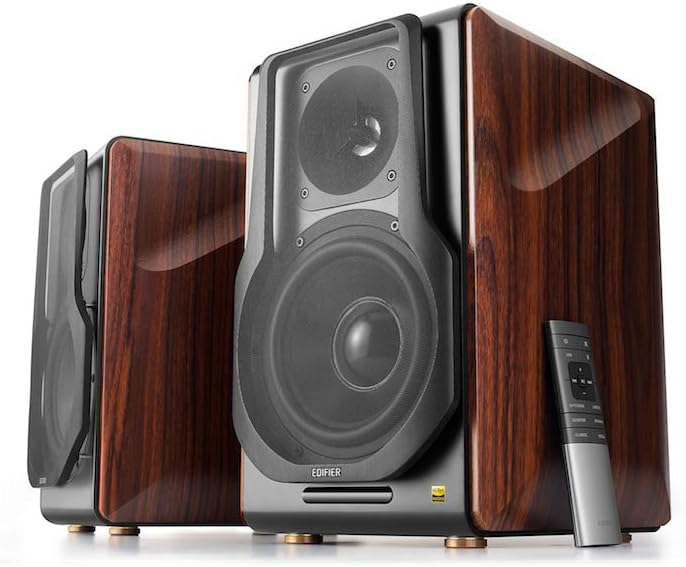
Figure 3.1: Edifier S3000Pro Speakers and Remote Control.
3.1 የድምጽ ማጉያ አቀማመጥ
Place the speakers in your desired listening area. Due to their wireless inter-speaker connection, you have flexibility in positioning them. Ensure each speaker is near a power outlet.

ምስል 3.2: ዘፀample placement of Edifier S3000Pro speakers in a room.
3.2 የኃይል ግንኙነት
Connect the included power cables to each speaker and then to a wall outlet. The speakers will automatically attempt to pair with each other upon power-on.
3.3 የድምጽ ግብዓት ግንኙነቶች
The active (right) speaker features a variety of input ports:
- Bluetooth 5.0 with aptX HD: ከተኳኋኝ መሳሪያዎች ለሽቦ አልባ የድምጽ ዥረት።
- የዩኤስቢ ድምጽ; Connect directly to a computer for high-resolution audio playback.
- ኦፕቲካል፡ For digital audio connection from TVs, game consoles, etc.
- ኮአክሲያል ፦ ሌላ ዲጂታል የድምጽ ግቤት አማራጭ።
- የመስመር መግቢያ (RCA): Standard analog input for various audio sources.
- ሚዛናዊ (XLR)፡- Professional-grade input for balanced audio signals.

Figure 3.3: Rear panel of the active speaker with various input options.
3.4 Wireless Inter-Speaker Connection
The S3000Pro utilizes KleerNet wireless technology for lossless audio transmission between the left and right speakers. This connection is established automatically. If re-pairing is ever needed, refer to the troubleshooting section.
Video 3.1: Official Edifier S3000Pro Audiophile Active Speakers overview, ቁልፍ ባህሪያትን እና ግንኙነትን ያሳያል።
4. የአሠራር መመሪያዎች
Control your S3000Pro speakers using the included wireless remote or the controls located on the active (right) speaker.
4.1 የርቀት መቆጣጠሪያ ተግባራት

Figure 4.1: The wireless remote control for Edifier S3000Pro speakers.
- የኃይል ቁልፍ፡- ድምጽ ማጉያዎቹን ያበራል ወይም ያጠፋል.
- የድምጽ መቆጣጠሪያ፡- አጠቃላይ የድምጽ ደረጃን ያስተካክላል.
- ድምጸ-ከል አድርግ፡ የድምጽ ውፅዓት ድምጸ-ከል ያደርገዋል ወይም ያጠፋል።
- የግቤት ምርጫ፡- Dedicated buttons for USB, Bluetooth, Optical/Coaxial, and Line/Balanced inputs.
- የመልሶ ማጫወት መቆጣጠሪያዎች፡- Play/Pause, Skip Forward, Skip Backward (for Bluetooth and USB modes).
- የድምጽ ሁነታዎች፡ Buttons for Monitor, Dynamic, Classic, and Vocal sound profiles.
4.2 On-Speaker Controls
The active speaker features rotary knobs for direct control:
- Volume/Input Selection: Rotate to adjust volume; press to cycle through inputs.
- ትሬብል ቁጥጥር፡- ከፍተኛ-ድግግሞሽ ውጤትን ያስተካክላል።
- የባስ ቁጥጥር፡- ዝቅተኛ-ድግግሞሽ ውጤትን ያስተካክላል።
5. ባህሪያት እና ዲዛይን
The S3000Pro speakers are crafted with both acoustic performance and aesthetic appeal in mind.
5.1 Acoustic Design
- Planar Diaphragm Tweeters: Deliver clear, detailed high frequencies.
- 6.5-inch Aluminum Alloy Woofers: Provide powerful and accurate bass response.
- አብሮ የተሰራ Ampማስታገሻ ፦ Each speaker features a 78 watts amplifier, eliminating the need for external ampማቅለል።
- ሃይ-ሪስ ኦዲዮ፡- Supports higher bit depth and sample rates (96 kHz or higher) for superior sound quality.
5.2 Construction and Aesthetics
The speaker cabinets are constructed from high-quality MDF (Medium-Density Fiberboard) with a brown wood finish, offering both durability and a classic aesthetic. The front features a matt black finish with removable cloth grilles.

ምስል 5.1: የፊት view highlighting the drivers and finish.

ምስል 5.2: ጎን view አሳይasing the wood finish.
6. ጥገና
To ensure the longevity and optimal performance of your Edifier S3000Pro speakers, follow these maintenance guidelines:
- ማጽዳት፡ Use a soft, dry cloth to wipe down the speaker cabinets. Avoid using abrasive cleaners, waxes, or solvents.
- አቧራ Regularly dust the speaker grilles and drivers with a soft brush or vacuum cleaner with a brush attachment.
- አቀማመጥ፡- ድምጽ ማጉያዎቹን በቀጥታ የፀሐይ ብርሃን፣ በሙቀት ምንጮች አቅራቢያ ወይም ከፍተኛ እርጥበት ባለባቸው ቦታዎች ላይ ከማስቀመጥ ይቆጠቡ። በድምጽ ማጉያዎቹ ዙሪያ በቂ የአየር ዝውውር እንዲኖር ያድርጉ።
- አያያዝ፡ Handle the speakers with care. Avoid pressing on the speaker cones or tweeters.
7. መላ መፈለግ
If you encounter issues with your S3000Pro speakers, refer to the following common solutions:
- ድምጽ የለም፡
- Ensure both speakers are powered on and connected to an electrical outlet.
- Verify the correct input source is selected on the active speaker or remote.
- ደህንነታቸው የተጠበቀ ግንኙነቶችን ለማግኘት ሁሉንም የኦዲዮ ገመዶችን ያረጋግጡ።
- Increase the volume on both the speakers and the audio source.
- Speakers Not Pairing Wirelessly:
- Ensure both speakers are powered on. The wireless connection between them is factory-paired and should resume automatically.
- If the wireless connection fails, locate the small "Pair" button on the back panel of both the active (R) and passive (L) speakers. Press and hold the "Pair" button on the active speaker first, then on the passive speaker. The LED indicator on the passive speaker will blink rapidly during pairing.
- የብሉቱዝ ግንኙነት ጉዳዮች፡-
- Ensure the speakers are in Bluetooth input mode.
- Delete the "Edifier S3000Pro" from your device's Bluetooth list and attempt to re-pair.
- Move your Bluetooth device closer to the speakers to reduce interference.
- የተዛባ ድምጽ;
- በሁለቱም ድምጽ ማጉያዎች እና የድምጽ ምንጭ ላይ ያለውን ድምጽ ይቀንሱ.
- የድምጽ ገመዶችን ጉዳት ወይም የተበላሹ ግንኙነቶችን ይፈትሹ።
- የድምጽ ምንጭ ግቤቱን ከመጠን በላይ እየነዳ እንዳልሆነ ያረጋግጡ።
8. ዝርዝሮች
| ባህሪ | ዝርዝር መግለጫ |
|---|---|
| የምርት ስም | አዘጋጅ |
| የሞዴል ስም | S3000PRO |
| የድምጽ ማጉያ አይነት | የመጽሐፍ መደርደሪያ |
| ቁሳቁስ | ኤምዲኤፍ |
| የግንኙነት ቴክኖሎጂ | ብሉቱዝ ፣ ዩኤስቢ |
| ገመድ አልባ የመገናኛ ቴክኖሎጂ | ብሉቱዝ |
| የብሉቱዝ ስሪት | 5.0 ከአፕቲክስ ኤችዲ ጋር |
| Woofer ዲያሜትር | 6.5 ኢንች |
| የጣፋጭ ዓይነት | Planar Diaphragm |
| የድምጽ ማጉያ ከፍተኛ የውጤት ኃይል | 256 ዋት |
| የምልክት-ወደ-ጫጫታ ሬሾ | 85 ዲቢቢ |
| የምርት ልኬቶች | 21.6" ዲ x 13.4" ዋ x 17.3" ኤች |
| የእቃው ክብደት | 3.3 ፓውንድ (1.5 ኪሎግራም) |
| የተካተቱ አካላት | ምርት, መመሪያ |
9. ዋስትና እና ድጋፍ
The Edifier S3000Pro speakers come with a full warranty. For detailed warranty information, product registration, or technical support, please visit the official Edifier webጣቢያ ወይም የደንበኛ አገልግሎታቸውን ያነጋግሩ። ለዋስትና ጥያቄዎች የግዢ ደረሰኝዎን ያስቀምጡ።
ለተጨማሪ እርዳታ፣ ን መጎብኘት ይችላሉ። Edifier Store on Amazon.


