1. ምርት አብቅቷልview
The Amazon Echo Dot Demo 2 is a compact smart speaker designed to bring the convenience of Alexa into your home. This device offers improved speaker quality for richer sound and is equipped with features suitable for family use, including parental controls and kid-friendly content.

Image 1.1: The Amazon Echo Dot Demo 2 device in Gray.
2. የማዋቀር መመሪያ
Follow these steps to set up your Echo Dot Demo 2:
- መሣሪያውን ያራግፉ; Carefully remove the Echo Dot (3rd generation), power adapter (15W), and Quick Start Guide from the box.
- አብራ፡ Plug the included power adapter into the Echo Dot and then into a wall outlet. The light ring on the device will turn blue, then orange, indicating it is ready for setup.
- የ Alexa መተግበሪያ አውርድ: On your mobile device (Fire OS, Android, or iOS), download and install the Amazon Alexa app. The app is also accessible via a web አሳሽ.
- ከWi-Fi ጋር ይገናኙ፡ Open the Alexa app and follow the on-screen instructions to connect your Echo Dot to your Wi-Fi network. The device supports dual-band Wi-Fi (802.11 a/b/g/n/ac on 2.4 and 5 GHz networks). It does not support ad-hoc (peer-to-peer) Wi-Fi networks. Amazon Wi-Fi simple setup can assist in connecting smart devices easily.
- ቅንብሮችን አዋቅር፡ Once connected, the app will guide you through personalizing settings, including linking your Amazon account and setting up parental controls if desired.
Your Echo Dot Demo 2 is now ready for use.
3. የአሠራር መመሪያዎች
The Echo Dot Demo 2 is voice-controlled via Alexa. Here are some key operating features:
3.1. Voice Commands and Interaction
Simply say "Alexa" followed by your command or question. Exampከሚከተሉት ያነሰ
- "አሌክሳ፣ ሙዚቃ ተጫወት።"
- "Alexa, tell me a story."
- " አሌክሳ፣ ሰዓት ቆጣሪ ለ 10 ደቂቃዎች ያዘጋጁ።"
- "አሌክሳ, የአየር ሁኔታ ምንድን ነው?"

Image 3.1: A child interacting with the Echo Dot Demo 2 by asking a question.
3.2. Audio and Entertainment
The device features improved speaker quality for a richer and louder sound experience. You can pair it with a second Echo Dot for stereo sound. It supports various audio services and content suitable for children, including over 1,000 Audible books and thousands of songs via Amazon Kids+ (formerly FreeTime Unlimited).
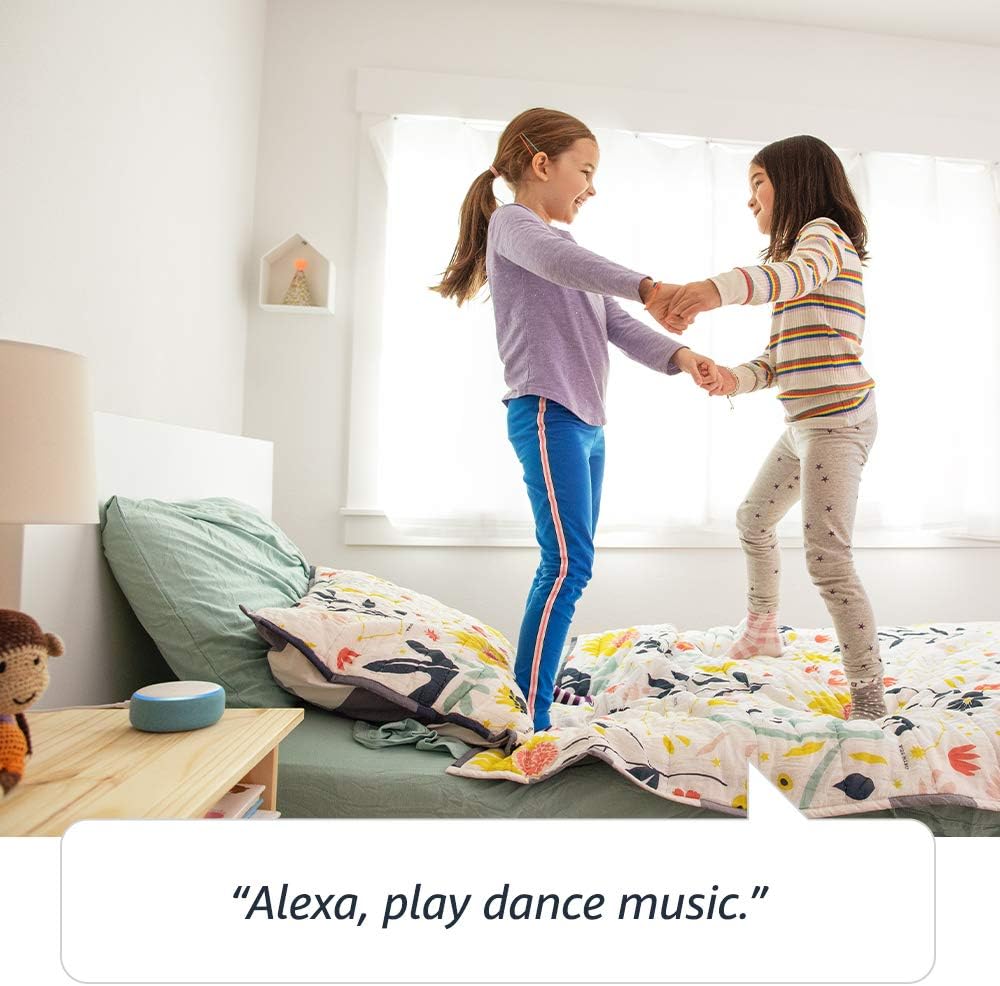
Image 3.2: Children enjoying music played through the Echo Dot Demo 2.
3.3. ግንኙነት
The Echo Dot Demo 2 allows for communication with approved friends and family. You can also use the Drop In feature to connect with other Echo devices within your household.

Image 3.3: Connecting with other Echo devices throughout the house.
3.4. የግላዊነት መቆጣጠሪያዎች
The device is designed with multiple layers of privacy controls. These include wake word technology, streaming indicators, and a microphone off button. You can also view እና የድምጽ ቅጂዎችዎን ይሰርዙ። ለተጨማሪ ዝርዝሮች የ Alexa ግላዊነት ሃብትን ይጎብኙ።

Image 3.4: Press the mic off button to disconnect the microphones for privacy.
3.5. የብሉቱዝ ግንኙነት
The Echo Dot supports Advanced Audio Distribution Profile (A2DP) for streaming audio from your mobile device to the Echo Dot or from the Echo Dot to your Bluetooth speaker. Audio/Video Remote Control Profile (AVRCP) allows for voice control of connected mobile devices. Bluetooth speakers requiring PIN codes are not supported.
3.6. Bedtime Routines
The Echo Dot can assist with bedtime routines by playing lullabies or reading stories.

Image 3.5: The Echo Dot can read bedtime stories.
4. ጥገና
To ensure the longevity and optimal performance of your Echo Dot Demo 2, follow these maintenance guidelines:
- ማጽዳት፡ Use a soft, dry, lint-free cloth to clean the exterior of the device. Do not use abrasive cleaners, liquids, or sprays.
- አቀማመጥ፡- Place the device on a stable, flat surface away from direct sunlight, heat sources, and moisture. Avoid placing it near strong electromagnetic fields.
- ኃይል፡- Always use the original power adapter provided with the device. Disconnect the power adapter during electrical storms or when unused for extended periods.
- የአየር ማናፈሻ; መሳሪያው በቂ የአየር ዝውውር እንዳለው ያረጋግጡ። የአየር ማናፈሻ ክፍተቶችን አይዝጉ።
5. መላ መፈለግ
If you encounter issues with your Echo Dot Demo 2, try the following troubleshooting steps:
- ኃይል የለም፡
- Ensure the power adapter is securely plugged into both the Echo Dot and a working wall outlet.
- አስማሚውን ወደ ሌላ ሶኬት ለመሰካት ይሞክሩ።
- ምንም የWi-Fi ግንኙነት የለም፡
- If Alexa indicates it cannot connect to the internet, check your home Wi-Fi network.
- የእርስዎን Wi-Fi ራውተር እና ሞደም እንደገና ያስጀምሩ።
- Open the Alexa app and navigate to device settings to reconfigure the Wi-Fi connection.
- መሣሪያው በእርስዎ የWi-Fi ራውተር ክልል ውስጥ መሆኑን ያረጋግጡ።
- አሌክሳ ምላሽ አይሰጥም
- Ensure the microphone is not muted (the light ring will be red if muted). Press the microphone off button to unmute.
- ለመሣሪያው በግልፅ እና በቀጥታ ይናገሩ።
- Try restarting the Echo Dot by unplugging it from the power outlet for a few seconds and then plugging it back in.
- ድምጽ የለም፡
- "Alexa, volume up" በማለት የድምጽ ደረጃውን ያረጋግጡ.
- If connected to an external speaker via Bluetooth or 3.5mm cable, ensure the external speaker is powered on and functioning correctly.
For further assistance, refer to the Amazon Alexa app or contact Amazon Customer Service.
6. ዝርዝሮች
| ባህሪ | ዝርዝር |
|---|---|
| መጠን | 3.9" x 3.9" x 1.7" (99 ሚሜ x 99 ሚሜ x 43 ሚሜ) |
| ክብደት | 10.6 አውንስ (300 ግራም) |
| የ Wi-Fi ግንኙነት | Dual-band Wi-Fi supports 802.11 a/b/g/n/ac (2.4 and 5 GHz) networks. Does not support ad-hoc (peer-to-peer) Wi-Fi networks. |
| የብሉቱዝ ግንኙነት | ለድምጽ ዥረት የ A2DP ድጋፍ; ለተገናኙ ተንቀሳቃሽ መሳሪያዎች የድምጽ ቁጥጥር AVRCP. ፒን ኮድ የሚያስፈልጋቸው የብሉቱዝ ድምጽ ማጉያዎች አይደገፉም። |
| ኦዲዮ | Built-in speaker, 3.5 mm stereo audio output (cable not included). |
| የስርዓት መስፈርቶች | Alexa App compatible with Fire OS, Android, iOS devices, and web አሳሾች. |
| በሳጥኑ ውስጥ ተካትቷል | Echo Dot (3rd generation), 15W power adapter, Quick Start Guide. |
| ትውልድ | Echo Dot Kids Edition - 2019 release |
| የዕድሜ ክልል | Ages 3 and up. Not for children under 3 years. |
| የግላዊነት ባህሪያት | የዋይ ዎርድ ቴክኖሎጂ፣ የዥረት አመልካቾች፣ የማይክሮፎን ማጥፋት አዝራር፣ የመጠቀም ችሎታ view እና የድምጽ ቅጂዎችን ሰርዝ። |
7. ዋስትና እና ድጋፍ
7.1. የዋስትና መረጃ
Your Echo Dot Demo 2 includes a ከጭንቀት ነጻ የሆነ የ 2 ዓመት ዋስትና. If the device breaks, you can return it for a free replacement. Use of the Echo Dot Kids Edition is subject to specific terms, which can be found on the Amazon webጣቢያ.
7.2. የተደራሽነት ባህሪያት
The Alexa app and Alexa-enabled products offer several features for customers with accessibility needs related to vision, hearing, mobility, and speech. More information on Alexa accessibility can be found on the Amazon webጣቢያ.
7.3. የደንበኛ ድጋፍ
For any questions, technical assistance, or warranty claims, please contact Amazon Customer Service through the Alexa app or the Amazon support webጣቢያ.