ASUS ROG Strix XG49VQ 49-inch Curved Gaming Monitor User Manual
1. መግቢያ
The ASUS ROG Strix XG49VQ is a super ultra-wide 49-inch Dual Full HD (3840 x 1080) 1800R curved gaming monitor designed to provide an immersive and smooth gaming experience. It features a 144Hz refresh rate, Radeon FreeSync 2 HDR technology, DCI-P3 90% professional color gamut coverage, and DisplayHDR 400 certification. This manual provides essential information for setting up, operating, maintaining, and troubleshooting your monitor.
2. በሳጥኑ ውስጥ ያለው
ሁሉም የሚከተሉት ንጥሎች በጥቅልዎ ውስጥ መካተታቸውን ያረጋግጡ፡-
- ASUS ROG Strix XG49VQ Monitor
- DisplayPort ገመድ
- HDMI ገመድ
- የኃይል አስማሚ
- ፈጣን ጅምር መመሪያ
- የ VESA ተራራ ስብስብ
3. ማዋቀር
3.1 የማሳያ ስብስብ
Carefully remove the monitor and its components from the packaging. Attach the stand base to the monitor arm, then secure the assembled stand to the monitor. Ensure all connections are firm.
3.2 ማገናኛ ገመዶች
Connect the power adapter to the monitor and a power outlet. Use the provided DisplayPort or HDMI cable to connect your computer or gaming console to the monitor. The monitor features multiple input ports for versatile connectivity.
ምስል: የኋላ view of the monitor highlighting accessible I/O ports and smart cable management for a tidy setup.
3.3 አካላዊ ማስተካከያዎች
The monitor offers ergonomic adjustments for optimal viewምቾት;
- ዘንበል የማያ ገጹን አንግል ከ +20° እስከ -5° ያስተካክሉ።
- ማወዛወዝ፡ ማያ ገጹን በአግድም ከ +16° ወደ -16° ያሽከርክሩ።
- የከፍታ ማስተካከያ; የማያ ገጹን ቁመት እስከ 120 ሚሜ ያስተካክሉ።

ምስል፡ ተቆጣጣሪው ያሳያልasing its ergonomic design with arrows indicating available tilt, swivel, and height adjustment ranges.
4. ሞኒተሩን መስራት
4.1 ማብራት / ማጥፋት
እሱን ለማብራት ወይም ለማጥፋት በተቆጣጣሪው ላይ የሚገኘውን የኃይል ቁልፍ ተጫን።
4.2 የማሳያ ባህሪያት
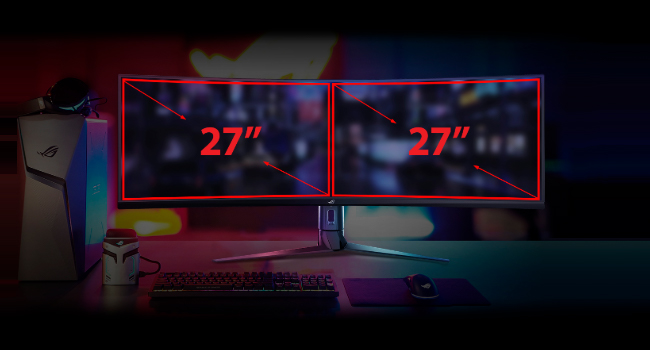
- Super Ultra-wide Display: The 49-inch curved screen provides an expansive view, equivalent to two 27-inch monitors side-by-side.
- 144Hz የማደሻ መጠን፡- Experience smooth, lag-free visuals, crucial for fast-paced gaming.
- Radeon FreeSync 2 HDR: Synchronizes the monitor's refresh rate with your GPU's frame rate to eliminate screen tearing and stuttering, especially with HDR content.
- DisplayHDR 400 & DCI-P3 90%: Ensures high color contrast and cinematic color performance for vibrant and realistic visuals.

Image: Visual representation of the 49-inch super ultra-wide display, showing its equivalence to two 27-inch monitors for an expansive workspace.

Image: A split-screen comparison demonstrating the enhanced visual quality with High Dynamic Range (HDR) enabled, highlighting DCI-P3 90% and DisplayHDR 400 certification.

Image: A split-screen comparison illustrating the difference in gameplay smoothness with Radeon FreeSync 2 HDR turned 'On' versus 'Off'.
4.3 የ ASUS የአይን እንክብካቤ ቴክኖሎጂ
ASUS Eye Care technology is integrated to minimize eye fatigue during extended use. This includes flicker-free backlighting and blue light filters, certified by TÜV Rheinland, to protect your eyes.
4.4 GamePlus and GameVisual
Utilize exclusive GamePlus and GameVisual overlays and color modes to optimize your gaming experience. These features provide in-game enhancements and display adjustments tailored for various game genres.
4.5 Picture-by-Picture (PBP) Functionality
The ultra-wide display supports Picture-by-Picture (PBP) mode, allowing you to view content from multiple input sources simultaneously, effectively acting as multiple monitors on a single screen.
Video: Official ASUS ROG Strix XG49VQ product overview, demonstrating key features like the ultra-wide display, high refresh rate, HDR, and various gaming enhancements.
Video: A merchant's overview of the ASUS ROG Strix XG49VQ, highlighting its curved design, FreeSync technology, and eye care features.
5. ጥገና
5.1 መቆጣጠሪያውን ማጽዳት
የተቆጣጣሪውን ስክሪን ለማፅዳት በለስላሳ እና ከተሸፈነ ጨርቅ በጥንቃቄ ያጥፉት። ለግትር ምልክቶች፣ በትንሹ መampጨርቁን በውሃ ወይም መለስተኛ፣ የማያበላሽ የስክሪን ማጽጃ ያድርጉ። የስክሪኑን ገጽ ሊጎዱ የሚችሉ ጠጣር ኬሚካሎችን ወይም ሻካራ ቁሳቁሶችን ከመጠቀም ይቆጠቡ።
5.2 አጠቃላይ እንክብካቤ
Keep the monitor in a well-ventilated area. Avoid exposing it to direct sunlight, high humidity, or extreme temperatures. Do not block the ventilation openings on the monitor casing.
6. መላ መፈለግ
6.1 ምንም ማሳያ / ጥቁር ማያ
- የኃይል ገመዱ ከሁለቱም ሞኒተሪው እና ከኃይል ማመንጫው ጋር ደህንነቱ በተጠበቀ ሁኔታ መገናኘቱን ያረጋግጡ።
- Verify that the video cable (DisplayPort/HDMI) is firmly connected to both the monitor and your computer/console.
- Check if the correct input source is selected on the monitor's OSD (On-Screen Display) menu.
6.2 Image Quality Issues (e.g., Washed Out, Red Dot)
- If the display appears washed out or has unusual artifacts (like a red dot), try performing a "Reset All" from the monitor's OSD menu.
- Consider disabling HDR in your operating system or monitor settings if you experience poor image quality, as some content or system configurations may not fully support HDR effectively.
- Adjust brightness, contrast, and color settings via the OSD menu to suit your preferences.
6.3 Flickering or Stuttering
- የግራፊክስ ካርድ ነጂዎችዎ ወቅታዊ መሆናቸውን ያረጋግጡ።
- Verify that Radeon FreeSync 2 HDR is enabled in both your monitor settings and graphics card control panel.
- የቪዲዮ ገመዱን ለጉዳት ወይም ለላላ ግንኙነት ያረጋግጡ።
7. ዝርዝሮች
| ባህሪ | ዝርዝር መግለጫ |
|---|---|
| የቋሚ ማያ ገጽ ማሳያ መጠን | 49 ኢንች |
| የማያ ጥራት | 3840x1080 |
| ከፍተኛው ማያ ገጽ ጥራት | 3840 x 1080 ፒክስል |
| የምርት ስም | ASUS |
| ተከታታይ | XG49VQ |
| የንጥል ሞዴል ቁጥር | XG49VQ |
| የእቃው ክብደት | 21.4 ፓውንድ |
| የምርት ልኬቶች | 46.98 x 20.83 x 13.57 ኢንች |
| ቀለም | ጥቁር |
| ጥራዝtage | 100-240 tsልት |
| የዩኤስቢ 2.0 ወደቦች ብዛት | 1 |
| የዩኤስቢ 3.0 ወደቦች ብዛት | 2 |
| ምጥጥነ ገጽታ | 32፡9 |
| የስክሪን ወለል መግለጫ | ማት |
8. ዋስትና እና ድጋፍ
ለዝርዝር የዋስትና መረጃ እና ቴክኒካዊ ድጋፍ፣ እባክዎን ኦፊሴላዊውን ASUS ይመልከቱ webየዋስትና ካርድ ወይም ከምርትዎ ጋር አብሮ የተካተተውን ድህረ ገጽ። የግዢ ደረሰኝዎን ለዋስትና ጥያቄዎች ያስቀምጡ።


