1. መግቢያ
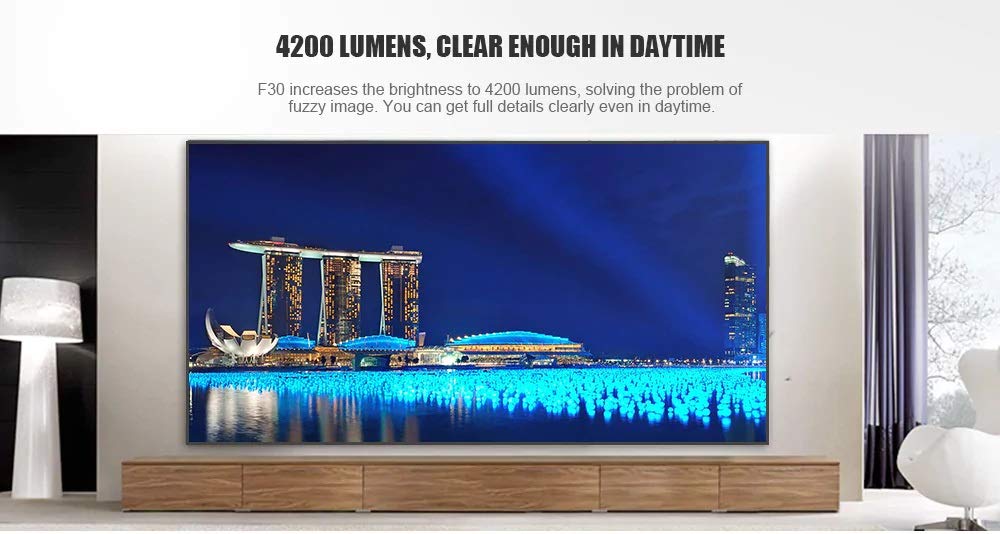
This manual provides essential instructions for the safe and efficient use of your Vivibright F30 Projector. Please read this manual thoroughly before operating the device and retain it for future reference. The Vivibright F30 is a Full HD 1080p LED projector designed for home theater, education, and business presentations, offering 4200 lumens brightness and multiple connectivity options.
2. የደህንነት መረጃ
- የኃይል አቅርቦት; የተገለጸውን የኃይል አስማሚ ብቻ ይጠቀሙ። ጥራዝ ያረጋግጡtagኢ የፕሮጀክተሩን መስፈርቶች ያሟላል።
- የአየር ማናፈሻ; የአየር ማናፈሻ ክፍተቶችን አያግዱ. ከመጠን በላይ ሙቀትን ለመከላከል ለትክክለኛው የአየር ፍሰት በፕሮጀክተሩ ዙሪያ በቂ ቦታ መኖሩን ያረጋግጡ.
- ሙቀት፡ ፕሮጀክተር ኤልamp generates heat. Avoid touching the lens or vents immediately after use.
- የዓይን መከላከያ; l ጊዜ በቀጥታ ወደ ፕሮጀክተር ሌንስን አይመልከቱamp is on. The bright light can cause eye strain or damage.
- አቀማመጥ፡- ፕሮጀክተሩን በተረጋጋና ደልዳላ ቦታ ላይ ያስቀምጡት። በቀጥታ የፀሐይ ብርሃን፣ በሙቀት ምንጮች አቅራቢያ ወይም ከፍተኛ እርጥበት ወይም አቧራ ባለባቸው አካባቢዎች ውስጥ አያስቀምጡት።
- ማጽዳት፡ ከማጽዳትዎ በፊት ኃይሉን ያላቅቁ። ለስላሳ እና ደረቅ ጨርቅ ይጠቀሙ። ፈሳሽ ወይም ኤሮሶል ማጽጃዎችን አይጠቀሙ።
- አገልግሎት መስጠት፡ Do not attempt to service the projector yourself. Refer all servicing to qualified personnel.
3. የጥቅል ይዘቶች
ሁሉም እቃዎች በጥቅሉ ውስጥ መኖራቸውን ያረጋግጡ፡-
- Vivibright F30 Projector
- የኃይል ገመድ
- የርቀት መቆጣጠሪያ
- የተጠቃሚ መመሪያ (ይህ ሰነድ)
- የኤችዲኤምአይ ገመድ (እንደ ክልል/ጥቅል ሊለያይ ይችላል)
4. ምርት አብቅቷልview
እራስዎን ከፕሮጀክተሩ ክፍሎች እና በይነገጾች ጋር ይተዋወቁ።
ምስል 4.1፡ ፊት ለፊት view of the Vivibright F30 Projector, showing the lens and ventilation.

ምስል 4.2፡ ጎን view of the Vivibright F30 Projector, highlighting the various input ports.
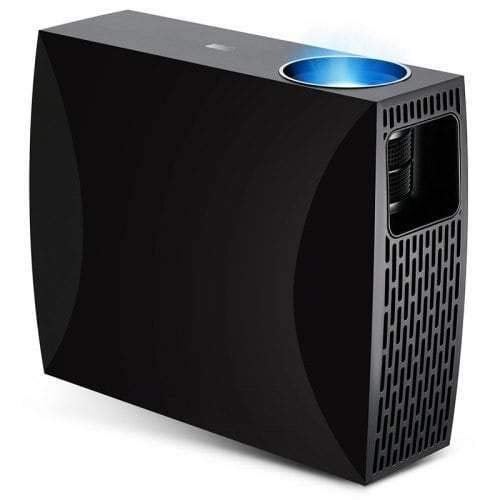
ምስል 4.3፡ Top or rear view of the Vivibright F30 Projector, showing control buttons or additional vents.
4.1. በይነገጾች
- HDMI ወደቦች፡ For connecting devices like laptops, gaming consoles, Blu-ray players, and media players.
- ቪጂኤ ወደብ፡ For connecting older computers or other VGA-compatible devices.
- የዩኤስቢ ወደቦች፡ For connecting USB storage devices to play media directly.
- ኦዲዮ ወጥቷል ፦ ውጫዊ ድምጽ ማጉያዎችን ወይም የጆሮ ማዳመጫዎችን ለማገናኘት.
- የኃይል ግቤት፡ የኃይል ገመዱን ለማገናኘት.
5. ማዋቀር
5.1. አቀማመጥ
Position the projector on a stable surface or mount it appropriately. Ensure the projector is perpendicular to the projection screen for optimal image geometry. The projection distance can range from 1.2 to 6.8 meters, depending on the desired screen size.
5.2. የኃይል ግንኙነት
- የኃይል ገመዱን ከፕሮጀክተሩ የኃይል ግብዓት ወደብ ጋር ያገናኙ።
- የኃይል ገመዱን ሌላኛውን ጫፍ ወደ ኤሌክትሪክ መሰኪያ ይሰኩት።
5.3. የግቤት መሳሪያዎችን ማገናኘት
Connect your desired source device (e.g., laptop, media player) to the projector using an appropriate cable (HDMI, VGA, USB). Ensure the cable is securely connected to both the projector and the source device.
5.4. የትኩረት እና የቁልፍ ድንጋይ ማስተካከያ
- ትኩረት፡ ምስሉ በማያ ገጹ ላይ ጥርት ብሎ እና ግልጽ እስኪሆን ድረስ በፕሮጀክተር ሌንስ ላይ ያለውን የትኩረት ቀለበት ያሽከርክሩ።
- ቁልፍ ድንጋይ If the projected image is trapezoidal (wider at the top or bottom), use the keystone correction feature (manual or digital, depending on model) to adjust the image to a rectangular shape.
6. የአሠራር መመሪያዎች
6.1. ማብራት / ማጥፋት
- አብራ፡ በፕሮጀክተሩ ወይም በርቀት መቆጣጠሪያው ላይ የኃይል አዝራሩን ይጫኑ። የአመላካች መብራቱ ይለወጣል፣ እና lamp ያበራል።
- ኃይል ዝጋ: Press the power button again. Confirm shutdown if prompted. Allow the projector to cool down before unplugging it.
6.2. የግቤት ምንጭ ምርጫ
Press the "Source" button on the remote control or the projector's control panel to cycle through available input sources (HDMI1, HDMI2, VGA, USB). Select the input corresponding to your connected device.
6.3. የምናሌ ዳሰሳ
Use the arrow buttons on the remote control or projector to navigate through the on-screen display (OSD) menu. Press "OK" or "Enter" to select an option and "Exit" or "Menu" to go back or close the menu.
6.4. የምስል እና የድምጽ ቅንብሮች
Adjust picture settings such as brightness, contrast, color, and aspect ratio via the OSD menu to optimize image quality. Adjust volume levels for the built-in speaker or connected external audio devices.
7. ጥገና
7.1. ሌንስን ማጽዳት
ለኦፕቲካል ገጽታዎች ተብሎ በተዘጋጀ ለስላሳ፣ ከንጣፍ ነፃ በሆነ ጨርቅ የፕሮጀክተር ሌንሱን በቀስታ ይጥረጉ። ሻካራ ቁሳቁሶችን ወይም ጠጣር ኬሚካሎችን አይጠቀሙ።
7.2. የፕሮጀክተሩን አካል ማጽዳት
የፕሮጀክተሩን ውጫዊ ገጽታ ለማጽዳት ለስላሳ እና ደረቅ ጨርቅ ይጠቀሙ. ለግትር ምልክቶች, ትንሽ መamp ጨርቅ መጠቀም ይቻላል, ከዚያም ደረቅ ጨርቅ ይከተላል. ምንም ፈሳሽ ወደ አየር ማናፈሻ ክፍተቶች ውስጥ እንደማይገባ ያረጋግጡ.
7.3. ኤልamp ህይወት
The Vivibright F30 Projector utilizes an LED lamp with an estimated lifespan of up to 50,000 hours, requiring no regular replacement under normal usage conditions.
8. መላ መፈለግ
| ችግር | ሊሆን የሚችል ምክንያት | መፍትሄ |
|---|---|---|
| ምንም ምስል አልታየም። |
|
|
| ምስሉ ደብዛዛ ነው |
|
|
| ምስሉ ትራፔዞይዳል (የኪስቶን ውጤት) ነው |
|
|
| ድምጽ የለም። |
|
|
| ፕሮጀክተር ከመጠን በላይ ይሞቃል ወይም ይዘጋል |
|
|
9. ዝርዝሮች
| ባህሪ | ዝርዝር |
|---|---|
| የምርት ስም | ቪቪብራይት |
| ሞዴል | F30 |
| ቤተኛ ውሳኔ | 1920 x 1080 (ሙሉ ኤችዲ) |
| የሚደገፍ ውሳኔ | እስከ 4 ኪ |
| ብሩህነት | 4200 Lumens (LED Luminous) |
| የንፅፅር ሬሾ | 2200፡1 |
| የማሳያ ቴክኖሎጂ | LCD |
| Lamp ዓይነት | LED |
| Lamp ህይወት | እስከ 50,000 ሰዓታት ድረስ |
| የፕሮጀክት ርቀት | ከ 1.2 እስከ 6.8 ሜትር |
| የድምጽ ደረጃ | 29 ዲሴብል |
| ግንኙነት | ኤችዲኤምአይ ፣ ቪጂኤ ፣ ዩኤስቢ |
| ልዩ ባህሪያት | Portable, Built-in Speaker |
| የእቃው ክብደት | 3 ኪ.ግ |
| የመጫኛ አይነት | የጠረጴዛ ተራራ |
10. ዋስትና እና ድጋፍ
10.1. የዋስትና መረጃ
The Vivibright F30 Projector comes with a የ 1 ዓመት ዋስትና ከተገዛበት ቀን ጀምሮ. ይህ ዋስትና በመደበኛ አጠቃቀም ላይ የምርት ጉድለቶችን እና ጉድለቶችን ይሸፍናል። ለዋስትና ጥያቄዎች እባክዎ የግዢ ማረጋገጫዎን ያቆዩ።
ዋስትናው አላግባብ መጠቀም፣ አደጋዎች፣ ያልተፈቀዱ ጥገናዎች ወይም መደበኛ ብልሽት የሚደርስ ጉዳትን አይሸፍንም።
10.2. የደንበኛ ድጋፍ
For technical assistance, warranty claims, or further inquiries, please contact Vivibright customer support through their official website or the contact information provided with your purchase documentation. When contacting support, please have your product model (F30) and purchase details ready.


