1. መግቢያ
This manual provides essential information for the safe and efficient operation of your Muse M-1990 DJ Bluetooth Party Speaker. Please read these instructions thoroughly before using the device and retain them for future reference.
The Muse M-1990 DJ is a powerful party speaker designed to deliver high-quality audio with dynamic light effects. It features multiple connectivity options including Bluetooth, CD player, USB, and AUX inputs, making it versatile for various audio sources.

Image 1.1: The Muse M-1990 DJ Bluetooth Party Speaker showcasing its integrated light effects.
2. የደህንነት መረጃ
የኤሌክትሪክ ንዝረትን፣ የእሳት አደጋን ወይም በክፍሉ ላይ ጉዳት እንዳይደርስ ለመከላከል የሚከተሉትን የደህንነት ጥንቃቄዎች ያክብሩ።
- ክፍሉን ለዝናብ ወይም ለእርጥበት አያጋልጡት።
- ሐ አይክፈቱasinሰ. ሁሉንም አገልግሎቶች ብቁ ለሆኑ ባለሙያዎች ያመልክቱ።
- የኃይል አቅርቦቱን ጥራዝ ያረጋግጡtagሠ በክፍሉ ላይ ካለው የደረጃ መለያ ጋር ይዛመዳል።
- ክፍሉን በቀጥታ ከፀሀይ ብርሀን ፣ ከሙቀት ምንጮች እና ከመጠን በላይ አቧራ ያርቁ።
- በክፍሉ ዙሪያ በቂ የአየር ዝውውርን ያረጋግጡ.
- ከባድ ዕቃዎችን በክፍሉ ላይ አታስቀምጡ.
- በመብረቅ አውሎ ንፋስ ጊዜ ወይም ለረጅም ጊዜ ጥቅም ላይ በማይውልበት ጊዜ ክፍሉን ይንቀሉ.
3. የጥቅል ይዘቶች
ሁሉም እቃዎች በማሸጊያው ውስጥ መኖራቸውን ያረጋግጡ፡-
- Muse M-1990 DJ Party Speaker Unit
- የርቀት መቆጣጠሪያ (2 AA ባትሪዎችን ይፈልጋል፣ ተካትቷል)
- ባለ ገመድ ማይክሮፎን
- AUX IN Cable (3.5mm jack)
- የኃይል ገመድ (AC 100-240V፣ 50/60Hz)

Image 3.1: Included accessories: remote control, wired microphone, and AUX cable.
4. ምርት አብቅቷልview
Familiarize yourself with the main components and controls of your M-1990 DJ speaker.
4.1 የላይኛው የቁጥጥር ፓነል
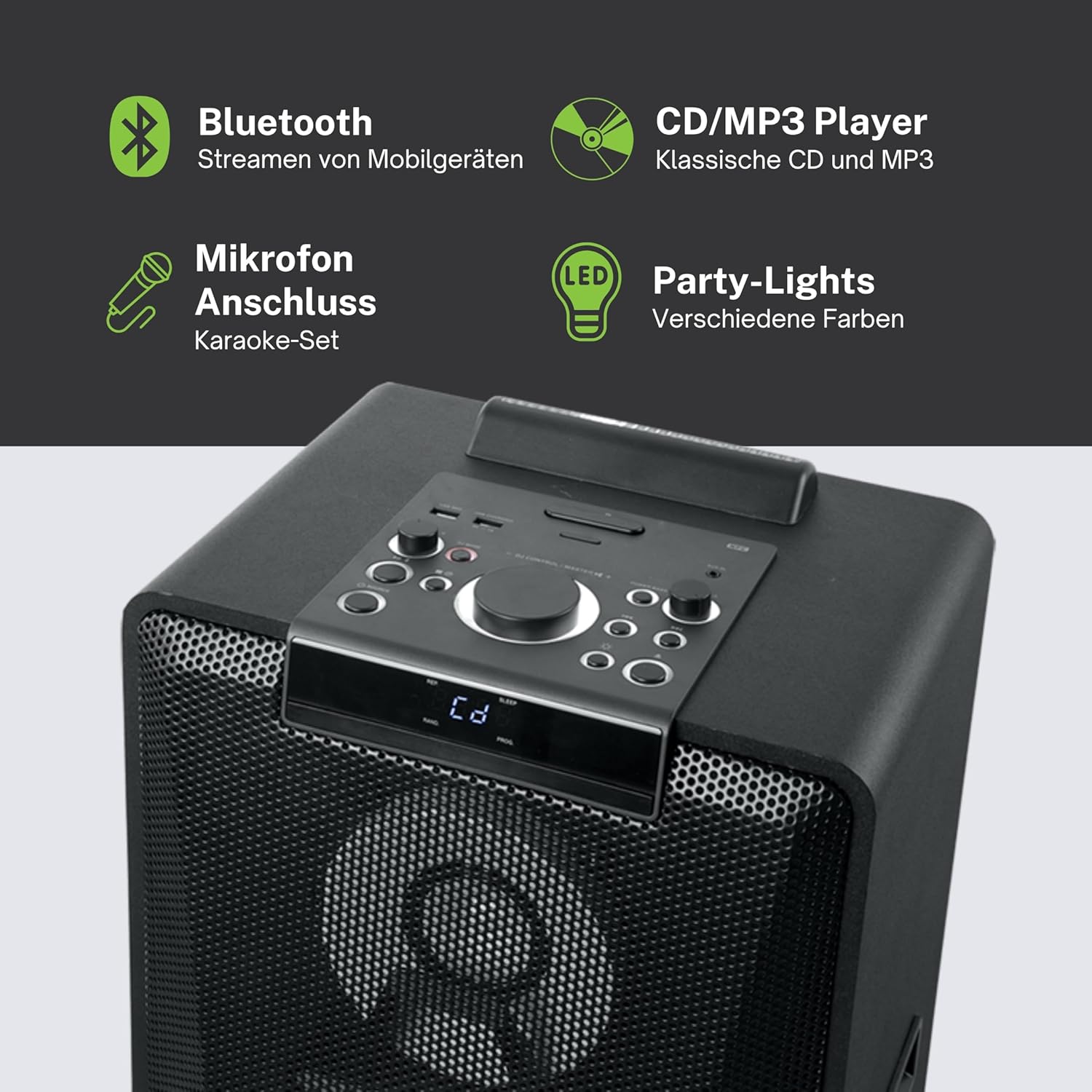
ምስል 4.1፡ ዝርዝር view of the top control panel, showing various buttons and the LED display.
The top panel features controls for power, volume, source selection, playback, light effects, and a white LED display. It also includes a built-in cradle for a tablet or smartphone.
4.2 Rear Connectivity Ports
የኋላ ፓነል የተለያዩ የግብዓት እና የውጤት አማራጮችን ይሰጣል፡
- USB 2.0 Port (for MP3 playback and charging)
- AUX IN 1 (2 x RCA jacks)
- AUX IN 2 (3.5mm jack)
- Microphone Inputs (2 jacks)
- Guitar Input (1 jack)
- AC Power Input (100-240V, 50/60Hz)
5. ማዋቀር
5.1 አቀማመጥ
Place the speaker on a stable, flat surface. Ensure there is adequate space around the unit for ventilation. The unit is designed for floor mounting.
5.2 የኃይል ግንኙነት
- Connect the supplied power cable to the AC power input on the rear of the speaker.
- Plug the other end of the power cable into a standard wall outlet (AC 100-240V, 50/60Hz).
- The unit does not contain a rechargeable battery and must be connected to a power source for operation.
6. የአሠራር መመሪያዎች
6.1 ማብራት / ማጥፋት
Press the Power button on the top control panel or the remote control to turn the unit on or off.
6.2 የብሉቱዝ ማጣመር
- Press the Source button to select Bluetooth mode. The LED display will show 'BT' and the Bluetooth indicator will flash.
- በእርስዎ ዘመናዊ ስልክ፣ ታብሌት ወይም ሌላ ተኳኋኝ መሣሪያ ላይ ብሉቱዝን ያንቁ።
- ፈልግ 'M-1990 DJ' in your device's Bluetooth list and select it to pair.
- Once paired, the Bluetooth indicator will stop flashing, and you can begin streaming audio.
- For NFC-enabled devices, simply tap your device on the NFC area of the speaker for automatic pairing.
6.3 ሲዲ መልሶ ማጫወት
- የሲዲ ሁነታን ለመምረጥ የምንጭ አዝራሩን ይጫኑ።
- Open the CD tray and place a CD (CD, CD-R/RW, MP3 compatible) with the label side up.
- Close the CD tray. Playback will start automatically or can be initiated using the Play/Pause button.
6.4 የዩኤስቢ መልሶ ማጫወት
- MP3 የያዘ የዩኤስቢ ፍላሽ አንፃፊ አስገባ files into the USB 2.0 port.
- Press the Source button to select USB mode.
- Playback will start automatically or can be controlled using the playback buttons.
- The USB port also functions as a charging port for external devices.
6.5 AUX ግቤት
- Connect your external audio device to either the AUX IN 1 (RCA jacks) or AUX IN 2 (3.5mm jack) using the appropriate cable.
- Press the Source button to select the corresponding AUX input.
- ከተገናኘው መሣሪያዎ መልሶ ማጫወትን ይቆጣጠሩ።
6.6 የማይክሮፎን እና የጊታር ግብዓቶች
- Plug your microphone(s) into the Microphone input jacks.
- Plug your guitar into the Guitar input jack.
- Adjust the microphone/guitar volume using the dedicated controls on the top panel.
6.7 የብርሃን ተፅእኖዎች
The M-1990 DJ features color-changing lights and strobe effects. Use the dedicated Light Effects button on the control panel or remote to cycle through different modes or turn the lights off.
6.8 Stereo Pairing (Dual Bluetooth)
If you have two M-1990 DJ units, you can pair them wirelessly for a stereo sound experience. Refer to the specific instructions for stereo pairing in the full manual (if provided by manufacturer) or on the manufacturer's webጣቢያ.
7. ጥገና
7.1 ጽዳት
- ከማጽዳትዎ በፊት ሁልጊዜ ክፍሉን ከኃይል ማከፋፈያው ያላቅቁት.
- ውጫዊ ገጽታዎችን ለማጽዳት ለስላሳ እና ደረቅ ጨርቅ ይጠቀሙ.
- አጨራረስን ሊጎዱ ስለሚችሉ ብስባሽ ማጽጃዎችን፣ ሰምዎችን ወይም ፈሳሾችን አይጠቀሙ።
7.2 ማከማቻ
ረዘም ላለ ጊዜ ጥቅም ላይ በማይውልበት ጊዜ ድምጽ ማጉያውን በቀጥታ ከፀሀይ ብርሀን እና ከከፍተኛ ሙቀት ርቆ በቀዝቃዛና ደረቅ ቦታ ያከማቹ።
8. መላ መፈለግ
If you encounter issues with your M-1990 DJ speaker, refer to the following common problems and solutions:
| ችግር | ሊሆን የሚችል ምክንያት | መፍትሄ |
|---|---|---|
| ኃይል የለም | የኃይል ገመድ አልተገናኘም; የኃይል መውጫው ንቁ አይደለም። | የኃይል ገመዱ ደህንነቱ በተጠበቀ ሁኔታ መገናኘቱን ያረጋግጡ፤ የተለየ ሶኬት ይሞክሩ |
| ድምጽ የለም። | Volume too low; Incorrect source selected; Audio cable not connected | Increase volume; Select correct input source; Check audio cable connections |
| ብሉቱዝ አይጣመርም። | ድምጽ ማጉያ በማጣመር ሁነታ ላይ አይደለም; መሣሪያ ብሉቱዝ ጠፍቷል; መሣሪያ በጣም ሩቅ | Ensure speaker is in BT mode and flashing; Enable Bluetooth on device; Move device closer (within 10m) |
| ሲዲ አይጫወትም። | CD inserted incorrectly; CD scratched/dirty; Incorrect format | Reinsert CD correctly; Clean CD; Ensure CD is audio CD or MP3 compatible |
| ዩኤስቢ አይጫወትም | የዩኤስቢ ድራይቭ በትክክል አልገባም; Files not MP3 format; USB drive corrupted | የዩኤስቢ ድራይቭን እንደገና ያስገቡ፤ ያረጋግጡ files are MP3; Try a different USB drive |
እነዚህን መፍትሄዎች ከሞከሩ በኋላ ችግሩ ከቀጠለ፣ እባክዎ የደንበኛ ድጋፍን ያግኙ።
9. ዝርዝሮች
Detailed technical specifications for the Muse M-1990 DJ Party Speaker:
- የሞዴል ቁጥር፡- ኤም-1990 ዲጄ
- የምርት ስም፡ ሙሴ
- የውጤት ኃይል፡ 1000 ዋት
- የሰርጦች ብዛት፡- 2
- የግንኙነት ቴክኖሎጂ; ብሉቱዝ V4.2
- ተስማሚ መሣሪያዎች ስማርትፎን ፣ ታብሌት
- የድምፅ ግብዓቶች 2 x Microphone jacks, 1 x Guitar jack, 2 x RCA AUX IN, 1 x 3.5mm AUX IN
- የዩኤስቢ ወደብ፡ 1 x USB 2.0 (for MP3 playback and charging)
- ሲዲ ማጫወቻ፡ ከሲዲ፣ ከሲዲ-አር/አርደብሊው፣ ከኤምፒ3 ጋር ተኳሃኝ
- የብርሃን ተፅእኖዎች; Color changing lights, Strobe effects, Light projection
- የኃይል ምንጭ፡- AC 100-240V, 50/60Hz (Electric Cable)
- ዳግም ሊሞላ የሚችል ባትሪ፡ አይ
- ቁሳቁስ፡ እንጨት (ካቢኔ)
- ቀለም፡ ጥቁር
- የእቃው ክብደት፡ 17.9 ኪ
- ልኬቶች (L x W x H)፦ 35.6 x 34.8 x 105.7 ሴንቲሜትር
- የሚመከር አጠቃቀም፡- Party and entertainment
- የመጫኛ አይነት፡ የወለል ተራራ
- የተካተቱ ባትሪዎች፡- 2 AA (for remote control)

Image 9.1: Dimensional drawing of the Muse M-1990 DJ speaker.
10. ዋስትና እና ድጋፍ
10.1 የዋስትና መረጃ
Warranty terms and conditions for the Muse M-1990 DJ speaker are typically provided with the product packaging or can be found on the official Muse webጣቢያ. እባክዎ ለማንኛውም የዋስትና ጥያቄዎች የግዢ ማረጋገጫዎን ያቆዩ።
10.2 የደንበኛ ድጋፍ
For further assistance, technical support, or service inquiries, please refer to the contact information provided in your product documentation or visit the official Muse customer support webጣቢያ.


