1. መግቢያ
The Eizo ColorEdge CS2731 is a 27-inch IPS LCD monitor designed for creative professionals who demand exceptional color accuracy and image quality. This manual provides detailed instructions for setting up, operating, and maintaining your monitor to ensure optimal performance.

ምስል 1.1: የፊት view of the Eizo ColorEdge CS2731 Monitor, showcasing its sleek design and display capabilities.
2. ቁልፍ ባህሪያት
- 27-inch Wide Gamut LCD: Features a 2560x1440 resolution IPS panel for fine detail and wide viewing ማዕዘኖች.
- 99% Adobe RGB Color Space: Ensures accurate reproduction of a wide range of colors, crucial for professional photo and video editing.
- Hardware Calibration Support: Compatible with free calibration software (ColorNavigator 7) for precise color management.
- ሁለገብ ግብዓቶች፡- Includes USB Type-C, DisplayPort, HDMI, and DVI-D for broad connectivity.
- የ5-አመት የአምራች ዋስትና፡- የምርት ጥራት እና አስተማማኝነት የረጅም ጊዜ ዋስትና ይሰጣል።
3. ማዋቀር
3.1 ማራገፍ እና መገጣጠም
Carefully remove the monitor and its components from the packaging. Assemble the stand according to the included quick setup guide, ensuring all connections are secure before placing the monitor on a stable surface.
3.2 ተቆጣጣሪውን ማገናኘት
Connect the monitor to your computer using one of the available input ports. The ColorEdge CS2731 supports USB Type-C, DisplayPort, HDMI, and DVI-D connections. For optimal performance and color depth, DisplayPort or USB Type-C are recommended.

Figure 3.1: USB Type-C connection allows for video, USB signal, and power delivery (up to 60W) with a single cable.
Ensure the power cable is securely connected to the monitor and a power outlet. The monitor supports 240 Volts input.
3.3 አካላዊ ማስተካከያዎች
The monitor stand allows for various adjustments to enhance your viewing comfort and efficiency:
- የከፍታ ማስተካከያ; Adjust the monitor's height to your eye level.
- የማዘንበል ማስተካከያ፡ Tilt the screen forward or backward to reduce glare and improve viewአንግል።
- Pivot Function: ለቁም እይታ ማያ ገጹን 90 ዲግሪ አሽከርክር viewing, ideal for editing long documents or images.

Figure 3.2: Adjusting the monitor height for ergonomic viewing


Figure 3.3: Monitor tilt adjustments (+5° to -35°).
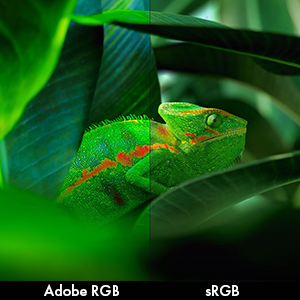
Figure 3.4: Monitor pivot function for portrait orientation.
4. ሞኒተሩን መስራት
4.1 ማብራት / ማጥፋት
Press the power button located on the front bezel to turn the monitor on or off. The power indicator light will illuminate when the monitor is active.
4.2 Color Management and Calibration
The Eizo ColorEdge CS2731 is designed for precise color reproduction. It features a wide color gamut covering 99% of the Adobe RGB color space, ensuring accurate and vibrant colors.

Figure 4.1: Illustration of the monitor's 99% Adobe RGB color gamut coverage, ideal for creative work.
The monitor also includes a Digital Uniformity Equalizer (DUE) to ensure consistent brightness and chromaticity across the entire screen, minimizing variations that can affect color accuracy.

Figure 4.2: The Digital Uniformity Equalizer corrects tone deviations for consistent display across the screen.
For hardware calibration, use Eizo's ColorNavigator 7 software. This software, combined with an optional calibration sensor, simplifies the calibration process and ensures predictable, accurate results across all units.

Figure 4.3: ColorNavigator 7 software facilitates precise hardware calibration for various creative workflows.
ቪዲዮ 4.1: አልቋልview of the ColorEdge CS Series Monitors, highlighting their features for creative professionals, including color reproduction, image quality, and ease of use. This video demonstrates the wide color gamut, digital uniformity equalizer, and hardware calibration capabilities.
5. ጥገና
5.1 መቆጣጠሪያውን ማጽዳት
የማሳያ ስክሪኑን ለማጽዳት፣ ለስላሳ፣ ከንጣፍ ነፃ በሆነ ጨርቅ በቀስታ ይጥረጉት። ለጠንካራ ቆሻሻዎች፣ ትንሽ ይጥረጉ።ampጨርቁን በውሃ ወይም በስክሪን ማጽጃ መፍትሄ. ኃይለኛ ኬሚካሎችን ወይም ሻካራ ቁሳቁሶችን ከመጠቀም ይቆጠቡ.
5.2 አጠቃላይ እንክብካቤ
Keep the monitor in a well-ventilated area, away from direct sunlight and excessive heat or moisture. Avoid placing heavy objects on the monitor or its cables. When moving the monitor, ensure it is powered off and disconnected from all cables.
6. መላ መፈለግ
6.1 ምንም ኃይል የለም
- የኤሌትሪክ ገመዱ ከሁለቱም ሞኒተሪው እና ከኃይል ማመንጫው ጋር ደህንነቱ በተጠበቀ ሁኔታ መገናኘቱን ያረጋግጡ።
- የኃይል መውጫው የሚሰራ መሆኑን ያረጋግጡ፣ ሌላ መሳሪያ በማገናኘት።
6.2 በስክሪኑ ላይ ምንም ምስል የለም
- Verify that the video cable (USB-C, DisplayPort, HDMI, or DVI-D) is securely connected to both the monitor and your computer.
- Ensure the correct input source is selected on the monitor's OSD (On-Screen Display) menu.
- Check your computer's display settings to ensure it is configured to output to the monitor.
6.3 Color Inaccuracies
- Perform a hardware calibration using Eizo ColorNavigator 7 software and a compatible sensor.
- የግራፊክስ ካርድ ነጂዎችዎ ወቅታዊ መሆናቸውን ያረጋግጡ።
- Check the monitor's color mode settings in the OSD menu.
For further assistance, please refer to the comprehensive troubleshooting guide available on the Eizo support webጣቢያ.
7. ዝርዝሮች

Figure 7.1: Key dimensions of the Eizo ColorEdge CS2731 Monitor.
| ባህሪ | ዋጋ |
|---|---|
| የስክሪን መጠን | 27 ኢንች |
| ጥራት | 2560 x 1440 (QHD ሰፊ 1440 ፒ) |
| ምጥጥነ ገጽታ | 1.78፡1 |
| የምስል ብሩህነት | 350 ሲዲ/ሜ |
| የስክሪን ወለል መግለጫ | ማት |
| ግብዓቶች | USB Type-C, DisplayPort, HDMI, DVI-D |
| ጠቅላላ የዩኤስቢ ወደቦች | 3 |
| ጥራዝtage | 240 ቮልት |
| የእቃው ክብደት | 22.2 ፓውንድ |
| የንጥል ሞዴል ቁጥር | CS2731-BK |
| የመጀመሪያ ቀን ይገኛል። | ኤፕሪል 8, 2019 |
Note: Some regional models may have specific voltage requirements or warranty limitations. Refer to your product's specific documentation.

Figure 7.2: Specific warranty and input voltage information for models intended for the Japanese market.
8. ዋስትና እና ድጋፍ
The Eizo ColorEdge CS2731 monitor comes with a የ 5 ዓመት የአምራች ዋስትና. ይህ ዋስትና በመደበኛ አጠቃቀም ላይ የቁሳቁሶች እና የአሠራር ጉድለቶችን ይሸፍናል ።
For warranty claims, technical support, or additional product information, please visit the official Eizo support webየደንበኛ አገልግሎታቸውን በድረ-ገጽ ላይ ያግኙ ወይም ያነጋግሩ። ተጨማሪ መረጃዎችን እና ግብዓቶችን በድረ-ገጻቸው ላይ ማግኘት ይችላሉ። Eizo Store on Amazon.
Please note that the warranty may be region-specific. For example, some models may have a warranty valid only in Japan, as indicated in certain product images.


