1. መግቢያ
This manual provides comprehensive instructions for the setup, operation, maintenance, and troubleshooting of your Canyon CNS-SW71SS Smartwatch. Please read this manual carefully before using your device to ensure proper function and longevity.
The Canyon CNS-SW71SS Smartwatch is designed to help you monitor your fitness activities and stay connected. It features a 1.22-inch color screen, multi-sport modes, heart rate monitoring, sleep tracking, and notification alerts. Its IP68 water resistance makes it suitable for various environments.
2. ምርት አብቅቷልview
2.1 ቁልፍ ባህሪያት
- 1.22-inch color touch screen display.
- Multi-sport mode for tracking various activities.
- Daily activity monitoring: calories, steps, heart rate, and sleep.
- Notifications for incoming calls, SMS, emails, calendar events, and social media.
- Music control and remote camera function.
- Smart alarm and weather data display.
- እስከ 7 ቀናት የባትሪ ዕድሜ።
- IP68 water resistance (submersible up to 1 meter for 30 minutes).
- ብሉቱዝ 4.0 ግንኙነት.
- Compatible with iOS and Android operating systems.
- Comes with two interchangeable wristbands: metal and TPU.
2.2 ክፍሎች
The Canyon CNS-SW71SS Smartwatch consists of the main watch unit, interchangeable wristbands, and a charging cable.

ምስል 1: የፊት view of the Canyon CNS-SW71SS Smartwatch, showing the display with steps, distance, calories, and heart rate data.

ምስል 2: ማዕዘን view of the Canyon CNS-SW71SS Smartwatch, featuring a silver metal mesh strap and a round display.
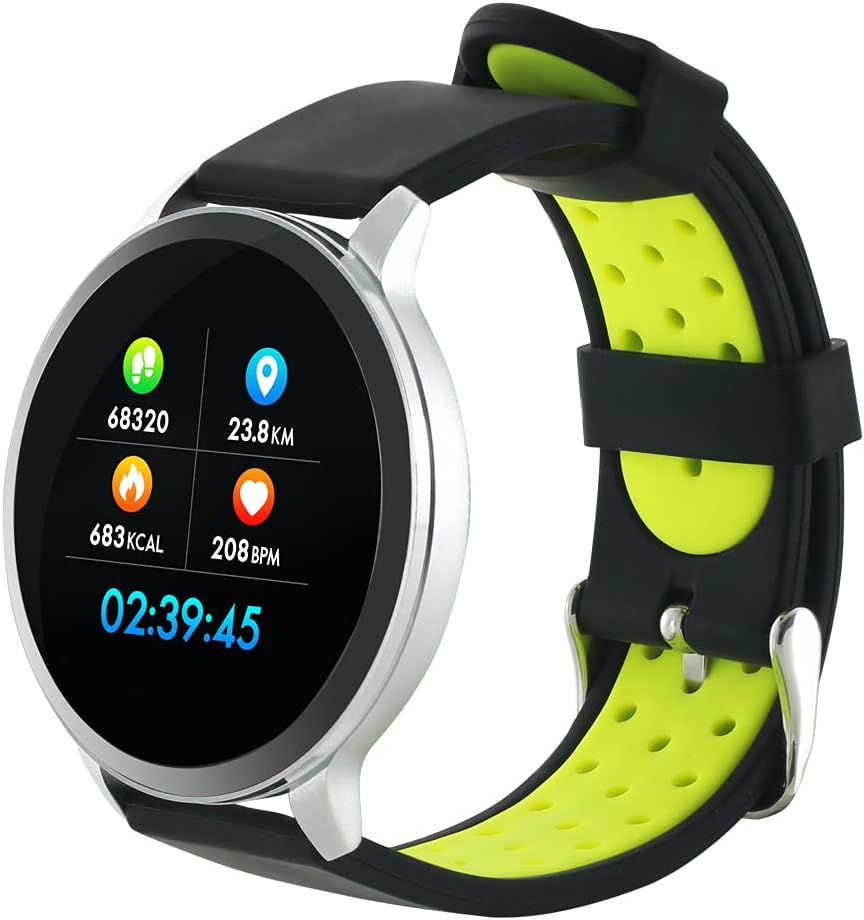
Figure 3: The Canyon CNS-SW71SS Smartwatch shown with an alternative black and lime green TPU strap, highlighting its interchangeable design.

ምስል 4: የኋላ view of the Canyon CNS-SW71SS Smartwatch, displaying the optical heart rate sensor and magnetic charging contacts.

Figure 5: The retail packaging for the Canyon CNS-SW71SS Smartwatch, illustrating key features and the included two straps.
3. ማዋቀር
3.1 Smartwatchን በመሙላት ላይ
- የኃይል መሙያ ገመዱን ከዩኤስቢ የኃይል አስማሚ (ያልተካተተ) ወይም ከኮምፒዩተር የዩኤስቢ ወደብ ጋር ያገናኙ።
- Align the magnetic charging pins of the cable with the charging contacts on the back of the smartwatch. The watch will vibrate and display a charging icon.
- Allow approximately 2-3 hours for a full charge. A full charge provides up to 7 days of usage.
3.2 Installing the Canyon Fit Application
- Scan the QR code provided in the packaging or search for "Canyon Fit" in your smartphone's app store (Google Play Store for Android, Apple App Store for iOS).
- መተግበሪያውን ያውርዱ እና ይጫኑት።
- Open the Canyon Fit app and follow the on-screen instructions to create an account and set up your profile.
3.3 ከስማርትፎንዎ ጋር ማጣመር
- የእርስዎ ስማርት ሰዓት መሙላቱን እና መብራቱን ያረጋግጡ።
- በእርስዎ ዘመናዊ ስልክ ላይ ብሉቱዝን ያንቁ።
- የCanyon Fit መተግበሪያን ይክፈቱ።
- Navigate to the device pairing section within the app (usually found under 'Device' or 'Profile")።
- Select your smartwatch (e.g., "CNS-SW71SS") from the list of available devices.
- ከተጠየቀ የማጣመር ጥያቄውን በሁለቱም በስማርት ስልክዎ እና በስማርት ሰዓትዎ ላይ ያረጋግጡ።
3.4 Attaching/Changing Wristbands
The smartwatch comes with two wristbands (metal and TPU) that can be interchanged. To attach or change a wristband, locate the quick-release pins on the underside of the strap. Slide the pin to detach the current strap and then align and slide the pin of the new strap into the corresponding holes on the watch body until it clicks into place.
4. የአሠራር መመሪያዎች
4.1 መሰረታዊ ዳሰሳ
- የንክኪ ማያ Swipe left/right to navigate through different functions and menus. Swipe up/down to view ማሳወቂያዎች ወይም ፈጣን ቅንብሮች.
- የጎን አዝራር፡- Press the side button to return to the main watch face or to wake up the screen. A long press may access power options or specific features depending on the context.
4.2 የአካል ብቃት ክትትል
- ባለብዙ-ስፖርት ሁነታ፡- Access the 'Workout' or 'Sport' menu on your watch. Select your desired activity (e.g., running, cycling, walking) to start tracking. The watch will record duration, distance, calories burned, and heart rate.
- የዕለት ተዕለት እንቅስቃሴ; ሰዓቱ እርምጃዎችዎን፣ ርቀትዎን እና ቀኑን ሙሉ የተቃጠሉ ካሎሪዎችዎን በራስ-ሰር ይከታተላል። View these statistics on the watch face or in the Canyon Fit app.
- የልብ ምት ክትትል; The watch continuously monitors your heart rate. You can also manually initiate a heart rate measurement from the heart rate interface.
- የእንቅልፍ ክትትል; Wear the smartwatch to bed, and it will automatically track your sleep patterns, including deep sleep, light sleep, and wake times. View detailed sleep analysis in the Canyon Fit app.
4.3 ማሳወቂያዎች
Once paired with your smartphone and with notification permissions granted in the Canyon Fit app, your smartwatch will display alerts for:
- ገቢ ጥሪዎች
- የኤስኤምኤስ መልዕክቶች
- ኢሜይሎች
- የቀን መቁጠሪያ ክስተቶች
- Social Media Apps (e.g., WhatsApp, Facebook, Instagራንደም አክሰስ ሜሞሪ)
በሰዓቱ ፊት ወደ ላይ ወደ ላይ ያንሸራትቱ view recent notifications. You can dismiss notifications from the watch.
4.4 ተጨማሪ ተግባራት
- የሙዚቃ ቁጥጥር፡- While music is playing on your phone, you can use the watch to play/pause, skip tracks, and adjust volume.
- የርቀት ካሜራ፡ Open the camera function in the Canyon Fit app. Use your smartwatch as a remote shutter button to take photos on your phone.
- ዘመናዊ ማንቂያ Set alarms through the Canyon Fit app. The watch will vibrate to wake you up gently.
- የአየር ሁኔታ መረጃ Once connected to your phone, the watch will display current weather conditions and forecasts for your location.
5. ጥገና
5.1 ጽዳት
- የሰዓት ስክሪኑን እና አካሉን በለስላሳ፣ ዲ ይጥረጉamp ጨርቅ.
- For the metal strap, use a soft brush to gently clean any debris. For the TPU strap, wash with mild soap and water.
- ከመሙላቱ በፊት የኃይል መሙያ እውቂያዎቹ ንጹህ እና ደረቅ መሆናቸውን ያረጋግጡ።
- ለማጽዳት ኃይለኛ ኬሚካሎችን ወይም ሻካራ ቁሳቁሶችን ከመጠቀም ይቆጠቡ.
5.2 የውሃ መቋቋም (IP68)
The Canyon CNS-SW71SS Smartwatch is IP68 rated, meaning it is resistant to dust and can be immersed in water up to 1 meter deep for a maximum of 30 minutes. While it can withstand splashes, rain, and brief immersion, it is not recommended for hot showers, saunas, or diving, as steam and high water pressure can compromise the seals.
- Do not press any buttons while the watch is submerged.
- ሰዓቱን ከውሃ ጋር ከተጋለጡ በኋላ በደንብ ያድርቁት።
5.3 የባትሪ እንክብካቤ
- በተደጋጋሚ ባትሪውን ሙሉ በሙሉ ከመሙላት ይቆጠቡ።
- የባትሪውን ጤና ለመጠበቅ መሳሪያውን በመደበኛነት ይሙሉት፣ ጥቅም ላይ ባይውልም እንኳ።
- ለረጅም ጊዜ ጥቅም ላይ በማይውልበት ጊዜ ሰዓቱን በቀዝቃዛና ደረቅ ቦታ ያከማቹ።
6. መላ መፈለግ
- ሳይበራ ይመልከቱ፡ ሰዓቱ ሙሉ በሙሉ መሙላቱን ያረጋግጡ። ቢያንስ ለ 30 ደቂቃዎች ከኃይል መሙያው ጋር ያገናኙት.
- ከስማርትፎን ጋር ማጣመር አይቻልም፡-
- ብሉቱዝ በስልክዎ ላይ እንደነቃ ያረጋግጡ።
- Ensure the Canyon Fit app has necessary permissions.
- ሁለቱንም ስልክዎን እና ስማርት ሰዓቱን እንደገና ያስጀምሩ።
- መሣሪያውን በመተግበሪያው በኩል ለማላቀቅ እና ለማጣመር ይሞክሩ።
- ማሳወቂያዎች አይታዩም:
- Check notification settings in the Canyon Fit app and your phone's system settings.
- ሰዓቱ በብሉቱዝ መገናኘቱን ያረጋግጡ።
- ትክክለኛ ያልሆነ የልብ ምት/እንቅስቃሴ ውሂብ፡
- ሰዓቱ በጣም ጥብቅ ወይም በጣም ልቅ ያልሆነ ሳይሆን በእጅ አንጓዎ ላይ በደንብ መልበስዎን ያረጋግጡ።
- በሰዓቱ ጀርባ ላይ ያለውን ዳሳሽ ያጽዱ።
- Environmental factors or certain movements can affect accuracy.
- ማያ ገጽ ምላሽ የማይሰጥ፡ Try restarting the smartwatch by holding down the side button. If unresponsive, allow the battery to fully drain and then recharge.
7. ዝርዝሮች
| የሞዴል ስም | CNS-SW71SS |
| የምርት ስም | ካኖን |
| የማሳያ መጠን | 1.22 ኢንች |
| የስርዓተ ክወና ተኳኋኝነት | አንድሮይድ፣ አይኦኤስ |
| የግንኙነት ቴክኖሎጂ | ብሉቱዝ 4.0 |
| የውሃ መቋቋም ደረጃ | IP68 |
| ልዩ ባህሪያት | Wireless Charging (implied by product data), Multi-Sport Mode, Heart Rate Monitor, Sleep Tracker, Notifications |
| ተስማሚ መሣሪያዎች | ስማርትፎን |
| ባትሪ | እንደገና ሊሞላ የሚችል (1 ተካትቷል) |
| የቀለም አማራጮች | Black, Lime Green, Silver |
8. ዋስትና እና ድጋፍ
For warranty information and technical support, please refer to the documentation included with your purchase or visit the official Canyon website. You can also contact Canyon customer service for assistance with product issues or inquiries.
የመስመር ላይ ድጋፍ https://canyon.eu/support/ (ዘፀampሊንክ፣ እባክዎን ኦፊሴላዊ የድጋፍ ገጽን ያረጋግጡ)


