መግቢያ
The Amazon Echo Show 8 (1st Gen, 2019 release) is a smart display designed to enhance your daily life with Alexa. Featuring an 8-inch HD screen and stereo sound, it allows you to manage your day, connect with loved ones through video calls, enjoy entertainment, control smart home devices, and personalize your experience. This manual provides detailed instructions to help you get the most out of your device.
በሣጥኑ ውስጥ ያለው
Upon unboxing your Echo Show 8, ensure all components are present:
- Echo Show 8 መሳሪያ
- የኃይል አስማሚ (30 ዋ) ከኬብል (4.9 ጫማ) ጋር
- ፈጣን ጅምር መመሪያ
ማዋቀር
Setting up your Echo Show 8 is a straightforward process, often simplified by Amazon Wi-Fi simple setup technology.
- አብራ፡ Connect the power adapter to your Echo Show 8 and plug it into a wall outlet. The device will power on automatically.
- የቋንቋ ምርጫ፡- የሚመርጡትን ቋንቋ ለመምረጥ በማያ ገጽ ላይ ያሉትን ጥያቄዎች ይከተሉ።
- የWi-Fi ግንኙነት፡- Select your Wi-Fi network from the list and enter the password. The Echo Show 8 supports dual-band Wi-Fi (802.11a/b/g/n/ac).
- Amazon Account Login: Log in with your Amazon account credentials. If you don't have one, you will be prompted to create one.
- የመሣሪያ ምዝገባ፡- Your device will register to your Amazon account.
- Time Zone and Location: Confirm your time zone and location settings.
- አጋዥ ስልጠና፡ The device may offer a brief tutorial on how to navigate and use its features.
The Alexa app is compatible with Fire OS, Android, and iOS devices and is also accessible via your web browser for further management and customization.
የእርስዎን ኢኮ ሾው መስራት 8
The Echo Show 8 can be operated using voice commands with Alexa or through its touch screen interface.
Voice Commands (Alexa)
Simply say "Alexa" followed by your command. Exampከሚከተሉት ያነሰ
- "አሌክሳ, የአየር ሁኔታ ምንድን ነው?"
- "አሌክሳ፣ ሙዚቃ ተጫወት።"
- "Alexa, call [contact name]."
- "Alexa, show me my photos."
- "Alexa, turn off the lights."

Image: Echo Show 8 displaying current weather conditions, demonstrating its ability to provide glanceable information.
የንክኪ ማያ ገጽ ዳሰሳ
Swipe down from the top of the screen to access quick settings and the home menu. Swipe left from the right edge to view cards with suggestions and information. Tap on icons and options to interact with the device.
ባህሪያት
The Echo Show 8 offers a wide range of features to simplify and enrich your daily routines:
- Video Calling & Messaging: Connect with friends and family who have the Alexa app or an Echo device with a screen. Make announcements to other devices in your home.

Image: A user making a video call on the Echo Show 8, highlighting its communication capabilities.
- መዝናኛ፡ Ask Alexa to show you movie trailers, TV shows, movies, or the news. Listen to radio stations, podcasts, and audiobooks.
- ዘመናዊ የቤት መቆጣጠሪያ፡- Voice control compatible devices or manage them on the easy-to-use display. Ask Alexa to show you security cameras, control lights, and adjust thermostats.

Image: The Echo Show 8 displaying a live feed from a nursery camera, illustrating its smart home monitoring feature.
- ግላዊነት ማላበስ፡ Show off your albums from Amazon Photos. Customize your home screen. Create morning routines to start your day.
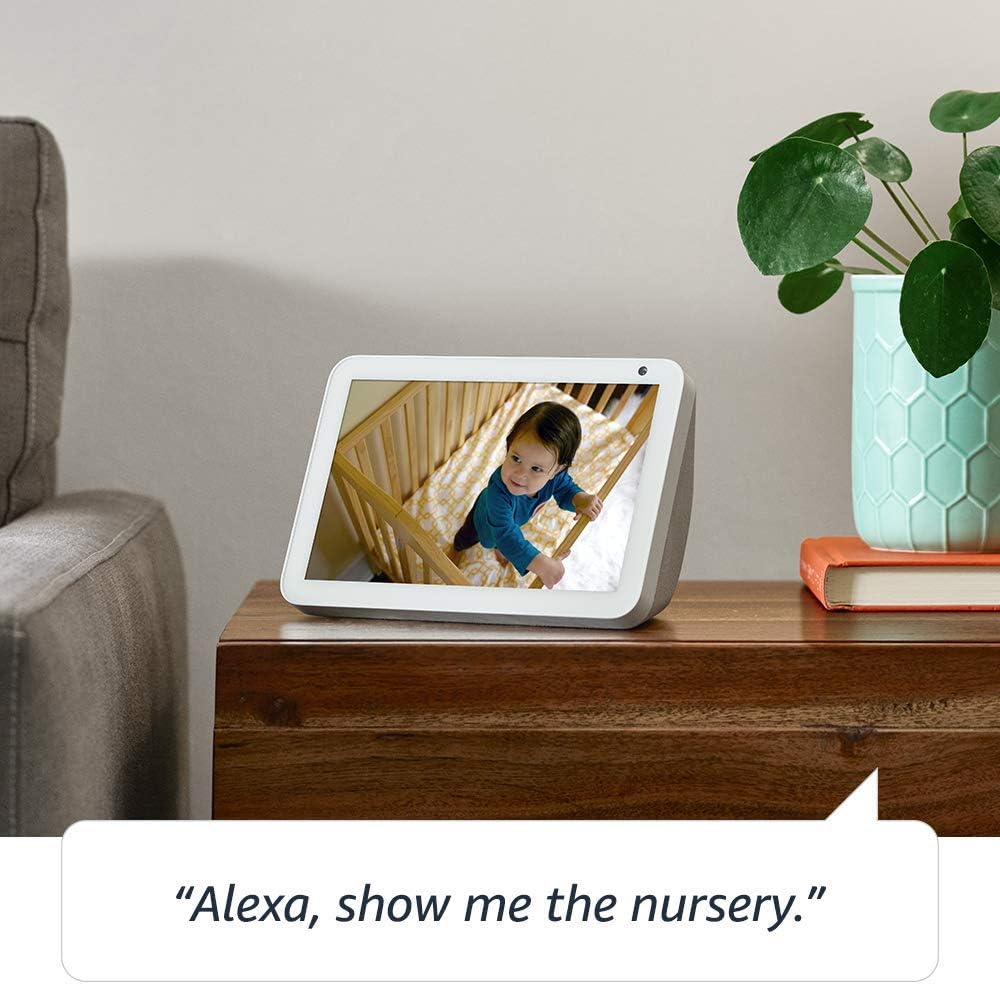
Image: The Echo Show 8 displaying a scenic photo from a user's Amazon Photos album, demonstrating its personalization options.
- ዕለታዊ እርዳታ፡ Cook along to step-by-step recipes. Easily update to-do lists and calendars. Glance at weather and traffic on your way out.
የግላዊነት ባህሪያት
The Echo Show 8 is designed with privacy in mind, offering several controls:
- ማይክሮፎን/ካሜራ ጠፍቷል አዝራር፡- Electronically disconnect the microphones and camera with one press of a button.
- አብሮ የተሰራ የካሜራ መከለያ; Slide the built-in shutter to physically cover the camera lens.

Image: A finger activating the physical camera shutter on the Echo Show 8, demonstrating a privacy control feature.
- ዋክ ቃል ቴክኖሎጂ፡- Alexa devices are designed to detect only your chosen wake word (e.g., "Alexa").
- የዥረት አመላካቾች፡- Visual indicators show when Alexa is streaming your request to the cloud.
- የድምጽ ቀረጻ አስተዳደር፡- ችሎታ view and delete your voice recordings through the Alexa app or Alexa Privacy Hub.
ለተጨማሪ መረጃ የAlexa Privacy Hub ን ይጎብኙ።
ጥገና
የእርስዎን Echo Show 8 ረጅም ዕድሜ እና ጥሩ አፈጻጸም ለማረጋገጥ እነዚህን የጥገና መመሪያዎች ይከተሉ፡
- ማጽዳት፡ Use a soft, lint-free cloth to clean the screen and exterior. Avoid abrasive cleaners or sprays directly on the device.
- አቀማመጥ፡- Place the device on a stable, flat surface away from direct sunlight, heat sources, and moisture. Ensure proper ventilation.
- የሶፍትዌር ማሻሻያ The device automatically receives software updates. Ensure it is connected to Wi-Fi to receive these updates, which improve performance and add new features.
መላ መፈለግ
If you encounter issues with your Echo Show 8, try the following steps:
- ኃይል የለም፡
- የኃይል አስማሚው ከመሣሪያው እና ከሚሠራው የኃይል ምንጭ ጋር ደህንነቱ በተጠበቀ ሁኔታ መገናኘቱን ያረጋግጡ።
- የተለየ የኃይል መውጫ ይሞክሩ።
- የWi-Fi ግንኙነት ችግሮች፡-
- የWi-Fi ይለፍ ቃልዎ ትክክል መሆኑን ያረጋግጡ።
- የእርስዎን Wi-Fi ራውተር እና ሞደም እንደገና ያስጀምሩ።
- Echo Show 8ን ወደ Wi-Fi ራውተርዎ ያቅርቡ።
- አሌክሳ ምላሽ አይሰጥም
- Ensure the microphone is not muted (check the microphone/camera off button).
- በግልጽ እና በተለመደው ድምጽ ይናገሩ.
- ለጥቂት ሰከንዶች በማላቀቅ እና እንደገና በማገናኘት መሳሪያውን እንደገና ለማስጀመር ይሞክሩ።
- የማያ ገጽ ጉዳዮች፡-
- ማያ ገጹ ምላሽ የማይሰጥ ከሆነ መሣሪያውን እንደገና ለማስጀመር ይሞክሩ።
- ማያ ገጹ ንጹህ እና ከቆሻሻ የጸዳ መሆኑን ያረጋግጡ።
- ፍቅር: As a last resort, you can perform a factory reset. This will erase all your personal data and settings. To do this, go to Settings > Device Options > Reset to Factory Defaults.
ዝርዝሮች
| ባህሪ | ዝርዝር |
|---|---|
| መጠን | 7.9”x 5.4”x 3.9” (200mm x 135mm x 99mm) |
| ክብደት | 36.6 አውንስ (1037 ግራም) |
| ማሳያ | 8.0 ”ንክኪ ማያ ገጽ |
| ካሜራ | 1MP camera with built-in shutter |
| የ Wi-Fi ግንኙነት | Dual-band Wi-Fi supports 802.11a/b/g/n/ac Wi-Fi networks. Does not support connecting to ad-hoc (or peer-to-peer) Wi-Fi networks. |
| የብሉቱዝ ግንኙነት | የላቀ የኦዲዮ ስርጭት ፕሮfile (A2DP) support for audio streaming from your mobile device to Echo Show 8 or from Echo Show 8 to your Bluetooth speaker. Audio/Video Remote Control Profile (AVRCP) ለተገናኙ የሞባይል መሳሪያዎች የድምጽ ቁጥጥር። ከእጅ ነፃ የሆነ የድምጽ ቁጥጥር ለማክ ኦኤስ ኤክስ መሳሪያዎች አይደገፍም። የፒን ኮዶችን የሚጠይቁ የብሉቱዝ ድምጽ ማጉያዎች አይደገፉም። |
| ኦዲዮ | 2.0” (52 mm) neodymium speakers with passive bass radiator |
| የስርዓት መስፈርቶች | Echo Show 8 comes ready to connect to your WiFi. The Alexa app is compatible with Fire OS, Android, and iOS devices and also accessible via your web browser. Supported operating systems. Certain skills and services may require subscription or other fees. |
| ፕሮሰሰር | MediaTek MT 8163 |
| ቋንቋ | አሌክሳ እንግሊዝኛ እና ስፓኒሽ ይናገራል |
የተደራሽነት ባህሪያት
The Echo Show 8 includes various accessibility features to personalize Alexa to your abilities:
- ወደ Alexa ንካ፡ በማያ ገጽ ላይ ሰቆች ወይም በቁልፍ ሰሌዳ በኩል በመንካት አሌክሳን ይድረሱ።
- የሚለምደዉ ማዳመጥ፡ አሌክሳ ከመመለሱ በፊት ለመናገር ለመጨረስ ተጨማሪ ጊዜ ይሰጣል።
- ተመራጭ የንግግር መጠን፡- አሌክሳ ምን ያህል ፈጣን ወይም ቀርፋፋ እንደሚናገር ይቆጣጠሩ።
- አሌክሳ መግለጫ ጽሑፍ፣ የጥሪ መግለጫ ጽሑፍ፣ የተዘጋ መግለጫ ጽሑፍ፡ ለሚደገፍ ይዘት የጽሑፍ መግለጫ ጽሑፎችን ያቅርቡ።
- አሳይ እና ይንገሩ፡- Helps customers who are blind or visually impaired identify products by saying “Alexa, what am I holding.”
- ድምጽView ስክሪን አንባቢ፡- Enables access for customers who are blind or visually impaired.
- ስክሪን ማጉያ፡ Enables zooming in/out and panning around the screen.
- አቅራቢያ ሲሆን አሳውቅ፡- Plays notification sounds when you’re detected near your Echo device.
- Kindle ጮክ ብሎ አንብብ፡- አሌክሳ የእርስዎን Kindle መጽሐፍት ጮክ ብሎ ማንበብ ይችላል።
- የእውነተኛ ጊዜ ጽሑፍ፡- Enables typing live text in a video call.
- ተጨማሪ ቅንጅቶች የቀለም ገለባ፣ የቀለም እርማት፣ ድምጽ ጠይቅ እና ሌሎችንም ያካትታሉ።
To enable these features, go to Settings → Accessibility on your Echo Show 8.
ዋስትና እና ድጋፍ
Your Certified Refurbished Echo Show 8 comes with a 1-year limited warranty and service, similar to a new device. Use of Echo Show 8 is subject to Amazon's terms and conditions.
For further assistance, visit the Amazon Device Support page or contact Amazon Customer Service.


