መግቢያ
Thank you for choosing the Macally Wireless Bluetooth Keyboard. This multi-device keyboard is designed to enhance your productivity across various platforms, including Mac, iOS, Windows, and Android devices. Featuring 110 keys, 20 Mac OS shortcuts, and a numeric keypad, it offers a comfortable and efficient typing experience. Its ultra-slim design and rechargeable battery make it an ideal companion for both work and leisure.

Image: The Macally Wireless Bluetooth Keyboard, showcasing its full layout and sleek silver design.
የጥቅል ይዘቶች
- Macally Wireless Bluetooth Keyboard
- የኃይል መሙያ ገመድ
- የተጠቃሚ መመሪያ
ማዋቀር
1. የቁልፍ ሰሌዳውን መሙላት
Before initial use, fully charge the keyboard using the included charging cable. Connect the cable to the keyboard's charging port and a USB power source. The LED indicator will show charging status.

Image: Illustration showing the keyboard connected to a charging cable, emphasizing its rechargeable nature.
2. ከመሳሪያዎች ጋር ማጣመር
The Macally Wireless Bluetooth Keyboard supports connecting up to three Bluetooth-enabled devices simultaneously. Follow these steps to pair your devices:
- የኃይል ማብሪያ / ማጥፊያውን በመጠቀም የቁልፍ ሰሌዳውን ያብሩ.
- Press and hold one of the Bluetooth keys (BT1, BT2, or BT3) for a few seconds until the corresponding LED indicator starts blinking rapidly. This indicates pairing mode.
- On your device (computer, tablet, or smartphone), go to Bluetooth settings and search for available devices.
- Select "Macally Keyboard" (or similar name) from the list.
- If prompted, enter the pairing code displayed on your screen using the Macally keyboard and press Enter.
- Once paired, the LED indicator will stop blinking and remain solid for a few seconds before turning off.
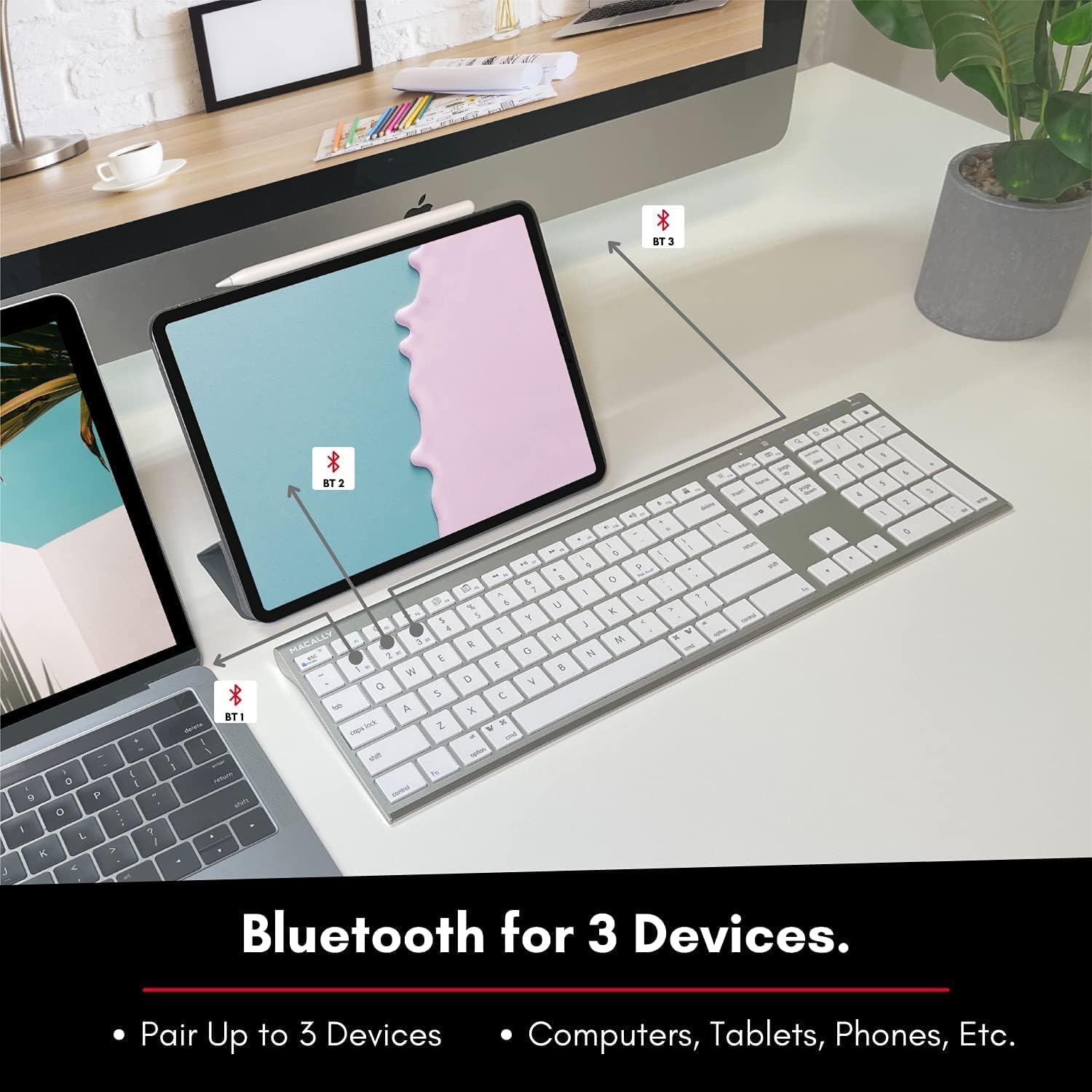
Image: The keyboard connected to a laptop and a tablet, illustrating its multi-device pairing capability.
የአሠራር መመሪያዎች
በመሳሪያዎች መካከል መቀያየር
To switch between paired devices, simply press the corresponding Bluetooth key (BT1, BT2, or BT3) once. The keyboard will automatically connect to the selected device within a few seconds.

Image: Visual representation of the keyboard seamlessly switching between a smartphone, iMac, and laptop, highlighting the multi-sync feature.
Function Keys and Shortcuts
The keyboard features a full set of 110 keys, including a numeric keypad and 20 dedicated Mac OS shortcut keys. These shortcuts provide quick access to various functions such as brightness control, volume adjustment, media playback, and more. Refer to your device's operating system documentation for specific shortcut functionalities.
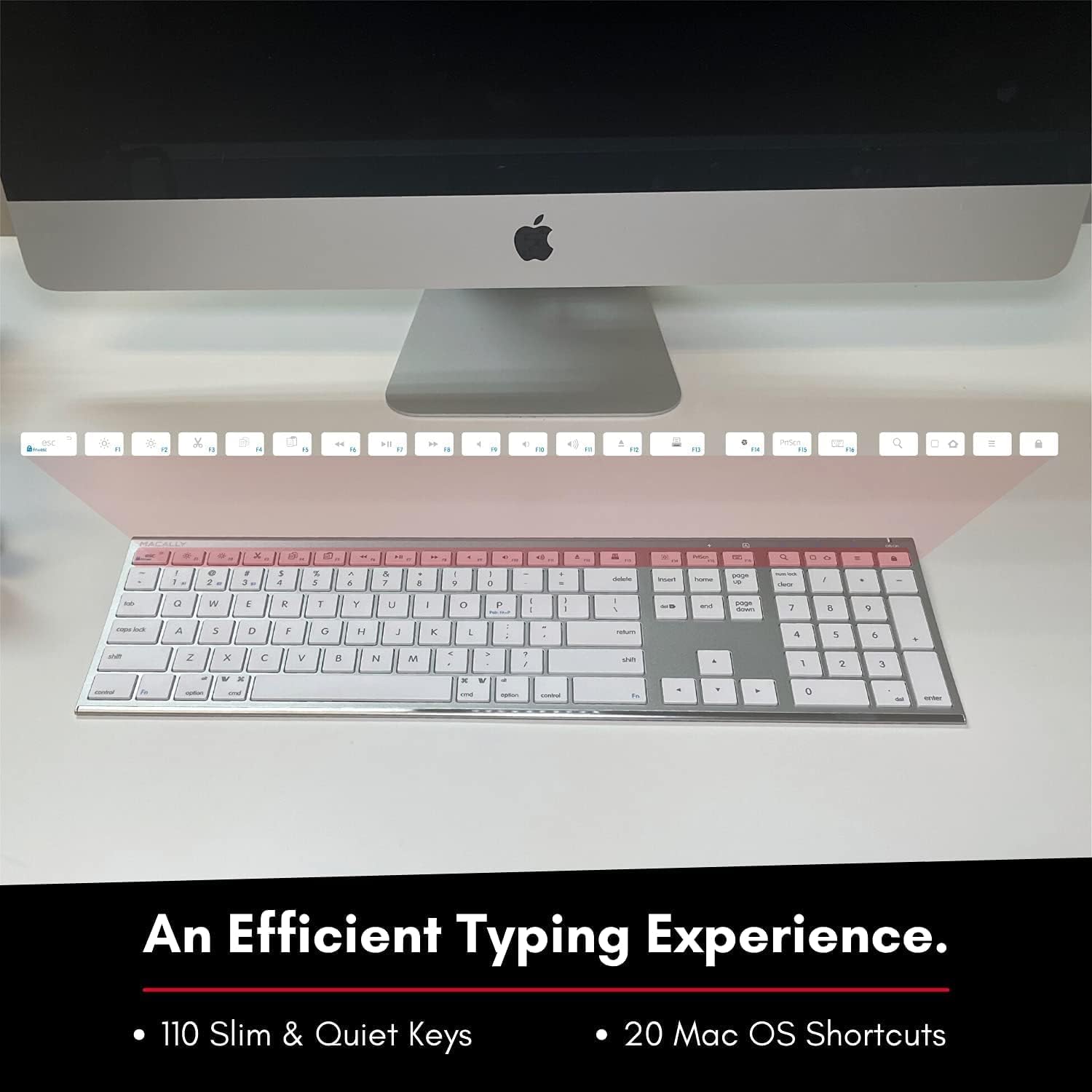
Image: Close-up of the keyboard's top row, highlighting the dedicated function and shortcut keys.
ተኳኋኝነት
This keyboard is broadly compatible with a range of operating systems and devices, including:
- ማክሮስ
- ዊንዶውስ
- iOS (iPhone, iPad)
- አንድሮይድ

Image: The keyboard positioned in front of an iMac, indicating its compatibility with Mac systems.
ጥገና
To ensure the longevity and optimal performance of your Macally Wireless Bluetooth Keyboard, follow these maintenance guidelines:
- ማጽዳት፡ Use a soft, lint-free cloth to wipe the surface of the keyboard. For stubborn dirt, slightly dampበጨርቁ ላይ በውሃ ወይም ለስላሳ የጽዳት መፍትሄ. ከመጠን በላይ እርጥበትን ያስወግዱ.
- የባትሪ እንክብካቤ The keyboard features a built-in rechargeable battery. To maximize battery life, avoid fully discharging the battery frequently. Charge the keyboard when the low battery indicator appears.
- ማከማቻ፡ ለረጅም ጊዜ ጥቅም ላይ በማይውልበት ጊዜ የባትሪ ዕድሜን ለመቆጠብ የቁልፍ ሰሌዳውን ያጥፉ። ከፀሀይ ብርሀን እና ከከፍተኛ ሙቀት ርቆ በቀዝቃዛና ደረቅ ቦታ ያከማቹ።
- መፍሰስን ያስወግዱ፡ በውስጣዊ አካላት ላይ ጉዳት እንዳይደርስ ፈሳሾችን ከቁልፍ ሰሌዳው ያርቁ።
መላ መፈለግ
Keyboard Not Responding or Typing Incorrectly
- የቁልፍ ሰሌዳ መሙላቱን ያረጋግጡ።
- Verify that the keyboard is powered on and the correct Bluetooth channel (BT1, BT2, or BT3) is selected for your device.
- የቁልፍ ሰሌዳውን ከመሳሪያዎ ጋር እንደገና ለማጣመር ይሞክሩ።
- Check if the Fn lock is active. On the top right, there should be a lock symbol with an FN in the lock. If there is a Blue LED light on the panel which is on the top right, then press and hold Fn እና ይጫኑ ESC to shut off the Fn lock.

Image: A troubleshooting tip for the Fn lock feature, showing the relevant keys.
Mouse Keys Issue (macOS)
- If your keyboard inputs are behaving like mouse movements, you may have "Mouse Keys" enabled.
- Go to System Preferences (or System Settings on newer macOS versions), then click on ተደራሽነት. After that, scroll to የጠቋሚ ቁጥጥር እና አሰናክል የመዳፊት ቁልፎችን አንቃ.

Image: A troubleshooting tip for disabling Mouse Keys in system settings.
የብሉቱዝ ግንኙነት ጉዳዮች
- የመሣሪያዎ ብሉቱዝ መንቃቱን እና ሊገኝ የሚችል መሆኑን ያረጋግጡ።
- Move the keyboard closer to your device to ensure a strong signal.
- ማንኛውንም ሊሆኑ የሚችሉ የጣልቃ ገብነት ምንጮችን ያስወግዱ (ለምሳሌ፣ ሌሎች ገመድ አልባ መሳሪያዎች፣ ትላልቅ የብረት እቃዎች)።
- ሁለቱንም የቁልፍ ሰሌዳውን እና መሳሪያዎን እንደገና ያስጀምሩ.
ዝርዝሮች
| የምርት ስም | በመሣሪያ |
| የሞዴል ቁጥር | ACEBTKEY-US |
| የምርት ልኬቶች | 18.11 x 6.3 x 0.91 ኢንች |
| የእቃው ክብደት | 14.9 አውንስ |
| የግንኙነት ቴክኖሎጂ | ብሉቱዝ |
| የቁልፎች ብዛት | 110 |
| ተስማሚ መሣሪያዎች | ማክሮስ፣ ዊንዶውስ፣ አይኦኤስ፣ አንድሮይድ |
| ባትሪ | 3 Lithium Polymer batteries (included, rechargeable) |
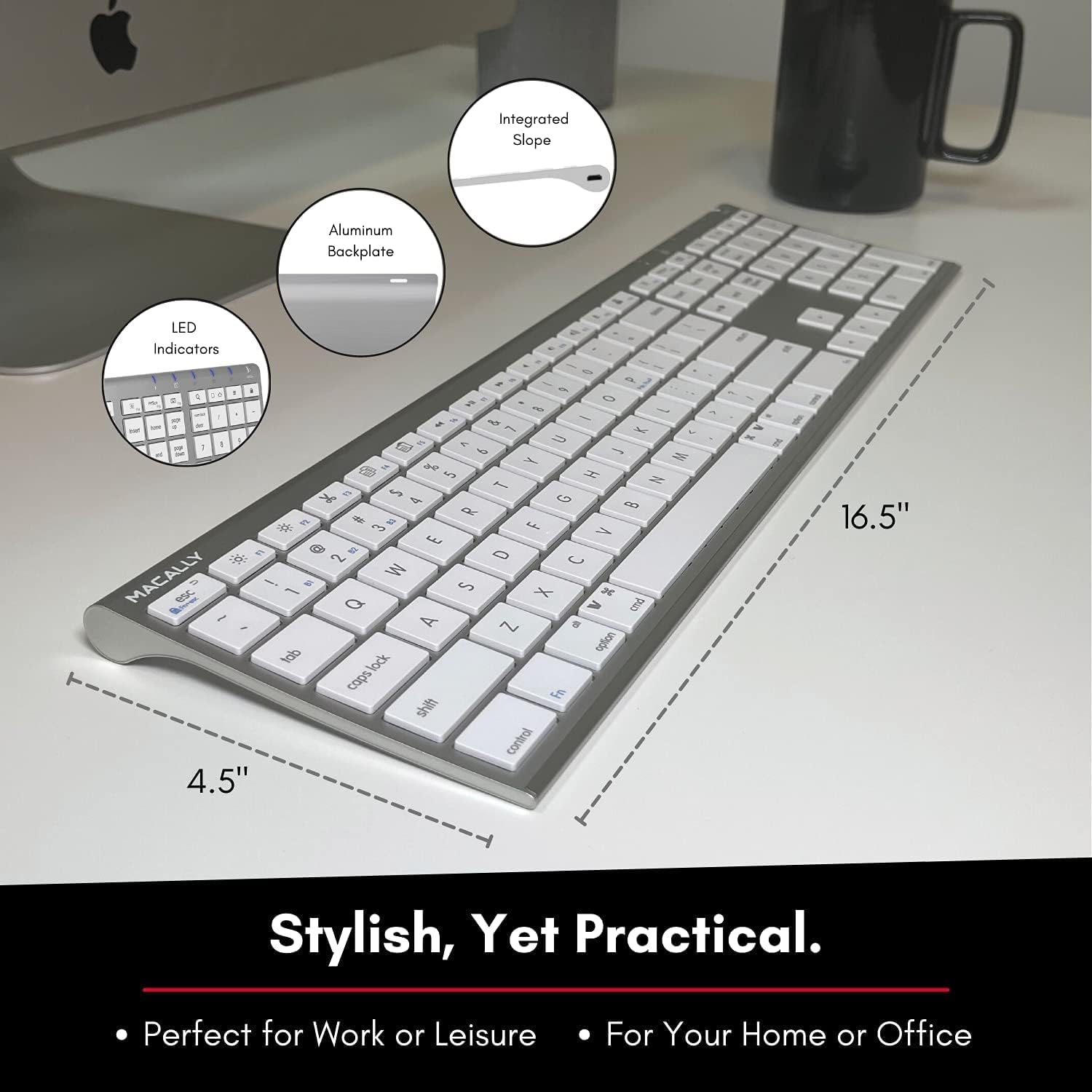
Image: Diagram illustrating the physical dimensions of the Macally Wireless Bluetooth Keyboard.
ዋስትና እና ድጋፍ
Macally is committed to delivering high-quality, user-friendly workflow solutions. For any product inquiries, technical support, or warranty information, please visit the official Macally webጣቢያ ወይም የደንበኛ አገልግሎታቸውን ያነጋግሩ። ተጨማሪ መረጃ እና የድጋፍ ምንጮችን በ ላይ ማግኘት ይችላሉ። ማካሊ በአማዞን ላይ መደብር.