መግቢያ
This manual provides instructions for the safe and efficient use of your KMC Smart Tap 4-Outlet Wi-Fi Smart Plug. Please read this guide thoroughly before operation and retain it for future reference.
ምርት አልቋልview
ቁልፍ ባህሪያት
- 4-Outlet Design: One "always on" outlet and three individually controllable outlets.
- የWi-Fi ግንኙነት፡- Requires a 2.4GHz Wi-Fi network.
- የርቀት መቆጣጠሪያ፡- Manage devices via the KMC Smart app.
- የድምጽ ቁጥጥር፡- ከ Amazon Alexa እና Google Home ጋር ተኳሃኝ.
- የጊዜ ሰሌዳ እና የጊዜ ቆጣሪዎች፡ Automate power on/off for connected devices.
- የኢነርጂ ክትትል; በእውነተኛ ጊዜ እና ታሪካዊ የኃይል ፍጆታን ይከታተሉ።
- ደህንነት፡ ETL Certified, built-in thermal sensor.
የጥቅል ይዘቶች
- KMC Smart Tap 4-Outlet Wi-Fi Smart Plug
- መመሪያ መመሪያ
የምርት ንድፍ

ፊት ለፊት view of the KMC Smart Tap, showing the four outlets, the main power button, and Wi-Fi indicator.
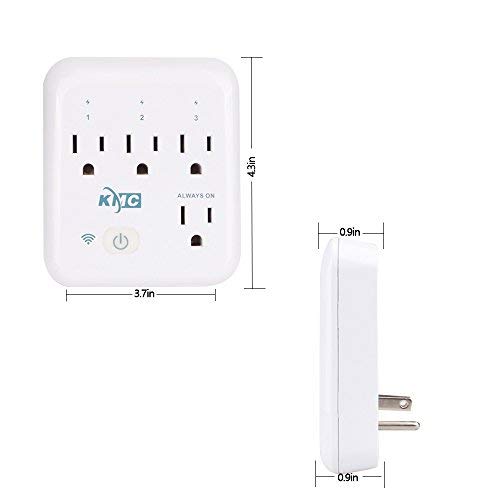
Diagram illustrating the dimensions of the KMC Smart Tap (3.7 inches width, 4.3 inches height, 0.9 inches depth).
የማዋቀር መመሪያ
መጫን
Plug the KMC Smart Tap into a standard 110V wall outlet. Ensure it is securely seated.
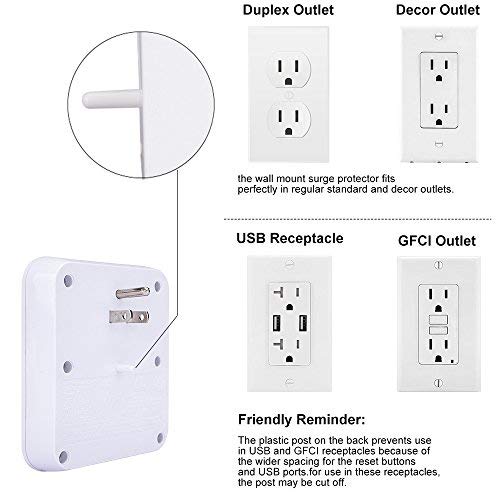
Image showing the KMC Smart Tap plugged into a duplex outlet, with a note about its compatibility and a reminder that the plastic post on the back prevents use in USB and GFCI receptacles due to wider spacing.
የመተግበሪያ ማውረድ እና የመለያ መፍጠር
Download the "KMC Smart" or "Smart Life" app from your smartphone's app store (iOS or Android).
ለአዲስ መለያ ይመዝገቡ ወይም አስቀድመው ካለዎት ይግቡ።
የመሣሪያ ማጣመር
- Ensure your smartphone is connected to a 2.4GHz Wi-Fi network. The KMC Smart Tap requires a 2.4GHz network for initial setup and operation.
- አዲስ መሳሪያ ለመጨመር መተግበሪያውን ይክፈቱ እና በስክሪኑ ላይ ያሉትን መመሪያዎች ይከተሉ።
- The device's Wi-Fi indicator light will blink during pairing.
- Once successfully paired, the indicator light will become solid.
ኦፕሬሽን
በእጅ መቆጣጠሪያ
The main power button on the front of the KMC Smart Tap can be pressed to manually toggle power for all three individually controlled outlets simultaneously. The "Always On" outlet remains powered.
የርቀት መቆጣጠሪያ በመተግበሪያ በኩል
Open the KMC Smart app on your smartphone.
Select the KMC Smart Tap device.
You can individually control the three switchable outlets (labeled 1, 2, 3) and monitor the "Always On" outlet status from anywhere with an internet connection.
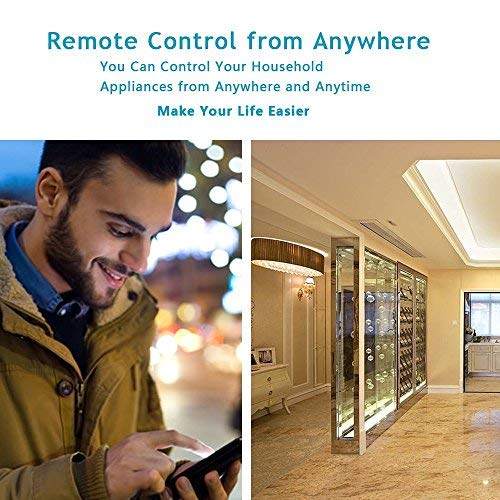
A person using a smartphone to remotely control household appliances, demonstrating the remote control feature of the smart plug.
የድምጽ ቁጥጥር
The KMC Smart Tap is compatible with Amazon Alexa and Google Home.
To enable voice control, link your KMC Smart account within the Alexa or Google Home app.
For Amazon Alexa, you can name each individual outlet (1, 2, 3) to control them independently using voice commands (e.g., "Alexa, turn on Outlet 1").
For Google Home, overall control of the device is supported.
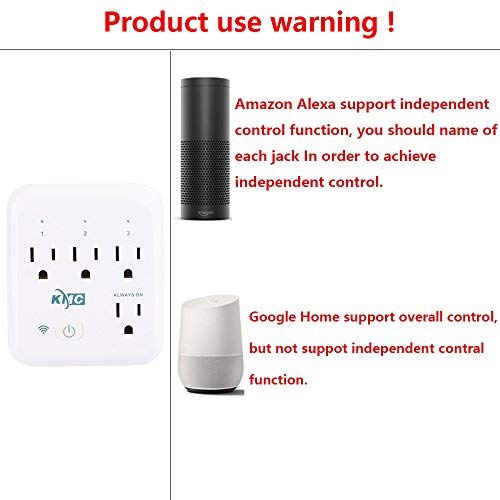
Image showing the KMC Smart Tap alongside Amazon Alexa and Google Home devices, indicating compatibility and control methods.
የጊዜ ሰሌዳ እና የጊዜ ቆጣሪዎች
Within the KMC Smart app, navigate to the device settings to set schedules and timers for your connected appliances.
You can program specific times for outlets to turn on or off automatically, enhancing convenience and energy efficiency.

An image depicting a child sleeping peacefully, illustrating how scheduling features can be used to manage device operation for routines, such as ensuring a restful environment.
የኢነርጂ ክትትል
The KMC Smart app provides real-time and historical energy consumption data for devices connected to the Smart Tap.
Access the "Electricity Statistics" section in the app to view current usage (Current, Power, Voltage) and historical data (daily, monthly, yearly kWh).
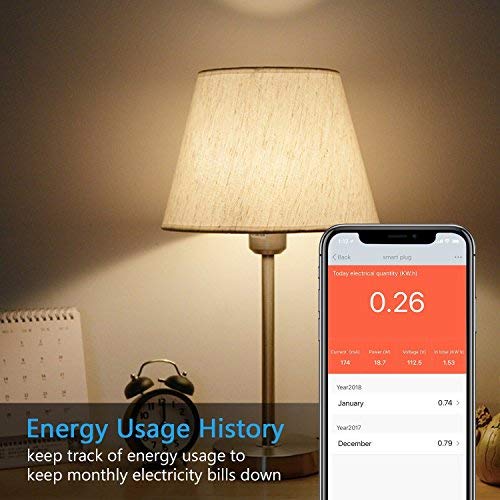
A smartphone screen displaying "Energy Usage History" with current electrical quantity (0.26 kWh) and monthly breakdowns for previous years, next to a lamp.
ጥገና
ማጽዳት
- Disconnect the smart plug from the power outlet before cleaning.
- Use a dry, soft cloth to wipe the surface. Do not use liquid or aerosol cleaners.
የደህንነት ጥንቃቄዎች
- መሣሪያውን አይሰብስቡ ወይም አይቀይሩት።
- መሳሪያውን ለውሃ ወይም እርጥበት አዘል አካባቢዎች ከማጋለጥ ይቆጠቡ።
- Do not exceed the maximum load of 15A, 1875W.
- The built-in thermal sensor will automatically turn off overheating appliances.
መላ መፈለግ
Device Not Connecting to Wi-Fi
- የWi-Fi አውታረ መረብዎ 2.4GHz መሆኑን ያረጋግጡ። 5GHz ኔትወርኮች አይደገፉም።
- የWi-Fi ይለፍ ቃልዎ ትክክል መሆኑን ያረጋግጡ።
- ስማርት ሶኬቱን ወደ ዋይፋይ ራውተርዎ ቅርብ ያድርጉት።
- Reset the smart plug by holding the power button for 5-10 seconds until the Wi-Fi indicator blinks rapidly, then attempt pairing again.
የርቀት መቆጣጠሪያ አይሰራም
- ስማርትፎንዎ ንቁ የበይነመረብ ግንኙነት እንዳለው ያረጋግጡ።
- Ensure the smart plug is connected to your home Wi-Fi network (solid Wi-Fi indicator light).
- የመተግበሪያ ዝመናዎችን ያረጋግጡ።
የድምጽ ቁጥጥር ጉዳዮች
- Confirm that your KMC Smart account is correctly linked in the Alexa or Google Home app.
- Ensure the device names in the smart home app match your voice commands.
- የድምጽ ረዳት መሣሪያዎን የበይነመረብ ግንኙነት ያረጋግጡ።
ዝርዝሮች
| ባህሪ | ዋጋ |
|---|---|
| የዋልታዎች ብዛት | 2 |
| የሽቦዎች ቁጥር | 2 |
| ተሰኪ ቅርጸት | ዓይነት A |
| ዝርዝር ሜታል | ኢ.ቲ.ኤል |
| Ampንዴት | 15 Amps |
| ዩፒሲ | 743267670332 |
| አምራች | KT-KMC |
| የጥቅል ልኬቶች | 8.58 x 4.84 x 2.24 ኢንች |
| የእቃው ክብደት | 14.9 አውንስ |
| ASIN | B07SWZ2N4J |
| የመጀመሪያ ቀን ይገኛል። | ሰኔ 10፣ 2019 |
| የምርት ስም | KMC |
| ቀለም | ነጭ |
| ጥራዝtage | 110 ቮልት |
| ቁሳቁስ | አሲሪሎኒትሪል ቡታዲየን ስቲሪን (ኤቢኤስ) |
| የማገናኛ አይነት | መሰካት |
ዋስትና እና ድጋፍ
የዋስትና መረጃ
The KMC Smart Tap includes a 30-day money-back guarantee and lifetime support.
የደንበኛ ድጋፍ
For technical assistance or warranty claims, please refer to the contact information provided on the KMC official website or within the KMC Smart app.