1. መግቢያ
This manual provides detailed instructions for the installation, operation, and maintenance of your ESX VN715-E39-DAB In-Car Navigation and Multimedia System. Please read this manual thoroughly before using the device to ensure proper functionality and to prevent damage. Keep this manual for future reference.
2. ምርት አብቅቷልview እና ባህሪያት
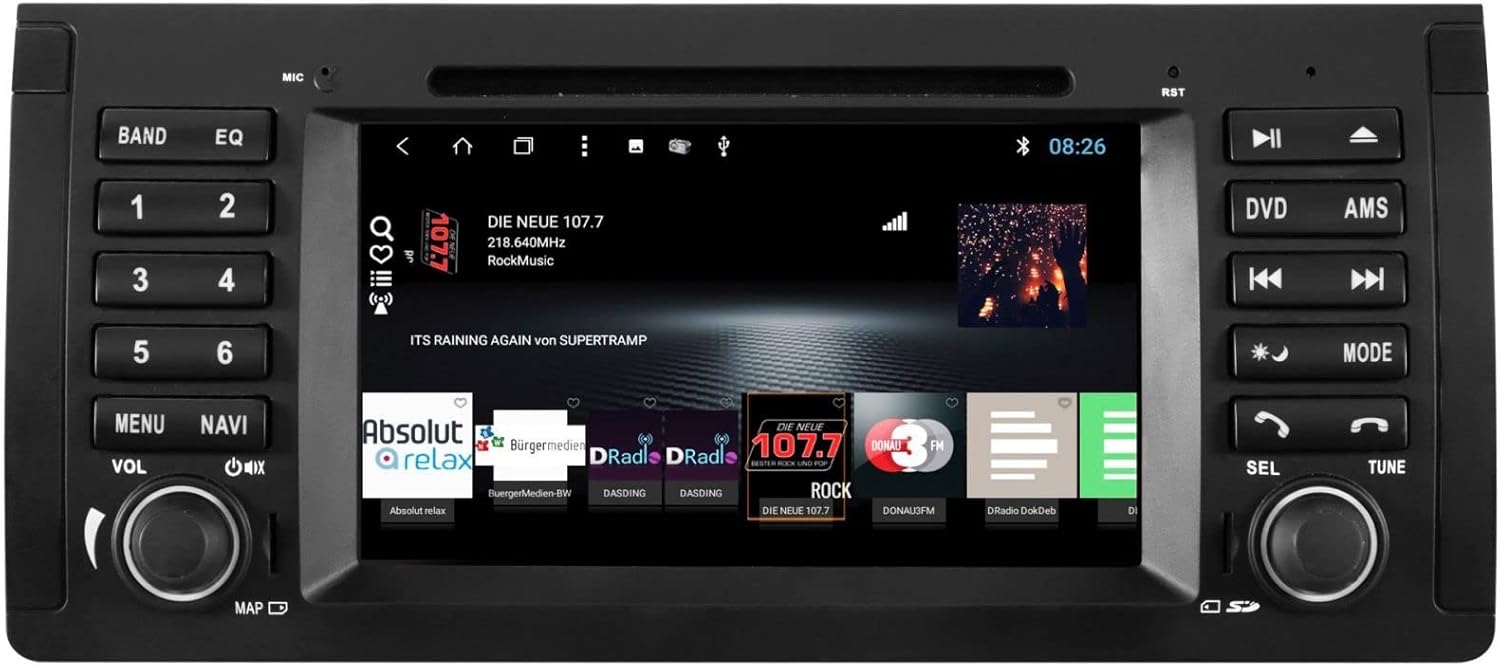
The ESX VN715-E39-DAB is an advanced in-car multimedia system designed to enhance your driving experience with navigation, entertainment, and connectivity features. It integrates seamlessly into compatible BMW vehicles.
ቁልፍ ባህሪዎች
- High-Resolution 8-inch Touchscreen: ግልጽ የሆኑ ምስላዊ እና በቀላሉ የሚታወቁ ቁጥጥርዎችን ይሰጣል።
- Advanced Android i15 Operating System: Offers a familiar and customizable user interface.
- Google Maps Navigation: Supports both online and offline navigation for reliable route guidance.
- Mobile Internet Connectivity: Connects via Wi-Fi hotspot for online services.
- DAB+ ዲጂታል ሬዲዮ፡ Includes a DAB antenna for high-quality digital radio reception with station logos.
- ኤኤም/ኤፍኤም ሬዲዮ ከ RDS ጋር፡ Standard analog radio reception with Radio Data System functionality.
- Multi-format DVD Player: Supports DVD, DVD-R/RW, DVD+R/RW, VCD, CD, CD Text, CD-R/RW, and MP3 formats.
- Bluetooth Hands-Free Kit: Enables safe phone calls and audio streaming with an internal microphone and optional external microphone connection.
- የስማርትፎን ውህደት፡- Connect iPhone or Android smartphones via USB for various functions.
- የድምጽ ቁጥጥር፡- Utilize voice commands through a connected smartphone.
- የድምጽ ውጤቶች ፦ ቅድመ-amplifier outputs for front, rear, subwoofer, and center channels.
- የካሜራ ግቤት፡ One adjustable camera input for reverse cameras.
- ረዳት ግብዓቶች/ውጤቶች፡ One AUX video input, two audio/video outputs, and one AUX audio input.
- የዩኤስቢ ወደቦች፡ Two USB ports for media and connectivity.
- የማይክሮ ኤስዲ ካርድ ማስገቢያ; Dedicated slot for navigation data and media files.
- ማበጀት፡ Personalize with customizable logos and wallpapers.
- Authenticity Certificate: Included with the product.
3. ማዋቀር እና መጫን
Installation of the ESX VN715-E39-DAB system requires technical knowledge and should ideally be performed by a qualified professional. Incorrect installation can lead to damage to the device or vehicle electrical system.
ተኳኋኝነት
This unit is compatible with specific BMW models and connector types:
- BMW 5 Series E39 (1996-2001) with 17-pin system connector.
- BMW 5 Series E39 (2002-2003) with 40-pin system connector.
- BMW X5 E53 (2000-2001) with 17-pin system connector.
- BMW X5 E53 (2002-2007) with 40-pin system connector.
- BMW M5 (1996-2003) with 17/40-pin system connector.
አጠቃላይ የመጫኛ ደረጃዎች (በባለሙያ መጫን ይመከራል)፡
- የባትሪውን ግንኙነት አቋርጥ፡ ማንኛውንም የኤሌክትሪክ ሥራ ከመጀመርዎ በፊት ሁልጊዜ የተሽከርካሪውን ባትሪ ያላቅቁ።
- አሁን ያለውን ክፍል ያስወግዱ፦ Carefully remove the factory radio or navigation system from the dashboard.
- ሽቦ ማሰሪያን ማገናኘት; Connect the appropriate wiring harness (17-pin or 40-pin) to the vehicle's electrical system and the ESX unit. Ensure all connections are secure.
- አንቴናዎችን ያገናኙ፡ Connect the GPS antenna, DAB antenna, and radio antenna to their respective ports on the unit. Position the antennas for optimal reception.
- ተያያዥ ነገሮች፡- Connect any optional accessories such as a reverse camera, external microphone, USB devices, or auxiliary inputs/outputs.
- ክፍሉን ይጫኑ; Securely mount the ESX unit into the dashboard opening.
- ባትሪውን እንደገና ማገናኘት; የተሽከርካሪውን ባትሪ እንደገና ያገናኙ እና ስርዓቱን ይሞክሩ።

4. የአሠራር መመሪያዎች
Familiarize yourself with the touchscreen interface and physical buttons for optimal use.
4.1 መሠረታዊ አሠራር
- ማብራት/ማጥፋት፡ Press and hold the power button (usually the VOL knob) to turn the unit on or off. A short press typically mutes or unmutes the audio.
- የድምጽ መቆጣጠሪያ፡- Rotate the VOL knob to adjust the audio volume.
- የማያ ንክኪ በይነገጽ፡ Navigate through menus and applications by tapping, swiping, and pinching on the 8-inch touchscreen.

4.2 አሰሳ
Access the navigation application (e.g., Google Maps) from the home screen. Input your destination, and the system will provide turn-by-turn directions. Ensure GPS antenna is properly connected for accurate positioning.

4.3 Radio (DAB+/AM/FM)
- ሁነታን ይምረጡ፡- Tap the 'Radio' or 'DAB+' icon on the home screen or press the 'BAND' button.
- ጣቢያዎችን ይቃኙ፡ Use the 'AMS' (Auto Memory Store) button or on-screen controls to scan and save available stations.
- ይቃኙ፡ Manually tune using the 'TUNE' knob or on-screen frequency controls.
- ቅድመ-ቅምጦች Save your favorite stations to preset buttons (1-6) for quick access.

4.4 የብሉቱዝ ግንኙነት
- ማጣመር፡ Go to the Bluetooth settings on the unit and your smartphone. ፈልግ available devices and select 'ESX VN715-E39-DAB'. Enter the PIN if prompted (usually '0000' or '1234').
- ከእጅ ነጻ ጥሪ፡ አንዴ ከተጣመሩ በኋላ በቀጥታ በመሳሪያው በኩል ጥሪዎችን ማድረግ እና መቀበል ይችላሉ።
- የድምፅ ዥረት Play music from your smartphone via Bluetooth A2DP.
4.5 የሚዲያ መልሶ ማጫወት (ዲቪዲ/ዩኤስቢ/ኤስዲ)
- ዲቪዲ፡ Insert a DVD into the disc slot. The system will automatically switch to DVD mode or prompt you to select it.
- ዩኤስቢ/ኤስዲ፡ Insert a USB drive into a USB port or an SD card into the Micro SD slot. Access media files through the 'Media' or 'File Explorer' application.
5. ጥገና
Regular maintenance ensures the longevity and optimal performance of your ESX VN715-E39-DAB system.
- ማያ ገጹን ማጽዳት; የሚዳሰሰውን ስክሪኑን በቀስታ ለማጽዳት ለስላሳ፣ ከተሸፈነ ጨርቅ ነጻ የሆነ ጨርቅ ይጠቀሙ። ለግትር ማጭበርበሮች በትንሹ መampጨርቁን በውሃ ወይም በስክሪኑ ደህንነቱ የተጠበቀ ማጽጃ። ኃይለኛ ኬሚካሎችን ያስወግዱ.
- የሶፍትዌር ማሻሻያ Periodically check for software updates from the manufacturer's official website or through the unit's system settings (if available) to ensure you have the latest features and bug fixes.
- Disc Drive Care: Keep the DVD slot free of dust and debris. Avoid inserting damaged or non-standard discs.
6. መላ መፈለግ
If you encounter issues with your unit, refer to the following common troubleshooting steps:
| ችግር | ሊሆን የሚችል ምክንያት | መፍትሄ |
|---|---|---|
| ኃይል የለም | ያልተቋረጠ የኃይል ግንኙነት፣ የተነፋ ፊውዝ፣ የተሽከርካሪ ባትሪ ጉዳይ። | Check power cables and fuse. Ensure vehicle battery is charged. Consult a professional if issues persist. |
| ድምጽ የለም | Volume muted, speaker wires disconnected, incorrect audio source. | Check volume level and mute status. Verify speaker connections. Select the correct audio source. |
| የጂፒኤስ ሲግናል ጠፍቷል | GPS antenna improperly connected or obstructed, unit in an area with poor satellite reception. | የጂፒኤስ አንቴና ደህንነቱ በተጠበቀ ሁኔታ መገናኘቱን እና ግልጽ መሆኑን ያረጋግጡ view የሰማይ። ወደ ክፍት ቦታ ይሂዱ። |
| የብሉቱዝ ማጣመር አለመሳካት | Bluetooth not enabled on device, incorrect PIN, device out of range. | Ensure Bluetooth is active on both devices. Re-enter PIN. Bring devices closer. Restart both devices. |
| የማያ ንክኪ ምላሽ የማይሰጥ | የስርዓት ማቀዝቀዝ፣ በማያ ገጹ ላይ ቆሻሻ። | Perform a soft reset (refer to device settings or power cycle). Clean the screen. |
If these steps do not resolve the issue, please contact customer support or a qualified service technician.
7. ዝርዝሮች
Detailed technical specifications for the ESX VN715-E39-DAB unit:
- የምርት ስም፡ ኢኤስኤክስ
- ሞዴል፡ VN715-E39-DAB
- የስክሪን መጠን፡ 8 ኢንች
- የማሳያ አይነት፡ LCD
- ስርዓተ ክወና፡ Android i15
- የግንኙነት ቴክኖሎጂ; Bluetooth, USB, Wi-Fi (via hotspot)
- የሚዲያ ዓይነት፡ DVD, DVD-R/RW, DVD+R/RW, VCD, CD, CD Text, CD-R/RW, MP3, USB, Micro SD
- ሬዲዮ መቃኛ DAB+, AM/FM with RDS
- አሰሳ፡ Google Maps (online/offline)
- ተኳኋኝነት BMW 5 Series E39 (1996-2003), BMW X5 E53 (2000-2007), BMW M5 (1996-2003)
- መነሻ፡- ቻይና
8. ዋስትና እና ድጋፍ
For warranty information, please refer to the documentation provided with your purchase or contact your retailer. For technical support, please visit the official ESX website or contact their customer service department. Ensure you have your model number (VN715-E39-DAB) and proof of purchase available when seeking support.