1. መግቢያ
This manual provides essential information for the safe and efficient operation of your RAGGIE RGS 1500W 12V Solar Power Inverter. This device is designed to convert 12V DC electricity from batteries or solar panels into 220V AC electricity, allowing you to power standard household appliances from a DC power source. Please read this manual thoroughly before installation and use.
2. የደህንነት መረጃ
ማስጠንቀቂያ፡- እነዚህን የደህንነት መመሪያዎች አለመከተል የኤሌክትሪክ ንዝረት፣ እሳት፣ ከባድ ጉዳት ወይም ሞት ሊያስከትል ይችላል።
- Ensure the inverter is installed in a well-ventilated, dry, and cool environment, away from direct sunlight, heat sources, and flammable materials.
- Do not expose the inverter to rain, moisture, or liquids.
- ኢንቬንተሩን ከ12 ቮ ዲሲ የኃይል ምንጭ ጋር ብቻ ያገናኙ። ከተለየ ቮልት ጋር ይገናኛልtagሠ ክፍሉን ሊጎዳ ይችላል.
- Always connect the battery terminals with correct polarity: positive (+) to positive, and negative (-) to negative. Reverse polarity will damage the unit.
- ከመጠን በላይ ሙቀት እና መወዛወዝ ለመከላከል ሁሉም ግንኙነቶች ጥብቅ እና ደህንነታቸው የተጠበቀ መሆናቸውን ያረጋግጡ።
- ኢንቮርተርን አትክፈት ሐasinሰ. በውስጥም ለተጠቃሚ አገልግሎት የሚሰጡ ክፍሎች የሉም። ሁሉንም አገልግሎቶች ብቁ ለሆኑ ባለሙያዎች ያመልክቱ።
- ልጆችን ከኢንቨርተሩ እና ከግንኙነቶቹ ያርቁ።
- Always disconnect the DC power source before performing any maintenance or troubleshooting.
- Ensure the inverter is properly grounded.
3. ምርት አብቅቷልview
The RAGGIE RGS 1500W inverter features robust construction and essential ports for reliable power conversion.
3.1 የኋላ ፓነል ክፍሎች
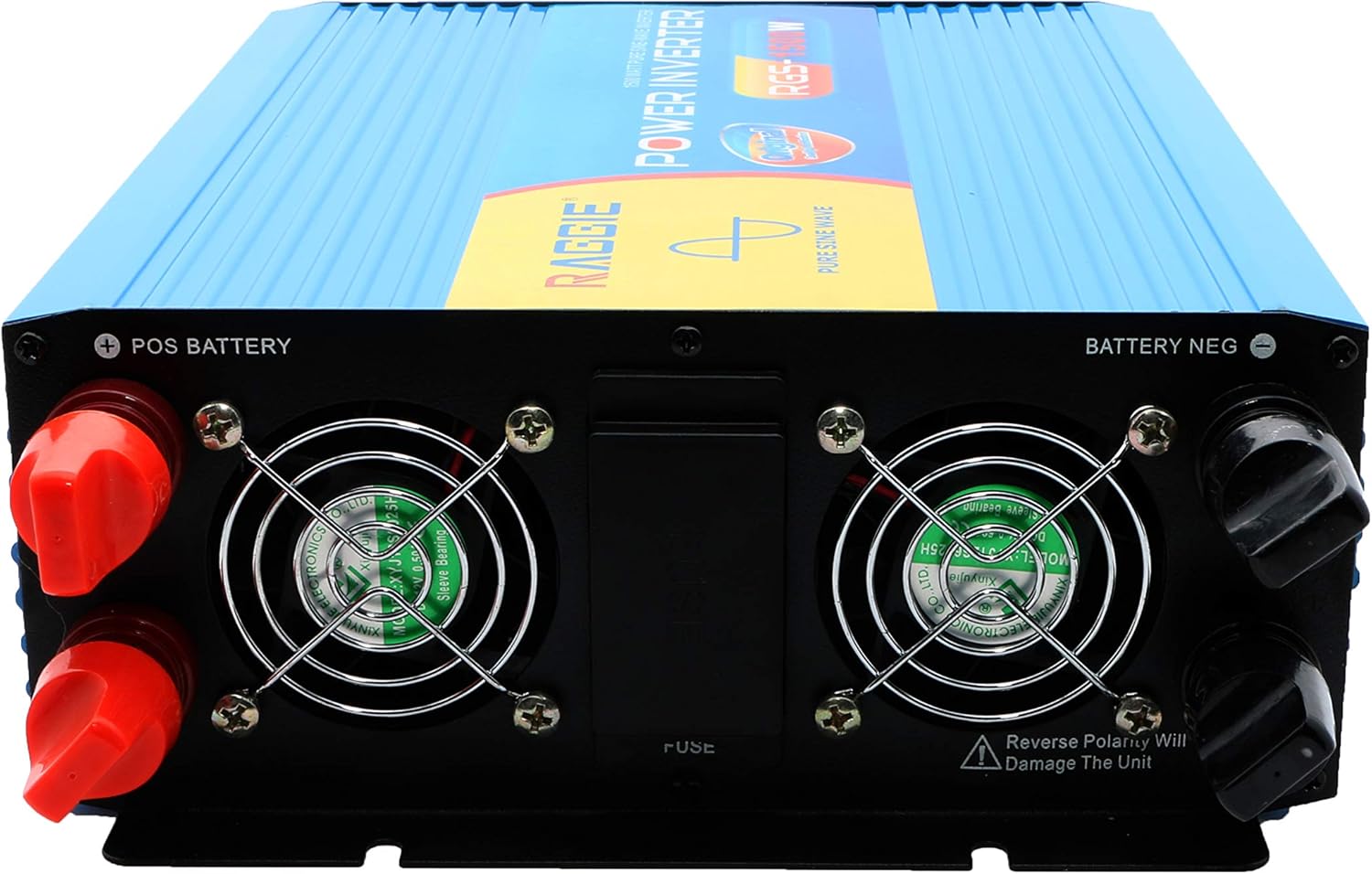
The rear panel includes the DC input terminals for connecting to your 12V battery or solar array, along with cooling fans and a fuse compartment.
3.2 የፊት ፓነል ክፍሎች
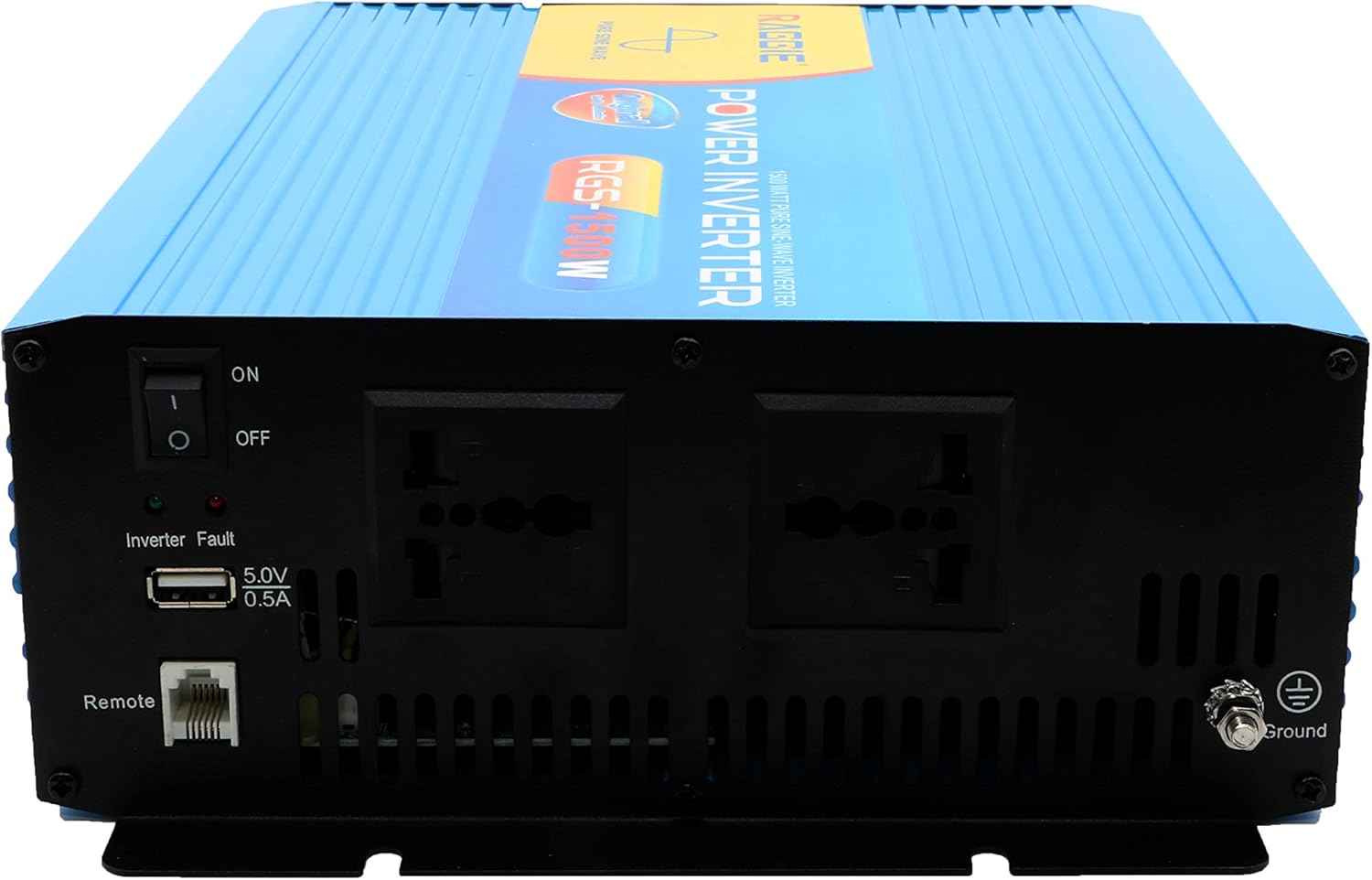
The front panel provides the AC output sockets for connecting your appliances, the main power switch, a USB charging port, and a remote control port.
4. ማዋቀር እና መጫን
Follow these steps for proper installation of your inverter.
4.1 ማሸግ እና መፈተሽ
- Carefully remove the inverter from its packaging.
- Inspect the unit for any signs of damage during transit. If damage is found, do not proceed with installation and contact your supplier.
- ሁሉም መለዋወጫዎች መኖራቸውን ያረጋግጡ።
4.2 አቀማመጥ
- Choose a location that is dry, cool, and well-ventilated.
- በቀጥታ የፀሐይ ብርሃን፣ ከፍተኛ ሙቀት ወይም ከመጠን በላይ አቧራ ያለባቸውን ቦታዎች ያስወግዱ።
- Mount the inverter securely on a stable surface.
- Ensure there is adequate clearance around the cooling fans for proper airflow.
4.3 DC Input Connection (Battery/Solar)
IMPORTANT: Ensure the inverter's power switch is in the OFF position before making any connections.
- Use appropriate gauge cables for your 12V DC input. Refer to the specifications for recommended cable sizes.
- ያገናኙት። ቀይ (+) cable to the positive terminal of your 12V battery/solar array.
- የሌላውን ጫፍ ያገናኙ ቀይ (+) cable to the positive terminal (POS BATTERY) on the inverter's rear panel.
- ያገናኙት። ጥቁር (-) cable to the negative terminal of your 12V battery/solar array.
- የሌላውን ጫፍ ያገናኙ ጥቁር (-) cable to the negative terminal (BATTERY NEG) on the inverter's rear panel.
- ሁሉም ግንኙነቶች ጥብቅ እና አስተማማኝ መሆናቸውን ያረጋግጡ።
4.4 የመሬት አቀማመጥ
For safety, the inverter must be properly grounded.
- Connect a grounding wire from the ground terminal on the inverter's front panel to a suitable earth ground point (e.g., vehicle chassis, ground rod).
4.5 AC Output Connection (Appliances)
- Plug your AC appliances directly into the AC output sockets on the inverter's front panel.
- ጠቅላላውን ዋት ያረጋግጡtage of all connected appliances does not exceed the inverter's continuous output power (1500W).
5. የአሠራር መመሪያዎች
5.1 Turning On the Inverter
- Ensure all DC and AC connections are correctly made and secure.
- Switch the main power switch on the inverter's front panel to the ON አቀማመጥ.
- The inverter will typically emit a short beep and an indicator light will illuminate, indicating it is operational.
5.2 Turning Off the Inverter
- ሁሉንም የኤሲ መሳሪያዎች ከኢንቨርተሩ ያላቅቁ።
- Switch the main power switch on the inverter's front panel to the ጠፍቷል አቀማመጥ.
5.3 የዩኤስቢ ኃይል መሙያ ወደብ
- The inverter includes a 5.0V 0.5A USB port for charging small electronic devices.
- Plug your USB device into this port for charging.
6. ጥገና
መደበኛ ጥገና የኢንቮርተርዎን ጥሩ አፈጻጸም እና ረጅም ዕድሜ ያረጋግጣል።
- ማጽዳት፡ Periodically clean the exterior of the inverter with a dry, soft cloth. Ensure cooling vents are free from dust and debris. Do not use liquid cleaners.
- የግንኙነት ፍተሻ፡- Regularly inspect all DC and AC connections to ensure they remain tight and free from corrosion. Loose connections can cause overheating and power loss.
- ፊውዝ መተካት፡ The inverter is equipped with internal fuses. If the inverter stops working and troubleshooting does not resolve the issue, the fuse may need replacement. This should only be performed by qualified personnel.
7. መላ መፈለግ
ይህ ክፍል በኢንቨርተርዎ ላይ ሊያጋጥሙዎት የሚችሉ የተለመዱ ችግሮችን ያብራራል።
| ችግር | ሊሆን የሚችል ምክንያት | መፍትሄ |
|---|---|---|
| ምንም የኃይል ውፅዓት የለም / ኢንቮርተር አይበራም | Loose DC connections ዝቅተኛ የባትሪ መጠንtage የተነፋ ፊውዝ ኢንቮርተር አጥፋ | Check and tighten DC cables ባትሪውን ይሙሉ ወይም ይተኩ Check and replace fuse (by qualified personnel) የኢንቨርተር ማብሪያ / ማጥፊያውን ያብሩ |
| Overload warning / Inverter shuts down | Connected load exceeds 1500W Surge power too high | ጠቅላላውን ዋት ይቀንሱtage of connected appliances Ensure appliance starting current is within inverter's peak capacity |
| Overheating warning / Inverter shuts down | ደካማ የአየር ዝውውር ከመጠን በላይ የአካባቢ ሙቀት የታገዱ የማቀዝቀዣ አድናቂዎች | Ensure adequate airflow around the inverter Move inverter to a cooler location Clean cooling fans and vents |
| ዝቅተኛ የባትሪ መጠንtagሠ ማስጠንቀቂያ | የባትሪ ክፍያ አነስተኛ ነው | ባትሪውን እንደገና ይሙሉ |
8. ዝርዝሮች
| ባህሪ | ዝርዝር መግለጫ |
|---|---|
| የምርት ስም | ራጂጂ |
| የሞዴል ቁጥር | RGS 1500W |
| የማያቋርጥ የውጤት ኃይል | 1500 ዋት |
| ግብዓት Voltage | 12 ቮልት ዲሲ |
| የውጤት ቁtage | AC (Standard for region, typically 220V) |
| የኃይል ምንጭ | External (Battery/Solar) |
| የሚመከር አጠቃቀሞች | Provide AC power from a DC source, operate AC devices using DC power. |
| ከፍተኛ የውጤት ኃይል | 18000 Watts (Momentary Surge) |
| የምስክር ወረቀቶች | UL, ETL, CE |
| የመጀመሪያ ቀን ይገኛል። | ጁላይ 9፣ 2019 |
9. ዋስትና እና ድጋፍ
የዋስትና መረጃ ወይም የቴክኒክ ድጋፍ ለማግኘት፣ ከግዢዎ ጋር የቀረቡትን ሰነዶች ይመልከቱ ወይም አምራቹን በቀጥታ ያነጋግሩ። የግዢ ደረሰኝዎን እንደ የግዢ ማረጋገጫ ያስቀምጡ።


